React-select: First Option all time selected
Hey guys,
i have following bug:
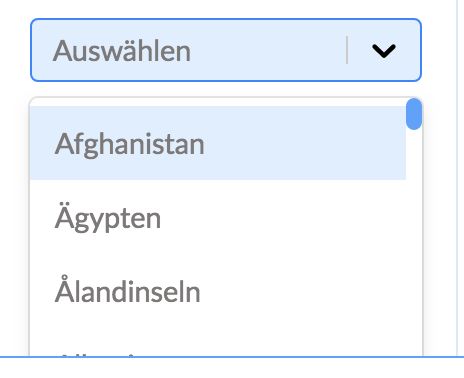
After a click on the Input Field the first Option in the Dropdown list is all time selected.
Is it possible to fix it or add an option to disable it?
 tobias-schanze
All 10 comments
It is hard to guess without seeing your code but I had a similar problem solution was to update the selected value in optionChange function. I am new to React but I am guessing that if it is defined through a prop it will be rendered only once, thus will never change; if it is defined using state then you need to update the selected state everytime user selects.
<Select
          value={this.state.selected}
          options={...}
          onChange={this.optionChange} />

  private optionChange = (selected: {label:string, value:string}) => {
    this.setState({selected});
  }
 furkanusta
on 23 Sep 2018
furkanusta
on 23 Sep 2018
@tobias-schanze please supply us with a codesandbox to reproduce your issue, otherwise we will not be able to triage your issue for you.
 gwyneplaine
on 24 Sep 2018
gwyneplaine
on 24 Sep 2018
Here is an link:
https://codesandbox.io/s/wqqnk0povk
tobias-schanze
on 27 Sep 2018
Have somebody an Idea?
tobias-schanze
on 8 Oct 2018
I didn't see the issue from your codesandbox example. FYI I was testing in Chrome 69.
 Chopinsky
on 8 Oct 2018
Chopinsky
on 8 Oct 2018
The problem he mentions is that the first option is focused by default.
Honestly it's not that much of a problem, but having a difference between visual mouse and keyboard selection wouldn't be a bad idea. Something like only keeping the focus state active if keyboard is being used.
 Rall3n
on 9 Oct 2018
Rall3n
on 9 Oct 2018
Nobody an Idea?
tobias-schanze
on 19 Oct 2018
I have the same issue, I select the correct option on change, it still selects the first item every time, even though the correct one is also selected. Pressing arrow keys shows that it has selected the first item for some reason:
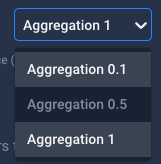
There the actual selected item is "Aggregation 1" but on opening it has also selected the first item for keyboard focus??
const currentValue = useMemo(() => {
  if (value) {
    return options.find(option => option.value === value)
  }
  return null
}, [value])

const handleChange = selectedOption => {
  onChange(selectedOption.value, name)
}

return (
  <SelectWrapper css={styles} width={width} data-test-selector='SingleSelect-Wrapper'>
    <ReactSelect
      className={className}
      value={currentValue}
      styles={customStyles(theme)}
      onChange={handleChange}
      options={options}
      isDisabled={disabled}
    />
  </SelectWrapper>
)
 DominicTobias-b1
on 27 Mar 2020
DominicTobias-b1
on 27 Mar 2020
This will be resolved when #4080 is merged.
 bladey
on 10 Jun 2020
bladey
on 10 Jun 2020
Greetings,
This is a duplicate of https://github.com/JedWatson/react-select/pull/3705 which has a PR being reviewed for next release. As such I will close this issue for now, and feel free to add yourself as a subscriber to either the issue or associated PR if you would like to be notified when this feature request has been released.
 ebonow
on 7 Dec 2020
ebonow
on 7 Dec 2020
Related issues
 AchinthaReemal
·
3Comments
AchinthaReemal
·
3Comments
 ericj17
·
3Comments
ericj17
·
3Comments
 x-yuri
·
3Comments
x-yuri
·
3Comments
 pablote
·
3Comments
pablote
·
3Comments
 jonorogers
·
3Comments
jonorogers
·
3Comments
Most helpful comment
The problem he mentions is that the first option is focused by default.
Honestly it's not that much of a problem, but having a difference between visual mouse and keyboard selection wouldn't be a bad idea. Something like only keeping the focus state active if keyboard is being used.