React-select: [V2] [Typescript] ValueType<Option> is not exported.
The problem
I'm using React-Select v2 in typescript and the onChange event handler has a first parameter with a the type ValueType<T> which is declared like this in the typings:
export type ValueType<OptionType> = OptionType | OptionsType<OptionType> | null | undefined;
The problem is that, because of that I can't declare my event handler as:
private handleChange = (selected: MyOption) => {
  /** Code **/
}
Instead I have to declare it like this:
private handleChange = (selected?: MyOption | MyOption[] | null) => {
  /** Code **/
}
I can also declare ValueType in my project, but that's a bit too much.
Possible solution:
Maybe there are better ways but one of the solutions, which would still be a bit awkward, would be to export the ValueType type so we can at least use that and not declare the value type in that manner.
 ericmackrodt
All 22 comments
Hi @ericmackrodt
Does this sandbox meet your requirements?
 claasahl
on 8 Aug 2018
claasahl
on 8 Aug 2018
Hi @claasahl ,
Thanks for the response.
It does, but in my case the I don't select multiple items.
Couple of questions:
Was the usage of getOptionValue and getOptionLabel that resolved it?
If so, would it work with a complex type?
Thanks!
ericmackrodt
on 9 Aug 2018
Hi @ericmackrodt
No, I don't think that getOptionValue or getOptionLabel had anything to do with it.
Yes, it also works with more complex types (see this sandbox).
claasahl
on 11 Aug 2018
sandbox example is using typescript 2.x, could be it that typescript 3.x is not compatible with this.
 daliusd
on 25 Jan 2019
daliusd
on 25 Jan 2019
Hit this issue too and found this thread in my search for answers. The suggestions above didn't resolve the issue for me, but I think helped point me in the right direction!
I was super confused about this for a while and then I realised it's pretty easy to solve with a type check before you attempt to use the selectedOption. If you explicitly check whether selectedOption is an array, TypeScript then understands that it is not possible for the value to be an array from that point forward and allows you to use it like you expect to.
<Select
onChange={selectedOption => {
if (Array.isArray(selectedOption)) {
throw new Error("Unexpected type passed to ReactSelect onChange handler");
}
doSomethingWithSelectedValue(selectedOption.value);
}}
...
/>
For reference, below is the error I was getting, which goes away when the Array.isArray check is uncommented:

 bradchristensen
on 13 Feb 2019
bradchristensen
on 13 Feb 2019
I had the same issue when using a select that allows single-select only. I was getting the same error as @bradchristensen.
I solved this by defining a type and doing a type assertion before using the selected option.
import { ValueType } from "react-select/lib/types";

type OptionType = { label: string; value: number };

<Select
  onChange={(selectedOption: ValueType<OptionType>) => {
    const value = (selectedOption as OptionType).value;
    ...
  }}
  ...
/>
 plotka
on 9 Apr 2019
plotka
on 9 Apr 2019
the solution of @plotka worked for me, i was having the same error, looks like you have to make that assertion everytime that you are working with the component, does there's a way to abstract that and only use my interface defnition by default?
 ErSulba
on 25 May 2019
ErSulba
on 25 May 2019
The following worked for me using a multiselect:
<Select
placeholder={"Select Device..."}
isMulti
options={generateDeviceOptions()}
getOptionValue={getOptionValue}
onChange={(selectedOption: ValueType<SelectedDevice>, e: ActionMeta) => handleDeviceChange((selectedOption as SelectedDevice[]), e)}
value={props.devices}
/>
function handleDeviceChange (selectedOption: SelectedDevice[], e: ActionMeta) {
console.log(selectedOption);
props.setDevices(selectedOption)
console.log(e);
}
type SelectedDevice = {
label: any;
value: any;
}
Hopefully this will help others who stumble upon this issue.
using:
"react-select": "^3.0.4"
"@types/react-select": "^3.0.0"
 zbischoff0812
on 10 Jul 2019
zbischoff0812
on 10 Jul 2019
Is there a convenient solution without Array.isArray or as OptionType checking? Is it going to be implemented?
Option 1, intuitively expected, value as is
Doesn't work because React-Select doesn't know what value we are passing

Option 2 (by @ericmackrodt and @bradchristensen), with explicit types in handler signature
Doesn't work because IContact[] is not the same as ReadonlyArray<IContact>

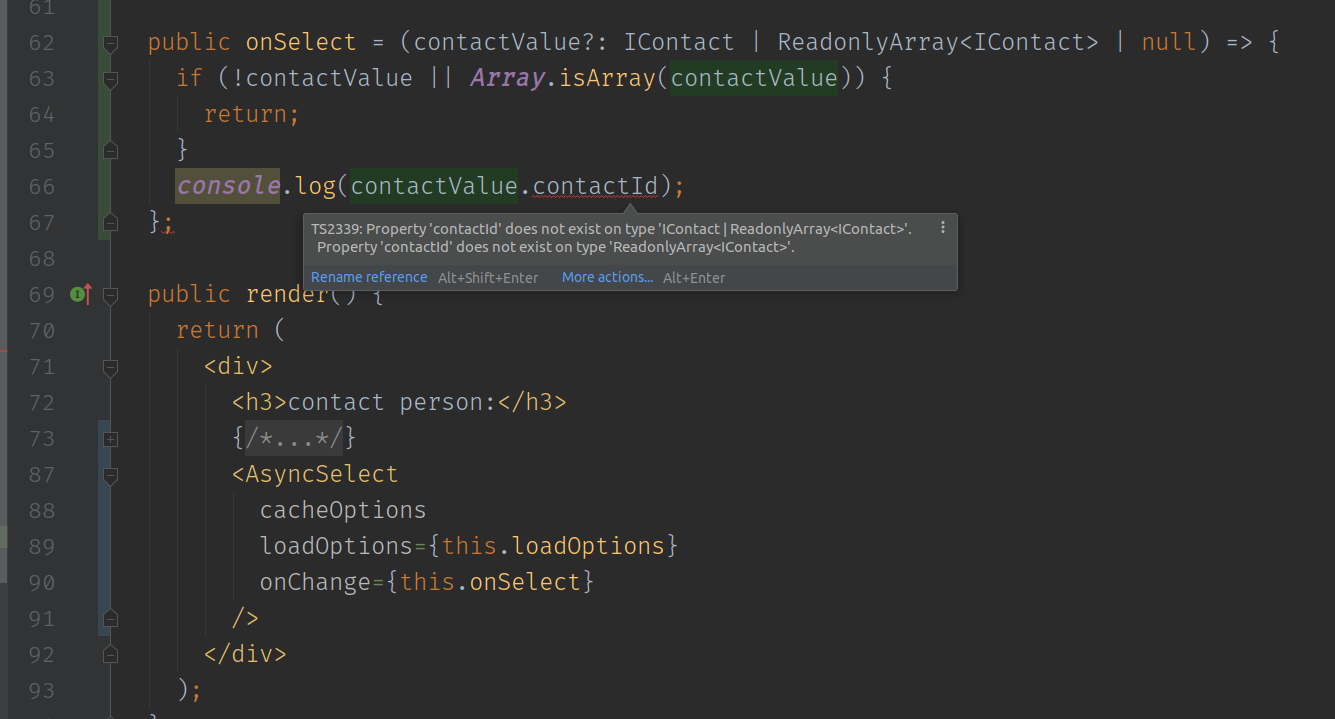
Option 3 (by @plotka), using as coercion
Though it works without errors, using as is not the best solution because it eliminates the power of TS checks

 goodwin64
on 23 Jul 2019
goodwin64
on 23 Jul 2019
I see another example here: https://github.com/pdx-connect/pdx-connect/blob/844c7849c154182bb52ffd7f45fe7258addc86f0/client/src/components/types.ts#L26
Implementation: https://github.com/pdx-connect/pdx-connect/blob/844c7849c154182bb52ffd7f45fe7258addc86f0/client/src/pages/oobe/Oobe.tsx#L137
@eggebrecht0
Hi! I was searching for a solution to this type issue and was impressed by your workaround.
If you are the author (hopefully), are you okay with granting the snippet here:
export interface OptionType {
label: string;
value: string;
}
export namespace OptionType {
/**
* Resolves a ValueType into an array of OptionType.
* @param value The ValueType to resolve.
*/
export function resolve(value: ValueType<OptionType>): OptionType[] {
let optionTypes: OptionType[];
if (value == null) {
optionTypes = [];
} else if (Array.isArray(value)) {
optionTypes = value;
} else {
optionTypes = [value];
}
return optionTypes;
}
}
// usage example:
handleMajorChange = (value: ValueType<OptionType>) => {
this.setState({
selectedMajor: OptionType.resolve(value)
});
};
available under the MIT license for others to use (and possibly use on this project / DefinitelyTyped?)
 tony
on 31 Aug 2019
tony
on 31 Aug 2019
I tried something similar to @zbischoff0812 in https://github.com/JedWatson/react-select/issues/2902#issuecomment-510206120
https://github.com/tony/cv/commit/ba814c560cb3249439d9f831fe9873f012a28633
This casting is super strange. If someone around here has TS kungfu, we need a solution for this in https://github.com/DefinitelyTyped/DefinitelyTyped/tree/master/types/react-select.
Thanks for letting this issue remain open. Not sure if we classify this as a react-select thing or a DefinitelyTyped one.
Here's a further simplification: https://github.com/tony/cv/commit/ddeef1651b0735b5bf4b33e8b3afecd1f34254fe
I release the snippet/example below under MIT for all to reuse:
import { ActionMeta, OptionProps, ValueType } from "react-select/src/types"; // tslint:disable-line no-submodule-imports
type ISelectOption = Pick<OptionProps, "label" | "value">;
interface IOptionType {
label: string;
value: string;
}
// get data in array format to work with label+value
const languageOptions = (((search || {}).data || {}).languages || []).length
? (search.data.languages.map(language => ({
label: language,
value: language
})) as ISelectOption[])
: [];
const onLanguageChange = (value: ValueType<IOptionType>, _: ActionMeta) => {
setLanguages(
(value as IOptionType[])
.map(({value: v}) => v as ActorLanguage)
);
};
return (
<Select
options={languageOptions}
isMulti={true}
onChange={onLanguageChange}
/>
);
Hi Tony,
I believe that snippet was created by our awesome architect Bradley Odell. I'm okay with granting the snippet, but since you asked I would contact Bradley.
Glad we could help!
-Terry
From: Tony Narlock notifications@github.com
Sent: Saturday, 31 August 2019 8:53:03 AM
To: JedWatson/react-select react-select@noreply.github.com
Cc: Terry Eggebrecht terry0@terryegg.com; Mention mention@noreply.github.com
Subject: Re: [JedWatson/react-select] [V2] [Typescript] ValueType
I see another example here: https://github.com/pdx-connect/pdx-connect/blob/844c7849c154182bb52ffd7f45fe7258addc86f0/client/src/components/types.ts#L26
Implementation: https://github.com/pdx-connect/pdx-connect/blob/844c7849c154182bb52ffd7f45fe7258addc86f0/client/src/pages/oobe/Oobe.tsx#L137
@eggebrecht0https://github.com/eggebrecht0
Hi! I was searching for a solution to this type issue and was impressed by your workaround.
If you are the author (hopefully), are you okay with granting the snippet here:
export interface OptionType {
label: string;
value: string;
}
export namespace OptionType {
/**
* Resolves a ValueType into an array of OptionType.
* @param value The ValueType to resolve.
*/
export function resolve(value: ValueType<OptionType>): OptionType[] {
let optionTypes: OptionType[];
if (value == null) {
optionTypes = [];
} else if (Array.isArray(value)) {
optionTypes = value;
} else {
optionTypes = [value];
}
return optionTypes;
}
}
// usage example:
handleMajorChange = (value: ValueType
this.setState({
selectedMajor: OptionType.resolve(value)
});
};
available under the MIT license for others to use (and possibly use on this project / DefinitelyTyped?)
—
You are receiving this because you were mentioned.
Reply to this email directly, view it on GitHubhttps://github.com/JedWatson/react-select/issues/2902?email_source=notifications&email_token=AKQGKYE3NTP45UW5EPCJRWDQHKHV7A5CNFSM4FONBXK2YY3PNVWWK3TUL52HS4DFVREXG43VMVBW63LNMVXHJKTDN5WW2ZLOORPWSZGOD5TPLSY#issuecomment-526841291, or mute the threadhttps://github.com/notifications/unsubscribe-auth/AKQGKYC27HWVZCX36Q7ZMFDQHKHV7ANCNFSM4FONBXKQ.
 eggebrecht0
on 31 Aug 2019
eggebrecht0
on 31 Aug 2019
@eggebrecht0: Thank you for letting us know!
@BTOdell: There is a snippet referred to here: https://github.com/JedWatson/react-select/issues/2902#issuecomment-526841291 having to do with this issue.
Are you okay with granting it and the implementation example under MIT license so people in this thread can use it / potentially remix it? We're trying to find a way to get these event types to fit together.
tony
on 31 Aug 2019
I tried something similar to @zbischoff0812 in #2902 (comment)
This casting is super strange. If someone around here has TS kungfu, we need a solution for this in https://github.com/DefinitelyTyped/DefinitelyTyped/tree/master/types/react-select.
Thanks for letting this issue remain open. Not sure if we classify this as a react-select thing or a DefinitelyTyped one.
Here's a further simplification: tony/cv@ddeef16
I release the snippet/example below under MIT for all to reuse:
import { ActionMeta, OptionProps, ValueType } from "react-select/src/types"; // tslint:disable-line no-submodule-imports type ISelectOption = Pick<OptionProps, "label" | "value">; interface IOptionType { label: string; value: string; } // get data in array format to work with label+value const languageOptions = (((search || {}).data || {}).languages || []).length ? (search.data.languages.map(language => ({ label: language, value: language })) as ISelectOption[]) : []; const onLanguageChange = (value: ValueType<IOptionType>, _: ActionMeta) => { setLanguages( (value as IOptionType[]) .map(({value: v}) => v as ActorLanguage) ); }; return ( <Select options={languageOptions} isMulti={true} onChange={onLanguageChange} /> );
Tony,
I agree that the type casting is super strange. Let me see if I can shed some more insight on this. (I am not a TS master though.)
There are two ways ultimately that you can do this. The first way is the way I commented above, casting it within the callback function on the onChange prop.
The second way is the way you described in your comment and in your commit. After posting my solution, I ended up changing it to this.
When you do it the second way, this is what you get if you do not cast it:
handleDeviceChange(selectedOption: ValueType<UISelection>, e: ActionMeta) {
if(selectedOption)
this.props.setSelectedDevices([selectedOption]) <-- error here
else
this.props.setSelectedDevices([])
}
<Select
placeholder={"Select Device..."}
isMulti
isSearchable={true}
options={this.generateDeviceOptions()}
onChange={(selectedOption: ValueType<UISelection>, e: ActionMeta) => this.handleDeviceChange(selectedOption , e)}
value={this.props.selectedDevices.toArray().map(entry => {
return {
value: entry[1].value,
label: entry[1].label
}
})}
/>
```ts
Error:
Type 'UISelection | readonly UISelection[]' is not assignable to type 'UISelection'.
Type 'readonly UISelection[]' is missing the following properties from type 'UISelection': value, label
If you then cast it as
```ts
this.props.setSelectedDevices([selectedOption as UISelection])
or
this.props.setSelectedDevices(selectedOption as UISelection[])
The error goes away.
A couple of solutions to this are:
Allow setSelectedDevices or what ever the func you call, to accept readonly UISelection[]
Change OptionsType<OptionType> to not be readonly, but then you get the following error instead:
Argument of type 'UISelection | UISelection[]' is not assignable to parameter of type 'UISelection[]'.
Type 'UISelection' is missing the following properties from type 'UISelection[]': length, pop, push, concat, and 28 more.
which means you would still need to cast it as
([selectedOption as UISelection])`
or
(selectedOption as UISelection[])
to get tslint to stop complaining.
The more straightfoward solution is allowing the function to take readonly UISelection[] as a parameter type, something which would need to be documented.
zbischoff0812
on 31 Aug 2019
@tony
Here is the default type for OptionType:
export interface Props<OptionType = { label: string; value: string }> extends SelectComponentsProps {
And here is the type for ValueType<OptionType>:
export type OptionsType<OptionType> = ReadonlyArray<OptionType>;
export type ValueType<OptionType> = OptionType | OptionsType<OptionType> | null | undefined;
From: https://github.com/DefinitelyTyped/DefinitelyTyped/blob/master/types/react-select/src/types.d.ts#L13
Unfortunately, the react-select type definitions provided by DefinitelyTyped do not export the default OptionType because I believe it can be overridden and defined by the user somehow. But in our pdx-connect project, we just used the default OptionType and copied the type into our own definitions:
export interface OptionType {
label: string;
value: string;
}
Now, the onChange callback is defined as producing a ValueType<OptionType> as the first parameter:
onChange?: (value: ValueType<OptionType>, action: ActionMeta) => void;
But the ValueType<OptionType> is a complex union type and I figured it would be easier to deal with if it was just a OptionType[]. So, I create a simple OptionType.resolve utility function to perform this conversion wherever it was needed and to avoid duplicating code:
export namespace OptionType {
/**
* Resolves a ValueType into an array of OptionType.
* @param value The ValueType to resolve.
*/
export function resolve(value: ValueType<OptionType>): OptionType[] {
let optionTypes: OptionType[];
if (value == null) {
optionTypes = [];
} else if (Array.isArray(value)) {
optionTypes = value;
} else {
optionTypes = [value];
}
return optionTypes;
}
}
This resolve function simply performs "type differentiating" which you can read about here: https://www.typescriptlang.org/docs/handbook/advanced-types.html#type-guards-and-differentiating-types
This is essentially what has been suggested earlier in this thread: Use Array.isArray to check the type and handle it accordingly. I just packaged it up in a nice utility function that also checks for null or undefined and returns a single concrete type.
Ideally, the author of the react-select should add this utility function to his library so everyone can use it. I'm okay to release this snippet under MIT so others can use it and hopefully it gets put directly into the react-select library.
Also, note to everyone else in this thread: Avoid using as type-casting in TypeScript. It bypasses the safety of the type system and it's a good way to introduce runtime errors. The as keyword does not perform any runtime checks and code further along could break and it becomes a nightmare tracking down the bug.
 BTOdell
on 1 Sep 2019
BTOdell
on 1 Sep 2019
The following worked for me using a multiselect:
<Select placeholder={"Select Device..."} isMulti options={generateDeviceOptions()} getOptionValue={getOptionValue} onChange={(selectedOption: ValueType<SelectedDevice>, e: ActionMeta) => handleDeviceChange((selectedOption as SelectedDevice[]), e)} value={props.devices} /> function handleDeviceChange (selectedOption: SelectedDevice[], e: ActionMeta) { console.log(selectedOption); props.setDevices(selectedOption) console.log(e); } type SelectedDevice = { label: any; value: any; }Hopefully this will help others who stumble upon this issue.
using:
"react-select": "^3.0.4"
"@types/react-select": "^3.0.0"
That worked for me in not multiinput. Thank you very much
 carlosriveroib
on 10 Dec 2019
carlosriveroib
on 10 Dec 2019
The isArray check no longer works for me
Property 'value' does not exist on type '{ value: string; label: string; } | OptionsType<{ value: string; label: string; }>'.'
I think the type definitions have gotten a little more complex in v3 and now typescript no longer can infer that isArray === false should reject the OptionsType type.
 seanlaff
on 10 Jan 2020
seanlaff
on 10 Jan 2020
Also, note to everyone else in this thread: Avoid using as type-casting in TypeScript. It bypasses the safety of the type system and it's a good way to introduce runtime errors. The as keyword does not perform any runtime checks and code further along could break and it becomes a nightmare tracking down the bug.
Not trying to be an ass; I generally agree with you. I would like to point out, however, that this whole thing can be obviated by being more specific about prop types and template types. The type that gets called with onChange is limited by the prop types, so there could be a template parameter specifying whether this is a multi-select, an optional select, etc. and then the type of value type could be specific instead of just "It could be an array, a value, null, or undefined". In that case, you'd be able to assume that the parameter is what you expect it to be. So using as here is kind of just bypassing the bypass.
Also, yeah, not that I'm personally willing to take the time to do it, but I do think the ideal solution involves doing compile-time matching of prop types to deduce what the ValueType<OptionType> actually is in contexts like onChange where it should only ever be called with one value in a non-optional, non-multi select.
Now that Array.isArray doesn't seem to be working, I'm just using 'length' in option:
(option: ValueType<{ label: string; value: string }>) => {
if (!option) { // shouldn't happen ever I don't think
return;
} else if ('length' in option) { // shouldn't happen ever I don't think
if (option.length > 0) {
// same as below
}
return;
} else {
// only meaningful branch
}
 rivertam
on 18 Feb 2020
rivertam
on 18 Feb 2020
Is there a reason the type cannot simply be
{ value: string; label: string; } | Array<{ value: string; label: string; }
instead of
{ value: string; label: string; } | OptionsType<{ value: string; label: string; } ?
seanlaff
on 18 Feb 2020
@tony
Unfortunately, the
react-selecttype definitions provided by DefinitelyTyped do not export the defaultOptionTypebecause I believe it can be overridden and defined by the user somehow.
This seems to work , in case someone is looking for something similar to it
import { Props } from "react-select"
type ExtractDefaultType<P> = P extends Props<infer T> ? T : never
type OptionTypeBase = ExtractDefaultType<Props>
tsserver's hover shows that the extracted type signature is
type OptionTypeBase = {
label: string;
value: string;
}
 resolritter
on 6 Mar 2020
resolritter
on 6 Mar 2020
I had the same issue when using a select that allows single-select only. I was getting the same error as @bradchristensen.
I solved this by defining a type and doing a type assertion before using the selected option.
import { ValueType } from "react-select/lib/types";

type OptionType = { label: string; value: number };

<Select
  onChange={(selectedOption: ValueType<OptionType>) => {
    const value = (selectedOption as OptionType).value;
    ...
  }}
  ...
/>
The solution from @plotka worked for me but it leaves the feeling that something is not right...
 gilsoncav
on 6 May 2020
gilsoncav
on 6 May 2020
Hello -
In an effort to sustain the react-select project going forward, we're closing old issues.
We understand this might be inconvenient but in the best interest of supporting the broader community we have to direct our efforts towards the current major version.
If you aren't using the latest version of react-select please consider upgrading to see if it resolves any issues you're having.
However, if you feel this issue is still relevant and you'd like us to review it - please leave a comment and we'll do our best to get back to you!
 bladey
on 28 May 2020
bladey
on 28 May 2020
Related issues
 joshualimpj
·
3Comments
joshualimpj
·
3Comments
 batusai513
·
3Comments
batusai513
·
3Comments
 pablote
·
3Comments
pablote
·
3Comments
 sampatbadhe
·
3Comments
sampatbadhe
·
3Comments
 MalcolmDwyer
·
3Comments
MalcolmDwyer
·
3Comments
Most helpful comment
I had the same issue when using a select that allows single-select only. I was getting the same error as @bradchristensen.
I solved this by defining a type and doing a type assertion before using the selected option.