React-select: Clicking outside the browser dismisses menu
I'm trying to debug what is going on inside this component, when the menu is up, but clicking outside of the browser, such as into the chrome debugger, closes the menu. Right clicking "Inspect" inside the menu also causes a close, and causes the inspector to go to the element that would be below the menu. (edit: this is in v2, which i just realized i have)
 ericblade
All 7 comments
Same on v1, how can we inspect the menu elements (for development purposes)?
 canda
on 1 May 2018
canda
on 1 May 2018
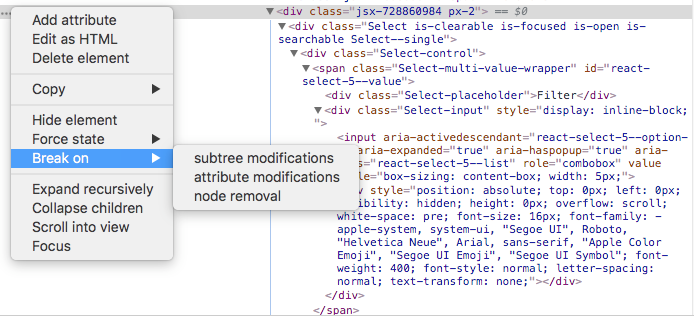
If you locate the <Select ... /> element in the dom inspector, you can add a breakpoint to its parent element. That way, if the menu tries to close, it would be stuck in a debugger state in which you would still be able to inspect the dom element. Steps to inspect actual menu while it is open:
Inspect around the elements and/or parent of the menu element, right-click → "Break on" → "subtree modifications"
 combizs
on 2 May 2018
combizs
on 2 May 2018
Well, good to learn about some debugging features I wasn't aware of, so thank you for that. I still find it slightly strange, that the menu closes when clicking outside the browser. Though maybe I'm wrong.
What I really wanted to do was dig into it with the menu open and displaying, so that I can figure out what tweaks I need to make to the styles all the way around to get it to display over everything else.
I'm hoping that V2 would have a few options that would affect it's defaults? 1- a way to draw over the top of everything, 2- a way to forcefully expand the parent of the Select . . . there was a 3rd possibility i had thought of yesterday and can't remember now that i'm posting about it. Anyway, that seems like it's the most encountered, and least easily solved reliably problem that I've seen while digging thru the tracker here.
ericblade
on 3 May 2018
nice, what I did was to hardcode the prop menuIsOpen
canda
on 4 May 2018
@canda just add that prop to the
ericblade
on 4 May 2018
Main select component <Select isMenuOpen />
On Fri, May 4, 2018, 2:11 AM Eric Blade notifications@github.com wrote:
@canda https://github.com/canda just add that prop to the ?
—
You are receiving this because you were mentioned.Reply to this email directly, view it on GitHub
https://github.com/JedWatson/react-select/issues/2575#issuecomment-386507024,
or mute the thread
https://github.com/notifications/unsubscribe-auth/ABKep7GDVATeF8VfHV3dKC7dkz2UwUuxks5tu-LxgaJpZM4TsHqx
.
canda
on 4 May 2018
thnx @ericblade, as specified above, we expose a 'menuIsOpen' prop for you to take control of whether the menu is shown or not. .
issue closed
 gwyneplaine
on 9 May 2018
gwyneplaine
on 9 May 2018
Related issues
 steida
·
3Comments
steida
·
3Comments
 geraldfullam
·
3Comments
geraldfullam
·
3Comments
 joshualimpj
·
3Comments
joshualimpj
·
3Comments
 mbonaci
·
3Comments
mbonaci
·
3Comments
 pgoldweic
·
3Comments
pgoldweic
·
3Comments
Most helpful comment
nice, what I did was to hardcode the prop
menuIsOpen