React-select: OnChange not display label in textbox
Hi, thanks for this component! I have a question:
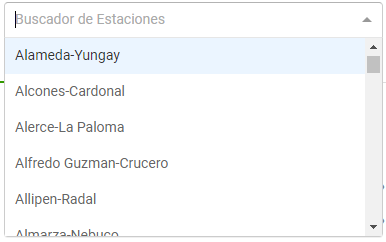
When I change the value the textbox is not updated with the selected label, always shows blank as if nothing was selected, but the onchange event does work.
I followed the installation and implementation instructions as indicated on the main page. Any ideas? Thanks!
 Fernals
All 6 comments
Hi @Fernals do you have a snippet of your setup? It's hard to see where it's going wrong. However, it's most likely something to do with your value.
 agirton
on 9 Jun 2017
agirton
on 9 Jun 2017
@agirton I'm having this same issues. Tried both on rc.4 and rc.5
Here's my setup:
const change = (val) => {
  console.log('CHANGE', val);
}
<Select
            name="assignee-filter"
            value={null}
            className="pull-left"
            options={staffUsers}
            onChange={change}
            placeholder="Filter by Assignee"
          />
The value of staffUsers is such:
[{"value":null,"label":"All Assignees"},{"value":456,"label":"Andrea Watts"},{"value":603,"label":"Cameron Hamari"},{"value":302,"label":"Christie Drew"},{"value":10,"label":"Christopher Kirk"},{"value":604,"label":"David Radtke"},{"value":628,"label":"Gabby Schiavenato"},{"value":371,"label":"Michelle Cunningham"},{"value":1,"label":"Michelle Cunningham"}]
the change function does fire with the correct values, but the select never renders a different view as if anything else is selected. If I change the value of value for the initial one, that stays as what is always rendered.
staffUsers is passed in as props from the render of a parent component, so it's possible the object being selected are not === but the value key of the object is the same.
Example change output console.log
CHANGE Object {value: 603, label: "Cameron Hamari"}
Any ideas? I tried removing any value prop from the Select component but that doesn't seem to change anything.
 kirkchris
on 9 Jun 2017
kirkchris
on 9 Jun 2017
You need to update the Select whenever the value changes from onChange. So in your change handler call setState or whatever you use to update the state with the new value.
agirton
on 9 Jun 2017
Hi @agirton thanks for your reply. My setup is similar to that of @kirkchris. Then apply the solution you indicated in your previous answer and now it works!

onChange:function(val){
        if(val == null){
            this.setState({valueselect:""});
        }else{
            this.setState({valueselect:val.value});
        }
}
<Select
       name="form-field-name"
       value={this.state.valueselect}
       options={this.state.estaciones}
       onChange={this.onChange}
       placeholder="Buscador de Estaciones"
/>
I do not know if this is the correct solution, but this works. 👍
Thanks @agirton
Fernals
on 9 Jun 2017
This confusion is might be arising from newcomers imitating the Usage example. It might help clarify to use & link to the term "controlled component".
 nortonwong
on 12 Jun 2017
nortonwong
on 12 Jun 2017
Hi @Fernals yes this works. Another option is you can make the onChange method easier by doing something like this:
onChange: function(val) {
  this.setState({valueselect: val});
}
Then the package will handle the null cases for you.
agirton
on 19 Jun 2017
Related issues
 geraldfullam
·
3Comments
geraldfullam
·
3Comments
 ericj17
·
3Comments
ericj17
·
3Comments
 steida
·
3Comments
steida
·
3Comments
 sampatbadhe
·
3Comments
sampatbadhe
·
3Comments
 mbonaci
·
3Comments
mbonaci
·
3Comments