React-select: How to prevent the dropdown list to go off screen?
How to prevent the dropdown list to go off screen?
 ghost
ghost
All 8 comments
It depends on the rest of your code, but I'd suggest looking into the scrollMenuIntoView option.
 rubencodes
on 26 Jan 2017
rubencodes
on 26 Jan 2017
Also check out the menuBuffer property in the options for a potential solution.
 robertmaloney
on 27 Jan 2017
robertmaloney
on 27 Jan 2017
isn't there an option to open the outer menu to the opposite direction (i.e. up) , if it reaches to the edge of the window height?
ghost
on 31 Jan 2017
menuBuffer doesn't appear to be working for me. I'm seeing the menu overflow the viewport on the bottom no matter what I set this to. Anyone else?
Also, is there a way to make the menu expand up instead of down? That would also work.
 colinhunt
on 3 Mar 2017
colinhunt
on 3 Mar 2017
+1
Happens to me as well, scrollMenuIntoView doesn't seem to work.
Correction - this only seems to work if your scrollable container is window. Otherwise, window.scrollBy that you use has no effect.
I have made this PR to solve it.
 OmriAharon
on 13 Mar 2017
OmriAharon
on 13 Mar 2017
Unfortunately, @OmriAharon's solution doesn't work for me. My page does not scroll, so a dropdown near the bottom of the page needs to open up rather than down. Seems like this is a common use case that should be solved by default? Seems to be a lot of people with the same issue and no response for a while.
I'd be interested in taking a stab at this if you could recommend what changes should be made @JedWatson? In the meantime I'll use the css hack to manually mark which ones need to open up
 tcosentino
on 30 May 2017
tcosentino
on 30 May 2017
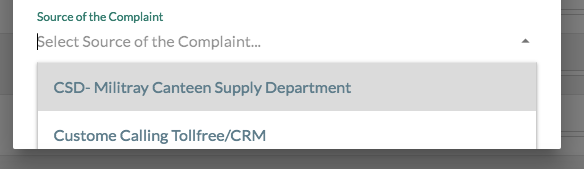
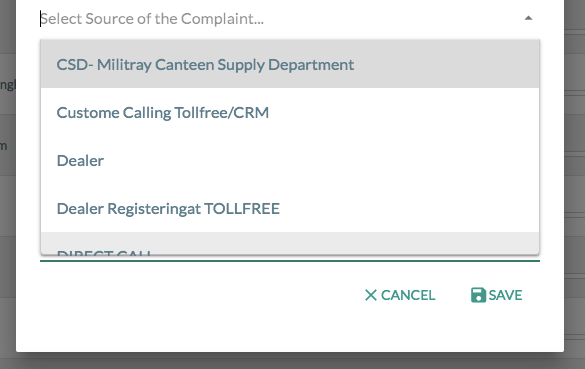
FWIW @OmriAharon's solution worked great for me. It opens up the entire dropdown list in the view despite being in a modal. Otherwise, when trying to scroll by clicking with a mouse or swiping in mobile would just close the dropdown list at the end of the screen.
Before:
After:
 hashwin
on 8 Mar 2018
hashwin
on 8 Mar 2018
Hello -
In an effort to sustain the react-select project going forward, we're closing old issues / pull requests.
We understand this might be inconvenient but in the best interest of supporting the broader community we have to direct our limited efforts to maintain the latest version.
If you feel this issue / pull request is still relevant and you'd like us to review it, please leave a comment and we'll do our best to get back to you.
 bladey
on 27 May 2020
bladey
on 27 May 2020
Related issues
 mbonaci
·
3Comments
mbonaci
·
3Comments
 x-yuri
·
3Comments
x-yuri
·
3Comments
 sampatbadhe
·
3Comments
sampatbadhe
·
3Comments
 AchinthaReemal
·
3Comments
AchinthaReemal
·
3Comments
 Meesam
·
3Comments
Meesam
·
3Comments
Most helpful comment
Unfortunately, @OmriAharon's solution doesn't work for me. My page does not scroll, so a dropdown near the bottom of the page needs to open up rather than down. Seems like this is a common use case that should be solved by default? Seems to be a lot of people with the same issue and no response for a while.
I'd be interested in taking a stab at this if you could recommend what changes should be made @JedWatson? In the meantime I'll use the css hack to manually mark which ones need to open up