React-responsive-carousel: stopOnHover not working correctly?
Been troubleshooting the use of stopOnHover within my solution. First time I've decided to setup the use of autoPlay within the Carousel. Upon setting autoPlay, when I hover over the component, the autoPlay is not being stopped. stopOnHover by default is set to true and I also manually added the property to the component.
After some digging, the carouselWrapper value is undefined below so the addEventListeners are not being properly added within the setupAutoPlay.
```
key: 'setupAutoPlay',
value: function setupAutoPlay() {
this.autoPlay();
var carouselWrapper = this.refs['carouselWrapper'];
        if (this.props.stopOnHover && carouselWrapper) {
            carouselWrapper.addEventListener('mouseenter', this.stopOnHover);
            carouselWrapper.addEventListener('mouseleave', this.startOnLeave);
        }
    }
```
Not quite sure why this is happening, even setting everything back to 100% default without my customizations to the CSS is still not working.
Any thoughts or something silly I'm completely forgetting...?
 Cyan005
All 7 comments
Would you be able to publish an example where this problem happens? You can fork this example https://codesandbox.io/s/lp602ljjj7
 leandrowd
on 20 Feb 2018
leandrowd
on 20 Feb 2018
So just using the forked example (guess I didn't need to fork to discover this), the area of my code that isn't being set properly is however being set within that example:
Sandbox
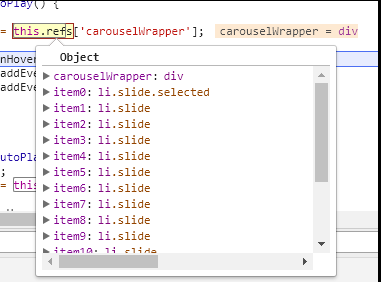
My Solution
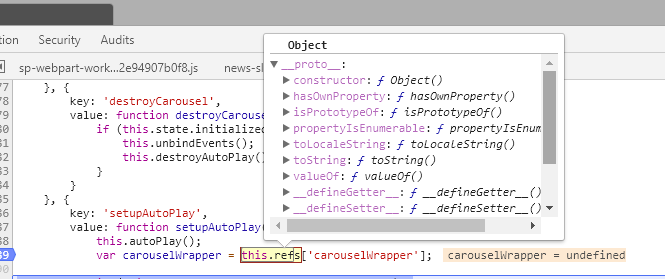
It's as if my Carousel.js is trying to use the refs before they are set within my solution. Digging into this further, checking for possible loading issues based on the data source that's driving the carousel.
Cyan005
on 20 Feb 2018
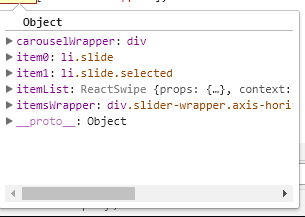
This seems to be the problem... this.refs for the carouselWrapper is not available on the first load when setupAutoPlay is being executed. However, once the page is ready it's available for use. Unfortunately, the events are not configured at this point.
After Everything Loaded - My Solution
Cyan005
on 20 Feb 2018
Ok, pinpointed the main issue and difference.
Works:
<Carousel showArrows={true} showThumbs={true} showStatus={false} interval={1000} autoPlay={true} infiniteLoop={true}>
<div className='newsBannerItem'><img src='#' />
<p className='legend'>Title Stuff Here.. <a href="#">Read More</a></p>
</div>
</Carousel>
Does Not Work:
<Carousel showArrows={true} showThumbs={true} showStatus={false} interval={1000} autoPlay={true} infiniteLoop={true}>
{
this.state.newsBannerItems.map((item, key) => {
return (
<div className='newsBannerItem' key={key}><img src={item.BannerImage.Url} />
<p className='legend'>{item.Title}... <a href={this.buildNewsLink(item)}>Read More</a></p>
</div>
);
})
}
</Carousel>
I guess my main question now... is there a different way that I should be using to dynamically load these items from a data source? So far the only thing that does not work is the stopOnHover, everything else has worked as expected so far.
Cyan005
on 20 Feb 2018
And... switching from using the state object to passing in as a prop resolves this issue. I can get away with using this scenario for what I need. However, if anyone in the future needed to use the state to follow this same pattern, this issue may pop back up again.
Updating from this.state.newsBannerItems to this.props.newsBannerItems resolves this.
Works:
<Carousel showArrows={true} showThumbs={true} showStatus={false} interval={1000} autoPlay={true} infiniteLoop={true}>
        {
         this.props.newsBannerItems.map((item, key) => {
            return (
              <div className='newsBannerItem' key={key}><img src={item.BannerImage.Url} />
                <p className='legend'>{item.Title}... <a href={this.buildNewsLink(item)}>Read More</a></p>
              </div>
            );
          })
        }
      </Carousel>
I'm experiencing same problem here.
My work around still uses this.state.newsBannerItems. but put an empty <div> as placeholder if its length is 0.
 thewashingtonhua
on 20 Mar 2018
thewashingtonhua
on 20 Mar 2018
Closing this as it has been a while. Feel free to reopen if the problem persists...
leandrowd
on 5 Apr 2020
Related issues
 sinaler
·
3Comments
sinaler
·
3Comments
 ledbetterljoshua
·
6Comments
ledbetterljoshua
·
6Comments
 thesecretlyawesome
·
6Comments
thesecretlyawesome
·
6Comments
 ShineOfFire
·
6Comments
ShineOfFire
·
6Comments
 paulgasbarra
·
5Comments
paulgasbarra
·
5Comments
Most helpful comment
And... switching from using the state object to passing in as a prop resolves this issue. I can get away with using this scenario for what I need. However, if anyone in the future needed to use the state to follow this same pattern, this issue may pop back up again.
Updating from this.state.newsBannerItems to this.props.newsBannerItems resolves this.
Works: