React-redux-firebase: bug(query): orderBy in firestoreConnect() causing component re-render
Do you want to request a feature or report a bug?
Bug
What is the current behavior?
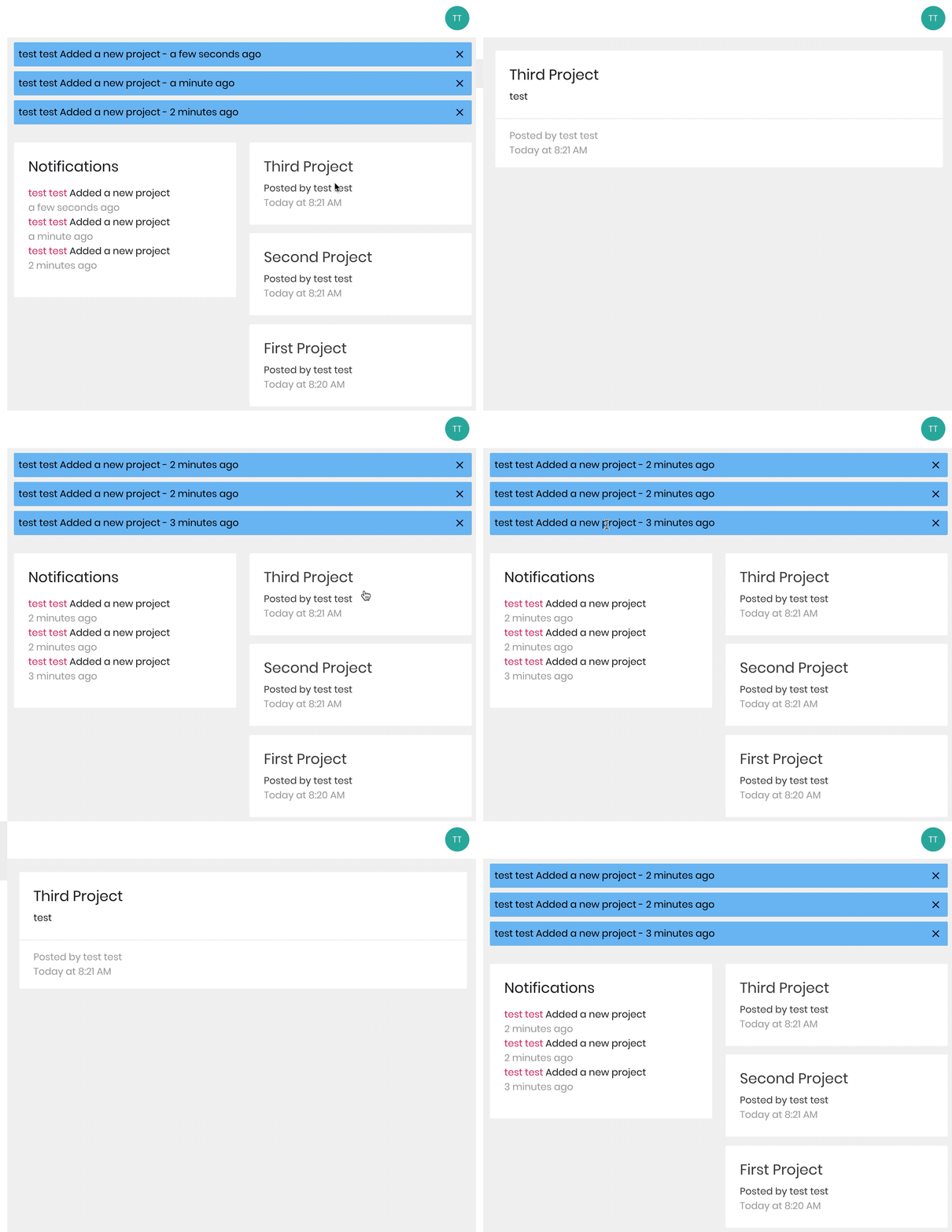
Using orderBy in firestoreConnect causes a re-render.
export default compose(
  firestoreConnect([
    { collection: "projects", orderBy: ["createdAt", "desc"] },
    { collection: "notifications", limit: 3, orderBy: ["time", "desc"] }
  ]),
  connect(mapStateToProps)
)(Dashboard);
It seems like the projects collection is first being fetched and rendered, then the orderBy part of the logic is being run. So you get the original unsorted list of projects rendered first, then the state is updated with the sorted list and the component re-renders.
As seen in the GIF above you first see the unordered list, then the ordered list.
To fix this issue I'm having to just fetch the data, and then sort it myself before rendering.
projects.sort((x, y) => {
      return y.createdAt.seconds - x.createdAt.seconds;
    });
...
export default compose(
  firestoreConnect([
    { collection: "projects" },
    { collection: "notifications", limit: 3, orderBy: ["time", "desc"] }
  ]),
  connect(mapStateToProps)
)(Dashboard);
What is the expected behavior?
The list of projects is sorted before being passed to the component for rendering.
Which versions of dependencies, and which browser and OS are affected by this issue? Did this work in previous versions or setups?
v3.10.0
Brave
macOS Catalina 10.15.1
 daithimorton
All 10 comments
actually iam end with this library, he did a lot of change in v3 without good docs.
 knour89
on 25 Jan 2020
knour89
on 25 Jan 2020
Not sure I understand the issue of re-render. It seems like two different renders would be happening due to loading two different list of data. Can you provide a full reproduction of the issue or at least provide the logic you are using for handling loading?
@knour89 v3 has been out for quite some time - the changes were to more closely match with patterns in the React community (using new Context API instead of adding a property the redux store). As for docs, there is the v3 migration guide for transitioning to the new version. Either way, hoping you find the right tools to help you build your project/application
 prescottprue
on 27 Jan 2020
prescottprue
on 27 Jan 2020
Not sure I understand the issue of re-render. It seems like two different renders would be happening due to loading two different list of data. Can you provide a full reproduction of the issue or at least provide the logic you are using for handling loading?
Your right it's two different renders, but that's not what you want when you use orderBy right? You want a single render with the sorted list.
daithimorton
on 27 Jan 2020
@beautifwhale You are querying two different sets of data - the notifications and the projects, which would be the two renders. If you just had the one query for projects with the orderBy, then yes, you would expect one render - How are you connecting to the projects within state?
It could be that your detail page is also loading data into projects since you are presumably loading a project on that page. Did you try maybe using storeAs in your projects page, maybe something like orderedProjects?
Could you provide the whole repo for reproduction of the issue? Or make a code sandbox?
Side Note
In the next coming major version of redux-firestore the plan is to have all queries stored under their query path instead of the collection name, which would mean that the single project and the list of projects would be stored in different places of redux state.
prescottprue
on 27 Jan 2020
@prescottprue I figured out what was wrong here, firestoreConnect in a child component. For example, I have a Dashboard with multiple child components, Header, Footer, ProjectList, and ProjectDetails was at another route. I was using firestoreConnect in ProjectList so when I clicked a project to view the details the ProjectList unmounted the listeners and the ProjectDetails component mounted. Now when I navigate back to the project list the listeners were mounted again. When a listener mounts it updates the firestore state 3 times, which means each time it caused the ProjectList component to re-render.
To fix this I moved the firestoreConnect to the parent Dashboard component. Now when the dashboard mounts the listeners are set up, and I just need to hook into the redux state in the child components to re-render when the list of projects is updated.
what I learned: firestoreConnect when called sets up and manages listeners, which update the firestore state slice in redux. Do not use firestoreConnect in a component that will mount and unmount alot.
daithimorton
on 26 Mar 2020
Could you please show me how did you solve it.
I dont understand the text above.
 adamtretera
on 21 Apr 2020
adamtretera
on 21 Apr 2020
Could you please show me how did you solve it.
I dont understand the text above.
Hey @Grixi the text above is basically saying
Do not use firestoreConnect in a component that will mount and unmount alot.
You need to use firestoreConnect in a root component that will mount the listeners once. When you use it in a child component, for example a tab on a page, the component may be mounted and unmounted as the user navigates through the tabs. If you use firestoreConnect on a tab page it will mount and unmount listeners, you don't want to do that.
If your using create-react-app use firestoreConnect in App.js to listen to the collections you want synced with your redux store.
daithimorton
on 21 Apr 2020
@daithimorton But how do I access it back to dashboard ?
adamtretera
on 24 Apr 2020
Interesting I was doing the same project and have the firebaseConnect in the Dashboard component but I got the same problem, would you be able to post your code?
 kubwensu
on 5 Jun 2020
kubwensu
on 5 Jun 2020
@daithimorton But how do I access it back to dashboard ?
@Grixi You need to setup the listeners in e.g. App.js, then hook your Dashboard component up to your Redux store. When the listeners mount they will update your Redux store, which will then make your data available to the Dashboard component.
daithimorton
on 5 Jun 2020
Related issues
 MentalGear
·
4Comments
MentalGear
·
4Comments
 dantman
·
3Comments
dantman
·
3Comments
 gitsad
·
3Comments
gitsad
·
3Comments
 rscotten
·
3Comments
rscotten
·
3Comments
 nasimoyz
·
3Comments
nasimoyz
·
3Comments
Most helpful comment
Hey @Grixi the text above is basically saying
You need to use
firestoreConnectin a root component that will mount the listeners once. When you use it in a child component, for example a tab on a page, the component may be mounted and unmounted as the user navigates through the tabs. If you usefirestoreConnecton a tab page it will mount and unmount listeners, you don't want to do that.If your using create-react-app use firestoreConnect in App.js to listen to the collections you want synced with your redux store.