React-redux-firebase: Bug(Listeners): Component with same listeners does not update correctly.
What is the current behavior?
I have two containers with the same structure.
@connect(({ firebase: { auth, profile } }) => ({
  auth,
  profile
}))
export default class ContainerOneWrapper extends Component {
  render() {
    return (
      <ContainerOneComponent
        router={this.props.router}
        profile={this.props.profile}
        auth={this.props.auth}
      />
    )
  }
}
@connect(({ firebase: { auth } }) => ({
  auth
}))
export default class ContainerTwoWrapper extends Component {
  render() {

    return (
        <ContainerTwoComponent auth={this.props.auth} />
    )
  }
}
They both have the same listeners on them,
ComponentOne
@firebaseConnect(({ auth }) => [
  `/cookbooks/${auth.uid}`,
  `/planners/${auth.uid}`
])
@connect(({ firebase: { data, auth } }) => ({
  userMeals: data.cookbooks && data.cookbooks[auth.uid]
}))
ComponentTwo
@firebaseConnect(({ auth }) => [
  `/cookbooks/${auth.uid}`,
  `/planners/${auth.uid}`
])
@connect(({ firebase: { data, auth } }) => ({
  userMeals: data.cookbooks && data.cookbooks[auth.uid],
  userPlan: data.planners && data.planners[auth.uid]
}))
When I navigate to ComponentOne, it sets the listeners fine,

But then I go to ComponentTwo, and the listeners are UNSET, but the componentTwo listeners are not set.

And then if I go back to ComponentOne:

What is the expected behavior?
When navigating to a different component the listeners should unset and on the new component rendering, set the correct listeners, even if they're the same? 🤷🏻♂️
Which versions of dependencies, and which browser and OS are affected by this issue? Did this work in previous versions or setups?
using "react-redux-firebase": "^2.0.0-rc.2"
 karltaylor
All 23 comments
I am having a similar issue. Using the 2.0 version. Kinda makes using this pointless since nothing updates.
 kylepotts
on 14 Jan 2018
kylepotts
on 14 Jan 2018
Looking into this. Haven't replicated yet, but will post any updates here.
@karltaylor So that I correctly replicate - Were you no longer receiving updates in that collection (i.e. listener actually detached) or were you just seeing the UNSET_LISTENER action dispatched? Trying to figure if the dispatches are erroneous or if the listeners are actually being detached.
@kylepotts Same questions to you.
Thoughts before diving in:
- Obviously seems to relate to something to do with how listeners are being compared/set/unset
- It could be either erroneous (should not be happening) dispatches, or the listeners are actually being detached
- If the queries are different or write to different places in redux then hopefully this would go away - thought is if they have different
queryParamsorstoreAsthe comparison won't be an issue?
 prescottprue
on 16 Jan 2018
prescottprue
on 16 Jan 2018
Hey @prescottprue thanks for looking into this!
I was no longer receiving updates in that collection, so it's definitely detatched.
@kylepotts for a part time fixed I just added a watchEvent on componentDidMount. It adds the listeners again for me and works ok. Probs not the best solution...
componentDidMount() {
    this.props.firebase.watchEvent('value', `/cookbooks/${this.props.auth.uid}`)
    this.props.firebase.watchEvent('value', `/planners/${this.props.auth.uid}`)
}
@prescottprue I can do some digging around and let you know.
Pretty much on every page I have I have two things in the firebaseConnect() which are always the exact same thing.
`/userProfiles/${uid}`,
`/userAccount/${uid}`,
I'll add an extra storeAs to these and see if I can get some listeners to appear.
kylepotts
on 17 Jan 2018
Just an update adding a different store as seemed to make it work just fine.
kylepotts
on 19 Jan 2018
Got the same issue, it looks like. I found that reloading the browser while on a "working" component, it stopped working and hung waiting for data - I see it unset_listener before data arrives.
 abjorck
on 30 Jan 2018
abjorck
on 30 Jan 2018
@abjorck Good to know. Something to note: storeAs fixes the issue for some
prescottprue
on 30 Jan 2018
I have been looking into passing options to firebaseConnect for not calling UNSET_LISTENER for certain listeners - it has some implications though.
prescottprue
on 20 Mar 2018
Do you have time to elaborate? Could potentially look into it
karltaylor
on 21 Mar 2018
@karltaylor It would be great to get some help on this. What I was getting at is that query settings could prevent the unsetWatcher call within componentDidUnmount of firebaseConnect maybe something like:
// NOTE: THIS IS NOT REAL SYNTAX - EXAMPLE ONLY
firebaseConnect(() => [
{ path: 'some', unsetWatcher: false }
])
The more I think about it though, it may be better to approach it by intentionally allowing multiple listeners at the same path (which is currently prevented in some situations here).
Regardless of how it is approached, it seems like this may be a breaking change for some, so if it warrants v3.0.0 anyway then maybe we should take the opportunity to switch to storing the listener callbacks by key similar to redux-firestore - where right now they are tracked by a count of listeners on that path.
prescottprue
on 22 Mar 2018
429 also mentions using typescript for v3, which is an interesting idea that I wanted to make sure was noted.
prescottprue
on 22 Mar 2018
hi @prescottprue, I've compiled a quick example how to replicate this issue. You can have a look at it here.
I think it is caused by a race conditions within react's lifecycle methods.
firebaseConnect is using willComponentMount and willComponentUnmount set/unset listeners.
This causes following chain of events when using it in combination with the react-router:
- ComponentA invokes componentWillMount and creates a listener
foo - Route switch
- ComponentB componentWillMount kicks in before willUnmount of the previous component. It sees an existing listener and does nothing.
- ComponentA invokes componentWillUnmount and cleans up after itself while deleting listeners that belong to a ComponentB as well.
Potential solution:
Move watchEvents logic to componentDidMount rather than componentWillMount as per description here. I will give it a test later today to see if it causes any issues with our product.
 iamthefox
on 3 Apr 2018
iamthefox
on 3 Apr 2018
To expand on the example above,
This is how redux inspector looks when firebaseConnect is invoking componentWillMount
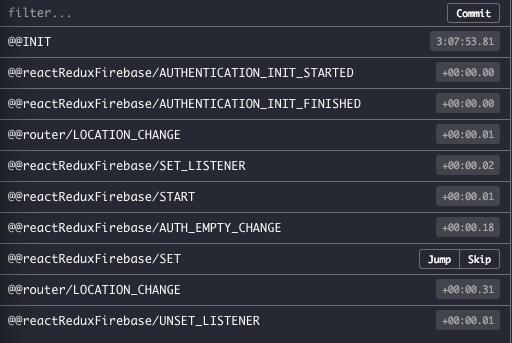
And this is how it looks if I replace it with componentDidMount.
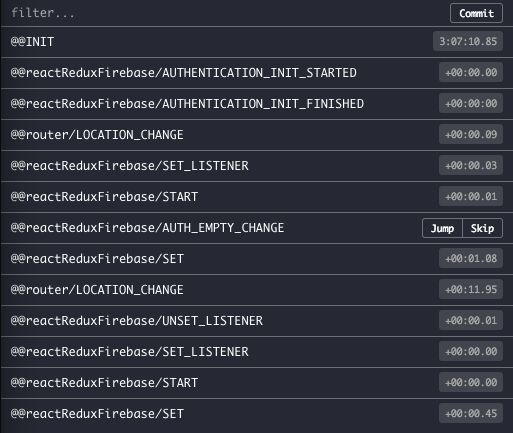
I can't tell what this could possibly affect, but for me personally it makes more sense to have it in didMount rather than willMount since it does not really bring any performance gains.
iamthefox
on 3 Apr 2018
Hi All,
I am also running into this issue .
Navigating from page A to page B with both using the same watchpath , destroys the listener on page A and does not restore it on Page B.
Navigating directly to page B works fine.
Is this a race condition where destroy for the old component takes place after mounting of the new component?
@prescottprue
Is it possible to index listeners by component_identifier + watchpath (instead of just watchpath)?
That way one component will not mess with listeners for other components
 ShayMatasaro
on 8 Apr 2018
ShayMatasaro
on 8 Apr 2018
@ShayMatasaro storeAs is the current way to give listeners a unique identifier, so you could go that route.
I don't believe it is a race condition, but instead that the incorrect number of listener callbacks are being/remaining attached. Since the callbacks for the listeners write data into redux, sometimes you want multiple callbacks (in the case of multiple of the same query going to different paths in redux) other times you want a single callback (in the case of multiple components with the same query that places data in the same place of redux).
This is currently one of the highest priority issues. Looking into it is planned to get attention this week and next.
All should feel free to continue to reach out if they are experiencing this or with PRs.
prescottprue
on 9 Apr 2018
@prescottprue Still having this issue. storeAsdidn't help. Is doing something like this (posted above) has any negative impact? like invoking multiple concurrent listeners on route change or any performance issue ?
componentDidMount() {
    this.props.firebase.watchEvent('value', `/cookbooks/${this.props.auth.uid}`)
    this.props.firebase.watchEvent('value', `/planners/${this.props.auth.uid}`)
}
The Issue I currently have is, the firebaseConnectis connected to the main App component that includes the routes. Whenever the route is changed, the UNSET_LISTENER is dispatched. Where it should, because firebaseis attached to the App Component which is present no matter which route you visit.
I am not sure if above code will work, becuase, I have to add it to App component, which is not changed when changing route, so the ComponentDidMountwill not be called.
Here is the code.:
class App extends React.Component {
  render(){
    return(
      <div>
          <Header auth={this.props.auth} />
          <main>
            <Route exact path="/" render={()=><Home auth={this.props.auth && this.props.auth} playlists={this.props.playlists} />} />
            <Route exact path="/friends" render={()=><Friends auth={this.props.auth && this.props.auth} profile={this.props.profile && this.props.profile} />} />
            <Route exact path="/music" component={Discover} />
          <main>
      <div>
    )
  }
}
export default compose(
  withRouter,
  firebaseConnect((props, firebase) => {
    return [{ path: `/playlists/${props.auth.uid }/`, storeAs: 'playlistP'}];
  }),
  connect(
    (state, props) => ({
      playlists: state.firebase.data['playlistP'],
      auth: state.firebase.auth,
      match: state.router.location,
      profile: state.firebase.profile, // load profile
    })
    ,
    {showUserArea}
  )
)(App);
Update: Found out what the issue was, a component inside one of the routes was connected to the same path: /playlists/${props.auth.uid }/ . So when the route is changed, the library automatically unsets the listener although both are connected to the same path with different storeAs value. So the same issue as everyone else is having. And looks like the storeAs solution is not working in case of route change.
Thanks
 towfiqi
on 14 Apr 2018
towfiqi
on 14 Apr 2018
@towfiqi It doesn't work for me neither. I started using redux-firestore with onSnapshot method (https://github.com/prescottprue/redux-firestore)
 kdela
on 14 Apr 2018
kdela
on 14 Apr 2018
Hey, @prescottprue
The issue is that when 2 components use firebaseConnect() to watch the same path, the first one to unmount will remove that path from the listeners, leaving the other disconnected.
If we use storeAs then the given store key is appended to the path id, like values:/users@<<storeKey>>. If the 2 components above use different store keys, then they will only remove their own path id when unmounting, and not interfere with the other's.
This might be a workaround in some cases, but not an actual solution. We are now downloading and storing the data twice, under 2 different keys, in firebase.data. If all components apply their own storeAs key, to safeguard their subscription, then they can't benefit from some of the data they are interested in being possibly already loaded by another component before.
Possible solutions -----
We could have another option similar to storeAs that only performs the path id concatenation step, but routes the downloaded data to the default location, or to an independently identified location. Maybe an option like withId, so you could call it like.
// NOT REAL SYNTAX
firebaseConnect((props) => ([
  { path: 'users', withId: 'profileComponent' }
]),
Which would produce the following firebase.listeners.allIds in the redux store
0: "value:/users$profileComponent"
1: "value:/users$searchComponent"
Otherwise we could just append the subscribing component's name automatically, or keep a counter of how many components are currently listening to a particular path, so that we don't get rid of it until it's 0, like in garbage collection strategies.
 santiago-elustondo
on 14 Apr 2018
santiago-elustondo
on 14 Apr 2018
right now they are tracked by a count of listeners on that path.
@prescottprue, this is not working properly. ^
I didn't realize you already had already done this.
santiago-elustondo
on 16 Apr 2018
It seems like this issue is fixed for firebaseConnect in v2.1.0.
Thanks to @Tapped to the PR to fix. Going to be looking into better ways to test things like this, and as always, open to PRs if anyone has ideas.
If anyone still experiences these symptoms or something similar after upgrading, please reach out.
prescottprue
on 29 Apr 2018
👏
karltaylor
on 29 Apr 2018
If anyone still experiences these symptoms or something similar after upgrading, please reach out.
Hey @proscottprue, I still encounter this issue :/
 omrihaim
on 3 Feb 2019
omrihaim
on 3 Feb 2019
@omrihaim could you possibly open up a new that lists the versions you are using to bump it to the top? It can also point to this issue for reference.
prescottprue
on 3 Feb 2019
Related issues
 dantman
·
3Comments
dantman
·
3Comments
 nasimoyz
·
4Comments
nasimoyz
·
4Comments
 michaelzoidl
·
3Comments
michaelzoidl
·
3Comments
 canyavall
·
5Comments
canyavall
·
5Comments
 kmhigashioka
·
5Comments
kmhigashioka
·
5Comments
Most helpful comment
Hey @prescottprue thanks for looking into this!
I was no longer receiving updates in that collection, so it's definitely detatched.
@kylepotts for a part time fixed I just added a
watchEventoncomponentDidMount. It adds the listeners again for me and works ok. Probs not the best solution...