React-redux-firebase: bug (reducer): error using redux-persist v5
This library does not seem to work with the latest version of redux-persist.
The state is not rehydrated.
redux-persist/stateReconciler: sub state for key `firebase` modified, skipping.
Here is my store config:
const reduxPersistConfig = {
  key: 'root',
  storage,
  debug: true
};

const rrfConfig = {
  userProfile: 'users'
};

firebase.initializeApp(firebaseConfigDev);

const composeEnhancers =
  (typeof window === 'object' &&
    process.env.NODE_ENV === 'development' &&
    window.__REDUX_DEVTOOLS_EXTENSION_COMPOSE__) ||
  compose;

export const store = createStore(
  persistReducer(reduxPersistConfig, rootReducer),
  undefined,
  composeEnhancers(reactReduxFirebase(firebase, rrfConfig))
);

export const storePersistor = persistStore(store);
 hwaterke
All 10 comments
(React Native) With the proviso that I wasn't entirely sure what to expect when integrating this library (though was secretly hoping that all my redux data would get magically saved to Firebase, just as it gets magically saved to AsyncStorage with vanilla redux-persist), I had the following experience when trying to integrate with v5 of redux-persist.
Here's my configuration:
````javascript
import { composeWithDevTools } from 'redux-devtools-extension';
import { createStore, applyMiddleware } from 'redux';
import { reactReduxFirebase } from 'react-redux-firebase';
import { persistStore } from 'redux-persist';
import { PersistGate } from 'redux-persist/lib/integration/react';
const reduxFirebaseConfig = {
enableLogging: true,
enableRedirectHandling: false
};
const firebaseConfig = {
...
}
const composeEnhancers = composeWithDevTools({ actionCreators });
const store = createStore(
reducer,
composeEnhancers(
reactReduxFirebase(firebaseConfig, reduxFirebaseConfig),
applyMiddleware(thunk, notificationsMiddleware)
)
);
const persistor = persistStore(store);
render() {
return (
)
}
````
Next up, here are the actions that were called by Redux (for what it's worth, I set up my firebase database access rules to be completely public for the time being):
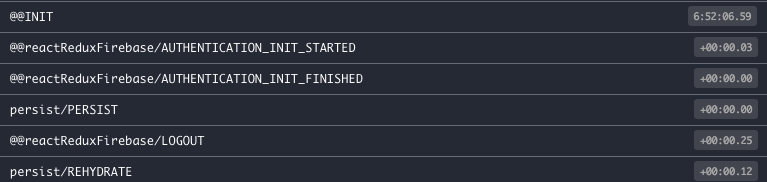
Finally, here are the log entries:
development-level warning are ON, performance optimizations are OFF
database.js:51 p:0: Making a connection attempt
database.js:51 getToken() completed. Creating connection.
database.js:51 c:0:0: Connection created
database.js:51 c:0:0:0 Websocket connecting to wss://myProjectName.firebaseio.com/.ws?v=5
database.js:51 c:0:0:0 Websocket connected.
database.js:51 c:0:0: Realtime connection established.
database.js:51 p:0: connection ready
database.js:51 p:0: reportStats {"c":{"sdk.js.3-9-0":1,"framework.reactnative":1}}
database.js:51 p:0: {"r":1,"a":"s","b":{"c":{"sdk.js.3-9-0":1,"framework.reactnative":1}}}
database.js:51 p:0: from server: {"r":1,"b":{"s":"ok","d":""}}
database.js:51 c:0:0: sending ping on primary.
database.js:51 c:0:0: got pong on primary.
database.js:51 c:0:0: Primary connection is healthy.
 jackkinsella
on 24 Nov 2017
jackkinsella
on 24 Nov 2017
Not too familiar with redux-persist v5 (only used older version). It seems like this might require allowing for a plugin setup similar to how redux form does it.
I am going to work on adding redux-persist example to an example so that we can debug this better.
 prescottprue
on 24 Nov 2017
prescottprue
on 24 Nov 2017
@prescottprue . is there any workaround for now?? Im using this awesome lib with redux persist v5 .. everything works great but the data is not getting persisted :/
Anyway to fix this ?? or atleast an ETA??
 victorkvarghese
on 7 May 2018
victorkvarghese
on 7 May 2018
@victorkvarghese I never looked into what the actual issue was with v5 since I am not using it in any project currently, but open to looking into it if you can provide an example for me to checkout.
prescottprue
on 7 May 2018
@prescottprue I will try to build a boilerplate with redux persist v5 and this lib .. will update it to u soon.
Problem is the reducer firebase is not getting persisted.
meaning the data object inside firebase is becoming blank on app relaunch.
but the auth section is persisted .. i think so..
"redux-persist/stateReconciler: sub state for key firebase modified, skipping."
Got this in log..
victorkvarghese
on 7 May 2018
Briefly: you should wrap the firebase reducer with persistReducer
const rootReducer = combineReducers({
  firebase: persistReducer(
    { key: 'firepersist', storage: myStorage },
    firebaseReducer
  ),
  anotherReducer,
  myBestReducer
});
Then you can use redux-persist as usual
Explanation:
By default, persistReducer uses the stateReconciler autoMergeLevel1, and, as stated in the docs of redux-persist, if some substate under persistReducer changes, that piece of state will be skipped:
Auto merge means if the some piece of substate was modified by your reducer during the REHYDRATE action, it will skip this piece of state.
react-redux-firebase modifies something inside the firebase state, before and during the rehydrate, so the firebase state will be skipped because is changed.
If you wrap the firebase reducer with persistReducer, only the changed substate under firebase will be skipped.
 ranfdev
on 28 May 2018
ranfdev
on 28 May 2018
@ranfdev Great to know, thanks for posting! Going to add that to the docs. Also open to a PR if you get a chance.
prescottprue
on 29 May 2018
Included notes about using v5 in the redux-persist integration section of the docs.
If anyone has trouble implementing, feel free to reach out. Thanks to @ranfdev for providing the solution.
prescottprue
on 29 May 2018
I edited the previous comment because i discovered it's not necessary to use the hardSet stateReconciler. You just need to wrap the firebase reducer with persistReducer. Also, hardSet is a bit brutal, so it's better to not use it
ranfdev
on 29 May 2018
@ranfdev Great to know, I'll update the the docs.
prescottprue
on 29 May 2018
Related issues
 katha247
·
4Comments
katha247
·
4Comments
 canyavall
·
5Comments
canyavall
·
5Comments
 benoj
·
4Comments
benoj
·
4Comments
 MentalGear
·
4Comments
MentalGear
·
4Comments
 NirLud
·
3Comments
NirLud
·
3Comments
Most helpful comment
Included notes about using v5 in the redux-persist integration section of the docs.
If anyone has trouble implementing, feel free to reach out. Thanks to @ranfdev for providing the solution.