React-redux-firebase: Strange behaviour when trying to listen to path with ids
v2.0.0.beta4 - I think that this is a bug, but please correct me if I'm wrong.
I have a user object like this:
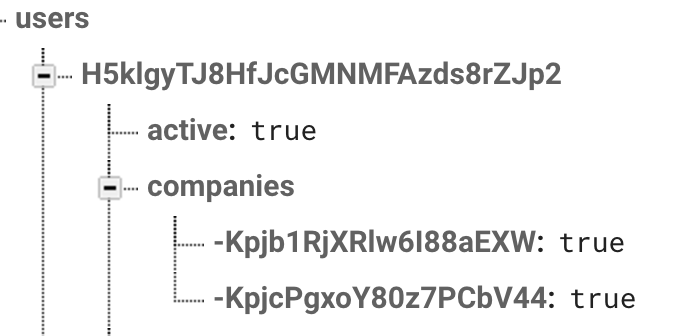
each companyID points to the companies collection:
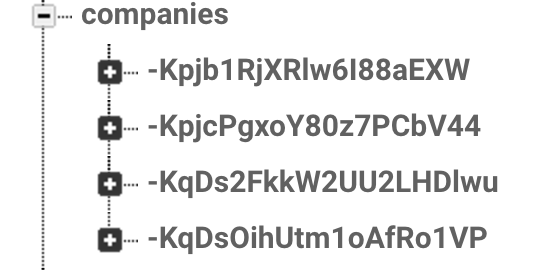
I need to populate the user's profile companies with the object from the companies collection. I can't just listen to path as I have a security rule in place that makes sure that only users assigned to a company have access to that company object.

Here are the things I've tried:
const populates = [{child: 'companies', root: 'companies'},];
const wrappedCompanies = firebaseConnect((props) => {
    return [{path: '/companies', populates}];
})(Companies);

const selector = (state, ownProps) => {
    const profile = populate(state.firebase, 'profile', populates)
    return {
        companies: profile.companies ? profile.companies : [],
        loading: !isLoaded(state.firebase),
        auth: state.firebase.auth
    }
};
export default connect(selector, actionCreators)(wrappedCompanies)
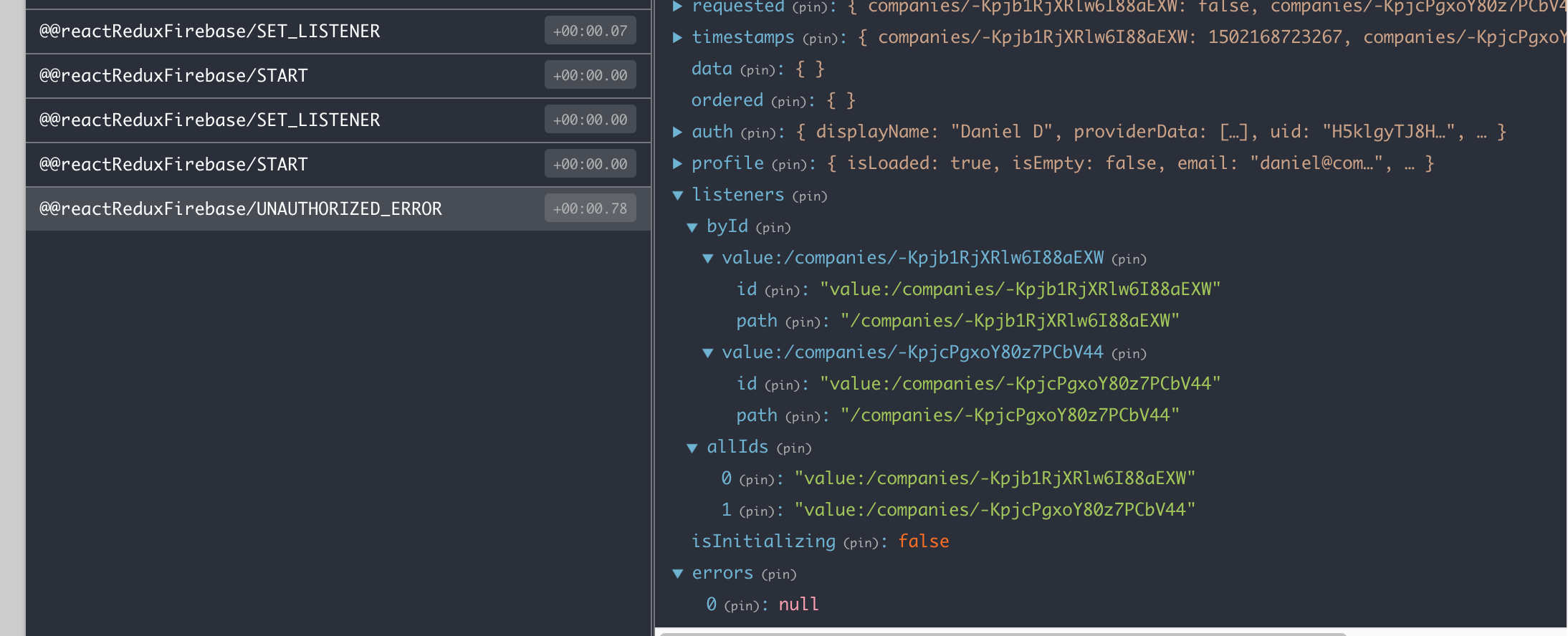
this won't populate the companies collection as I'm running in an Authorized error - which is expected behaviour so far.
Changing the code to:
const wrappedCompanies = firebaseConnect((props) => {
    if (typeof props.profile.companies !== "undefined") {
        let paths = Object.keys( props.profile.companies).map((company) => {
            return {path: '/companies/'+company, populates, }
        });
        return paths;
    }
    return [];
})(Companies);
leads to:
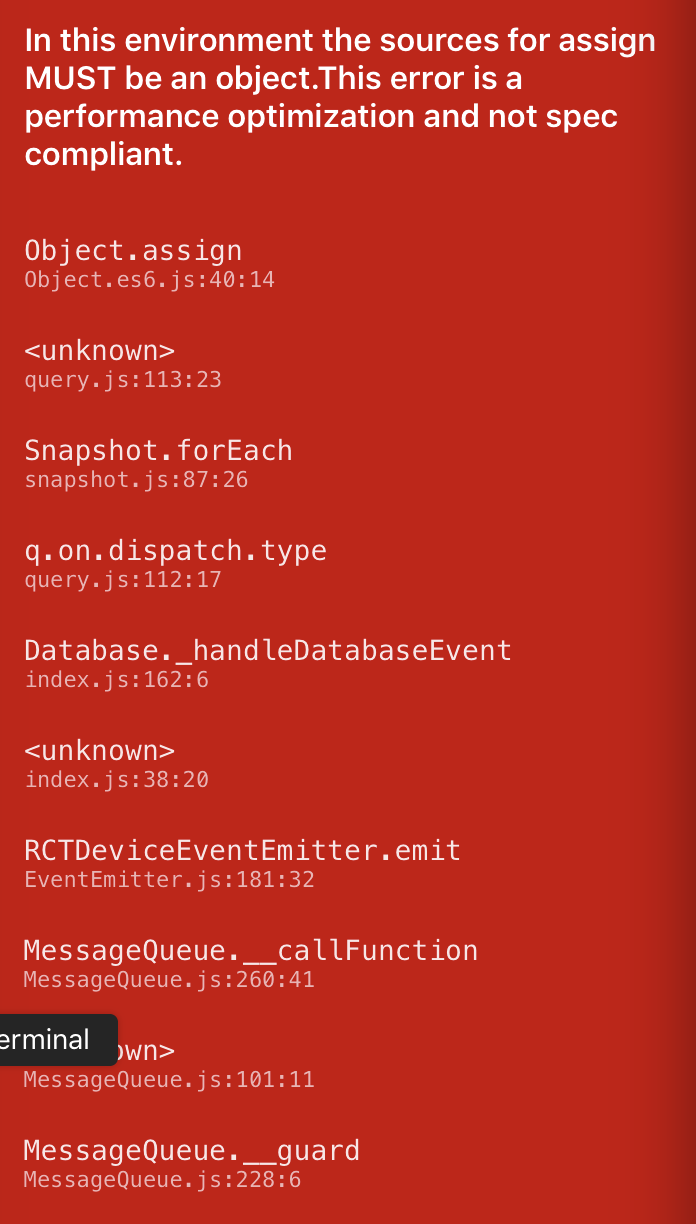
and this is my state:
Changing the code to:
const wrappedCompanies = firebaseConnect((props) => {

    if (typeof props.profile.companies !== "undefined") {
        let paths = Object.keys( props.profile.companies).map((company) => {
            return {path: '/companies/',  populates, queryParams: [ 'orderByKey', 'equalTo='+company ]}
        });

        return paths;
    }
    return [];
})(Companies);
doesn't trigger the "in this environment" error, but I always have the last company from the profile.companies populated. The first gets overwritten.
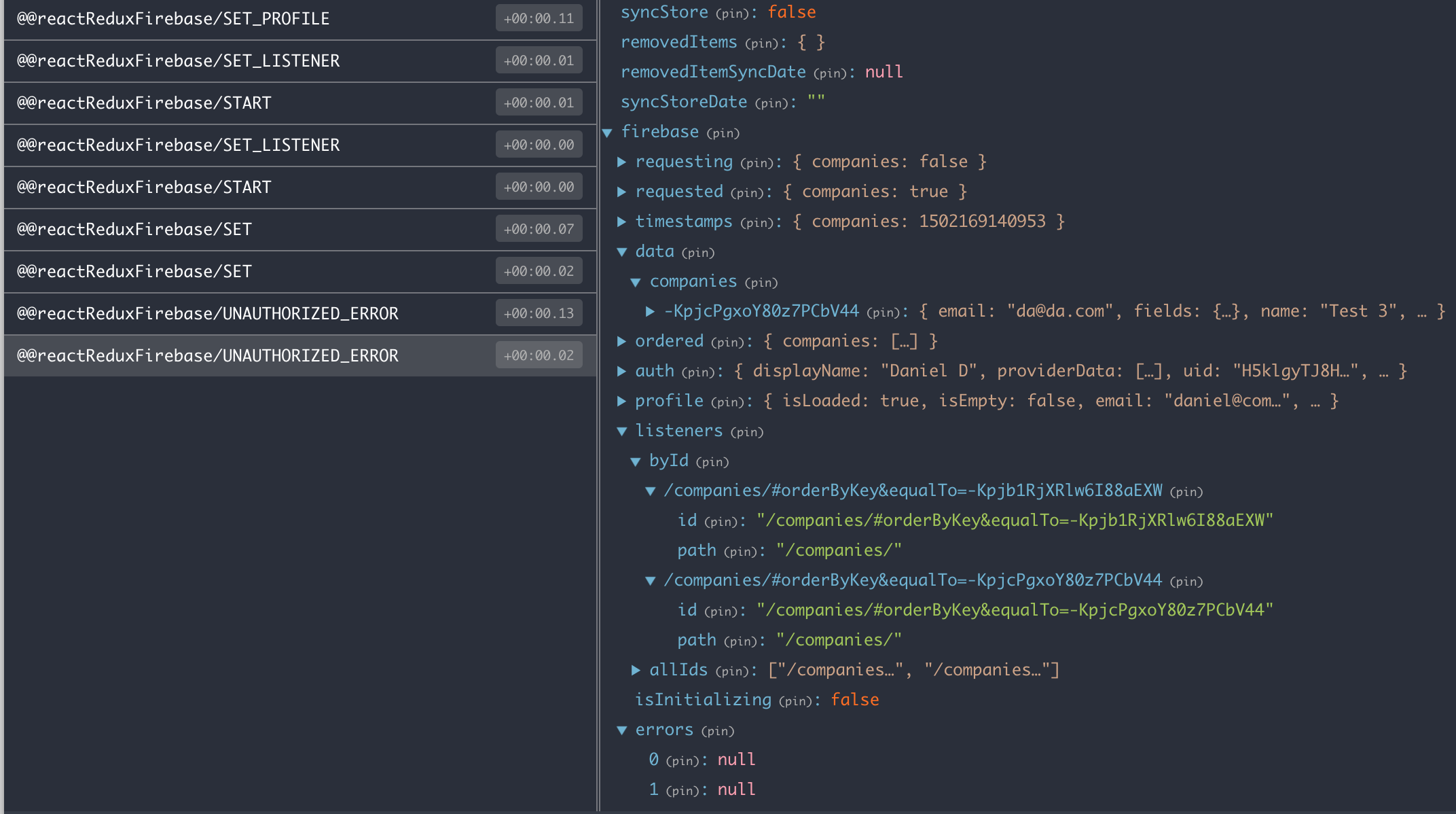
Note that despite the Unauthorized error - I'm able to get the data from the companies path. But each call to SET overrides the previous data and that's why I end up with just the last company.
If I change the code to:
const wrappedCompanies = firebaseConnect((props) => {
    if (typeof props.profile.companies !== "undefined") {
        let paths = Object.keys( props.profile.companies).map((company) => {
            return {path: '/companies/',  storeAs: 'myCompanies/'+company, populates, queryParams: [ 'orderByKey', 'equalTo='+company ]}
        });

        return paths;
    }
    return []
})(Companies);
I end up with this:
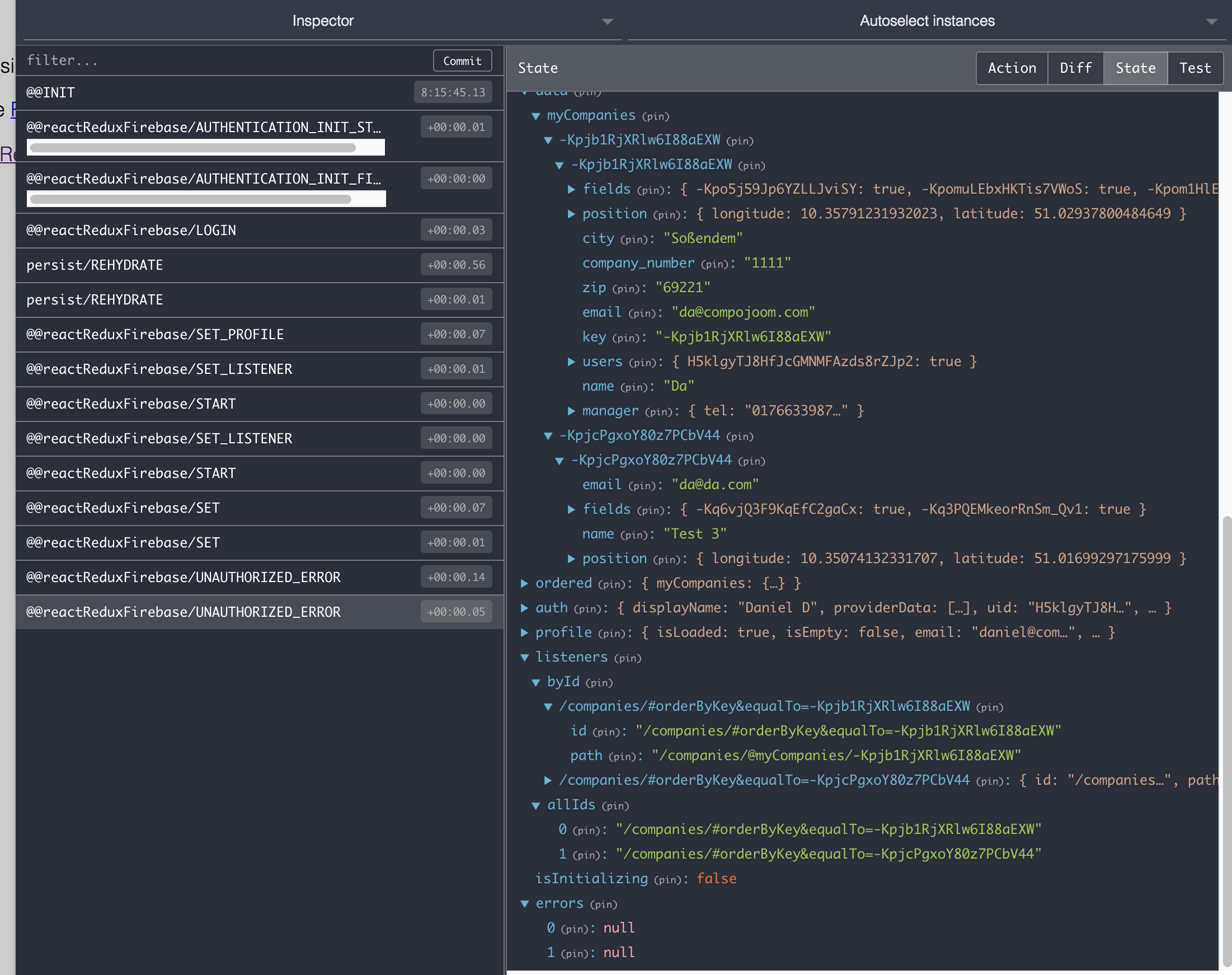
Which is better, but also not correct. Company object should be directly assigned to the companyKey and not companyKey : {companyKey : {}}
If I change the code to:
const wrappedCompanies = firebaseConnect((props) => {
    if (typeof props.profile.companies !== "undefined") {
        let paths = Object.keys( props.profile.companies).map((company) => {
            return {path: '/companies/',  storeAs: 'myCompanies/', populates, queryParams: [ 'orderByKey', 'equalTo='+company ]}
        });
        return paths;
    }
    return []
})(Companies);
I end up with this:
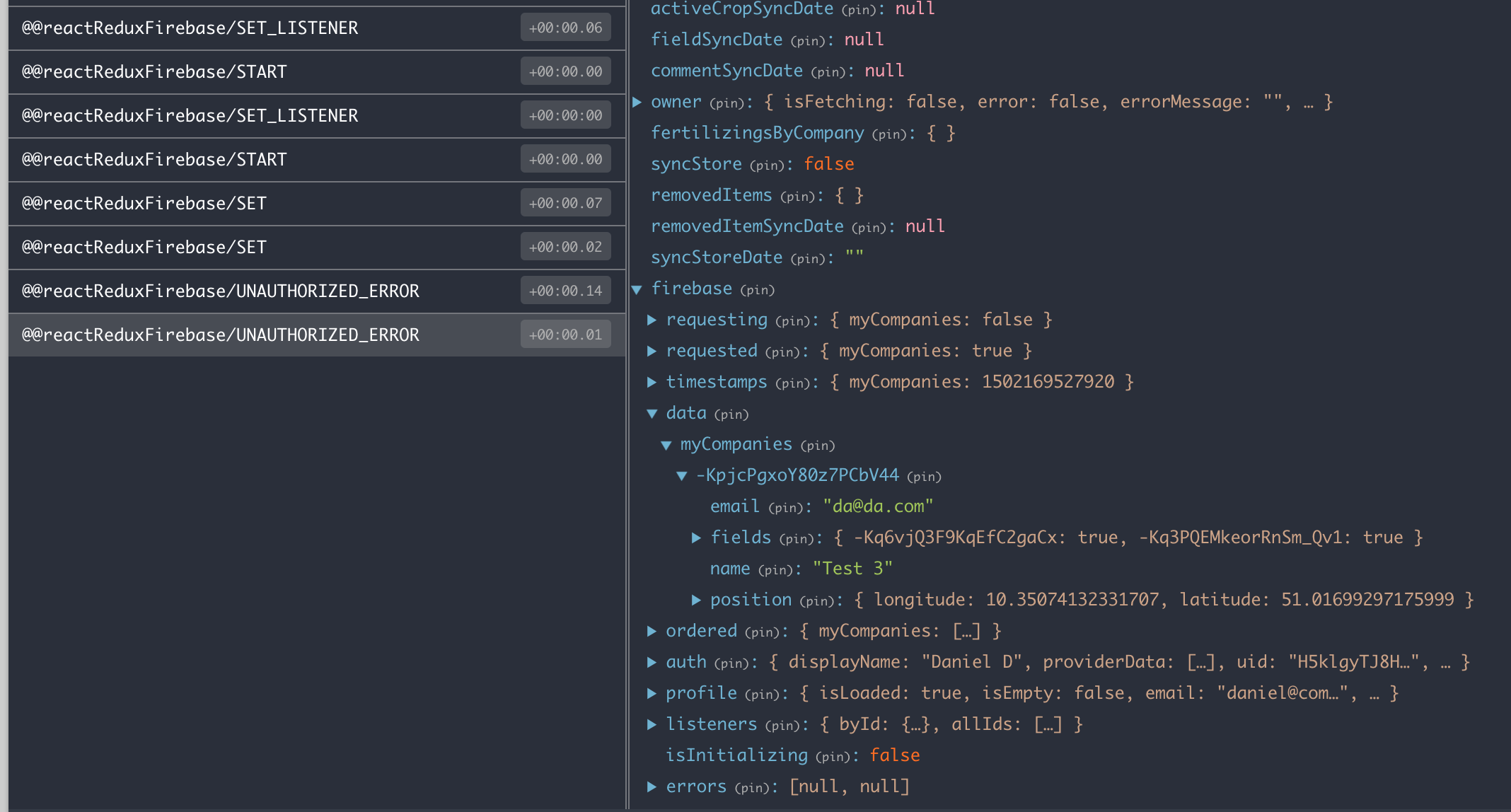
Note that this time the company object is directly assigned to it's key and not as in the first example above, but this time I end up with just a single company...
Am I using the library out of the ordinary use case?
I would expect that a call to [{path: 'todos/1'}, {path: 'todos/2'}] would work out of the box - won't trigger any optimisation error, would populate the todos with 1 and 2 and won't trigger an Authentication error.
Working with firebase directly in componentDidMount and just listening to the direct paths returns the correct results.
 compojoom
All 7 comments
We chatted about this on gitter, but the fixes coming in v2.0.0-beta.5 should hopefully take care of the first example.
Let me know if you get a chance to test the branch with the material example.
 prescottprue
on 9 Aug 2017
prescottprue
on 9 Aug 2017
Well there are similar/same problem when fetching data by id. I'm running this on v2.0.0-beta.5 with react-native-firebase@^2.1.0 on real (android) device and error still persists.
Given this data:
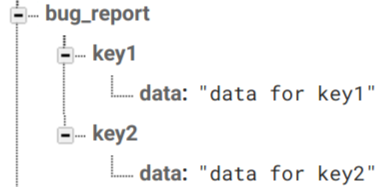
With this simple code:
import React from 'react'
import { connect } from 'react-redux'
import { compose } from 'redux'
import { Text, View } from 'react-native'
import { firebaseConnect } from 'react-redux-firebase'

const BugReport = props => (
  <View style={{ justifyContent: 'center', flex: 1 }}>
    <Text>{JSON.stringify(props.bug_report)}</Text>
  </View>
)

export default compose(
  firebaseConnect(() => [
    'bug_report/key1'
  ]),
  connect(state => ({
    bug_report: state.firebase.data.bug_report
  }))
)(BugReport)
(and this snippet from store.js):
const firebase = RNFirebase.initializeApp(firebaseApiConfig)
....
reactReduxFirebase(firebase, { userProfile: 'users', enableRedirectHandling: false, enableLogging: true }),
react-native is not happy

Maybe clue lies on those debug lines:
LOG | Message
----------|--------------
query.js:16 RNFirebase | [debug] creating Query undefined undefined
reference.js:70 firebase:db:ref | [debug] Created new Reference 10 /
query.js:16 RNFirebase | [debug] creating Query //bug_report/key1 undefined
reference.js:70 firebase:db:ref | [debug] Created new Reference 11 //bug_report/key1
reference.js:269 firebase:db:ref | [debug] adding reference.on 11 value
index.js:77 firebase:database | [debug] on() : 11 1 value
index.js:159 firebase:database | [debug] _handleDatabaseEvent: 11 1 //bug_report/key1 value key1
query.js:16 RNFirebase | [debug] creating Query //bug_report/key1/data undefined
reference.js:70 firebase:db:ref | [debug] Created new Reference 12 //bug_report/key1/data
And if I'm right, red screen is actually telling us that we are doing something like Object.assign({}, primitiveData), where primitiveData is value from //bug_report/key1/data, but we didn't ask for this path, ( query path was //bug_report/key1, so I'm expecting object { "data" : "data for key1" }).
Is there any reason why lib is entering into fetched objects more deeply than we asked for?
Also, I have hard time to understand FIRST TWO lines of debug, are they on purpose here (query on root path) ?
 trajakovic
on 10 Aug 2017
trajakovic
on 10 Aug 2017
I was discussing this error with @prescottprue yesterday and it is exactly for the reason @trajakovic lists.
redux-firebase is creating an ordered array of the fetched data and there we use spread operator, but unfortunately some of the items in the collection are primitiveData.
The solution we decided on was to have the ordered list have the following structure:
{key: snap.key, value: snap.val()}
this way we won't need to do ...snap.val() and end up in this error. The code that needs to be changed is here:
const runQuery = (q, e, p, params) => {
    dispatch({ type: START, path: storeAs || path })

    // Handle once queries
    if (e === 'once') {
      return q.once('value')
        .then(snapshot => {


          if (snapshot.val() !== null) {
            const ordered = []
            snapshot.forEach((child) => {

                ordered.push({ key: child.key, value: child.val() })
            })
            dispatch({
              type: SET,
              path: storeAs || path,
              ordered: size(ordered) ? ordered : undefined,
              data: snapshot.val()
            })
          }
          return snapshot
        }, (err) => {
          dispatch({
            type: UNAUTHORIZED_ERROR,
            payload: err
          })
        })
    }
    // Handle all other queries

    /* istanbul ignore next: is run by tests but doesn't show in coverage */
    q.on(e, snapshot => {
      let data = (e === 'child_removed') ? undefined : snapshot.val()
      const resultPath = storeAs || (e === 'value') ? p : `${p}/${snapshot.key}`

      // create an array for preserving order of children under ordered
      const ordered = []

      if (e === 'child_added') {
          ordered.push({ key: child.key, value: child.val() })
      } else {
        snapshot.forEach((child) => {
            ordered.push({ key: child.key, value: child.val() })
        })
      }

      // Dispatch standard event if no populates exists
      if (!populates) {
        return dispatch({
          type: SET,
          path: storeAs || resultPath,
          data,
          ordered: size(ordered) ? ordered : undefined,
          requesting: false,
          requested: true
        })
      }

      // TODO: Allow setting of unpopulated data before starting population through config
      // TODO: Allow config to toggle Combining into one SET action
      const dataKey = snapshot.key
      promisesForPopulate(firebase, dataKey, data, populates)
        .then((results) => {
          // dispatch child sets first so isLoaded is only set to true for
          // populate after all data is in redux (Issue #121)
          forEach(results, (result, path) => {
            dispatch({
              type: SET,
              path,
              data: result
            })
          })
          dispatch({
            type: SET,
            path: storeAs || resultPath,
            data,
            ordered: size(ordered) ? ordered : undefined
          })
        })
    }, (err) => {
      dispatch({ type: UNAUTHORIZED_ERROR, payload: err })
    })
  }
/react-redux-firebase/src/actions/query.js - the watch event function.
@prescottprue will you make this change? Or do you want me to make a pull request with that?
compojoom
on 10 Aug 2017
@compojoom I will try to get to it today. Thanks for reporting 😄
prescottprue
on 10 Aug 2017
fyi, this problem also occur when I use { type: 'child_changed', path: 'users' }. Can I only listen to the change instead pulling the whole database?
 mike623
on 10 Aug 2017
mike623
on 10 Aug 2017
@compojoom Ended up being super busy. It would be awesome if you could make a pull request against the v2.0.0-rc.5 branch. If not I will try to get to it sometime soon.
@mike623 Good to know. I believe that @compojoom solution will help, but we can test before release.
prescottprue
on 11 Aug 2017
closing this as we've merged the fix
compojoom
on 12 Aug 2017
Related issues
 nasimoyz
·
4Comments
nasimoyz
·
4Comments
 MentalGear
·
4Comments
MentalGear
·
4Comments
 gitsad
·
3Comments
gitsad
·
3Comments
 sdacunha
·
4Comments
sdacunha
·
4Comments
 mukeshyadav-cdac
·
4Comments
mukeshyadav-cdac
·
4Comments
Most helpful comment
closing this as we've merged the fix