React-redux-firebase: Should this work with Expo?
Hi, I am glad to see this is supported with React-native but was wondering if it should be working with EXPO?
I have an expo app and I followed the instructions for react-native producing:
import { reactReduxFirebase } from "react-redux-firebase";
import * as firebase from "firebase";
import { applyMiddleware, createStore, compose } from "redux";
import { createLogger } from "redux-logger";

// Initialize Firebase
const firebaseConfig = {
  apiKey: "<mine>",
  authDomain: "<mine>",
  databaseURL: "<mine>",
  projectId: "<mine>",
  storageBucket: "<mine>"
};

// react-redux-firebase options
const reduxConfig = {
  userProfile: "users", // firebase root where user profiles are stored
  enableLogging: false // enable/disable Firebase's database logging
};

export default function configureStore(onComplete: ?() => void) {
  firebase.initializeApp(firebaseConfig);

  const logger = createLogger({
    predicate: (getState, action) => isDebuggingInChrome,
    collapsed: true,
    duration: true
  });
  const enhancer = compose(
    reactReduxFirebase(firebaseConfig, reduxConfig),
    applyMiddleware(logger)
  );

  const store = createStore(reducers, undefined, enhancer);
  return store;
}
I am getting a message

from the iOS simulator.
Stepping through the above code returns successfully; I imagine this is occurring during the store initialization.
The following are my dependencies:
  "dependencies": {
    "@expo/samples": "^2.0.2",
    "expo": "^19.0.0",
    "firebase": "^4.2.0",
    "react": "16.0.0-alpha.12",
    "react-native": "https://github.com/expo/react-native/archive/sdk-19.0.0.tar.gz",
    "react-navigation": "^1.0.0-beta.12",
    "react-redux": "^5.0.5",
    "react-redux-firebase": "^1.4.4",
    "redux": "^3.7.2",
    "redux-logger": "^3.0.6",
    "redux-observable": "^0.14.1",
    "redux-promise-middleware": "^4.2.1",
    "redux-saga": "^0.15.6",
    "redux-thunk": "^2.2.0",
    "rxjs": "^5.4.2"
  },
Note that I am using the firebase integration provided as part of Expo
Thanks much!
 dchersey
All 13 comments
@dchersey A few things:
- Yes, this does work with expo (there should be no effect since this is just a redux connector for Firebase)
- For
v1.4.*you need to passAsyncStoragefromreact-nativeinto options as seen in the react-native complete example - added this to the the react-native recipe - You probably do NOT want to initialize Firebase outside of
reactReduxFirebase(or even have Firebase as a dependency). Withv1.*.*that happens automatically internally (howeverv2.0.0is intentionally built for doing this). v2.0.0is heavily suggested for native since you can initialize outside ofreactReduxFirebaseand you choose whether to use the JS SDK orreact-native-firebase(for native modules)- I have not used the "Expo integration for Firebase", so not sure how that may or may not change things. If it uses Firebase's native-modules, it may cause issues with
v1.*.*
I updated the react-native section of the docs to make this setup more clear.
 prescottprue
on 4 Aug 2017
prescottprue
on 4 Aug 2017
Thanks, I am trying it with 2.0.0 -- one thing I am noticing is that it requires react@^0.14.6 || ^15.0.0.
I am running 16.0.0-alpha.12 -- any thoughts on when the dependency will be updated?
dchersey
on 4 Aug 2017
@dchersey I can look into adding that very soon. There has also been discussion of dropping react from the peer dependencies all together (since some have been hoping to use with other Frameworks such as Angular), but that is not yet finalized.
prescottprue
on 4 Aug 2017
That would be great. FYI, I have configured my code to use 1.4.4 now using those instructions and it connects OK to firebase, etc but I get a console warning:
Warning: PropTypes has been moved to a separate package.
Accessing React.PropTypes is no longer supported and will be removed completely in React 16.
Use the prop-types package on npm instead. (https://fb.me/migrating-from-react-proptypes)
It's coming out of the firebaseConnect(["count"])(HomeScreen); statement in index.js:12 from the below stack trace
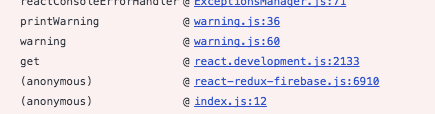
Since I am using react 16..0.0-alpha.12 I'm guessing this is broken; explains why I am not getting my props from the firebase reducer.
dchersey
on 5 Aug 2017
@dchersey firebaseConnect does not pass props data into props directly, you need to use it along with connect:
compose(
firebaseConnect(['count']), // this gets data into redux
connect(({ firebase }) => ({ // missing this part that passes from redux into props
count: dataToJS(firebase, 'count')
}))
)(HomeScreen)
// or with decorators:
@firebaseConnect(['count'])
@connect(({ firebase }) => ({
count: dataToJS(firebase, 'count')
}))
export default class HomeScreen extends Component {
// component code
}
Though you are seeing this warning, things should still work. v1.5.0-* starts the usage of the prop-types package instead of getting it from React.
The syntax for v1.5.0-* is the same as v1.4.4, so you should be able to update to get rid of this warning without an issue.
prescottprue
on 5 Aug 2017
@dchersey v2.0.0-beta.4 release includes react 16 as a peer dep (even though that should have only been causing warnings).
prescottprue
on 6 Aug 2017
Thanks; I have upgraded to v2.0.0-beta.4 and the warnings went away.
However I am still getting the original "this operation is not supported in the environment this application is running on. location.protocol must be http, https or chrome-extension and web storage must be enabled" message.
Here's my configureStore.js:
import { applyMiddleware, createStore, compose } from "redux";
import { createLogger } from "redux-logger";
// var reducers = require("../reducers");
import reducers from "../reducers";
import { reactReduxFirebase } from "react-redux-firebase";
import * as firebase from "firebase/app";
import "firebase/auth";
import "firebase/database";
import "firebase/storage";
var isDebuggingInChrome = __DEV__ && !!window.navigator.userAgent;
// Initialize Firebase
const firebaseConfig = {
apiKey: "<mine>",
authDomain: "<mine>",
databaseURL: "<mine>",
projectId: "<mine>",
storageBucket: "<mine>"
};
// react-redux-firebase options
const reduxConfig = {
userProfile: "users", // firebase root where user profiles are stored
enableLogging: false // enable/disable Firebase's database logging
};
firebase.initializeApp(firebaseConfig);
export default function configureStore(onComplete: ?() => void) {
const logger = createLogger({
predicate: (getState, action) => isDebuggingInChrome,
collapsed: true,
duration: true
});
const enhancer = compose(
reactReduxFirebase(firebase, reduxConfig),
applyMiddleware(logger)
);
const store = createStore(reducers, undefined, enhancer);
// persistStore(store, {storage: AsyncStorage}, onComplete);
if (isDebuggingInChrome) {
window.store = store;
}
return store;
}
I am able to successfully use this firebase instance outside of redux.
dchersey
on 7 Aug 2017
@dchersey Please make sure you are passing enableRedirectHandling: false as mentioned in the v2.0.0 docs for react-native. There has been discussion of making this happen automatically in the react-native environment, but the logic has yet to be figured out.
Correct, you should not have any issue access the Firebase instance outside of redux (one of the goals for v2)
prescottprue
on 7 Aug 2017
Ah, I did not see that.
With the corrected code, I am now getting
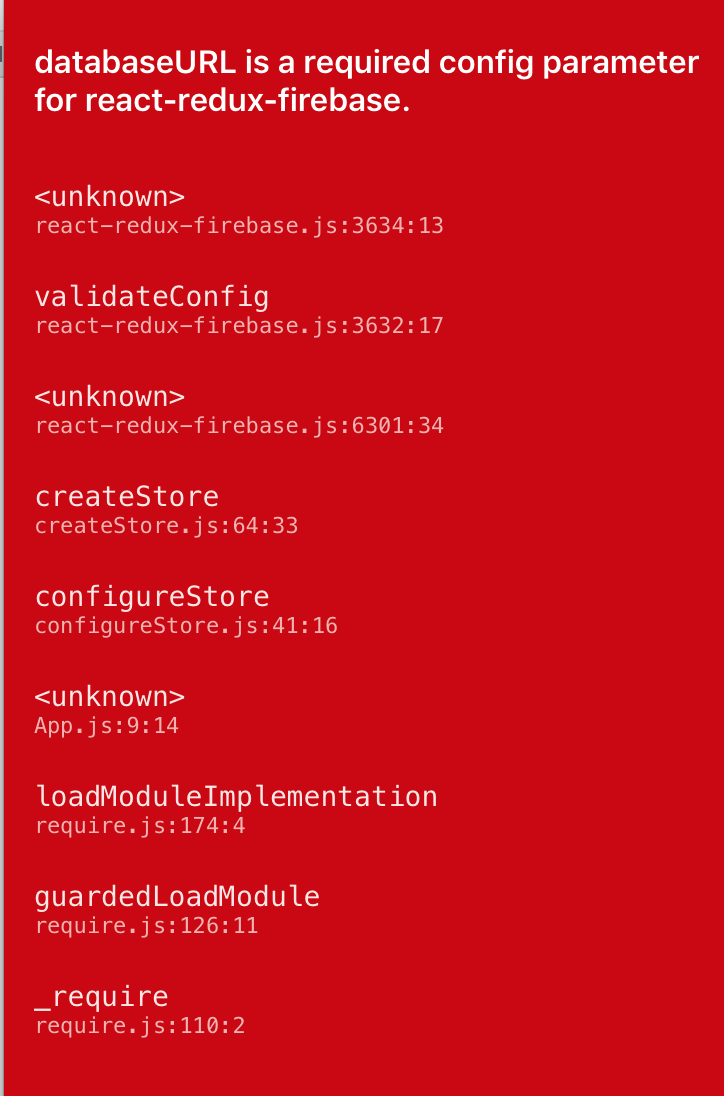
// react-redux-firebase options
const reduxConfig = {
enableRedirectHandling: false // required
};
firebase.initializeApp(firebaseConfig);
export default function configureStore(onComplete: ?() => void) {
const logger = createLogger({
predicate: (getState, action) => isDebuggingInChrome,
collapsed: true,
duration: true
});
// const enhancer = compose(
// reactReduxFirebase(firebase, reduxConfig),
// applyMiddleware(logger)
// );
const store = createStore(
reducers,
undefined,
compose(
reactReduxFirebase(firebase, reduxConfig), // pass in firebase instance instead of config
applyMiddleware(logger)
)
);
// persistStore(store, {storage: AsyncStorage}, onComplete);
if (isDebuggingInChrome) {
window.store = store;
}
return store;
}
I'm definitely supplying that parameter in firebaseConfig but it looks like react-redux-firebase is not getting it?
dchersey
on 8 Aug 2017
@dchersey Make sure you completely delete node_modules and reinstall. That validation code should not run at all in v2.0.0. Did you confirm v2.0.0 is installed by running npm ls react-redux-firebase?
prescottprue
on 8 Aug 2017
Yes, that was it ... and after working through a couple of other issues it loads without complaint.
However I am still unable to connect to my component, possibly due to an error in the doc for firebaseConnect
import { connect } from 'react-redux'
import { createFirebaseConnect } from 'react-redux-firebase'
// sync /todos from firebase (in other store) into redux
const fbWrapped = createFirebaseConnect('someOtherName')(['todos'])
// pass todos list from redux as this.props.todosList
export default connect(({ firebase: data: { todos }, auth, profile }) => ({
todos,
profile, // pass profile data as this.props.profile
auth // pass auth data as this.props.auth
}))(fbWrapped)
Unfortunately I am not fluent enough with ES6 to spot it myself, but it is complaining about an invalid token in the firebase: data: {todos" line. I'm not using decorators yet ... adding that will be the next step but I'd like to see it working first without.
Thank you again for all of your patient help !
dchersey
on 8 Aug 2017
@dchersey firebaseConnect and createFirebaseConnect are different.
The way that you are using createFirebaseConnect (i.e. passing a string as the first argument) points it to a different store key, which is most likely not what you are trying to do unless you setup multiple stores (edge use case). Not passing anything as the first argument would create the type of firebaseConnect you are aiming to make, but that is also what it is by default when you use firebaseConnect.
The example you referenced is in the docs for createFirebaseConnect, not firebaseConnect. The confusion might have come from the fact that they are on the same page (due to the fact that the API Reference section is autogenerated from comments, and both functions live in the same file).
It seems that this is what you want:
import { connect } from 'react-redux'
import { firebaseConnect } from 'react-redux-firebase'
// sync /todos from firebase into redux
const fbWrapped = firebaseConnect([
'todos'
])(App)
// pass todos list from redux as this.props.todosList
export default connect(({ firebase: data: { todos }, auth, profile }) => ({
todos,
profile, // pass profile data as this.props.profile
auth // pass auth data as this.props.auth
}))(fbWrapped)
Going to close since these are more useability questions than the original issue. Feel free to reach out over gitter as well (I am usually a little faster to respond on there).
prescottprue
on 8 Aug 2017
Thanks again for your help; got it working finally. I'm using the decorators now .. here is the connect code that works with 2.0.0 ..using a simple counter to prove it works.
@firebaseConnect(["/count"])
@connect(({ firebase: { data: { count } } }) => ({
  count
}))

export default class HomeScreen extends React.Component {
  static propTypes = {
    count: PropTypes.number,
    firebase: PropTypes.object
  };
  return (
      <View style={styles.container}>
        <View style={styles.contentContainer}>
          <Text style={styles.countText}>
            {this.props.count}
          </Text>
          <Button
            title="Count"
            onPress={() => {
              this.props.firebase.set("/count", (this.props.count || 0) + 1);
            }}
          />
        </View>
      </View>
    );
  }
}
Related issues
 darrenfurr
·
5Comments
darrenfurr
·
5Comments
 sdacunha
·
4Comments
sdacunha
·
4Comments
 MentalGear
·
4Comments
MentalGear
·
4Comments
 katha247
·
4Comments
katha247
·
4Comments
 benoj
·
4Comments
benoj
·
4Comments
Most helpful comment
Thanks again for your help; got it working finally. I'm using the decorators now .. here is the connect code that works with 2.0.0 ..using a simple counter to prove it works.