React-quill: how to add more fonts to ReactQuill
Hey Guys,
I am having issues with adding fonts to ReactQuill.
Currently I cannot find any help on this and I found a thread but now that way is deprecated.
Would be great if some one had a working piece to show me
 tylerkrett
All 14 comments
Do you want to add more fonts to the drop-down or change the default font? The latter you can do with CSS targeting the class quill ql-editor.
 alexkrolick
on 27 Sep 2017
alexkrolick
on 27 Sep 2017
I need to change the drop down of fonts I would like to add more.
I am really struggling :(
tylerkrett
on 27 Sep 2017
https://codepen.io/alexkrolick/pen/NapmrE?editors=0110
Not quite done, but take a look at this and the Quill docs: https://quilljs.com/playground/#custom-fonts
alexkrolick
on 27 Sep 2017
Thank you so much Alex for your assistance but I am using the html custom toolbar.
when using the code:
const Font = this.Quill.import('formats/font'); ??? where is it finding this
Font.whitelist = ['mirza', 'roboto'] ; is this being appended below ?
this.Quill.register(Font, true);
it stops my whole editor from rendering
tylerkrett
on 28 Sep 2017
const Font = ReactQuill.Quill.import('formats/font'); // <<<< ReactQuill exports it
Font.whitelist = ['mirza', 'roboto'] ; // allow ONLY these fonts and the default
ReactQuill.Quill.register(Font, true);
Then you need to change the HTML (JSX) of the toolbar to show the select options for those fonts.
alexkrolick
on 28 Sep 2017
Alex you are a star mate :)
Right now im working on making and Arbitrary colour picker for React Quill. so people can use hexadecimal values for colours. Once I am done I will make a github repo for people enjoy. Here I go hope I can do it haha
tylerkrett
on 29 Sep 2017
@tylerkrett long time since your message but was wondering how the colour picker was going.
 volkandkaya
on 29 Jan 2018
volkandkaya
on 29 Jan 2018
@alexkrolickc I can't see that your custom fonts are working. All I see in the dropdown and get rendered is 'San Serif'.
 jbowen28
on 6 Feb 2018
jbowen28
on 6 Feb 2018
@jbowen28 What is the solution to this problem? font is all 'San Serif'
 swustzl
on 7 Feb 2018
swustzl
on 7 Feb 2018
@swustzl I did a work around for the 'San Serif' below for fonts and font sizes:
  .ql-picker.ql-font {
    .ql-picker-item {
      font-size: 0;
      &:before {
        content: attr(data-value) !important;
        font-size: 14px;
      }
    }
  }
 michaelmcshinsky
on 6 Apr 2018
michaelmcshinsky
on 6 Apr 2018
@mmcshinsky I added this to get the font being used to show as the picker label
.ql-picker.ql-font{
  .ql-active {
    &:before {
      content: attr(data-value) !important;
      font-size: 14px;
    }
  }
}
I've been trying to get the selects to match the fonts, I came up with this that works but it's a bit manual is there anyway to use theattr(data-value) to set the font and make it a little more dynamic? 🤔
.ql-font .ql-picker-options span[data-value="Ubuntu"]::before {
  font-family: "Ubuntu";
}

.ql-font .ql-picker-options span[data-value="Raleway"]::before {
  font-family: "Raleway";
}

.ql-font .ql-picker-options span[data-value="Roboto"]::before {
  font-family: "Roboto";
}
 andrewcodes404
on 17 Aug 2018
andrewcodes404
on 17 Aug 2018
@mmcshinsky I tried the css you provided, still shows Sans-Serif in the picker. Is there a workaround or could you share a codepen , so that I can see it in action?
 rohanmohapatra
on 14 Dec 2019
rohanmohapatra
on 14 Dec 2019
I know this is an old issue, but for future searchers, here is how I solved it:
In the examples, they did it like this (_which did not work for me_):
#toolbar-container .ql-font span[data-label="lateef"]::before {
    font-family: "Lateef", cursive;
}

#toolbar-container .ql-font span[data-label="markazi-text"]::before {
    font-family: 'Markazi Text', serif;
}
This did not work for me.
What worked is:
.ql-picker.ql-font .ql-picker-label[data-value="lateef"]::before,
.ql-picker.ql-font .ql-picker-item[data-value="lateef"]::before
{
    font-family: "Lateef", cursive;
    content: "Lateef";
}

.ql-picker.ql-font .ql-picker-label[data-value="markazi-text"]::before,
.ql-picker.ql-font .ql-picker-item[data-value="markazi-text"]::before
{
    font-family: 'Markazi Text', serif;
    content: "Markazi";
}
As you can see, the changes are:
- "data-label" is changed to "data-value".
- added "content: "FONT_NAME";"
Here is a sample of a not properly working example:
https://codepen.io/alexkrolick/pen/NapmrE?editors=0110.
Here is the same code after modification:
https://codepen.io/ialeidan/pen/xxwrBMK?editors=0110.
_I am NOT a CSS expert, but that what worked for me :)_
 ialeidan
on 28 Apr 2020
ialeidan
on 28 Apr 2020
Finally, I found it.
Feel free to skip steps if already done
Step 1 - Setup
import ReactQuill from "react-quill";
import "react-quill/dist/quill.snow.css";
const Quill = ReactQuill.Quill;
var Font = Quill.import("formats/font");
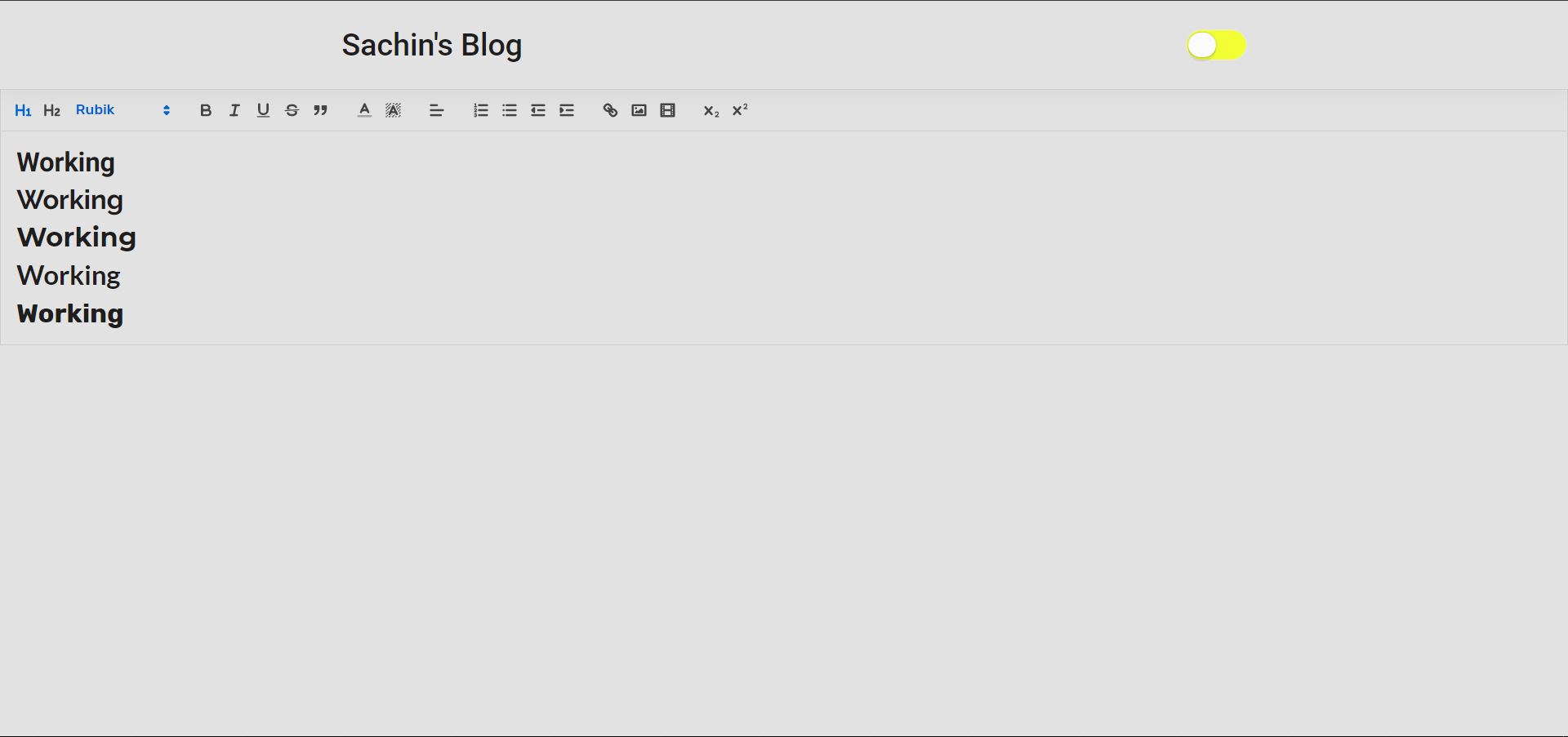
Font.whitelist = ["Roboto", "Raleway", "Montserrat", "Lato", "Rubik"];
Quill.register(Font, true);`
Step 2 - Setup Modules and Formats
modules = {
    toolbar: [
      [{ header: "1" }, { header: "2" }, { font: Font.whitelist }],
      ["bold", "italic", "underline", "strike", "blockquote"],
      [{ color: [] }, { background: [] }],
      [{ align: [] }],
      [
        { list: "ordered" },
        { list: "bullet" },
        { indent: "-1" },
        { indent: "+1" },
      ],
      ["link", "image", "video"],
      [{ script: "sub" }, { script: "super" }],
    ],
  };

  formats = [
    "header",
    "font",
    "bold",
    "italic",
    "underline",
    "strike",
    "blockquote",
    "background",
    "code",
    "script",
    "list",
    "bullet",
    "indent",
    "link",
    "image",
    "video",
  ];
Step 3 - Render on the screen
render() {
    return (
      <main>
        <ReactQuill
          theme="snow"
          modules={this.modules}
          formats={this.formats}
        />
      </main>
    );
  }
Step 4 - Fix the CSS
Take a look and change accordingly depending on the fonts you are using
It's simple code written for every font
.ql-picker.ql-font {
  .ql-picker-item {
    font-size: 0;
    &:before {
      content: attr(data-value) !important;
      font-size: 14px;
    }
  }
}

.ql-picker.ql-font{
  .ql-active {
    &:before {
      content: attr(data-value) !important;
      font-size: 14px;
    }
  }
}

.ql-picker.ql-font .ql-picker-label[data-value="Roboto"]::before,
.ql-picker.ql-font .ql-picker-item[data-value="Roboto"]::before
{
    font-family: "Roboto", cursive;;
    content: "Roboto" !important;
}

.ql-picker.ql-font .ql-picker-label[data-value="Raleway"]::before,
.ql-picker.ql-font .ql-picker-item[data-value="Raleway"]::before
{
    font-family: "Raleway", cursive;;
    content: "Raleway" !important;
}

.ql-picker.ql-font .ql-picker-label[data-value="Montserrat"]::before,
.ql-picker.ql-font .ql-picker-item[data-value="Montserrat"]::before
{
    font-family: "Montserrat", cursive;;
    content: "Montserrat" !important;
}

.ql-picker.ql-font .ql-picker-label[data-value="Lato"]::before,
.ql-picker.ql-font .ql-picker-item[data-value="Lato"]::before
{
    font-family: "Lato", cursive;;
    content: "Lato" !important;
}

.ql-picker.ql-font .ql-picker-label[data-value="Rubik"]::before,
.ql-picker.ql-font .ql-picker-item[data-value="Rubik"]::before
{
    font-family: "Rubik", cursive;;
    content: "Rubik" !important;
}

/* Set content font-families */
.ql-font-Roboto {
  font-family: "Roboto";
}
.ql-font-Raleway {
  font-family: "Raleway";
}
.ql-font-Montserrat {
  font-family: "Montserrat";
}
.ql-font-Lato {
  font-family: "Lato";
}
.ql-font-Rubik {
  font-family: "Rubik";
}
The Output
 imsks
on 19 Jun 2020
imsks
on 19 Jun 2020
Related issues
 Nazanin1369
·
4Comments
Nazanin1369
·
4Comments
 levous
·
3Comments
levous
·
3Comments
 pooriamo
·
3Comments
pooriamo
·
3Comments
 andylacko
·
5Comments
andylacko
·
5Comments
 gustavoelizalde
·
5Comments
gustavoelizalde
·
5Comments
Most helpful comment
Then you need to change the HTML (JSX) of the toolbar to show the
selectoptionsfor those fonts.