React-popper: adaptive positioning with usePopper vertical position failing in certain circumstances
Reproduction demo
Run yarn install && yarn start
What went wrong?

I'm trying to make a gallery of images in buttons that shows a larger version of the image on hover. I'm running into these strange issues when using placement: 'top'. The tooltip shows fine when it is below the but not when it is above.
Trying changing placement, commenting in/out <Svg/> zooming in/out, scrolling. I can't narrow down exactly what is causing the problem, but it happens frequently, and in all browsers.
Packages versions
"@popperjs/core": "^2.4.4",
"react-popper": "^2.2.3",
 vincerubinetti
All 3 comments
It seems that this fixes it:
modifiers: [
      {
        name: 'computeStyles',
        options: {
          adaptive: false, // true by default
        },
      },
    ]
Possibly related to this issue on the popperjs core, except that I'm not even using position: relative.
vincerubinetti
on 16 Aug 2020
Not sure if the same issue, but most likely it is.
I am using a rather complex combination but it seems it is a superset of what you have. I included some debug hints, so you may try those ...
What I have is
- React Tippy in headless mode with
inlinePositioningplugin (Tippy is based on Popper) - Default positioning:
top - Popper element rendered to
document.body flipmodifier withfallbackPlacements: ['top-start', 'top-end', 'bottom', 'bottom-start', 'bottom-end'],preventOverflowmodifier withmainAxis: false, altAxis: trueoffsetmodifier with dynamic offset calculation
What happens to me is that until the flip modifier kicks in, everything is OK
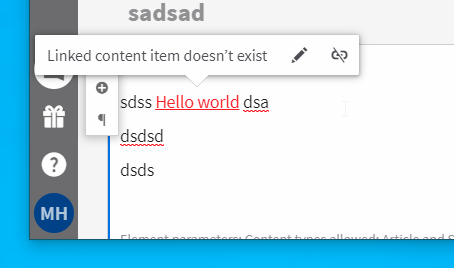
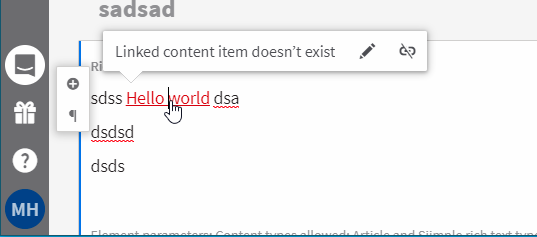
But once the flip modifier triggers the simulation of the alternative positions, it throws the popper element beyond the fold. Thanks to offset and some negative margins I can see it misplaced. Yours may be just below the fold ...

When I disable adaptive mode, it works OK and properly flips
After an agonizing debug session, I narrowed it down to a point where I found out that the popper element has both top: 0 and bottom: 0 set at the same time, making its height the window height instead of my default height and further calculating offsets with it
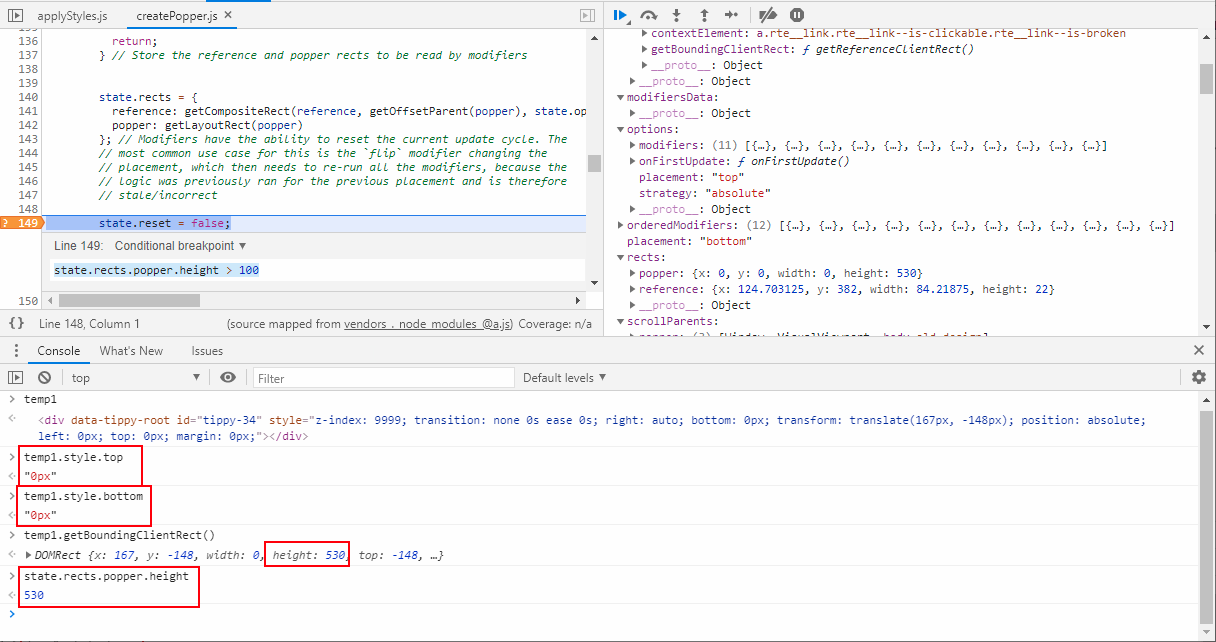
Upon further debugging, I found out that the initialStyles of the applyStyles modifier write top position but don't reset bottom getting the wrapper element into this situation. It seems that it is not aware of the historical styles applied by the flip modifier, or the flip modifier doesn't reset the complete state.

Hopefully someone with proper knowledge will pick this information up, and try to find a proper fix for it.
 kenticomartinh
on 9 Nov 2020
kenticomartinh
on 9 Nov 2020
Related issues
 sajcics
·
3Comments
sajcics
·
3Comments
 craigsketchley
·
3Comments
craigsketchley
·
3Comments
 souporserious
·
5Comments
souporserious
·
5Comments
 Argonanth
·
4Comments
Argonanth
·
4Comments
 gormonn
·
4Comments
gormonn
·
4Comments
Most helpful comment
It seems that this fixes it: