React-popper: Incorrect position on mount
After updating to version 2.2 and above, popper is incorrectly positioned on first mount. Simple scroll or resize event will fix it.
Reproduction demo
https://codesandbox.io/s/gifted-ishizaka-3mxdv
Steps to reproduce the problem
- In provided codesandbox demo, open styles.css and remove min-height on line 4
What is the expected behavior?
Popper should be placed correctly
What went wrong?
Popper is misplaced, window resize will cause popper refresh and it will be corrected
Any other comments?
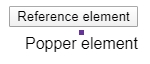
incorrect position after mount: (purple is arrow element, just to demonstrate position)
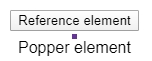
after resize, position is corrected
Packages versions
- @popperjs/core: 2.3.2
- react-popper: 2.2.2
 ejdzipi
All 12 comments
I can't reproduce it in Chrome or FF. In Safari the layout shifts but updates aren't triggered by default when the DOM layout changes. Is that the issue?
 atomiks
on 15 Apr 2020
atomiks
on 15 Apr 2020
I am using Chrome 81.0.4044.92 64bit on Win10. Also tried Firefox 75.0 and issue is present.
Here is screencast:

ejdzipi
on 15 Apr 2020
I see, this is expected behavior. The popper doesn't update due to layout changes by default, only scroll/resize. It should've happened with any version in the past though.
atomiks
on 15 Apr 2020
But it is causing issues with arrow position in my other project. This is how it looked like on the first mount before using hooks version:

After implementing hooks, it looks like this:

ejdzipi
on 15 Apr 2020
You are probably passing an arrow with useRef, not using useState, right? You need to use callback refs not a ref object.
If not, try to create a CodeSandbox reproduction that matches the screenshot
atomiks
on 15 Apr 2020
I have updated the sandbox: https://codesandbox.io/s/gifted-ishizaka-3mxdv
The first load is showing displaced arrow:

Can you please check it out?
ejdzipi
on 15 Apr 2020
https://codesandbox.io/s/frosty-breeze-3525h?file=/src/styles.css
two problems:
- you arrow needs to have a
width&heightspecified - you need to use a ternary for the className, since it's doing
arrowundefinedcurrently
atomiks
on 15 Apr 2020
I have implemented it in my project, based on your example (added width, height, corrected classnames) but the problem persists. I was unable to reproduce it on codesandbox, but i found that if i scroll page at least 1px down, everything works correct. Problem is shown only on the first page load, when content is not scrolled.
ejdzipi
on 16 Apr 2020
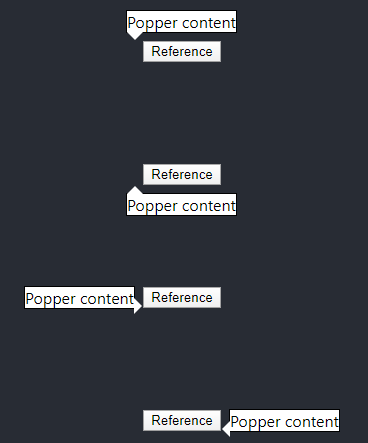
I have created another demo, which reproduces the problem. First, i have bootstrapped simple react app from create-react-app, then i have added popper, react-popper and emotion for css-in-js. I have implemented popper example using hooks and the problem persists.
Repo URL: https://github.com/ejdzipi/cra-popper-arrow-issue
@atomiks can you please take another look on this? I have added width&height for arrow element, ref is managed with useState, code is taken from this library's readme. I have no clue how to fix it. Thanks.
ejdzipi
on 20 Apr 2020
the arrow needs to have same width and height, and its position needs to be absolute, otherwise before Popper has a chance to position it, the arrow will stretch the tooltip.
https://codesandbox.io/s/lingering-waterfall-qr9y2?file=/src/Popper.js
 FezVrasta
on 20 Apr 2020
FezVrasta
on 20 Apr 2020
Thank you, finally i understand it 🎉 Could this information be added to library documentation? I believe that it might be beneficial for others, if there is information that arrow element should have defined size and absolute position.
ejdzipi
on 20 Apr 2020
I agree with @ejdzipi that it would be beneficial to add this to the docs. I started out having position: absolute; on the arrow element but removed that because I noticed that the styles.arrow also contained this style. Later on I noticed there was some misplacement going on which must have been caused by the popper being stretched by the arrow in the initial render cycle.
Alternatively, you could consider omitting position: 'absolute' from styles.arrow because that would make it much more obvious what is going wrong.
 HendrikThePendric
on 3 Jun 2020
HendrikThePendric
on 3 Jun 2020
Related issues
 rolandjitsu
·
5Comments
rolandjitsu
·
5Comments
 souporserious
·
6Comments
souporserious
·
6Comments
 linusthe3rd
·
4Comments
linusthe3rd
·
4Comments
 craigsketchley
·
3Comments
craigsketchley
·
3Comments
 RajaBellebon
·
3Comments
RajaBellebon
·
3Comments
Most helpful comment
the arrow needs to have same width and height, and its
positionneeds to be absolute, otherwise before Popper has a chance to position it, the arrow will stretch the tooltip.https://codesandbox.io/s/lingering-waterfall-qr9y2?file=/src/Popper.js