React-pdf: Page.jsx loading not working
Before you start - checklist
- [x] I followed instructions in documentation written for my React-PDF version
- [x] I have checked if this bug is not already reported
- [x] I have checked if an issue is not listed in Known issues
- [x] If I have a problem with PDF rendering, I checked if my PDF renders properly in Mozilla Firefox
Description
I can't show the loading prop in Page.jsx
I'm making the lazy pdf loading component now
our server team split pdf and gave me each pdf url
and I'm rendering each pdf with the intersection observer api
https://developer.mozilla.org/en-US/docs/Web/API/Intersection_Observer_API
Each component has react-pdf Document, Page component seperately
react-pdf has page and the pdf prop when my component intersect with the container component
so, flow can't enter to area that handle loading logic like below
is there way that i can clear pdf or page before intersect with new lazy load component?
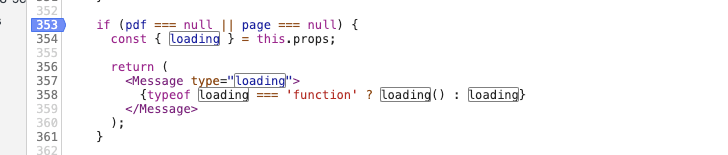
Page.jsx
What should i do?
Steps to reproduce
Hmm.... I think it's hard to reproduce.....
Environment
- Browser [Chrome 80.0.3987.132]:
- React-PDF version [5.0.0-beta.2]:
- React version [^16.13.0]:
- Webpack version [^4.41.0]:
 namuwikilover
All 2 comments
I am facing the same problem. In my case, I use react-window to virtualize the list of pages. When the user scrolls the document, I want to show a blank page with the dimensions of the real page. To do this, I have to pass a style prop coming from react-window, with the absolute css values. However, it seems that the
 caiorios
on 31 Mar 2020
caiorios
on 31 Mar 2020
@caiorios I'll keep that in mind. Thank you.
namuwikilover
on 1 Apr 2020
Related issues
 shivekkhurana
·
4Comments
shivekkhurana
·
4Comments
 Vanals
·
4Comments
Vanals
·
4Comments
 Waize
·
4Comments
Waize
·
4Comments
 varand-pez
·
3Comments
varand-pez
·
3Comments
 mapoulos
·
4Comments
mapoulos
·
4Comments
Most helpful comment
I am facing the same problem. In my case, I use react-window to virtualize the list of pages. When the user scrolls the document, I want to show a blank page with the dimensions of the real page. To do this, I have to pass a style prop coming from react-window, with the absolute css values. However, it seems that the component prevents me to do that.