React-pdf: Chinese characters can't wrap lines as automatically as English characters
Describe the bug
English can automatically wrap and add a hyphen,
Chinese is beyond。
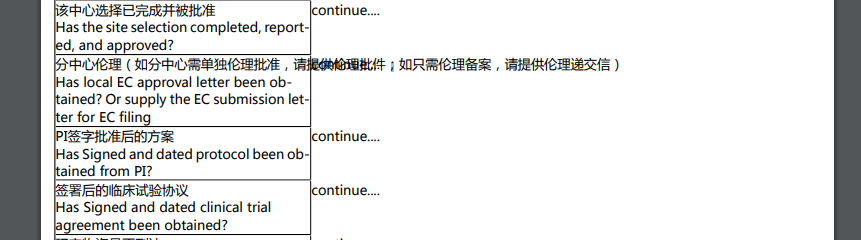
Screenshots
Desktop (please complete the following information):
- OS: [Windows]
- Browser [chrome]
- React-pdf version [1.6.4]
 America-first-melon
All 19 comments
When using the Font.registerHyphenationCallback, the Chinese characters that are exceeded can be successfully truncated,but will appear a -.
Is it possible to delete this?
America-first-melon
on 16 Aug 2019
em.. Wrapping fails when ( ) is included.
America-first-melon
on 16 Aug 2019
how did this happen?

<View style={{flexDirection: "row"}}>
            <View style={{
                        borderWidth: 1,
                        backgroundColor: "red",
                        width: "50%"
                    }}>
                        <Text>和撒旦画哈师大话说得好暗红色的划划水的和撒旦画哈师大话说得好暗红色的划划水的和撒旦画哈师大话说得好暗红色的划划水的和撒旦画哈师大话说得好暗红色的划划水的和撒旦画哈师大话说得好暗红色的划划水的和撒旦画哈师大话说得好暗红色的划划水的</Text>
                    </View>
                    <View style={{
                        borderWidth: 1,
                        backgroundColor: "blue",
                        width: "50%"
                    }}>
                        <Text>の建物賃貸借契約書一時使用目的の建物賃一時使用賃貸借契約書一時(使用目的の建物賃一時使用賃貸借契約書一時使用目的の建物賃一時使用賃貸借契約書一時使用目的の建物賃一時使用目的の建物賃貸借契約書一時使用一時使用目的の建物賃貸借契約書一時使用貸借契約書一時使用一時使用目的の建物賃貸借)契約書一時使用目的の建物賃貸借契約書</Text>
                    </View>
                </View>
the font is pingfang.
America-first-melon
on 19 Aug 2019
how did this happen?
<View style={{flexDirection: "row"}}> <View style={{ borderWidth: 1, backgroundColor: "red", width: "50%" }}> <Text>和撒旦画哈师大话说得好暗红色的划划水的和撒旦画哈师大话说得好暗红色的划划水的和撒旦画哈师大话说得好暗红色的划划水的和撒旦画哈师大话说得好暗红色的划划水的和撒旦画哈师大话说得好暗红色的划划水的和撒旦画哈师大话说得好暗红色的划划水的</Text> </View> <View style={{ borderWidth: 1, backgroundColor: "blue", width: "50%" }}> <Text>の建物賃貸借契約書一時使用目的の建物賃一時使用賃貸借契約書一時(使用目的の建物賃一時使用賃貸借契約書一時使用目的の建物賃一時使用賃貸借契約書一時使用目的の建物賃一時使用目的の建物賃貸借契約書一時使用一時使用目的の建物賃貸借契約書一時使用貸借契約書一時使用一時使用目的の建物賃貸借)契約書一時使用目的の建物賃貸借契約書</Text> </View> </View>the font is pingfang.
请问 怎么让中文字 不乱的 我怎么试了 好多方法 都不对呢
 MaoGirlsQueen-001
on 27 Aug 2019
MaoGirlsQueen-001
on 27 Aug 2019
呢
我自己解决了
 MaoGirlsQueen
on 28 Aug 2019
MaoGirlsQueen
on 28 Aug 2019
呢
我自己解决了
试试换行有问题嘛? 我这换行一直有问题,换行也会带上连字符
America-first-melon
on 28 Aug 2019
呢
我自己解决了
我为什么 不能显示中文呢
我的都是乱码
 rechun
on 27 Sep 2019
rechun
on 27 Sep 2019
@rechun 先引用汉字字体
America-first-melon
on 28 Sep 2019
我发现了 已经解决了
America-first-melon notifications@github.com 于2019年9月28日周六 下午7:33写道:
@rechun https://github.com/rechun 先引用汉字字体
—
You are receiving this because you were mentioned.
Reply to this email directly, view it on GitHub
https://github.com/diegomura/react-pdf/issues/692?email_source=notifications&email_token=AHCLSQJCFA22D5RJK4EYLQDQL46HDA5CNFSM4IMF7UDKYY3PNVWWK3TUL52HS4DFVREXG43VMVBW63LNMVXHJKTDN5WW2ZLOORPWSZGOD72XHYA#issuecomment-536179680,
or mute the thread
https://github.com/notifications/unsubscribe-auth/AHCLSQJFQUL6GBYW6YFML4TQL46HDANCNFSM4IMF7UDA
.
rechun
on 15 Oct 2019
中文换行的有解决吗
 zhonggithub
on 23 Oct 2019
zhonggithub
on 23 Oct 2019
same issue
zhonggithub
on 24 Oct 2019
中文换行的有解决吗
rechun
on 19 Nov 2019
中文换行的有解决吗
换行
能行吗? 我没行。。 换其他的了,换成 chrome-to-pdf 了
America-first-melon
on 19 Nov 2019
我用react-pdfobject 和 jspdf 了
zhonggithub
on 19 Nov 2019
我用react-pdfobject 和 jspdf 了
有效果就行
America-first-melon
on 19 Nov 2019
try https://github.com/diegomura/react-pdf/issues/419#issuecomment-554844061
or
Font.registerHyphenationCallback(word => word.length === 1 ? [word] : Array.from(word).map(char => char));
 boxcc
on 6 Feb 2020
boxcc
on 6 Feb 2020
动态数据加载,内容中的\n 或者回车怎么换行呢?
 lixiaohui100200
on 13 Mar 2020
lixiaohui100200
on 13 Mar 2020
@America-first-melon
You can refer the following code snippet to remove the redundant hyphen character.
    Font.registerHyphenationCallback((word: string) => {
      if (word.length === 1) {
        return [word];
      }

      return Array.from(word)
        .map((char) => [char, ''])
        .reduce((arr, current) => {
          arr.push(...current);
          return arr;
        }, []);
    });
 lalayueh
on 11 May 2020
lalayueh
on 11 May 2020
@America-first-melon
You can refer the following code snippet to remove the redundant hyphen character.
    Font.registerHyphenationCallback((word: string) => {
      if (word.length === 1) {
        return [word];
      }

      return Array.from(word)
        .map((char) => [char, ''])
        .reduce((arr, current) => {
          arr.push(...current);
          return arr;
        }, []);
    });
3q
America-first-melon
on 21 May 2020
Related issues
 redcranesolutions
·
4Comments
redcranesolutions
·
4Comments
 idrisadetunmbi
·
3Comments
idrisadetunmbi
·
3Comments
 diegomura
·
4Comments
diegomura
·
4Comments
 cheald
·
3Comments
cheald
·
3Comments
 pavle-lekic-htec
·
4Comments
pavle-lekic-htec
·
4Comments