React-pdf: Loading and registering fonts is broken
Describe the bug
When attempting to load the source of a font, locally or from an external URL, an error comes back as Error: Unknown font format like in your example here
https://react-pdf.org/repl?example=font-register
To Reproduce
Steps to reproduce the behavior including code snippet (if applies):
- Register a font
- See console errors & failure to load the doc
Expected behavior
Fonts are loaded successfully and applied to the document.
Screenshots

 simondobson
All 14 comments
I opened a similar issue. Now I see this was created earlier, so I'll copy everything to here.
Describe the bug
A clear and concise description of what the bug is.
Can't register fonts
To Reproduce
Steps to reproduce the behavior including code snippet (if applies):
- Create a simple PDF Viewer with just text
import { Document, Font, Image, Page, PDFViewer , StyleSheet, Text, View } from "@react-pdf/renderer"
class BensPlayGround extends Component {
public render() {
return (
<Box
stl={css`
iframe {
width: ${width}px;
height: ${width * 1.5}px;
}
`}
>
< PDFViewer >
<MyDocument />
</PDFViewer >
</Box>
)
}
}
const styles={...}
const MyDocument = () => (
<Document>
<Page size="A4" style={styles.page}>
<View style={styles.pageW}>
<Text
style={styles.title}
>
Certificate of Appreciation
</Text>
</View>
</Page>
</Document>
)
Everything works well.
- Try to change the font to "monteserrat 700 or Roboto 700" by either using a url, or using a ttf file in the same directory
Font.register({ family: "Roboto", fonts: [
{ src: "/roboto.bold.ttf", fontWeight: 700 },
]})
const styles = StyleSheet.create({
title: {
......
fontWeight: 700,
fontFamily: "Roboto",
}
})
const MyDocument = () => (
<Document>
<Page size="A4" style={styles.page}>
<View style={styles.pageW}>
<Text
style={styles.title}
>
Certificate of Appreciation
</Text>
</View>
</Page>
</Document>
)
This is how it shows up in the browser.
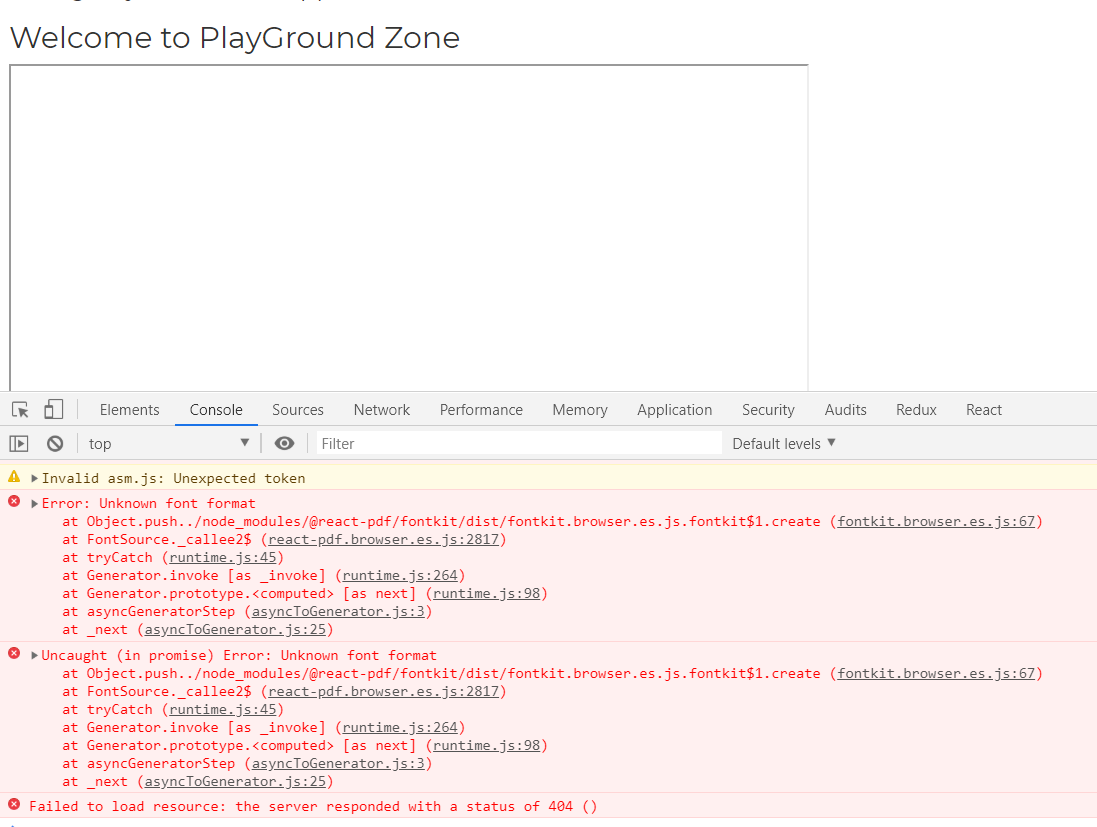
Desktop (please complete the following information):
- OS: [e.g. MacOS, Windows] Windows
- Browser [e.g. chrome, safari] Chrome
- React-pdf version [e.g. v1.1.0] 1.6+
 carpben
on 12 Aug 2019
carpben
on 12 Aug 2019
having the same issue
 akenzua
on 13 Aug 2019
akenzua
on 13 Aug 2019
I had this issue as well. I was able to resolve it by importing the font file as a variable then using that as the src value.
import font from "./font.ttf"

Font.register({
  family: "FamilyName",
  format: "truetype",
  src: font
});
 igolden
on 3 Sep 2019
igolden
on 3 Sep 2019
I am having the same issues with trying to bring Lato into a project. Have tried @igolden solution to no avail (though thanks for posting it!)
 agentlewis
on 17 Oct 2019
agentlewis
on 17 Oct 2019
I had this issue as well. I was able to resolve it by importing the font file as a variable then using that as the src value.
import font from "./font.ttf"

Font.register({
  family: "FamilyName",
  format: "truetype",
  src: font
});
Thank you!!! Why isn't this in the docs?
 mdodge-ecgrow
on 9 Dec 2019
mdodge-ecgrow
on 9 Dec 2019
I'll add it! Thanks
 diegomura
on 10 Dec 2019
diegomura
on 10 Dec 2019
Im having the same problem when registering fonts.
Tried to import them but I'll get this error:

Tried with ttf fonts in the same directory with no luck.

Even when the font is there. What am I doing wrong?
 Tuomask
on 1 Apr 2020
Tuomask
on 1 Apr 2020
Figured it out with a huge help from my colleague.
With typescript you need declarations.d.ts file in your src folder.
declare module "*.ttf" {
    const content: any;
    export default content;
}

declare module "*.otf" {
    const content: any;
    export default content;
}
Can anyone tell me which font formats are acceptable? I know TrueType, any others?
 tomgallagher
on 28 Apr 2020
tomgallagher
on 28 Apr 2020
Has anyone fixed this?
We have tried doing it with codes below. Still getting the same error.
import headingfont from "./BalooSemiBold.ttf";

Font.register({
  family: "Baloo",
  format: "truetype",
  src: headingfont,
});

<View style={(styles.section, { fontFamily: 'Baloo' })}>
 ahlag
on 16 Sep 2020
ahlag
on 16 Sep 2020
I also have not been able to register fonts trying any of these methods - I've been trying it a lot of different ways, but always get that the font is null, or in an unknown format.
As an aside, are there any fonts that are included that I could use since this issue doesn't seem to be going away?
`
Method 1
import roboto from '../static/fonts/Roboto/Roboto-Regular.ttf';
Font.register({ family: "Roboto", fonts: [
{ src: roboto },
]})
Method 2
Font.register({ family: 'Roboto', src: 'https://github.com/google/fonts/raw/master/apache/roboto/static/Roboto-Regular.ttf' });
Method 3
Font.register({ family: 'Roboto', fonts: [ {src: '../static/fonts/Roboto/Roboto-Regular.ttf''}] });
`
 simple-asset-manager
on 18 Sep 2020
simple-asset-manager
on 18 Sep 2020
I am also unable to register fonts.
code:
Font.register({ family: 'SourceSansPro', fonts: [
 { src: 'https://fonts.gstatic.com/s/sourcesanspro/v14/6xK3dSBYKcSV-LCoeQqfX1RYOo3qNa7lujVj9_mf.woff2' }, // font-style: normal, font-weight: normal
 { src: 'https://fonts.gstatic.com/s/sourcesanspro/v14/6xKydSBYKcSV-LCoeQqfX1RYOo3i54rwmhdu3cOWxy40.woff2', fontWeight: 600 },
]});
code, variation 2:
Font.register({ family: 'SourceSansPro', fonts: [
 { src: 'https://fonts.googleapis.com/css2?family=Source+Sans+Pro&display=swap' }, // font-style: normal, font-weight: normal
 { src: 'https://fonts.googleapis.com/css2?family=Source+Sans+Pro:wght@600&display=swap', fontWeight: 600 },
]});
console:
Error: Unknown font format
    at Object../node_modules/@react-pdf/fontkit/dist/fontkit.browser.es.js.fontkit$1.create (fontkit.browser.es.js:68)
    at FontSource._callee2$ (react-pdf.browser.es.js:2892)
    at tryCatch (runtime.js:63)
    at Generator.invoke [as _invoke] (runtime.js:293)
    at Generator.next (runtime.js:118)
    at asyncGeneratorStep (asyncToGenerator.js:3)
    at _next (asyncToGenerator.js:25)
UPDATE:
I was able to get fonts to work using a .ttf url.
If you're using a google font you can do this by curling the google font url
➜  resume-builder-site git:(master) ✗ curl https://fonts.googleapis.com/css2\?family\=Source+Sans+Pro:wght@600\&display\=swap
@font-face {
  font-family: 'Source Sans Pro';
  font-style: normal;
  font-weight: 600;
  font-display: swap;
  src: local('Source Sans Pro SemiBold'), local('SourceSansPro-SemiBold'), url(https://fonts.gstatic.com/s/sourcesanspro/v14/6xKydSBYKcSV-LCoeQqfX1RYOo3i54rAkA.ttf) format('truetype');
}
Taking the .ttf url that comes back, and put that into the src
Font.register({ family: 'SourceSansPro', fonts: [
 { src: 'https://fonts.gstatic.com/s/sourcesanspro/v14/6xK3dSBYKcSV-LCoeQqfX1RYOo3aPw.ttf' }, // font-style: normal, font-weight: normal
 { src: 'https://fonts.gstatic.com/s/sourcesanspro/v14/6xKydSBYKcSV-LCoeQqfX1RYOo3i54rAkA.ttf', fontWeight: 600 },
]});
 heyalexchoi
on 19 Sep 2020
heyalexchoi
on 19 Sep 2020
I had this problem using NextJS. I solved this problem using require and installing next-fonts. So a downloaded the .tff and put it at the same folder. This was a really tricky problem, I tried using static folder and url. It was working at dev mode and local builds, but once I sent to production using AWS Amplify, my PDF Viewer was broken.
const font = require('./mplus.ttf')
Font.register({
  family: 'mplus-1',
  src: font
})
 igorvc30
on 30 Sep 2020
igorvc30
on 30 Sep 2020
I am not able to load font in playground too as well as in app.
any idea why it is not loading fonts Arimo ??
here is my code snippet:
const Quixote = () => (
  <Document>
    <Page style={styles.body}>
      <Text style={styles.title} fixed>
        Created with react-pdf
      </Text>
    </Page>
  </Document>
);

Font.register({
  family: 'Arimo',
   format: 'truetype',
  src: 'https://github.com/iakashpatel/fonts/raw/master/Arimo/Arimo-Regular.ttf'
});

const styles = StyleSheet.create({
  body: {
    paddingTop: 35,
    paddingBottom: 65,
    paddingHorizontal: 35,
  },
  title: {
    fontSize: 24,
    textAlign: 'center',
    fontFamily: 'Arimo',
    fontStyle: "normal",
    fontWeight: 400
  }
});

ReactPDF.render(<Quixote />);
 iakashpatel
on 7 Oct 2020
iakashpatel
on 7 Oct 2020
Related issues
 foureyedraven
·
3Comments
foureyedraven
·
3Comments
 GasimGasimzada
·
3Comments
diegomura
·
4Comments
mdodge-ecgrow
·
3Comments
GasimGasimzada
·
3Comments
diegomura
·
4Comments
mdodge-ecgrow
·
3Comments
 emt1803
·
3Comments
emt1803
·
3Comments
Most helpful comment
I had this issue as well. I was able to resolve it by importing the font file as a variable then using that as the src value.