React-pdf: Unable to load file from aws s3 pre signed URL
Hello Wojciech Maj,
I have gone through existing issues related to CORS. The domain I am requesting to has enabled CORS and has GET as well as POST in allowed method. I am still getting following error.

Now, here is what I am doing. I am basically fetching pre signed URL from aws s3 and then using this url in file props of Document.
In my network tab I see that in pre flight request allowed method is POST. However pdf.js uses GET to load PDF.
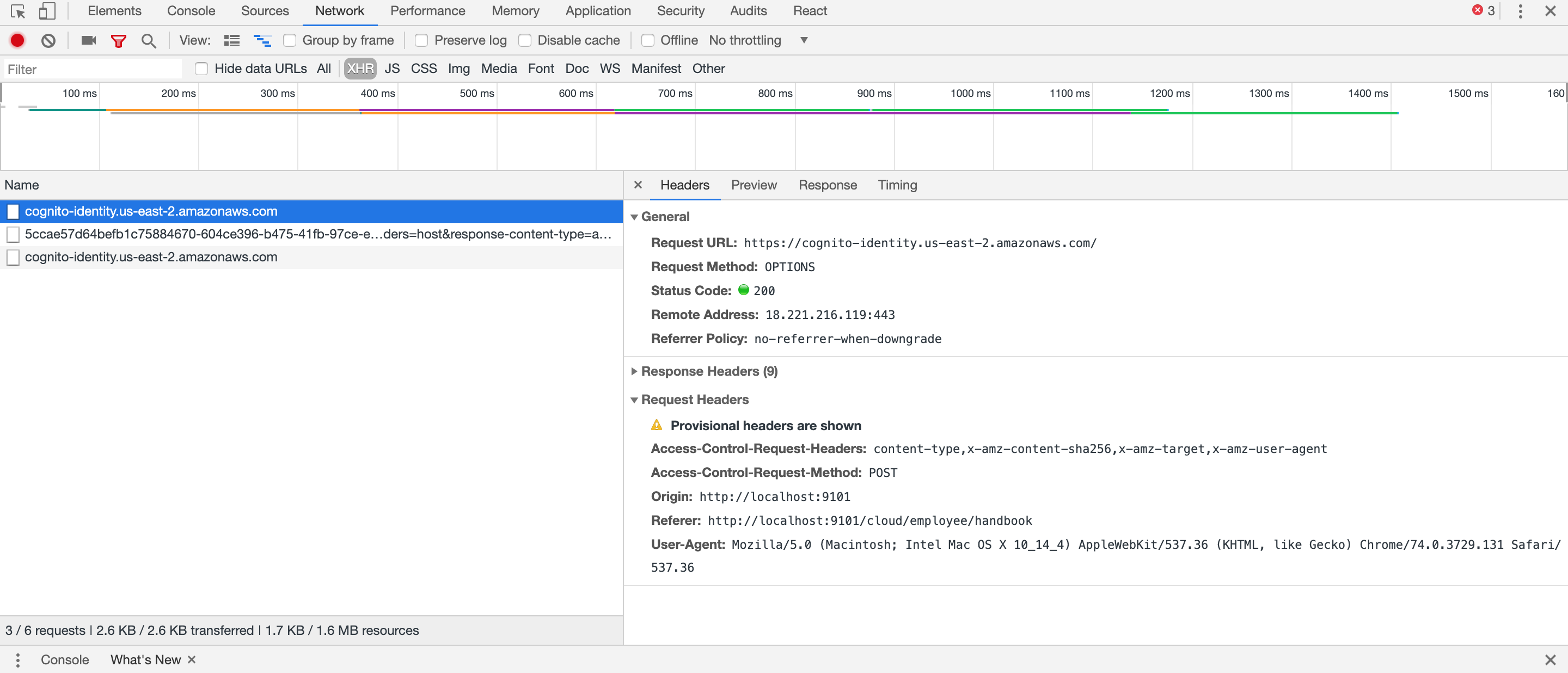
As you can see Access-Control-Request-Method: POST .
I tried sending httpHeader in file props as
<Document file= {{ url: 'URL',httpHeaders: {'Access-Control-Request-Method': 'GET',
"Access-
Control-Allow-Origin": "*"}, withCredentials: true }}
 onLoadSuccess={this.onDocumentLoadSuccess}
renderMode="canvas">
</Document>
But if I send like this then I am not seeing any pre flight request in network tab and CORS issue persist.
Thank you in advance!
 omitewary
All 6 comments
I had the same issue.
I solved using html iframe tag instead of using react-pdf.
<iframe style={{ <add your style here> }} src={'https://s3-sa-east-1.amazonaws.com/......'}/>
 gabrielnoal
on 10 May 2019
gabrielnoal
on 10 May 2019
We're having the same issue, the service worker and library initialize correctly but fail to load resources from a presigned url. These files can otherwise be loaded successfully.
 pat-schoeps
on 4 Jun 2019
pat-schoeps
on 4 Jun 2019
We came across this issue, using Azure BlobStorage and shared access signature.
 MariuszKogut
on 17 Jun 2019
MariuszKogut
on 17 Jun 2019
Solved the problem by changing CORS policy in s3 bucket https://docs.aws.amazon.com/AmazonS3/latest/user-guide/add-cors-configuration.html
CORS policy should be
<?xml version="1.0" encoding="UTF-8"?>
<CORSConfiguration xmlns="http://s3.amazonaws.com/doc/2006-03-01/">
<CORSRule>
    <AllowedOrigin>*</AllowedOrigin>
    <AllowedMethod>GET</AllowedMethod>
    <MaxAgeSeconds>3000</MaxAgeSeconds>
    <AllowedHeader>Authorization</AllowedHeader>
</CORSRule>
</CORSConfiguration>
 danpan1
on 29 Jun 2019
danpan1
on 29 Jun 2019
Looks like the same as https://github.com/wojtekmaj/react-pdf/issues/370
Adding CORS policy to s3 bucket works. Thanks @danpan1
 frankyjuang
on 26 Dec 2019
frankyjuang
on 26 Dec 2019
For anyone here having this issue still, even with the correct CORS policy, we used the source option on the Image component to construct this:
<Image
  source={{
    uri: logo,
    method: "GET",
    headers: {
    "Cache-Control": "no-cache"
    }
  }}
/>
 jonahallibone
on 23 Jul 2020
jonahallibone
on 23 Jul 2020
Related issues
 Kerumen
·
3Comments
Kerumen
·
3Comments
 wangzhidavid
·
4Comments
wangzhidavid
·
4Comments
 lorenzos
·
5Comments
lorenzos
·
5Comments
 wojtekmaj
·
4Comments
wojtekmaj
·
4Comments
 douglasrcjames
·
4Comments
douglasrcjames
·
4Comments
Most helpful comment
Solved the problem by changing CORS policy in s3 bucket https://docs.aws.amazon.com/AmazonS3/latest/user-guide/add-cors-configuration.html
CORS policy should be