React-pdf: Font file not parsing, characters garbled ('An invalid or illegal string was specified')
Describe the bug
When linking to a regular ttf file, the console shows the message SyntaxError: An invalid or illegal string was specified, and characters look garbled. These are all regular roman characters.
Using a Google-fonts hosted ttf file like the one in the react-pdf example, or this fonts.gstatic.com one seem to work, but a downloaded font coming straight out of Google Fonts, and the downloaded Noto font straight from the Google Noto website don't work. Either trough the rails app or an S3 bucket.
For the moment I can get away with using the ttf file from the gstatic server, but I guess Ideally any regular font works.
Any idea what is causing this?
To Reproduce
Steps to reproduce the behavior including code snippet (if applies):
- Open this react-repl link
- Observe the missing characters
Expected behavior
ttf fonts from regular sources should work as expected
Screenshots
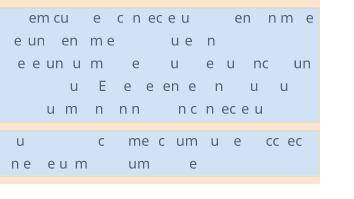
Desktop
- OS: MacOS
- Browser Firefox, Chrome
- React-pdf version 1.5.4
 marcohamersma
All 2 comments
I did have similar, but it was webpack file-loader config missing for ttf and other fonts files. After I configured properly I can now read ttf files in ReactJS/JSX code.
 alundiak
on 1 May 2019
alundiak
on 1 May 2019
Seems like there is something weird with the .ttf file that fontkit doesn't like. I opened the font with a font editor (Bird font is pretty good) and exported it without any changes and rendering went good.
Here it is the exported font:
It's not the first time I see this happening, but unfortunately there's no much I can do about it rather than this process. Hope it helped
 diegomura
on 11 May 2019
diegomura
on 11 May 2019
Related issues
 theobat
·
3Comments
theobat
·
3Comments
 kishaningithub
·
4Comments
kishaningithub
·
4Comments
 idrisadetunmbi
·
3Comments
idrisadetunmbi
·
3Comments
 yellowBanano
·
3Comments
yellowBanano
·
3Comments
 redcranesolutions
·
4Comments
redcranesolutions
·
4Comments
Most helpful comment
Seems like there is something weird with the
.ttffile thatfontkitdoesn't like. I opened the font with a font editor (Bird font is pretty good) and exported it without any changes and rendering went good.Here it is the exported font:
NotoSans-Regular.ttf.zip
It's not the first time I see this happening, but unfortunately there's no much I can do about it rather than this process. Hope it helped