React-pdf: Responsive Document/Page. Mission accomplished, But with a hack... Other solutions?
Before you start - checklist
- [x] I have read documentation in README
- [x] I have checked sample and test suites to see real life basic implementation
- [x] I have checked if this question is not already asked
What are you trying to achieve? Please describe.
I would like to make a responsive Document, meaning that if I resize the window, the document and its pages would also resize. I know it's possible, and tried to mimic what is done in the sample file, but It's very possible that I missing something, or maybe I have a CSS rule conflicting maybe.
Describe solutions you've tried
I was able to achieve what I wanted to accomplish, but I had to apply a css rule to my html and body tag. The successful result is available on my website, on this link Resume PDF, and its whole code is open source here: Sandro Portfolio.
On desktop, and mobile, the rendering is good, as we can see below:

Its currently working, thanks to this css rule added to html and body:
html, body {
  margin: 0;
  padding: 0;
  overflow-x: hidden;
}
If I remove overflow-x: hidden;, then its rendering the PDF, but it creates a huge white space on the right side, completely outside of the body output. It's not even the html tag, and the whole screen is scrollable horizontally. This white space is there only for small screen (mobile or very small window). I have no clue what creates that behavior, and I was hoping that it would be possible to achieve this without setting that rule: overflow-x: hidden;. The sample doesn't seem to do it either.
Here a screenshot of the result when the overflow rule is removed:

Why is that behavior happening? It seems like the PDF is breaking my html / body content. I would assume that it wouldn't impact the parents (div / component).
Additional information
The Resume page code is all in the folder of the component Resume on the repo here.
_ResumePage.js_
import React, { Component } from 'react';

import { Document, Page, pdfjs } from 'react-pdf/dist/entry.webpack';
pdfjs.GlobalWorkerOptions.workerSrc = `//cdnjs.cloudflare.com/ajax/libs/pdf.js/${pdfjs.version}/pdf.worker.js`;

import './ResumePage.css';
import 'react-pdf/dist/Page/AnnotationLayer.css';

import pdfFile from '../../public/SandroResume.pdf';

class ResumePage extends Component {
    state = {
        file: pdfFile,
        numPages: null,
        pageNumber: 1,
    }

    onDocumentLoadSuccess = ({ numPages }) => {
        this.setState({ numPages });
    }

    render() {
        const { file, pageNumber } = this.state;
        return (
            <div id="ResumeContainer">
                <Document className={"PDFDocument"} file={file} onLoadSuccess={this.onDocumentLoadSuccess}>
                    <Page className={"PDFPage PDFPageOne"} pageNumber={pageNumber} renderTextLayer={false} renderInteractiveForms={false} />
                    <Page className={"PDFPage"} pageNumber={pageNumber + 1} renderTextLayer={false} renderInteractiveForms={false} />
                </Document>
            </div>
        );
    }
}

export default ResumePage;
_ResumePage.css_
#ResumeContainer {
    margin:auto;
    width: 65%;
    display: flex;
    flex-direction: column;
    align-items: center;
}

.PDFDocument {
    display: flex;
    flex-direction: column;
    align-items: center;
}

.PDFPage {
    box-shadow: 0 0 8px rgba(0, 0, 0, .5);
}

.PDFPageOne {
    margin-bottom: 25px;
}

.PDFPage > canvas {
    max-width: 100%;
    height: auto !important;
}
Question on the fly:
Where is the best place for doing that instruction:
import { pdfjs } from 'react-pdf/dist/entry.webpack';
pdfjs.GlobalWorkerOptions.workerSrc = `//cdnjs.cloudflare.com/ajax/libs/pdf.js/${pdfjs.version}/pdf.worker.js`;
It's currently lives in the ResumePage.js. But Im wondering if there is a recommended place to do it?
The main component of the React app (App.js) ? Or it's okay the way I did it?
Environment
- Browser: Chrome 71.0.3578.98
- React-PDF version: 4.0.2
- React version: 16.7.0
- Webpack version: 4.28.4
 manonthemoon42
All 8 comments
Thanks for this! It might be a hack, but it got the job done for me! 🙏 🙏 🙏
 rjhilgefort
on 9 Feb 2019
rjhilgefort
on 9 Feb 2019
@manonthemoon42
Out of interest I tried your site/project and it seems there's something weird happening with the Annotation Layer
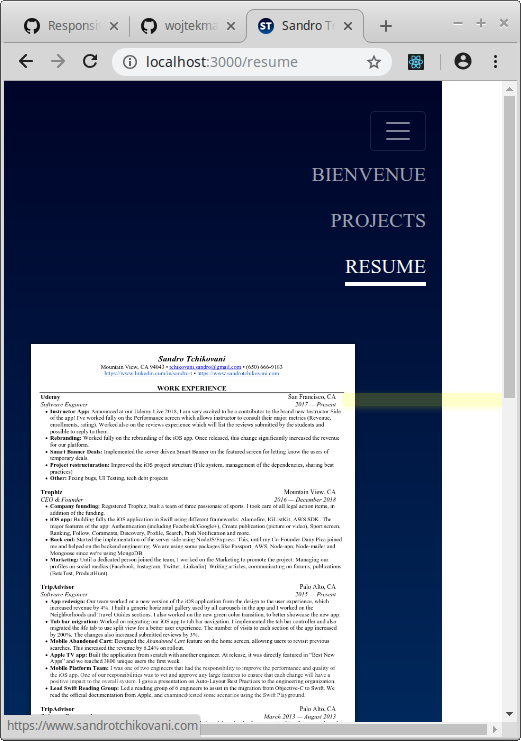
What I mean is:
1) overflow-x: hidden removed/commented the behaviour is as you mentioned
2) when window (width) is resized smaller links on your PDF become misplaced as seen in the picture.. you have 3 different clickable links (annotation layer) on top of your PDF page.. (email, web site address, linkedin). Links misplacement causes horizontal bar/overflow-x to activate.
3) if annotation layer is removed either commenting annotationlayer.css out or using parameter renderAnnotationLayer={false} everything works OK!
If you dont need annotation layer then you can fix the problem using point 3)
If not i cant yet say if this is a bug in the react-pdf annotation layer+css or not but for your information as well as for @wojtekmaj
 pxFIN
on 14 Feb 2019
pxFIN
on 14 Feb 2019
@pxFIN : the annotation layer seems to be causing a lot of dead space under my PDFs on the screen. If you'd like @wojtekmaj, I could submit a bug report.
 peterkmurphy
on 15 Feb 2019
peterkmurphy
on 15 Feb 2019
@pxFIN , first of all, thank you for taking some time for checking out my project and to look into this PDF layout issue.
Your recommendations sounds pretty good and I wanted to try them on.
What is interesting and weird, it's that after removing overflow-x: hidden; I am not able to reproduce the bug I originally reported here... I have no clue why...
Would that be possible that it was actually a bug in the Chrome Browser? And maybe my latest update actually fix it? 🤷🏻♂️
My Chrome Version on Mac is: Version 71.0.3578.98 (Official Build) (64-bit) .
Seems like its working fine now without the overflow-x: hidden rule.
manonthemoon42
on 18 Feb 2019
@manonthemoon42 In my opinion the problem here is your implementation since PDF scaling is only done once(internally in react-pdf component) so when enough window resizing is done annotation layer links get 'misplaced'
I dont think this is a bug in react-pdf rather its application implementation issue
One way to approach this see the example code https://github.com/wojtekmaj/react-pdf/issues/129
(Page component) width is adjusted according to window resize events thus scaling works (throttling recommended)
pxFIN
on 18 Feb 2019
FYI
https://github.com/pxFIN/react-router-express-node-example
Check my MyPDF component for one way of doing it (its very rude example without individual page sizes but for resizing purposes)
pxFIN
on 27 Feb 2019
Annotation Layer, unlike Canvas, cannot be automatically rescaled. You should specify Page width which will fit on current device to avoid problems with misaligned layers.
 wojtekmaj
on 15 Apr 2019
wojtekmaj
on 15 Apr 2019
Even with annotation layer rendering off, I still see the annotation layer in my implementation...
Here's the website I'm using
https://nohara42.github.io/
 NoHara42
on 16 Apr 2020
NoHara42
on 16 Apr 2020
Related issues
 saadq
·
3Comments
saadq
·
3Comments
 Waize
·
4Comments
Waize
·
4Comments
 joepio
·
3Comments
joepio
·
3Comments
 nnnikolay
·
4Comments
nnnikolay
·
4Comments
 shivekkhurana
·
4Comments
shivekkhurana
·
4Comments
Most helpful comment
Thanks for this! It might be a hack, but it got the job done for me! 🙏 🙏 🙏