React-pdf: Get warning Invalid stream: "FormatError: Bad FCHECK in flate stream: 120, 253"
HI,
I have a Jersey Backend REST service to get the PDF from server to Client.
I set the response to React state so that this will not retrieve the PDF from backend again in state changed.
However, I got the error Warning: Invalid stream: "FormatError: Bad FCHECK in flate stream: 120, 253" in loading that PDF to Document. All content of PDF are lost.
May I know how to solve this?
Below is my code:
Server
        @Override
        @GET
        @Path("/pdf")
        @Produces(MediaType.APPLICATION_PDF_VALUE)
public Response testPdf() throws Exception {

    File file = new File("C:\\Desktop\\test.pdf");
    FileInputStream fileInputStream = new FileInputStream(file);

    ResponseBuilder response = Response.ok((Object) fileInputStream);
    response.type("application/pdf");
    response.header("Content-Disposition", "filename=test.pdf");

    return response.build();
}
Client
````
import React, { Component } from 'react';
import { Document, Page } from 'react-pdf';
import axios from 'axios';
  class MyApp extends Component {
     state = {
         numPages: null,
        pageNumber: 1,
       pdfContent: null
   }

componentDidMount(){
    var that = this;

    axio.get("url\Pdf).then((response) => {
         that.setState({pdfContent: response });
    }).catch((error) => {
         console.warn(error);
    });
}

onDocumentLoadSuccess = ({ numPages }) => {
    this.setState({ numPages });
}

   printHandler(){
       window.print();
  }

  render() {
      const { pageNumber, numPages } = this.state;

  return (
      <div>
         <Document
            file={this.state.pdfContent}
            onLoadSuccess={this.onDocumentLoadSuccess}
         >
             <Page pageNumber={pageNumber} />
         </Document>
         <p>Page {pageNumber} of {numPages}</p>

         <button onClick={() => this.setState(prevState => ({
                 pageNumber: prevState.pageNumber + 1 }))}>Next page</button>
         <button onClick={() => this.setState(prevState => ({
                 pageNumber: prevState.pageNumber - 1 }))}>Prev Page</button>

          <button onClick={this.printHandler}/>
      </div>
  );
} }
```
 leonHk
All 17 comments
You're getting an error from this line in PDF.js. Are you able to download the PDF generated by the server and open it in Adobe Reader and/or Firefox?
 wojtekmaj
on 2 Jan 2019
wojtekmaj
on 2 Jan 2019
Hi wojtekmaj, I don’t want to use url in file prop because this will retreive the PDF again if there is state changed to trigger render
Yes, I am able to open the PDF in Chrome. Also, PDF can display in react-pdf if I use url in file prop. e.g.
leonHk
on 2 Jan 2019
Downloading a whole PDF just to display it in React-PDF is not a good idea - React-PDF supports partially downloading a PDF file, downloading only the pages it needs, to speed up loading time.
I don't know if I'll be able to help you here, unless you provide me with a valid PDF file that fails to load in React-PDF. You have many 3rd party dependencies involved - some backend file streaming service, axios I don't know much about. The React part looks okay to me.
Besides, re-downloading a file shouldn't be the case, file should download once if source did not change 🤔
wojtekmaj
on 2 Jan 2019
In my case, the PDF is a report which will generate in server side and return to client to display using react-pdf. Therefore, the PDF may be different in different time.
You said "re-downloading a file shouldn't be the case, file should download once if source did not change". Really??? However, you also said "React-PDF supports partially downloading a PDF file, downloading only the pages it needs, to speed up loading time."
For my testing, this will retrieve the PDF from server again if re-rendered the component e.g. We press next button to next page, state numPages value changed. This will trigger render. In this case, I found the backend retrieve PDF service have called.
Is there any prop need to config?
leonHk
on 2 Jan 2019
If the PDF may be different, I suggest using a hash in the URLs or just changing the filename each time the file is generated (which probably is a good idea because of caching).
React-PDF will definitely not re-download the same PDF twice, unless it's un-mounted and mounted again. We have tests for that in place. If the file prop remains the same, it won't start downloading the file again. There's nothing you need to config.
wojtekmaj
on 2 Jan 2019
Hi wojtekmaj. I found that If I code like this, the document will re-download.
<Document
file= {{ url: 'http://domain/test/pdf',
httpHeaders: { 'authorization': 'Bearer .....'},
}
>
That's because you shouldn't create objects on the fly in render() function, see #308 for further discussion on that matter.
wojtekmaj
on 4 Jan 2019
hi wojtekmaj,
Is it mean that the PDF must re-download if I need to add http header to the url like my example?
Is it mean I must set the file data to state to avoid the PDF re-downloading?
In addition, is it possible to get the loaded file data from react-pdf if I using file = "http://localhost/pdf" ? because I want to implement a print function using the loaded pdf.
leonHk
on 14 Jan 2019
Please use #308 for questions regarding file={{ ... }} syntax. The solution for you problem is already there by the way.
Regarding the original issue, being "FormatError: Bad FCHECK":
- Check if your file loads in Firefox correctly
- If yes, try uploading it on React-PDF test page and check if it loads correctly
- If yes, the issue is with the 3rd party tools you're using to send/receive the data and/or your code.
wojtekmaj
on 28 Jan 2019
I'm having the same problem. I'm getting the PDF from an API that returns an object with a data prop containing the file's binary.
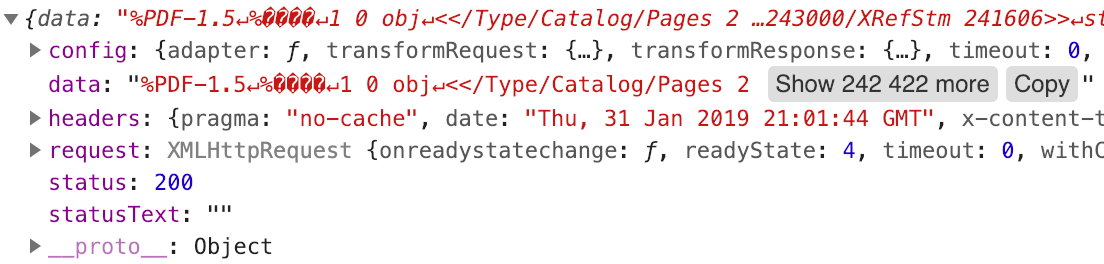
When I pass the entire object to Document as the file, I see multiple instances of Warning: Invalid stream: "FormatError: Bad FCHECK in flate stream: 120, 253" in the console. If I pass just the data as the file I get an error that the URL is bad.
I found the test page that you referred to (http://projekty.wojtekmaj.pl/react-pdf/test/). I'm not sure how to test the object on that page.
When I call my API in Postman, it returns a PDF that I'm able to open. I was able to upload that PDF to your test page without any problems. How do I resolve the format errors?
 depiction
on 31 Jan 2019
depiction
on 31 Jan 2019
I finally figured out the problem. I fixed it by changing the response type on the API request that gets the file to 'blob'. The default is 'application/json'.
depiction
on 1 Feb 2019
@depiction would you be able to describe in details what you did? I have similar issue with Warning: Invalid stream: "FormatError: Bad FCHECK in flate stream: 120, 253" messages in console log.
I'm sending (from PHP) the content of PDF file with the content type application/octet-stream.
 LukaszGrela
on 13 Feb 2019
LukaszGrela
on 13 Feb 2019
As mentioned above, make sure that the response type is set to 'blob'. Here is an example using Axios that calls an API, sets the response type, and creates a blob url from the response.
export function myService () {
    return axios.get('https://www.domain.com/api/, {
        responseType: 'blob',
        transformResponse: [function (data) {
            let blob = new window.Blob([data], { type: 'application/pdf' })
            return window.URL.createObjectURL(blob)
        }]
    })
}
Thanks, I've in the end set the responseType:'arraybuffer' in axios config and then passed the response.data to the Document's file prop as object {data:...}
Axios.get('http://path/to/api', { responseType: 'arraybuffer' }).then(
response => {
this.setState(_ => ({ file: { data: response.data } }));
}
);
which then is used in Document
<Document file={this.state.file}
//...
So I guess this would be a solution for the OP. :) Thank you guys.
wojtekmaj
on 3 Mar 2019
As mentioned above, make sure that the response type is set to 'blob'. Here is an example using Axios that calls an API, sets the response type, and creates a blob url from the response.
export function myService () {
    return axios.get('https://www.domain.com/api/, {
        responseType: 'blob',
        transformResponse: [function (data) {
            let blob = new window.Blob([data], { type: 'application/pdf' })
            return window.URL.createObjectURL(blob)
        }]
    })
}
Thank you
 mx4g
on 30 Apr 2020
mx4g
on 30 Apr 2020
Thanks, I've in the end set the
responseType:'arraybuffer'inaxiosconfig and then passed theresponse.datato theDocument'sfileprop as object{data:...}Axios.get('http://path/to/api', { responseType: 'arraybuffer' }).then( response => { this.setState(_ => ({ file: { data: response.data } })); } );which then is used in
Document<Document file={this.state.file} //...
Thank you
mx4g
on 30 Apr 2020
Related issues
 Solitaryo
·
5Comments
Solitaryo
·
5Comments
 shivekkhurana
·
4Comments
shivekkhurana
·
4Comments
 Vanals
·
4Comments
Vanals
·
4Comments
 Crackiii
·
3Comments
Crackiii
·
3Comments
 saadq
·
3Comments
saadq
·
3Comments
Most helpful comment
As mentioned above, make sure that the response type is set to 'blob'. Here is an example using Axios that calls an API, sets the response type, and creates a blob url from the response.