React-pdf: Can't load pdf using URL/Data parameter
I'm trying to load a PDF file using data object or URL but react-pdf only output "Loading PDF".
I'm listening for events onLoadSuccess, onLoadError, onRenderSuccess, onRenderError but only onLoadSuccess has being fired.

I'm also trying to load using data parameter {data: UIntArray} loaded with a fetch request (cors checked)
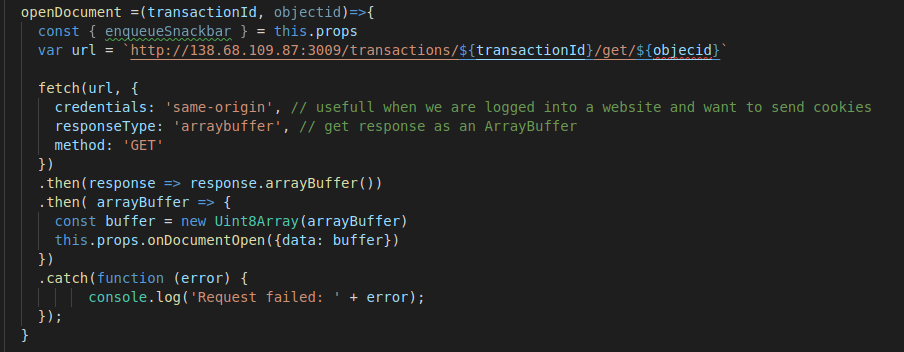
This is the object passed as parameter
*
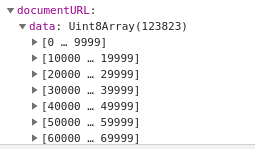
*
The url used in this example is public
React-PDF Document renders "Loading PDF ..."
Can someone help?
 moacsjr
All 5 comments
I have the same issue. I provide a Uint8Array to the file props of the Document component like this
<Document
    file={{ data: file }}
 >
where file is a Uint8Array.
I try to log each method : onLoadSuccess, onLoadError, onSourceError, onSourceSuccess.
Only onSourceSuccess is fired.
EDIT
I had the issue with worker so I've added these lines :
import { Document } from 'react-pdf/dist/entry.webpack';
import { pdfjs } from 'react-pdf';
pdfjs.GlobalWorkerOptions.workerSrc = `//cdnjs.cloudflare.com/ajax/libs/pdf.js/${pdfjs.version}/pdf.worker.js`;
But I think there is an error with webpack because in my browser console I can see :
Uncaught ReferenceError: window is not defined
Do you have an idea about this issue ?
 AntoninMarchardDev
on 12 Dec 2018
AntoninMarchardDev
on 12 Dec 2018
@AntoninMarchardDev See the bottom of #190
 wojtekmaj
on 14 Dec 2018
wojtekmaj
on 14 Dec 2018
I would add that you should store the Uint8Array file in the format { data: file } directly in the props otherwise you could face an issue where the page keeps rendering (see issue #308 for more information on this topic).
 nijellab
on 3 Apr 2019
nijellab
on 3 Apr 2019
I would add that you should store the
Uint8Arrayfile in the format{ data: file }directly in the props otherwise you could face an issue where the page keeps rendering (see issue #308 for more information on this topic).
OMG, you're a life savior!
I had the exact same issue, and I was this close to giving up and starting to implement the whole thing from the ground up with pdf.js =))
Thanks a million
 ali-garajian
on 18 Oct 2020
ali-garajian
on 18 Oct 2020
I would add that you should store the
Uint8Arrayfile in the format{ data: file }directly in the props otherwise you could face an issue where the page keeps rendering (see issue #308 for more information on this topic).
YES! I also had this issue. This fixed the continuous rerendering problem.
 karljinang
on 12 Nov 2020
karljinang
on 12 Nov 2020
Related issues
 shivekkhurana
·
4Comments
shivekkhurana
·
4Comments
 Solitaryo
·
5Comments
Solitaryo
·
5Comments
 varand-pez
·
3Comments
varand-pez
·
3Comments
 Crackiii
·
3Comments
Crackiii
·
3Comments
 herneli
·
3Comments
herneli
·
3Comments
Most helpful comment
I would add that you should store the
Uint8Arrayfile in the format{ data: file }directly in the props otherwise you could face an issue where the page keeps rendering (see issue #308 for more information on this topic).