React-pdf: Children of fixed View offsets unexpectedly
Hello!
At first I wanted to say thank you for so cool library! It's exactly what I looked for!
But unfortunately, I encountered with a disappointing problem.
OS:
Mac OSX and Ubuntu
React-pdf version:
@react-pdf/[email protected]
Description:
I found that children of View with _fixed_ flag moving to the right for each page > 1.
It's possible to see if you render whole document at a time and it consist of > 1 page.
At every page starts from second you can notice some offset for children of fixed View.
How to replicate issue including code snippet (if applies):
The root of the problem (as I understand it) is View-wrapper with fixed property
<View fixed>
  <Text>...</Text>
</View>
because
<Text fixed>...</Text>
works ok.
I've created example repo. There are two already rendered pdf which shows the issue. But I've already setup everything for experiments and you could try it by yourself. Just follow readme, please.
https://github.com/rederteph/react-pdf-issue
Hope it will help to reproduce and understand issue.
If you have any further questions, please don't hesitate to contact me!
 rederteph
All 8 comments
Thanks you!
And also thanks for providing a case I can run
I'll try to see this very soon!
 diegomura
on 31 Oct 2018
diegomura
on 31 Oct 2018
Hi, getting the same thing:
With @react-pdf/[email protected] (wasn't in .18):
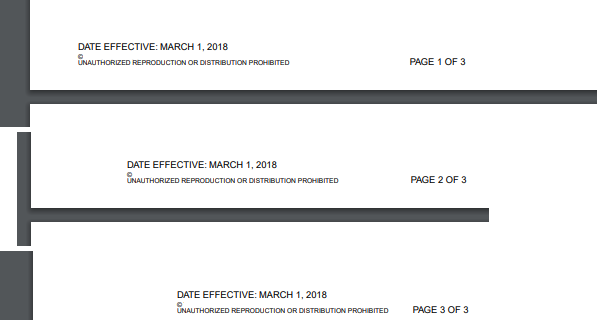
My styles are the following:
footer: {
flexDirection: 'row',
position: 'absolute',
bottom: 15,
left: 0,
right: 0,
paddingLeft: 36,
},
footerLeftColumn: {
width: 179.67,
fontSize: regFontSize,
paddingTop: leftFooterPadding
},
footerCenterColumn: {
textAlign: 'center',
width: 179.67,
flexDirection: 'column',
fontSize: regFontSize,
paddingTop: centerFooterPadding
},
footerRightColumn: {
textAlign: 'right',
paddingLeft: 64,
},
{/* FOOTER */}
<View style={styles.footer} fixed>
<View style={styles.footerLeftColumn}>
<Text style={styles.uppercase}>DATE EFFECTIVE: {dataEffective}</Text>
<Text style={[styles.uppercase, styles.footerSmallText]}>© The Company</Text>
<Text style={[styles.uppercase, styles.footerSmallText]}>UNAUTHORIZED REPRODUCTION OR DISTRIBUTION PROHIBITED</Text>
</View>
<View style={styles.footerCenterColumn}>
<Text style={styles.uppercase}>{surveyName}</Text>
<Text style={styles.uppercase} render={({ pageNumber, totalPages }) => (
`Page ${pageNumber} of ${totalPages}`
)} fixed />
</View>
<View style={styles.footerRightColumn}>
<Image
style={styles.logo}
src={logo}
/>
</View>
</View>
 ghost
on 9 Nov 2018
ghost
on 9 Nov 2018
Hi, just wanted to check on something. I tried to roll back to .alpha.18 which wasn't having this issue. However, after doing cleaing out node_modules and doing npm install @react-pdf/[email protected], I run the application and now alpha.18 has the same issue with fixed elements offsetting. Did it get overwritten or is it just downloading the latest version?
ghost
on 12 Nov 2018
The cause of this is in here. Sorry I didn't have time to look for it these past days. But if someone wants to propose a solution I would be happy to merge it 😄
diegomura
on 13 Nov 2018
So due to my own inexperience--I've never really worked on someone else's repo and imported the repo into my app--I'm having difficulty figuring out how to get this up and running.
I don't want to work on what is downloaded via npm install @react-pdf/renderer since that is just the compiled JS.
I'm doing npm install https://github.com/diegomura/react-pdf/tarball/master which downloads the repo and the dependencies. I updated the references in my components to the library (@react-pdf/renderer -> @react-pdf/renderer/src/index. I get this error:
ERROR in /mnt/c/Users/User/projects/current/client/node_modules/@react-pdf/renderer/src/elements/Page.js 11:22
Module parse failed: Unexpected token (11:22)
You may need an appropriate loader to handle this file type.
|
| class Page extends Base {
> static defaultProps = {
| size: 'A4',
| orientation: 'portrait',
@ /mnt/c/Users/User/projects/current/client/node_modules/@react-pdf/renderer/src/elements/index.js 3:0-26 13:8-12
@ /mnt/c/Users/User/projects/current/client/node_modules/@react-pdf/renderer/src/index.js
It is unclear to me if I need to add the dependencies to my package.json, if I need to npm install the package.json in the @react-pdf/renderer directory, if I need to be running npm run watch within @react-pdf/renderer, or if I just need to be importing the compiled JS only and making changes to @react-pdf/rendererwith npm run watch on so it compiles and imports my latest changes to the repo.
Also post this to SO since I am kind of stuck:
https://stackoverflow.com/questions/53310242/setting-up-git-npm-dependency-for-debugging
ghost
on 15 Nov 2018
Hey @ishraqiyun77 .
Yes, pointing to a local instance of a repo for development is not a neat process. The easiest way I think it is:
1 - Clone react-pdf repo in a separate folder
2 - Run yarn install in react-pdf dir
3 - Run yarn link in react-pdf dir. This will link the lib to your local version
4 - Run yarn watch in react-pdf dir. This will watch for file changes and re-bundle every time
5 - Run yarn link @react-pdf/renderer in your project to use local bundle
That should get you going
diegomura
on 15 Nov 2018
@diegomura Sweet. that got me up and running. Thanks for taking the time to explain that to me.
ghost
on 16 Nov 2018
Ok, think I have it sorted out and doesn't really need any changes to @react-pdf/renderer.
For those having issues, do your child elements explicitly have fixed on them as well?
I didn't and around alpha.18 this was sufficient and worked. Now, it doesn't. The fix for me was just adding fixed to each child element.
I think this would be a much easier fix than implementing it in @react-pdf/renderer. If you want, you'd have to modify the following:
    this.lines.forEach(line => {

      line.rect.x += left + padding.left;
      line.rect.y += top + padding.top - initialX;

    });
There is nothing in line that indicates if the element is fixed. There is however, a this.props.fixed that does tell you if it is, but if your child elements don't have fixed you'll need some way first of finding out that they are the child of a fixed element. Then you could do something like:
line.react.x += this.state.childFixedElement ? 0 : left + padding.left;
At that point, I figured it wasn't worth the additional effort when adding fixed to child elements would accomplish the same thing.
ghost
on 20 Nov 2018
Related issues
 theobat
·
3Comments
theobat
·
3Comments
 redcranesolutions
·
4Comments
redcranesolutions
·
4Comments
 jbrat
·
3Comments
jbrat
·
3Comments
 pavle-lekic-htec
·
4Comments
pavle-lekic-htec
·
4Comments
 saratonite
·
3Comments
saratonite
·
3Comments
Most helpful comment
Ok, think I have it sorted out and doesn't really need any changes to
@react-pdf/renderer.For those having issues, do your child elements explicitly have
fixedon them as well?I didn't and around
alpha.18this was sufficient and worked. Now, it doesn't. The fix for me was just addingfixedto each child element.I think this would be a much easier fix than implementing it in
@react-pdf/renderer. If you want, you'd have to modify the following:There is nothing in
linethat indicates if the element is fixed. There is however, athis.props.fixedthat does tell you if it is, but if your child elements don't havefixedyou'll need some way first of finding out that they are the child of a fixed element. Then you could do something like:At that point, I figured it wasn't worth the additional effort when adding
fixedto child elements would accomplish the same thing.