OS: Linux 4.13.0-45-generic
React-pdf version: 0.7.6
Description:
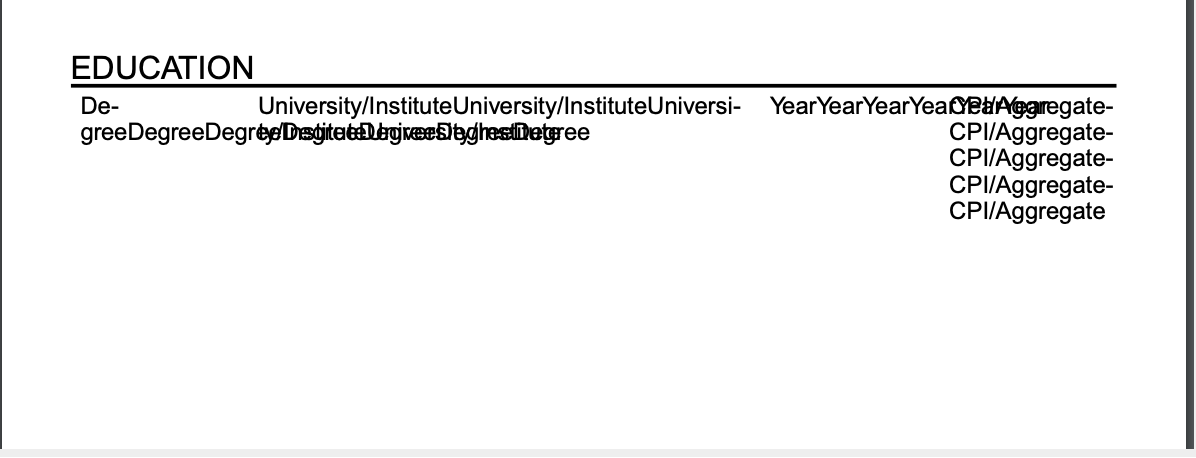
The css word-break property does not work.
How to replicate issue including code snippet (if applies):
http://i.imgur.com/9LBq4um.png
REPL : REPL example
 antonin-arquey
All 10 comments
It's not supported actually 😄
Thanks for reporting it. Keeping this open for future implementation
 diegomura
on 25 Jun 2018
diegomura
on 25 Jun 2018
Using flex instead of flexGrow solves this issue. Please refer to #523
diegomura
on 14 Apr 2019
@diegomura but word-break is still not implemented. Can I help somehow?
 tommmyy
on 15 May 2019
tommmyy
on 15 May 2019
I have the same problem. It is working fine when I am typing words with spaces but when it has no spaces, it overflows from it's container and overlap other text. I am using flex with four Text inside View. Looking for help so that it can break on the new line like word-break property in css.
 hardikmodi1
on 29 May 2019
hardikmodi1
on 29 May 2019
As a temporary solution you can insert SOFT-HYPHEN chars In the valid breaking points (after each / in your case, for example)
https://www.fileformat.info/info/unicode/char/00ad/index.htm
diegomura
on 29 May 2019
I hope following snippet will help you:
import { isString } from 'ramda-extension';
import { curry, compose, o, join, map, split, splitEvery } from 'ramda';

const makeBreaks = curry((breakChar, maxLength, input) =>
    compose(
        join(''),
        map(o(join(breakChar), splitEvery(maxLength))),
        split(/(\s+)/g)
    )(input)
);

const Text = ({ hardBreakAfter, breakChar, children, ...rest }) => (
    <BaseText {...rest}>
        {isString(children) ? makeBreaks(breakChar, hardBreakAfter, children) : children}
    </BaseText>
);

Text.propTypes = {
    breakChar: PropTypes.string,
    children: PropTypes.node,
    hardBreakAfter: PropTypes.number,
};

Text.defaultProps = {
    fontFamily: 'body',
    hardBreakAfter: 10,
    breakChar: '\u00ad',
};
I've run into a similar issue and using flex instead of flexGrow doesn't fix it. I have urls in a column that are breaking to 2 lines and there's a hyphen inserted. This is not appropriate in this case because the added hyphen makes the url incorrect. So if there's text in the pdf that says "Visit subdomain.myexampledomain.com" and it breaks to 2 lines and adds a hyphen "Visit subdomain.myexampledo-main.com" now the url is incorrect.
I learned about Font.registerHyphenationCallback(word => [word]) to turn off hyphenation, but now the url is wider than its container and when I try to use word-break: break-all to break without hyphenation isn't supported.
Here's a version of @antonin-arquey REPL example with my non hyphenate url use case.
I hope we can find a workaround or reopen this issue. Thanks for listening.
 rblakejohnson
on 3 Sep 2019
rblakejohnson
on 3 Sep 2019
@rblakejohnson, please were you able to solve the above issue?
 idrisadetunmbi
on 28 Nov 2019
idrisadetunmbi
on 28 Nov 2019
My workaround was to adjust column widths in my layout.
Thanks,
Blake
On Thu, Nov 28, 2019 at 10:53 AM Idris Adetunmbi < Idris Adetunmbi ( Idris Adetunmbi notifications@github.com ) > wrote:
@rblakejohnson ( https://github.com/rblakejohnson ) , please were you able
to solve the above issue?—
You are receiving this because you were mentioned.
Reply to this email directly, view it on GitHub (
https://github.com/diegomura/react-pdf/issues/248?email_source=notifications&email_token=AAHV2FOGQDXYYR4PV5RWA3DQWAAQBA5CNFSM4FGW5S32YY3PNVWWK3TUL52HS4DFVREXG43VMVBW63LNMVXHJKTDN5WW2ZLOORPWSZGOEFNGRNY#issuecomment-559573175
) , or unsubscribe (
https://github.com/notifications/unsubscribe-auth/AAHV2FJCDMLSRYI4Y3IHFC3QWAAQBANCNFSM4FGW5S3Q
).
rblakejohnson
on 3 Dec 2019
I would also like this functionality :)
 1Jesper1
on 1 Oct 2020
1Jesper1
on 1 Oct 2020
Related issues
 theobat
·
3Comments
theobat
·
3Comments
 yellowBanano
·
3Comments
yellowBanano
·
3Comments
 mdodge-ecgrow
·
3Comments
mdodge-ecgrow
·
3Comments
 brandly
·
3Comments
brandly
·
3Comments
 emt1803
·
3Comments
emt1803
·
3Comments
Most helpful comment
I've run into a similar issue and using
flexinstead offlexGrowdoesn't fix it. I have urls in a column that are breaking to 2 lines and there's a hyphen inserted. This is not appropriate in this case because the added hyphen makes the url incorrect. So if there's text in the pdf that says "Visit subdomain.myexampledomain.com" and it breaks to 2 lines and adds a hyphen "Visit subdomain.myexampledo-main.com" now the url is incorrect.I learned about
Font.registerHyphenationCallback(word => [word])to turn off hyphenation, but now the url is wider than its container and when I try to useword-break: break-allto break without hyphenation isn't supported.Here's a version of @antonin-arquey REPL example with my non hyphenate url use case.
I hope we can find a workaround or reopen this issue. Thanks for listening.