React-pdf: Text layer is not directly on top of canvas
All 14 comments
Hey @admehta01,
thank you for this example!
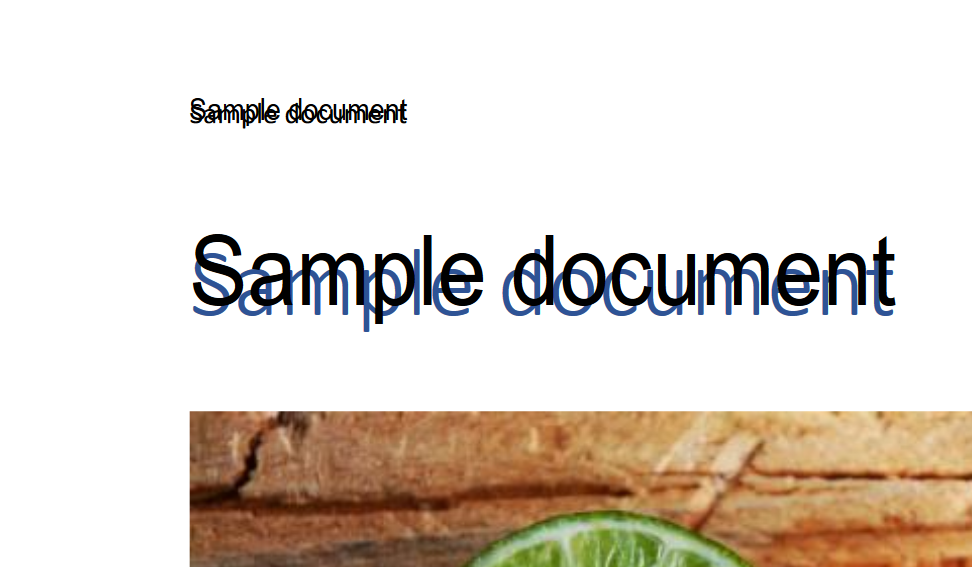
Rendering text content accurately is super hard. The more examples the better, as this helps me fine tune some settings that create text selection where it should be. Although Mozilla tried and surrendered - their selection is simply a rectangle, and behind this rectangle is usually severely misaligned text in Times New Roman. They sacrificed perfect alignment on most PDFs to get rid of extreme cases. In non-extreme cases, here's how it looks:
Mozilla's approach:
My approach:
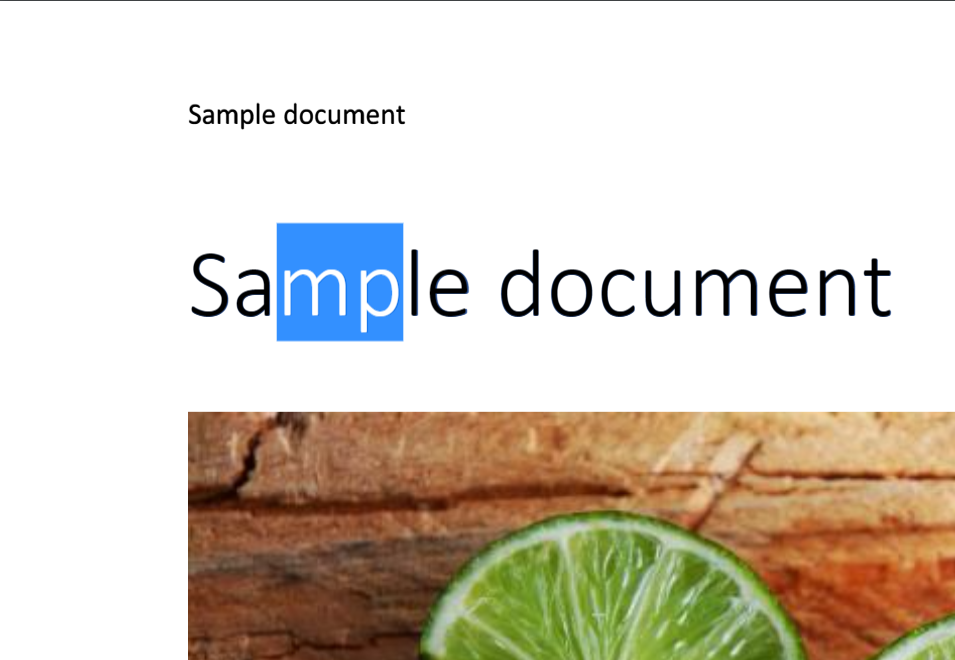
So, I'll try my best to figure out if we can make this selection better in your case by careful analysis of font data inside, but I can't promise you anything... :(
Thanks for understanding!
Wojciech
 wojtekmaj
on 16 Nov 2017
wojtekmaj
on 16 Nov 2017
Hey @admehta01,
I'm super excited to announce that in v2.3.0 experimental support for SVG rendering was added. As I said, it is experimental, but if the PDFs you want to display are not super fancy, you might want to try it out!
Why? Because SVG rendering gets rid of text layers altogether :)
wojtekmaj
on 17 Nov 2017
Awesome, thanks for the quick turnaround! But we embed <span>s inside the text layer <div>s (for highlighting certain portions of text) based on character count from top of document, and it looks like that won't work if we switch to <svg>. SVG rendering does look pretty sweet though.
 admehta01
on 17 Nov 2017
admehta01
on 17 Nov 2017
Uh, that's too bad! I hope that
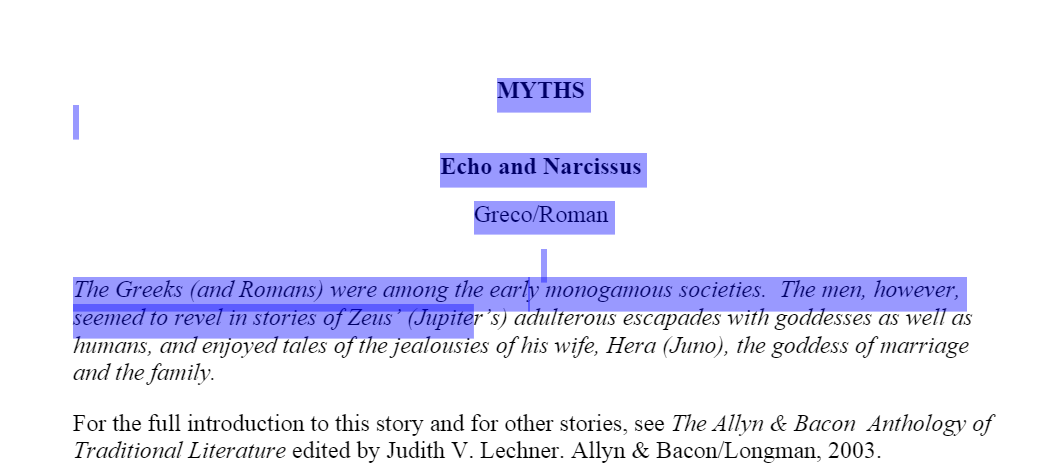
I found a solution for you though! If you only can accept custom color of selection, you can do:
.ReactPDF__Page__textContent div {
    opacity: 0.5;
}

.ReactPDF__Page__textContent div::selection {
    background-color: blue;
}
and this will entirely hide the text rendered in text layer!
Here's how it looks:
wojtekmaj
on 17 Nov 2017
Sorry was out of town, but just checked out your solution. Looks pretty good...thanks!
admehta01
on 28 Nov 2017
Hmm, upon testing of more PDFs, it seems it's very off in some cases whereas Mozilla PDF js is perfectly aligned.
Here are some of the test docs I am using: PDF1 PDF2 PDF3 PDF4
Any ideas?
admehta01
on 19 Dec 2017
hey! i found the problem, i will do a merge request soon
it because u r scaleX is calculated based on a scaled version.
it needs to be reset before calculating
 nurtureJamesTan
on 21 Dec 2017
nurtureJamesTan
on 21 Dec 2017
hi,
here is the fix, please help to test if it works on your browser
https://github.com/wojtekmaj/react-pdf/pull/121
nurtureJamesTan
on 21 Dec 2017
This will move it up a little bit, but not resolve the cases where it is very off.
See the PDFs in my comment 3 days ago.
admehta01
on 21 Dec 2017
I noticed the viewport.viewBox coming from Mozilla PDF.js was starting with non zero coordinates on these PDFs.
Adding this code to PageTextContent.jsx in renderTextItem() worked:
const { unrotatedViewport: viewport } = this;
left -= viewport.viewBox[0];
baselineBottom -= viewport.viewBox[1];
Hey @admehta01, thanks for looking into it! I'll try to merge it all nicely. Glad you provided these examples, too!
wojtekmaj
on 26 Dec 2017
Fixed in 2.5.0. Let me know what you think!
wojtekmaj
on 27 Dec 2017
while zooming pdf the text breaks and looks blurred..please provide a solution to fix that
 Abishek-Sudhakaran
on 10 Apr 2019
Abishek-Sudhakaran
on 10 Apr 2019
@Abishek-Sudhakaran You've got to make sure that PDF you're rendering fits in whatever container you prepared for it. Otherwise, browser will try to squish parts of the PDF. It will fail to do so with the page in its graphical form, of course, but not with the text layer.
wojtekmaj
on 1 May 2019
Related issues
wojtekmaj
·
4Comments
 Kerumen
·
3Comments
Kerumen
·
3Comments
 shivekkhurana
·
4Comments
shivekkhurana
·
4Comments
 SandMoshi
·
3Comments
SandMoshi
·
3Comments
 webguru103
·
3Comments
webguru103
·
3Comments
Most helpful comment
Hey @admehta01,
I'm super excited to announce that in v2.3.0 experimental support for SVG rendering was added. As I said, it is experimental, but if the PDFs you want to display are not super fancy, you might want to try it out!
Why? Because SVG rendering gets rid of text layers altogether :)