React-number-format: Empty input on disable
Hi,
I have toggle which can disable input and set value to undefined.
<NumberFormat
              onValueChange={(values) => setState(values.floatValue)}
              disabled={!isEnabled}
              customInput={Input}
              decimalScale={0}
              allowNegative={false}
              value={value} // can be number or undefined
            />
Describe the issue and the actual behavior
On disabling input becomes empty and placeholder appears
Describe the expected behavior
On disabling input has previous entered value
Please check the browsers where the issue is seen
- [x] Chrome
- [ ] Chrome (Android)
- [ ] Safari (OSX)
- [ ] Safari (iOS)
- [ ] Firefox
- [ ] Firefox (Android)
 Krakof
All 6 comments
@Krakof Thanks for reporting this. I was able to create a demo with the expected behavior. When disabling the input, the field is disabled with the entered value. I see that you are using a customInput for your use-case. Can you please provide a CodeSandbox demo link, if that's possible. This will help us investigate it a little better.
Here's the link to the demo I created for this use-case: https://codesandbox.io/s/input-disabled-demo-ke9f6

 nikhil-varma
on 11 Mar 2021
nikhil-varma
on 11 Mar 2021
@nikhil-varma Thanks for your reply
Actually the whole flow is:
On enabling I need to set min value to 1 and on disabling set value to undefined. Please check this demo https://codesandbox.io/s/broken-mountain-yi48g?file=/src/App.js
Krakof
on 11 Mar 2021
@Krakof Thanks! This doesn’t look like a library issue
Simple answer
- To solve this, what you can do is to set the value to an empty string when it is disabled and to 1 if it is enabled.
- According to what I have understood debugging the React code, it looks like when you pass
undefinedto the input as value, it does not update it toundefinedand neither does not empty it out. It will assign the previous value as is, and you will see no change to the input field. I have demonstrated this in the sandbox link as well. - Please refer this: https://codesandbox.io/s/input-disabled-demo-ke9f6 and you can refer the details below for understanding it a little better
Some details
- If you look at the vanilla DOM input interface, you will find that the data type of the
valueattribute is as follows:
[TreatNullAs=EmptyString] attribute DOMString value;- For more information you can visit: https://www.w3.org/TR/html50/forms.html#the-input-element
This would mean, for the DOM input
- If you provide
nullto any field of any type, it will become empty - If you provide any value to any field of any type, it will take it as a string
- If you provide
undefined,
- to a text field
- it will convert the
undefinedvalue to a string and then assign the "undefined" string to the input element
- it will convert the
- to a number field
- it will empty the field out, but you will be get a range error warning, because of a precision calculation error
- to a text field
- I have demonstrated the behaviour in the video
- For type text:
- For type number:
- For type text:
- If you provide
But in React, the updates for
undefinedandnulldon’t quite behave in the same way. It is not recommended to set input value toundefined/nullsince it will not empty the input field rather stick to the last updated value. To clear out the field value, you can use empty string.- For ref checkout this function: https://github.com/facebook/react/blob/master/packages/react-dom/src/client/ReactDOMInput.js#L136
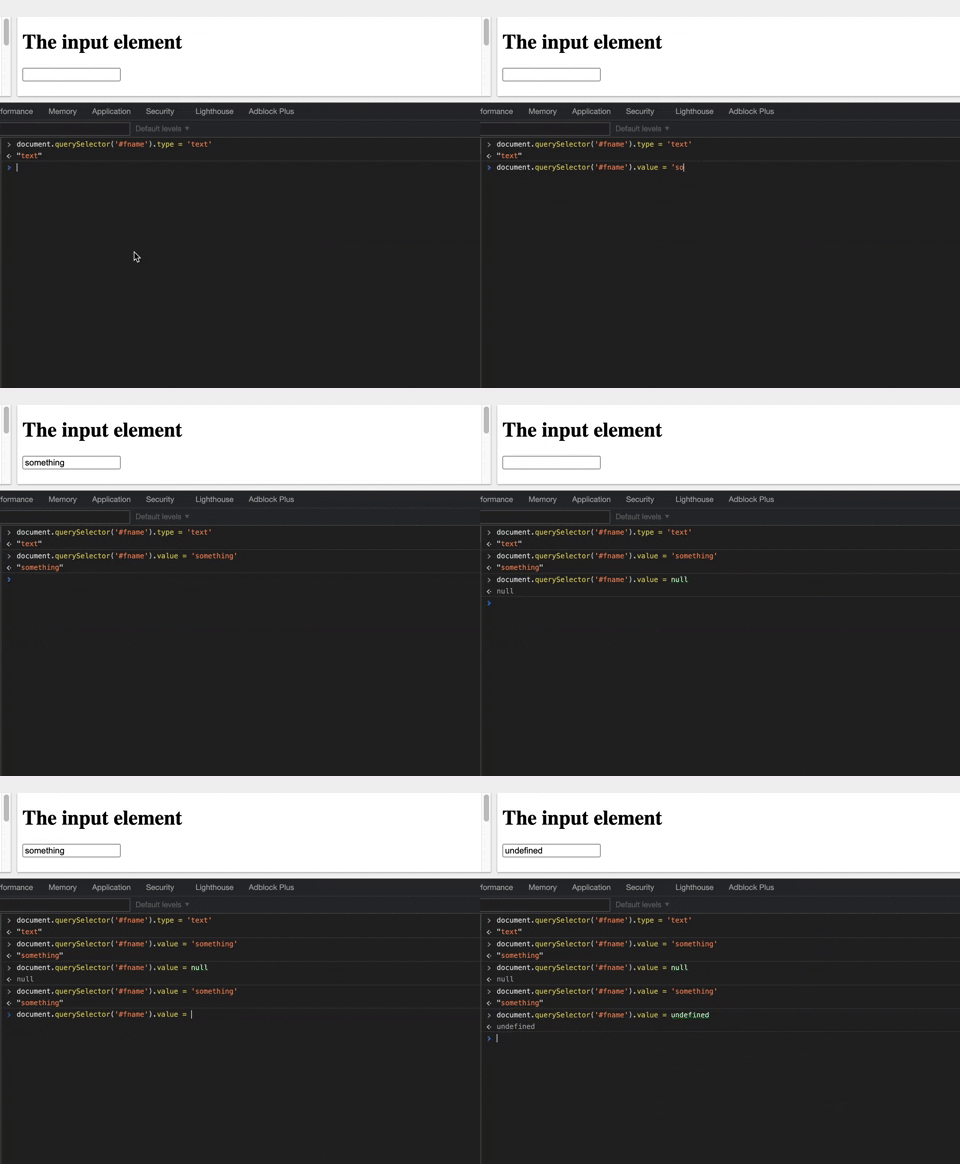
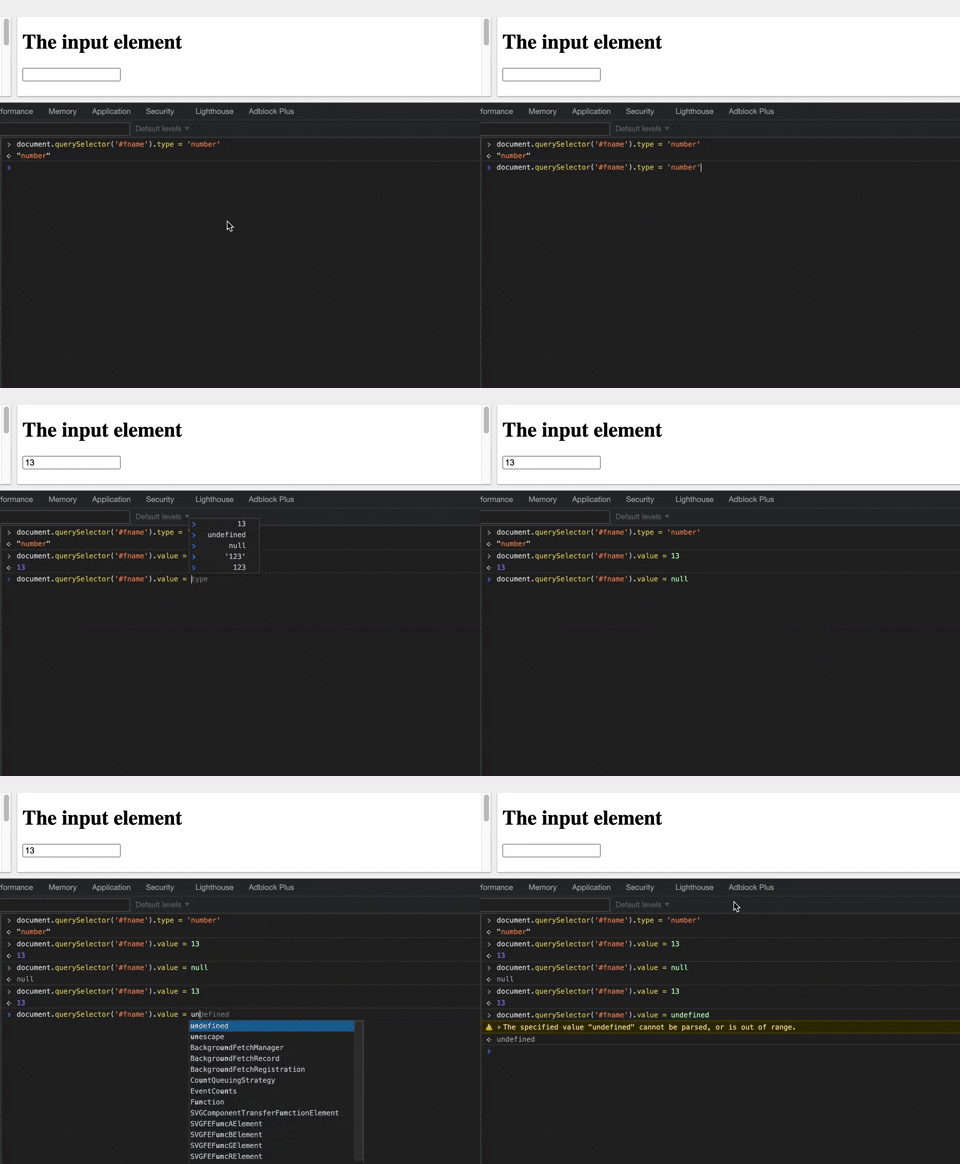
Hope this helps resolve the issue and also understand how input field works in a brief way
nikhil-varma
on 12 Mar 2021
As @nikhil-varma mentioned you will have to set the value as empty string on undefined / null. If you want to keep it controlled.
<NumberFormat
              onValueChange={(values) => setState(values.floatValue)}
              disabled={!isEnabled}
              customInput={Input}
              decimalScale={0}
              allowNegative={false}
              value={value === undefined ? '' : value} // can be number or undefined
            />
 s-yadav
on 12 Mar 2021
s-yadav
on 12 Mar 2021
@nikhil-varma Thanks a lot for your explanation
Krakof
on 13 Mar 2021
@Krakof You're welcome!
nikhil-varma
on 14 Mar 2021
Related issues
 theonelucas
·
8Comments
theonelucas
·
8Comments
 tanya94
·
3Comments
tanya94
·
3Comments
 nourahassan
·
5Comments
nourahassan
·
5Comments
 rioarray
·
6Comments
rioarray
·
6Comments
 maitedev
·
7Comments
maitedev
·
7Comments
Most helpful comment
As @nikhil-varma mentioned you will have to set the value as empty string on undefined / null. If you want to keep it controlled.