React-number-format: ThousandSeparator with leading zeros
The thousandSeparator is also added if your number starts with leading zeros. Consider the following (standard) configuration:
<NumberFormat thousandSeparator="," decimalSeparator="." />
When you enter 0123 it will be displayed as 0,123
The problem that arises with this is that we have some users who want to enter a decimal point as a comma (,). So you type:
0: The field now shows0,: The field still shows01: The field shows012: The field shows0123: The field now shows0,123
If you don't pay close attention, you get the feeling that you correctly entered 0.123. Only after the next blur event, you will see that you actually entered 123.
So the question is: Would it be possible to only append the thousandSeparator in places where the value is _actually_ bigger than a thousand, discounting leading zeros?
That would mean that 0123 would be displayed as 0123 rather than 0,123.
Frankly, it seems to work for numbers with more than 4 characters, as 01234 is correctly displayed as 01,234.
 TkDodo
All 5 comments
Here is a codeSandbox that shows the output:
https://codesandbox.io/s/q5v85j32j
If you enter 0123, you get:
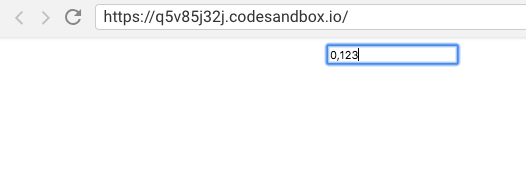
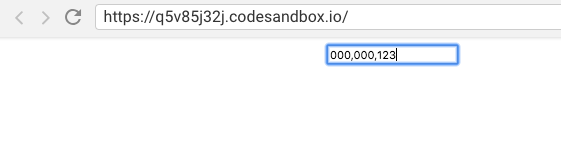
If you enter 000000123, you can also see two unneeded thousandSeparators:
TkDodo
on 6 Mar 2019
Agree, The thousand separator should ignore leading zeros. Will fix this.
 s-yadav
on 10 Mar 2019
s-yadav
on 10 Mar 2019
Thanks a lot for fixing this 🙏 ! When can we expect release 4.0.7?
TkDodo
on 19 Mar 2019
In npm it was already there. Added it on releases as well.
s-yadav
on 19 Mar 2019
I was just going to ask a question about this 😄
 benfluleck
on 21 Mar 2019
benfluleck
on 21 Mar 2019
Related issues
 tenkij
·
6Comments
tenkij
·
6Comments
 nourahassan
·
5Comments
nourahassan
·
5Comments
 sezarthiago
·
7Comments
sezarthiago
·
7Comments
 ddmedeiros
·
6Comments
ddmedeiros
·
6Comments
 arpontes
·
7Comments
arpontes
·
7Comments
Most helpful comment
In npm it was already there. Added it on releases as well.