React-native: [CameraRoll] Image Orientation Bug
This is blocking bug for us. I have seen a couple of issues and followed the suggest tips but I am still unable to get this image to render with proper orientation. This issue #1567 make reference to the bug and memory issues large camera rolls.
Here is an example of what I am talking about as you can see top image is rotated incorrectly. Doesn't happen with all images though oddly enough.

 myusuf3
All 35 comments
@a2 ping
myusuf3
on 2 Jul 2015
@brentvatne ping
myusuf3
on 2 Jul 2015
@myusuf3 - I'm not familiar with this part of the codebase, it sucks that it's a blocking issue for you :( perhaps @nicklockwood has some insight
 brentvatne
on 2 Jul 2015
brentvatne
on 2 Jul 2015
That would be awesome @nicklockwood if you could provide some insight!
myusuf3
on 2 Jul 2015
I don't have time to investigate this fully right now, however I have a theory about what the issue is.
UIImage has a concept of orientation which may be being ignored when the image is drawn.
The orientation metadata means that images in the camera roll aren't necessarily stored "right-way-up" on disk, but are instead rotated to the correct angle when drawn by iOS. If we're not taking the orientation into account, it would explain why some images are rotated and others aren't.
 nicklockwood
on 2 Jul 2015
nicklockwood
on 2 Jul 2015
@myusuf3 does the orientation appear differently on your thumbnails than it does on the Apple Photos app ?
 VonD
on 2 Jul 2015
VonD
on 2 Jul 2015
Some reading on orientation for those interested: http://www.daveperrett.com/articles/2012/07/28/exif-orientation-handling-is-a-ghetto/
 ide
on 2 Jul 2015
ide
on 2 Jul 2015
@ide thanks for the article. nice read!
VonD
on 2 Jul 2015
@VonD yes it does appear differently in both places. correct in the photos app and broken in our react application.
myusuf3
on 2 Jul 2015
@myusuf3 OK, here's a little experiment : a photo of my keyboard taken in the 4 orientations. Below are two screenshots : on the top the Photos app, on the bottom my RN app. The orientations seem consistent. I'm using RN 0.6.0 + the patch provided here : #1567 , and the screenshots are from a device with ios 8.3. How does this test work for you ?

VonD
on 3 Jul 2015
Is this the patch exactly? Just so we are clear.
  if ([imageTag hasPrefix:@"assets-library"]) {
    [[RCTImageLoader assetsLibrary] assetForURL:[NSURL URLWithString:imageTag] resultBlock:^(ALAsset *asset) {
      if (asset) {
        // ALAssetLibrary API is async and will be multi-threaded. Loading a few full
        // resolution images at once will spike the memory up to store the image data,
        // and might trigger memory warnings and/or OOM crashes.
        // To improve this, process the loaded asset in a serial queue.
        dispatch_async(RCTImageLoaderQueue(), ^{
          // Also make sure the image is released immediately after it's used so it
          // doesn't spike the memory up during the process.
          @autoreleasepool {
            ALAssetRepresentation *representation = [asset defaultRepresentation];
            ALAssetOrientation orientation = [representation orientation];
            UIImage *image = [UIImage imageWithCGImage:[asset thumbnail] scale:1.0f orientation:UIImageOrientationUp];
            RCTDispatchCallbackOnMainQueue(callback, nil, image);
          }
        });
This to me doesn't make sense since you are forcing all the images in the up orientation which should result in everything that wasn't take in up orientation to be broken.
myusuf3
on 3 Jul 2015
@VonD ^^^ If so that doesn't solve the issue for me.
myusuf3
on 3 Jul 2015
@myusuf3 I mean I can't say for certain that will work. It was just a thought. My thought was that the -thumbnail method is documented as performing the rotation for you and having an Up image orientation.
 a2
on 3 Jul 2015
a2
on 3 Jul 2015
So if I apply thumbnail [asset thumbnail] it will put everything in the up position once its done? @a2 Anyways I got that piece working and things in the application aren't flipped anymore. I was using a custom Image component in the camera roll screen. I will fix my PR #1842 to reflect it.
myusuf3
on 3 Jul 2015
@myusuf3 What's the status for orientation issue? Do you have a fork which works for you?
 ptmt
on 3 Aug 2015
ptmt
on 3 Aug 2015
This should be fixed now. If not, please re-open.
nicklockwood
on 3 Aug 2015
@nicklockwood Orientation doesn't work for me on current master. When rnplay.org will update to 0.9.0 I'll post example there, maybe there is some misunderstanging.
ptmt
on 3 Aug 2015
@unknownexception I am still patching the file for it to work. I hoping to see if this #2008 was merged into 0.8.0 so we could ditch this patch we currently have in our code which works well. @nicklockwood can you confirm that PR was merged in?
myusuf3
on 3 Aug 2015
@myusuf3 Changes from #2008 were committed to master on 7/21 (https://github.com/facebook/react-native/commit/9c73e2ff7aeac8c65f25472135e4c0410f797eea). @nicklockwood committed additional enhancements shortly thereafter (https://github.com/facebook/react-native/commit/85cb35c51439a17c0961cc80518d2e979d7279c0).
Merged into 0.9.0-rc. Please let us know if your issue is resolved.
 aroth
on 3 Aug 2015
aroth
on 3 Aug 2015
@unknownexception @myusuf3 @nicklockwood I've created PR #2214 to resolve this. The original fix was overwritten by other recent camera roll enhancements.
aroth
on 3 Aug 2015
@aroth @myusuf3 can you provide some sample photos that show at the wrong orientation in the camera roll example? I've tried taking photos in all orientations with the camera, but they always show the right way up even without @aroth's fix, and I don't want to merge it unless I can verify that it works.
nicklockwood
on 4 Aug 2015
@nicklockwood Screenshots from device attached below (iPhone 6).
_Without fix on device_

_With fix on device_

aroth
on 4 Aug 2015
@aroth can confirm, that fixed some cases. Thank you for your fix.
ptmt
on 5 Aug 2015
I've got the same problem here.
My images get from CameraRoll has a bad orientation.

When I read message above seems to be fixed...
Do you have an idea when it will be in a released version?
Best regards,
Tom
ps: You are making an awesome job guys! Thank you!
 thomashermant
on 27 Aug 2015
thomashermant
on 27 Aug 2015
@thomashermant The fix for this has been included in 0.11-rc.
aroth
on 27 Aug 2015
its not in 0.10.0? ugh.
myusuf3
on 27 Aug 2015
@brentvatne this is fixed already in .11. Close.
 browniefed
on 13 Sep 2015
browniefed
on 13 Sep 2015
Reopen... I have the same problem in RN 0.43.

Reproduction:
I made 1 photos, next I close camera, reopen and made 2 photos:

 pawellewandowski
on 22 Apr 2017
pawellewandowski
on 22 Apr 2017
Same problem, did you manage to resolve yours after the month or so?
 seancunningham
on 24 May 2017
seancunningham
on 24 May 2017
@pawellewandowski Have you resolved this issue? I have this with RN 0.48.3 and 16.0.0-alpha.12
 Iyoss
on 16 Oct 2017
Iyoss
on 16 Oct 2017
Still hapenning in 0.51.0
https://stackoverflow.com/questions/48350067/image-orientation-issue-in-android-react-native
 jose920405
on 19 Jan 2018
jose920405
on 19 Jan 2018
I'm getting this issue on iOS using React Native v0.52.0
 ewein
on 8 Feb 2018
ewein
on 8 Feb 2018
Getting this issue on Android, React Native 0.55
 phillmill
on 29 May 2018
phillmill
on 29 May 2018
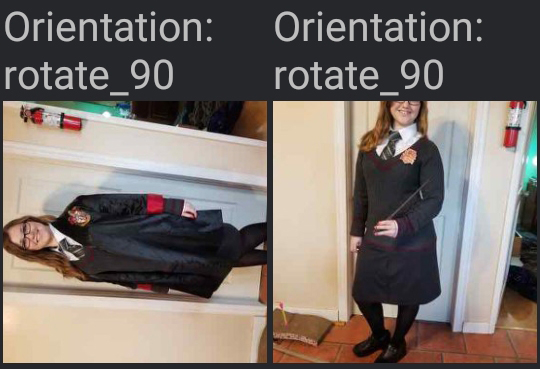
Hey @jose920405 I see you used react-native-exif to fix your issue (in the stackoverflow article). I gave it a try, but the thing is, is it's telling me to rotate images 90 degrees correctly, but in other instances it's also telling me to rotate images that are _already_ correct.
Below is a screenshot of two images, both of which are actually portrait images (and display as portrait in default gallery app). But as you can see, the Exif value says rotate 90 for both :S.
edit: this is on android / samsung galaxy s8+
phillmill
on 22 Jun 2018
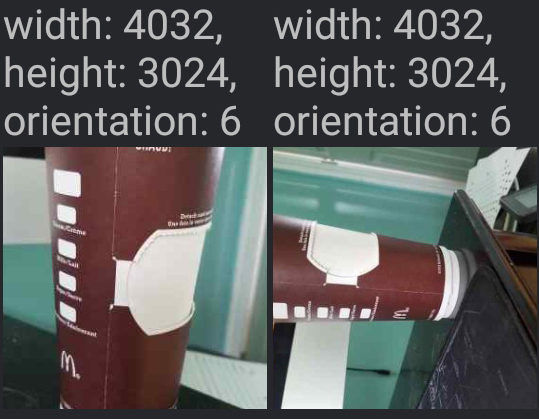
Here is some more context:
- Both photos below were taken as portrait
- Both are reporting dimensions of 4032x3024 (via CameraRoll.getPhotos())
- Both exif orientation values are "6" (which is supposed to mean rotate 90 degrees)
phillmill
on 23 Jun 2018
Related issues
 ghost
·
3Comments
ghost
·
3Comments
 vikeri
·
3Comments
vikeri
·
3Comments
 upbit
·
3Comments
upbit
·
3Comments
 DreySkee
·
3Comments
DreySkee
·
3Comments
 oney
·
3Comments
oney
·
3Comments
Most helpful comment
@pawellewandowski Have you resolved this issue? I have this with RN 0.48.3 and 16.0.0-alpha.12