React-native: Type annotations can only be used in TypeScript files.ts(8010) on React-Native CLI Startup
Please provide all the information requested. Issues that do not follow this format are likely to stall.
Description
I have created like 2 starter project in ReactNative using npx react-native init [projectName], and that error in the title always comes with the starter code, precisely on line 27.
React Native version:
System:
OS: Windows 10 10.0.18362
CPU: (2) x64 Intel(R) Celeron(R) 2957U @ 1.40GHz
Memory: 1.76 GB / 7.89 GB
Binaries:
Node: 12.17.0 - C:\Program Filesnodejsnode.EXE
Yarn: 1.22.4 - C:\Program Files (x86)\Yarn\bin\yarn.CMD
npm: 6.14.4 - C:\Program Filesnodejs\npm.CMD
Watchman: Not Found
SDKs:
Android SDK: Not Found
IDEs:
Android Studio: Version 3.6.0.0 AI-192.7142.36.36.6392135
Languages:
Java: javac 12
Python: Not Found
npmPackages:
@react-native-community/cli: Not Found
react: 16.11.0 => 16.11.0
react-native: 0.62.2 => 0.62.2
npmGlobalPackages:
react-native: Not Found
Steps To Reproduce
Provide a detailed list of steps that reproduce the issue.
- Create a new react native project
- Open the starter code from any editor, i use VScode.
- Go to App.js and scroll to line 27.
- Hold on a little bit then the error would occur.
Expected Results
Since it is a starter code from the react-native team, which helps new developers to understand the codebase and how it works, that error should not be there. It can scare a new developer coming into ReactNative.
Snack, code example, screenshot, or link to a repository:
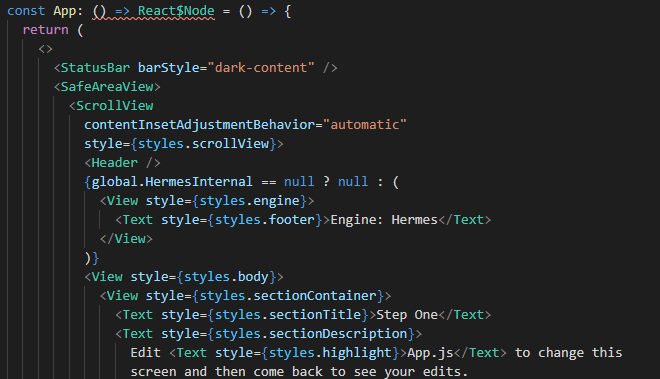
 KelvnPere
All 8 comments
Getting same issue ....

 rkratnesh852
on 15 Jun 2020
rkratnesh852
on 15 Jun 2020
rkratnesh852
on 15 Jun 2020
rkratnesh852
on 15 Jun 2020
:100: This can be closed now. The answer is correct!
 ecreeth
on 30 Jul 2020
ecreeth
on 30 Jul 2020
Does anyone have the solution to this ???
 kulbir914
on 23 Aug 2020
kulbir914
on 23 Aug 2020
Hi all the reason for this is that React Native template ships with a flow config. This error is a result of your VSCode plugins not working playing well with flow.
This should help you resolve the error!
 safaiyeh
on 24 Aug 2020
safaiyeh
on 24 Aug 2020
Quick fix:
Set "javascript.validate.enable": false in your VS Code settings.
 luojinghui
on 27 Aug 2020
luojinghui
on 27 Aug 2020
https://stackoverflow.com/a/50726464/7344761
This worked for me ..quick fix!!
Simply go to VS Code >>File>>Preferences>>Settings >> go to javascript(or search javascript and scroll down)>validate> enable/disable >>disable or uncheck
 khaja-nizamuddin1
on 2 Sep 2020
khaja-nizamuddin1
on 2 Sep 2020
i use this link and help me fix this issues
https://www.youtube.com/watch?v=UQV2HMQZK4o
or this but is some video
https://www.facebook.com/watch/?v=2782095745399197&extid=T54ZcHrD4BPCy62c
 dmassissa
on 28 Sep 2020
dmassissa
on 28 Sep 2020
Related issues
 lazywei
·
3Comments
lazywei
·
3Comments
 jobsamuel
·
3Comments
jobsamuel
·
3Comments
 ghost
·
3Comments
ghost
·
3Comments
 WG-Com
·
3Comments
WG-Com
·
3Comments
 arunabha
·
3Comments
arunabha
·
3Comments
Most helpful comment
Quick fix:
Set
"javascript.validate.enable": falsein your VS Code settings.