React-native: Declaration of 'YGValue must be imported from module 'yoga' before it is required
Description
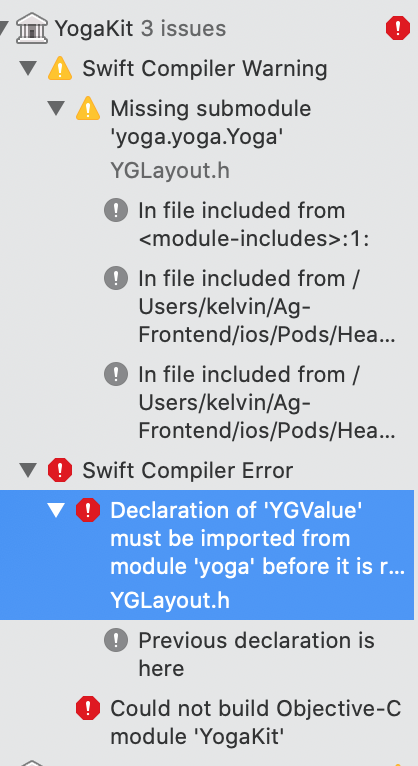
A fresh installation gives me an error on iOS: declaration of 'YGValue' must be imported from module 'yoga' before it is required
React Native version:
System:
    OS: macOS Mojave 10.14.6
    CPU: (4) x64 Intel(R) Core(TM) i7-7660U CPU @ 2.50GHz
    Memory: 406.34 MB / 8.00 GB
    Shell: 3.0.2 - /usr/local/bin/fish
  Binaries:
    Node: 13.8.0 - /usr/local/bin/node
    Yarn: 1.22.0 - /usr/local/bin/yarn
    npm: 6.13.7 - /usr/local/bin/npm
    Watchman: 4.9.0 - /usr/local/bin/watchman
  Managers:
    CocoaPods: 1.5.3 - /usr/local/bin/pod
  SDKs:
    iOS SDK:
      Platforms: iOS 12.1, macOS 10.14, tvOS 12.1, watchOS 5.1
    Android SDK:
      API Levels: 23, 26, 27, 28, 29
      Build Tools: 23.0.1, 26.0.2, 26.0.3, 27.0.3, 28.0.2, 28.0.3, 29.0.2
      System Images: android-28 | Google APIs Intel x86 Atom, android-28 | Google Play Intel x86 Atom, android-28 | Google Play Intel x86 Atom_64
      Android NDK: Not Found
  IDEs:
    Android Studio: 3.4 AI-183.5429.30.34.5452501
    Xcode: 10.1/10B61 - /usr/bin/xcodebuild
  Languages:
    Python: 2.7.16 - /usr/local/bin/python
  npmPackages:
    @react-native-community/cli: Not Found
    react: 16.11.0 => 16.11.0
    react-native: 0.62.1 => 0.62.1
  npmGlobalPackages:
    *react-native*: Not Found
Snack, code example, screenshot, or link to a repository:
__Screenshot__
Reproducible demo
npx react-native init AwesomeProjectnpx react-native run-ios
 shukerullah
All 13 comments
Same issue.
 NickyYo
on 6 Apr 2020
NickyYo
on 6 Apr 2020
The same thing happened to me
 FTD-ZF
on 7 Apr 2020
FTD-ZF
on 7 Apr 2020
| :warning: | Missing Reproducible Example |
|---|---|
| :information_source: | It looks like your issue is missing a reproducible example. Please provide a Snack or a repository that demonstrates the issue you are reporting in a minimal, complete, and reproducible manner. |
![github-actions[bot] picture](https://avatars2.githubusercontent.com/in/15368?v=4&s=40) github-actions[bot]
on 7 Apr 2020
github-actions[bot]
on 7 Apr 2020
Can you explicitly list all the steps taken to get to this state?
 hramos
on 7 Apr 2020
hramos
on 7 Apr 2020
New react-native project, version is "0.62.0 ", execute the command pod install in the ios directory, open the ios directory with xcode, compile, and report an error, is it the version of xcode? My xcode version is 10.1
FTD-ZF
on 8 Apr 2020
New react-native project, version is "0.62.0 ", execute the command pod install in the ios directory, open the ios directory with xcode, compile, and report an error, is it the version of xcode? My xcode version is 10.1
I have same Xcode version 10.1
shukerullah
on 8 Apr 2020
Seems to be the same as react-native-community/upgrade-support#20.
 lucasbento
on 8 Apr 2020
lucasbento
on 8 Apr 2020
After updating cocoapods to 1.9.1, it's working fine.
shukerullah
on 8 Apr 2020
Awesome, thanks for reporting back @shukerullah!
Closing this as it's resolved.
lucasbento
on 8 Apr 2020
After updating cocoapods to
1.9.1, it's working fine.
That was it. Thank you :)
 shumin
on 11 Apr 2020
shumin
on 11 Apr 2020
After updating cocoapods to
1.9.1, it's working fine.
This really works. Thank you :-)
 MehulOpenxcell
on 1 Jun 2020
MehulOpenxcell
on 1 Jun 2020
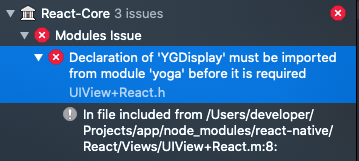
Even after updating cocoapods to 1.9.3 i'm still getting this error.
Xcode 12
System:
    OS: macOS 10.15.6
    CPU: (4) x64 Intel(R) Core(TM) i5-3210M CPU @ 2.50GHz
    Memory: 361.71 MB / 8.00 GB
    Shell: 3.0.2 - /usr/local/bin/fish
  Binaries:
    Node: 10.22.1 - ~/.nvm/versions/node/v10.22.1/bin/node
    Yarn: 1.22.4 - /usr/local/bin/yarn
    npm: 6.14.6 - ~/.nvm/versions/node/v10.22.1/bin/npm
    Watchman: 4.9.0 - /usr/local/bin/watchman
  Managers:
    CocoaPods: 1.9.3 - /Users/developer/.rvm/gems/ruby-2.7.0-preview1/bin/pod
  SDKs:
    iOS SDK:
      Platforms: iOS 14.0, DriverKit 19.0, macOS 10.15, tvOS 14.0, watchOS 7.0
    Android SDK:
      API Levels: 23, 25, 26, 27, 28, 29
      Build Tools: 27.0.3, 28.0.0, 28.0.3, 29.0.0, 29.0.0, 29.0.2, 29.0.3, 30.0.0
      System Images: android-26 | Intel x86 Atom, android-26 | Google Play Intel x86 Atom, android-27 | Intel x86 Atom, android-28 | Intel x86 Atom, android-28 | Google APIs Intel x86 Atom, android-28 | Google Play Intel x86 Atom, android-29 | Google APIs Intel x86 Atom
      Android NDK: Not Found
  IDEs:
    Android Studio: 3.6 AI-192.7142.36.36.6241897
    Xcode: 12.0/12A7209 - /usr/bin/xcodebuild
  Languages:
    Java: 1.8.0_212-release - /Applications/Android Studio.app/Contents/jre/jdk/Contents/Home/bin/javac
    Python: 2.7.16 - /usr/local/bin/python
  npmPackages:
    @react-native-community/cli: Not Found
    react: 16.13.1 => 16.13.1
    react-native: 0.63.3 => 0.63.3
    react-native-macos: Not Found
  npmGlobalPackages:
    *react-native*: Not Found
PodFile
require_relative '../node_modules/react-native/scripts/react_native_pods'
require_relative '../node_modules/@react-native-community/cli-platform-ios/native_modules'
require_relative '../node_modules/react-native-unimodules/cocoapods.rb'

platform :ios, '10.0'

target 'cmapp' do
  config = use_native_modules!
  # Uncomment the next line if you're using Swift or would like to use dynamic frameworks
  # use_frameworks!
  use_unimodules!

  use_react_native!(:path => config["reactNativePath"])

  # Pods for cmapp
  pod 'GoogleIDFASupport', '~> 3.14.0' #Analytics

  target 'cmappTests' do
    inherit! :complete
    # Pods for testing
  end

  # Enables Flipper.
  #
  # Note that if you have use_frameworks! enabled, Flipper will not work and
  # you should disable these next few lines.
  use_flipper!
  post_install do |installer|
    # flipper initilializer
    flipper_post_install(installer)

    installer.pods_project.targets.each do |target|
      targets_to_ignore = %w(React)

      if targets_to_ignore.include? target.name
        target.remove_from_project
      end
    end

    installer.pods_project.build_configurations.each do |config|
      config.build_settings["EXCLUDED_ARCHS[sdk=iphonesimulator*]"] = "arm64"
    end
  end

end
 AnthonyTailer
on 2 Oct 2020
AnthonyTailer
on 2 Oct 2020
For some reason my cocoapods do not update right.
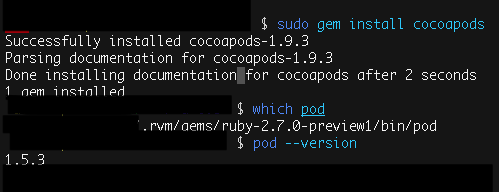
What I did was:
sudo gem update --system
rvm install ruby (I use RVM to Ruby version management)
So I tried install cocoapods again
gem install cocoapods
pod --version
And get these message:
Could not find proper version of cocoapods (1.5.3) in any of the sources
Run
bundle installto install missing gems.
After run this bundle install
I finally run
bundle update cocoapods
And get this done
AnthonyTailer
on 4 Oct 2020
Related issues
 axelg12
·
3Comments
axelg12
·
3Comments
 WG-Com
·
3Comments
WG-Com
·
3Comments
 jobsamuel
·
3Comments
jobsamuel
·
3Comments
 jlongster
·
3Comments
jlongster
·
3Comments
 aniss
·
3Comments
aniss
·
3Comments
Most helpful comment
After updating cocoapods to
1.9.1, it's working fine.