React-native: Touchableopacity not working inside Animated.View
Description:
Touchableopacity having style container_icon are not working, i have tried everything. Please Help. I think this might be related to Something like Touchableopacity not working inside Animated.View
React Native version:
System:
OS: Windows 10 10.0.18363
CPU: (8) x64 Intel(R) Core(TM) i7-7700HQ CPU @ 2.80GHz
Memory: 14.21 GB / 23.89 GB
Binaries:
Node: 12.10.0 - C:\Program Files\nodejs\node.EXE
Yarn: 1.19.1 - C:\Program Files (x86)\Yarn\bin\yarn.CMD
npm: 6.10.3 - C:\Program Files\nodejs\npm.CMD
SDKs:
Android SDK:
API Levels: 19, 23, 24, 25, 26, 27, 28, 29
Build Tools: 19.1.0, 26.0.3, 27.0.3, 28.0.1, 28.0.2, 28.0.3, 29.0.2
System Images: android-19 | Intel x86 Atom, android-19 | Google APIs Intel x86 Atom, android-26 | Google APIs Intel x86 Atom_64, android-27 | Google APIs Intel x86
Atom, android-27 | Google Play Intel x86 Atom, android-28 | Google APIs Intel x86 Atom, android-28 | Google Play Intel x86 Atom, android-28 | Google Play Intel x86 Atom_64, android-29 | Google APIs Intel x86 Atom, android-29 | Google Play Intel x86 Atom
npmPackages:
react: 16.9.0 => 16.9.0
react-native: 0.61.5 => 0.61.5
Steps To Reproduce
`import React, { Component } from 'react';
import { Animated, Easing, View, SafeAreaView, Text, FlatList, StyleSheet, Image, Dimensions, TouchableOpacity, ImageBackground, ScrollView, TextInput, Keyboard } from 'react-native';
import { Icon, Content } from "native-base";
import { connect } from 'react-redux';
import Footer from "../components/Footer";
const width = Dimensions.get('screen').width;
const height = Dimensions.get('screen').height;
class Profile extends Component {
constructor(props) {
console.log(props);
super(props);
this.state = {
loginData: props.LoginReducer.loginData,
scrollY: new Animated.Value(0)
}
this.animatedValue = new Animated.Value(0)
}
componentDidMount() {
    this.keyboardDidShowListener = Keyboard.addListener(
        'keyboardDidShow',
        () => {
            this.animate()
        },
    );
    this.keyboardDidHideListener = Keyboard.addListener(
        'keyboardDidHide',
        () => {
            this.animateBack()
        },
    );
}
onChangeText = (text, state) => {
    this.setState({ [state]: text })
}

_getHeaderBackgroundColor = () => {
    return this.animatedValue.interpolate({
        inputRange: [0, 500],
        outputRange: ['#E4335A', '#fff'],
        extrapolate: 'clamp',
        useNativeDriver: true
    });
};

_getCoverAndCardHeight = () => {
    return this.animatedValue.interpolate({
        inputRange: [0, 500],
        outputRange: [200, 120],
        extrapolate: 'clamp',
        useNativeDriver: true
    });
};

_getCardWidth = () => {
    return this.animatedValue.interpolate({
        inputRange: [0, 500],
        outputRange: ['80%', '100%'],
        extrapolate: 'clamp',
        useNativeDriver: true
    });
};

_getCardBottom = () => {
    return this.animatedValue.interpolate({
        inputRange: [0, 500],
        outputRange: [-100, 0],
        extrapolate: 'clamp',
        useNativeDriver: true
    });
};

_getCardImageParentW = () => {
    return this.animatedValue.interpolate({
        inputRange: [0, 500],
        outputRange: [100, 50],
        extrapolate: 'clamp',
        useNativeDriver: true
    });
};
_getCardImageParentH = () => {
    return this.animatedValue.interpolate({
        inputRange: [0, 500],
        outputRange: [100, 50],
        extrapolate: 'clamp',
        useNativeDriver: true
    });
};
_getCardImageParentLeft = () => {
    return this.animatedValue.interpolate({
        inputRange: [0, 500],
        outputRange: [(width / 2) - 100, 10],
        extrapolate: 'clamp',
        useNativeDriver: true
    });
};
_getCardImageParentTop = () => {
    return this.animatedValue.interpolate({
        inputRange: [0, 500],
        outputRange: [-50, 5],
        extrapolate: 'clamp',
        useNativeDriver: true
    });
};

_getCardMainMT = () => {
    return this.animatedValue.interpolate({
        inputRange: [0, 500],
        outputRange: [70, 0],
        extrapolate: 'clamp',
        useNativeDriver: true
    });
};

_getCardNameFontSize = () => {
    return this.animatedValue.interpolate({
        inputRange: [0, 500],
        outputRange: [18, 26],
        extrapolate: 'clamp',
        useNativeDriver: true
    });
};


_getCardIconParentColor = () => {
    return this.animatedValue.interpolate({
        inputRange: [0, 500],
        outputRange: ['#fff', '#E4335A'],
        extrapolate: 'clamp',
        useNativeDriver: true
    });
};
_getIconColor = () => {
    return this.animatedValue.interpolate({
        inputRange: [0, 500],
        outputRange: ['#E4335A', '#fff'],
        extrapolate: 'clamp',
        useNativeDriver: true
    });
};

_getPageContainerMT = () => {
    return this.animatedValue.interpolate({
        inputRange: [0, 500],
        outputRange: [120, 10],
        extrapolate: 'clamp',
        useNativeDriver: true
    });
};

animate = () => {
    const createAnimation = function (value, duration, easing, delay = 0) {
        return Animated.timing(
            value,
            {
                toValue: 500,
                duration,
                easing,
                delay
            }
        )
    }
    Animated.parallel([
        createAnimation(this.animatedValue, 200, Easing.ease),
    ]).start()
}

animateBack = () => {
    const createAnimation = function (value, duration, easing, delay = 0) {
        return Animated.timing(
            value,
            {
                toValue: 0,
                duration,
                easing,
                delay
            }
        )
    }
    Animated.parallel([
        createAnimation(this.animatedValue, 200, Easing.ease),
    ]).start()
}


render() {
    const headerBackgroundColor = this._getHeaderBackgroundColor();
    const coverAndCardHeight = this._getCoverAndCardHeight()
    const cardBottom = this._getCardBottom()
    const cardImageParentH = this._getCardImageParentH()
    const cardImageParentLeft = this._getCardImageParentLeft()
    const cardImageParentTop = this._getCardImageParentTop()
    const cardMainMT = this._getCardMainMT()
    const cardNameFontSize = this._getCardNameFontSize()
    const cardIconParentColor = this._getCardIconParentColor()
    const iconColor = this._getIconColor()
    const cardWidth = this._getCardWidth()
    const pageContainerMT = this._getPageContainerMT()
    const AnimatedIcon = Animated.createAnimatedComponent(Icon)

    return (
        <SafeAreaView style={{ flex: 1 }}>
            <View style={styles.container}>
                <Animated.View style={[styles.cover, { backgroundColor: headerBackgroundColor, height: coverAndCardHeight }]}>
                    <Animated.View style={[styles.card, { height: coverAndCardHeight, bottom: cardBottom, width: cardWidth }]}>
                        <Animated.View style={[styles.cardImageParent, {
                            height: cardImageParentH, width: cardImageParentH, top: cardImageParentTop, left: cardImageParentLeft
                        }]}>
                            <Image
                                style={styles.cardImage}
                                source={{ uri: this.state.loginData.photo }}
                            />
                        </Animated.View>
                        <Animated.View style={[styles.cardMain, { marginTop: cardMainMT }]}>
                            <View style={styles.cardNameParent}>
                                <Animated.Text style={[styles.cardName, { fontSize: cardNameFontSize }]}>{this.state.loginData.fname} {this.state.loginData.lname}</Animated.Text>
                            </View>
                            <Animated.View style={[styles.cardIconParent, { backgroundColor: cardIconParentColor }]}>
                                <TouchableOpacity style={styles.container_icon} onPress={() => { alert() }}>
                                    <AnimatedIcon type="SimpleLineIcons" name="user-female" style={[styles.icon, { color: iconColor }]} />
                                    <Animated.Text style={[styles.cardIconText, { color: iconColor }]}>Personal</Animated.Text>
                                </TouchableOpacity>
                                <TouchableOpacity style={styles.container_icon}>
                                    <AnimatedIcon type="FontAwesome" name="address-book-o" style={[styles.icon, { color: iconColor }]} />
                                    <Animated.Text style={[styles.cardIconText, { color: iconColor }]}>Address Book</Animated.Text>
                                </TouchableOpacity>
                                <TouchableOpacity style={styles.container_icon}>
                                    <AnimatedIcon type="MaterialCommunityIcons" name="chess-queen" style={[styles.icon, { color: iconColor }]} />
                                    <Animated.Text style={[styles.cardIconText, { color: iconColor }]}>Rewards</Animated.Text>
                                </TouchableOpacity>
                            </Animated.View>
                        </Animated.View>

                    </Animated.View>
                </Animated.View>
                <Animated.ScrollView
                    keyboardShouldPersistTaps="never"
                    overScrollMode={'never'}
                    style={[styles.pageContainer, { marginTop: pageContainerMT }]}
                    scrollEventThrottle={16}>
                    <View style={styles.parentField}>
                        <Text style={styles.parentFieldLabel}>First Name</Text>
                        <TextInput style={styles.parentFieldInput}
                            autoCompleteType={"name"}
                            keyboardType={"default"}
                            onChangeText={text => this.onChangeText(text, 'fname')}
                            value={this.state.fname} placeholder={'First Name'} placeholderTextColor={"#A9A9A9"}></TextInput>
                    </View>
                    <View style={styles.parentField}>
                        <Text style={styles.parentFieldLabel}>Last Name</Text>
                        <TextInput style={styles.parentFieldInput}
                            autoCompleteType={"name"}
                            keyboardType={"default"}
                            onChangeText={text => this.onChangeText(text, 'lname')}
                            value={this.state.lname} placeholder={'Last Name'} placeholderTextColor={"#A9A9A9"}></TextInput>
                    </View>
                    <View style={styles.parentField}>
                        <Text style={styles.parentFieldLabel}>Email</Text>
                        <TextInput style={styles.parentFieldInput}
                            autoCompleteType={"email"}
                            keyboardType={"email-address"}
                            onChangeText={text => this.onChangeText(text, 'email')}
                            value={this.state.email} placeholder={'Email'} placeholderTextColor={"#A9A9A9"}></TextInput>
                    </View>
                    <View style={styles.parentField}>
                        <Text style={styles.parentFieldLabel}>Phone</Text>
                        <TextInput style={styles.parentFieldInput}
                            autoCompleteType={"tel"}
                            keyboardType={"number-pad"}
                            onChangeText={text => this.onChangeText(text, 'phone')}
                            value={this.state.phone} placeholder={'Phone'} placeholderTextColor={"#A9A9A9"}></TextInput>
                    </View>
                </Animated.ScrollView>

            </View>
            <Footer navigation={this.props.navigation} route={this.props.route} />
        </SafeAreaView >
    );
}
}
const styles = StyleSheet.create({
container: {
flex: 1,
backgroundColor: '#fff'
},
cover: {
// height: 200,
position: 'relative',
justifyContent: 'center',
alignItems: 'center',
// backgroundColor: '#E4335A'
},
card: {
// height: 200,
position: 'absolute',
backgroundColor: 'rgba(255,255,255,0.9)',
// bottom: - 100,
// width: '80%',
borderRadius: 5,
justifyContent: 'flex-start',
alignItems: 'center',
},
cardImageParent: {
borderRadius: 50, borderColor: '#fff', borderWidth: 1, position: 'absolute'//top: -50,height: 100, width: 100,
},
cardImage: { alignSelf: 'center', height: '100%', width: '100%', borderRadius: 50 },
cardMain: {},//marginTop: 70
cardNameParent: { flex: 1, alignItems: 'center', justifyContent: 'center' },
cardName: { fontWeight: 'bold', textAlign: 'center', },//fontSize: 18,flex: 1
cardIconParent: { flexDirection: 'row', justifyContent: 'space-around', alignItems: 'center', width: '100%' },
container_icon: { flex: 1, justifyContent: 'center', alignItems: 'center' },
icon: { fontSize: 35, padding: 3 },
cardIconText: { fontSize: 14, fontWeight: 'bold' },
pageContainer: {},//marginTop: 120,
parentField: { justifyContent: 'flex-start', alignItems: 'flex-start', padding: 5, margin: 5, position: 'relative' },
parentFieldLabel: { fontSize: 14, fontWeight: 'bold', color: '#E4335A', backgroundColor: '#fff', position: 'absolute', zIndex: 1, left: 5, top: 0 },
parentFieldInput: { height: 50, borderColor: '#E4335A', borderWidth: 2, borderRadius: 5, width: width / 1.8, fontSize: 18, textAlignVertical: 'center', color: '#101010', backgroundColor: 'rgba(255, 255, 255, 0.8)', padding: 5, paddingTop: 10, width: '100%' },
});
const mapStateToProps = state => {
console.log('profile', state)
return {
LoginReducer: state.LoginReducer
};
};
const mapDispatchToProps = {
};
export default connect(mapStateToProps, mapDispatchToProps)(Profile);`
Expected Results
When i click on the Touchableopacity it is not calling the onpress function and is not even animating.
It is not working in this case:

But when it is animated after the keyboard get Open. It is working at this place.


 ahmad6242
All 14 comments
If your assumption is correct, then changing the Animated.Views to just simple Views should be able to fix the problem.
However, if I had to guess, I would say that there is a problem with the touchable area, i.e. one of your element is overlapping the buttons, hence you can't reach them anymore. When the keyboard is displayed the element might be pushed up and then the button is accessible.
Did you combine all your code into one file for this issue or is that actually what your file looks like? If that is actually what it looks like I would try to refactor it so that you have a lot less nested elements. That could make it easier to identify the problem.
 ccfz
on 11 Mar 2020
ccfz
on 11 Mar 2020
This is the complete code for the File.
the only thing that can overlap is the Scroll View in which the Textinputs are , i have also tried to remove the scrollview completely but it is still not working ...
You can copy the whole code and try to run it.
just remove the
<Footer navigation={this.props.navigation} route={this.props.route} />
from the code
I will try changing animated views to views and and will let you know if that is working.
UPDATE:
its still not working after changing the Animation view to Just View... I think that is related to Position:'absolute'
then can you please help me to figure this out because i had tried moving Views around and applying zindex also but its not giving me anything.
In this screenshot you can see the View in which the buttons are i have applied elevation to it.
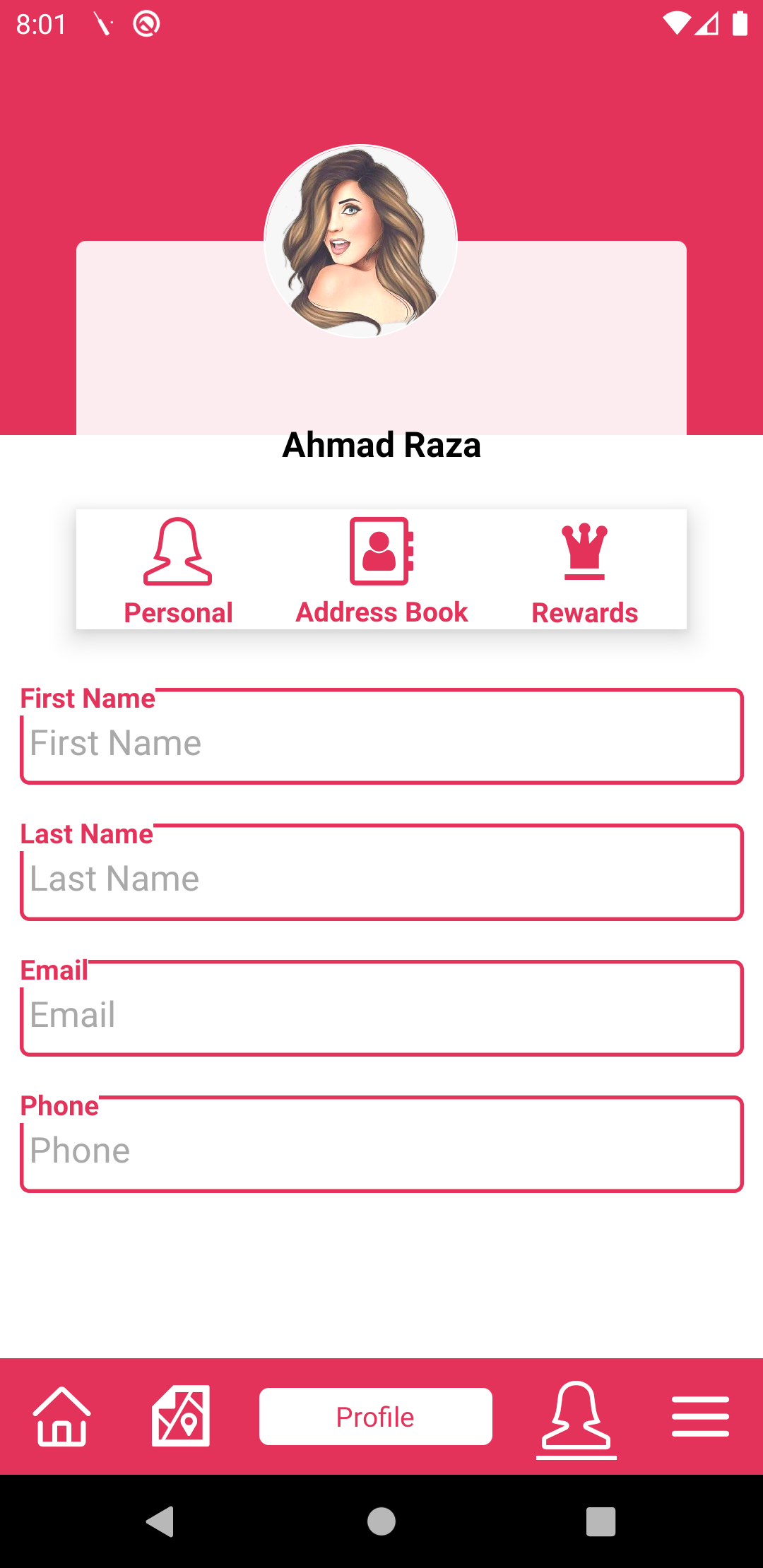
@RCiesielczuk
ahmad6242
on 11 Mar 2020
Facing similar issue like #24046 . But the issue was closed without resolution.
 KishoreBarik
on 23 Apr 2020
KishoreBarik
on 23 Apr 2020
I am also facing same issue on Android, on iOS it works fine.
 ankur-1989
on 27 Apr 2020
ankur-1989
on 27 Apr 2020
I've just resolve this issue on Android by change height of Animated.View which contain TouchableOpacity (to fit size of TouchableOpacity)
 hoangvu315
on 7 May 2020
hoangvu315
on 7 May 2020
I've just resolve this issue on Android by change height of Animated.View which contain TouchableOpacity (to fit size of TouchableOpacity)
Thanks, you just saved my day.
 plouh
on 26 Jun 2020
plouh
on 26 Jun 2020
Experiencing this as well with both TouchableOpacity and TextInput. Changing the height of the Animated.View is not a viable solution if the height needs to be dynamic.
 tbrother
on 9 Jul 2020
tbrother
on 9 Jul 2020
I was able to sort it out by setting the size of my touchable opacity same as my Animated.View
<Animated.View
            style={[[{transform: [{translateX: uiPosition.x}, {translateY: uiPosition.y}]}], {width: 50, height: 50}]}
            {...panResponder.panHandlers}
        >
            <TouchableOpacity style={{width: 50, height: 50}}>
                <View>
                    <Text>{`No\nLogs`}</Text>
                </View>
            </TouchableOpacity>
        </Animated.View>
 nateblog
on 26 Jul 2020
nateblog
on 26 Jul 2020
I solved the problem by moving
 emclab
on 2 Sep 2020
emclab
on 2 Sep 2020
I solved the problem by moving
inside . Reducing the height of didn't work for me.
Inside where ?
 sumit1317
on 19 Sep 2020
sumit1317
on 19 Sep 2020
I solved the problem by moving
inside . Reducing the height of didn't work for me.
it works , Thanks!
 pigeaon
on 15 Oct 2020
pigeaon
on 15 Oct 2020
I solved the problem by moving
inside . Reducing the height of didn't work for me. Inside where ?
Like this:
<TouchableWithoutFeedback onPress={handleDismiss} >
      <Animated.View
        style={[
          styles.container,
          {
            transform: [{ translateY: slide }],
          },
        ]}>
        <Text>{"text"}</Text>
      </Animated.View>
    </TouchableWithoutFeedback>
pigeaon
on 15 Oct 2020
I've just resolve this issue on Android by change height of Animated.View which contain TouchableOpacity (to fit size of TouchableOpacity)
it work by changing height with dimensions. Thanks
const screenHeight = Dimensions.get('window')
  .height
 nineandnine
on 6 Nov 2020
nineandnine
on 6 Nov 2020
try to remove flex:1 to AnimatedView,
its worked for me
 antoinefotso
on 12 Nov 2020
antoinefotso
on 12 Nov 2020
Related issues
 grabbou
·
3Comments
grabbou
·
3Comments
 DreySkee
·
3Comments
DreySkee
·
3Comments
 ghost
·
3Comments
ghost
·
3Comments
 despairblue
·
3Comments
despairblue
·
3Comments
 anchetaWern
·
3Comments
anchetaWern
·
3Comments
Most helpful comment
I've just resolve this issue on Android by change height of Animated.View which contain TouchableOpacity (to fit size of TouchableOpacity)