React-native: [TextInput bug] I apply a mask to a TextInput, it have a wrong performance
I created a simple app with react-native init AwesomeProject command and I put a TextInput. Then I applied a mask function and it's having the follow issue.

And when I comment the onChangeText, it have the same issue:
<TextInput
     keyboardType="decimal-pad"
     placeholder="0,00"
     value={value}
     //onChangeText={text => press(text)}
     style={{
         height: 60,
         borderColor: 'gray',
         borderWidth: 1,
         fontSize: 25
     }}
 />
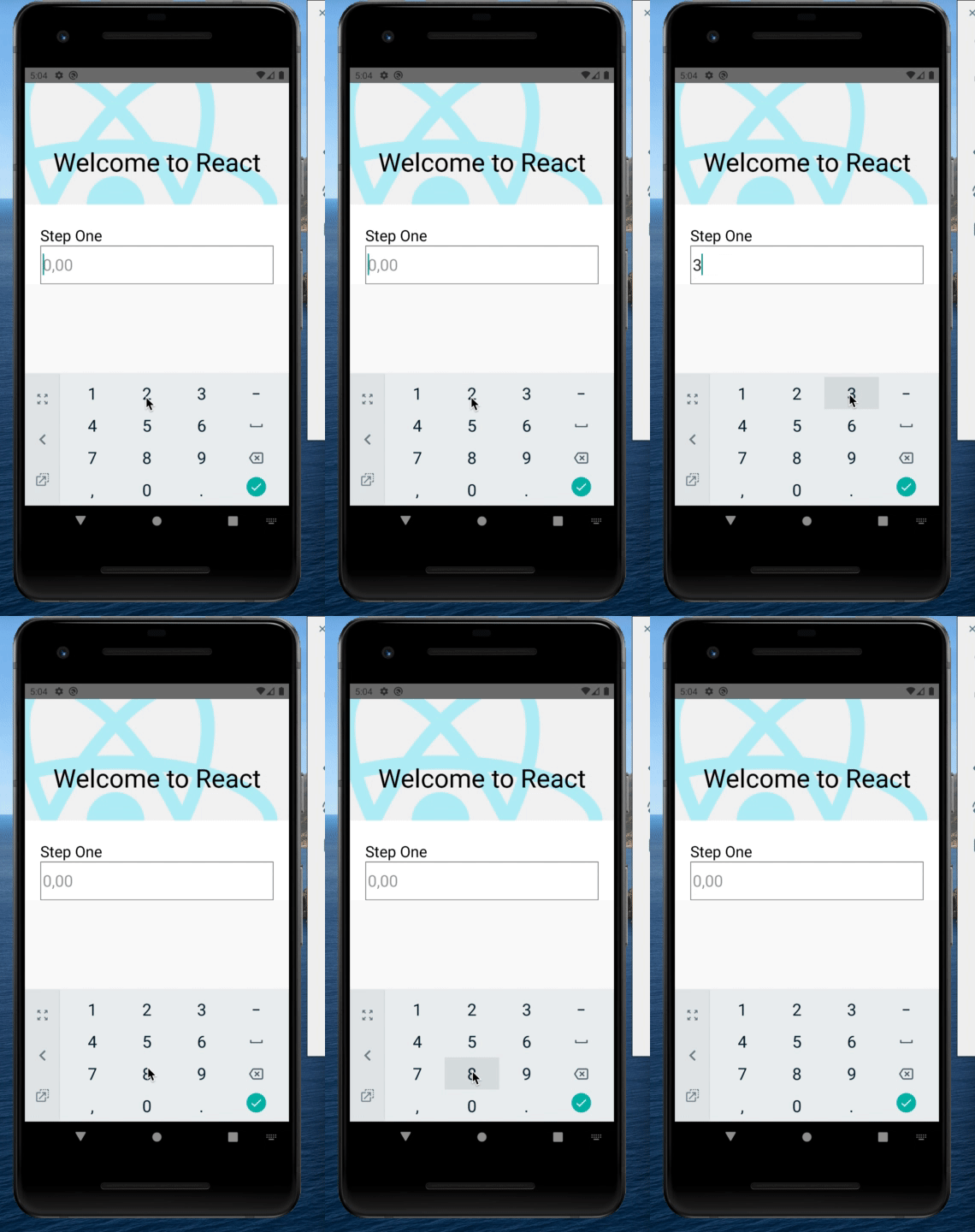
React Native version: 0.61.5
{
  "name": "AwesomeProject",
  "version": "0.0.1",
  "private": true,
  "scripts": {
    "android": "react-native run-android",
    "ios": "react-native run-ios",
    "start": "react-native start",
    "test": "jest",
    "lint": "eslint ."
  },
  "dependencies": {
    "react": "16.9.0",
    "react-native": "0.61.5"
  },
  "devDependencies": {
    "@babel/core": "7.8.6",
    "@babel/runtime": "7.8.4",
    "@react-native-community/eslint-config": "0.0.5",
    "babel-jest": "24.9.0",
    "eslint": "6.8.0",
    "jest": "24.9.0",
    "metro-react-native-babel-preset": "0.56.4",
    "react-test-renderer": "16.9.0"
  },
  "jest": {
    "preset": "react-native"
  }
}
My code:
/**
 * Sample React Native App
 * https://github.com/facebook/react-native
 *
 * @format
 * @flow
 */

import React from 'react';
import {
  SafeAreaView,
  StyleSheet,
  ScrollView,
  View,
  Text,
  StatusBar,
  TextInput
} from 'react-native';

import { Header, Colors } from 'react-native/Libraries/NewAppScreen';

const App: () => React$Node = () => {
  const [value, onChangeText] = React.useState('');

  const normalizeDecimalPlaces = (value: string) => {
    const defaultValue = '0' + ',' + '0'.repeat(2);
    if (!value) {
      return value === '' ? defaultValue : value;
    }
    const onlyNums = value.replace(/[^\d]/g, '');
    const onlyNumsInt = parseInt(onlyNums);
    if (!onlyNumsInt || onlyNumsInt === 0) {
      return defaultValue;
    }
    const result = onlyNumsInt / Math.pow(10, 2);
    const resultFixed = Number.parseFloat(String(result)).toFixed(2);
    return resultFixed;
  };

  const press = text => {
    console.log('value ==>', text);
    onChangeText(normalizeDecimalPlaces(text));
  };

  return (
    <>
      <StatusBar barStyle="dark-content" />
      <SafeAreaView>
        <ScrollView
          contentInsetAdjustmentBehavior="automatic"
          style={styles.scrollView}>
          <Header />
          <View style={styles.body}>
            <View style={styles.sectionContainer}>
              <Text style={styles.sectionTitle}>Step One</Text>
              <TextInput
                keyboardType="decimal-pad"
                placeholder="0,00"
                value={value}
                onChangeText={text => press(text)}
                style={{
                  height: 60,
                  borderColor: 'gray',
                  borderWidth: 1,
                  fontSize: 25
                }}
              />
            </View>
          </View>
        </ScrollView>
      </SafeAreaView>
    </>
  );
};

const styles = StyleSheet.create({
  scrollView: {
    backgroundColor: Colors.lighter,
  },
  engine: {
    position: 'absolute',
    right: 0,
  },
  body: {
    backgroundColor: Colors.white,
  },
  sectionContainer: {
    marginTop: 32,
    paddingHorizontal: 24,
  },
  sectionTitle: {
    fontSize: 24,
    fontWeight: '600',
    color: Colors.black,
  },
  sectionDescription: {
    marginTop: 8,
    fontSize: 18,
    fontWeight: '400',
    color: Colors.dark,
  },
  highlight: {
    fontWeight: '700',
  },
  footer: {
    color: Colors.dark,
    fontSize: 12,
    fontWeight: '600',
    padding: 4,
    paddingRight: 12,
    textAlign: 'right',
  },
});

export default App;
Please, I need to resolved this issue or knowing why happen this because I have a project with this issue and I replay it in a simple app for validate it.
This happen in Android and IOS.
Thanks.
 javcRP
All 3 comments
I have this same issue... a similar (identical??) issue was opened before here https://github.com/facebook/react-native/issues/24585 and closed as a duplicate of https://github.com/facebook/react-native/issues/23578
I have no idea how this bug is getting no attention. Text input is such a critical part of any application, and having flickering like this makes it seem like amateur hour.
 knap1930
on 15 Mar 2020
knap1930
on 15 Mar 2020
Hey there, it looks like there has been no activity on this issue recently. Has the issue been fixed, or does it still require the community's attention? This issue may be closed if no further activity occurs. You may also label this issue as a "Discussion" or add it to the "Backlog" and I will leave it open. Thank you for your contributions.
![stale[bot] picture](https://avatars3.githubusercontent.com/in/1724?v=4&s=40) stale[bot]
on 25 Jul 2020
stale[bot]
on 25 Jul 2020
Closing this issue after a prolonged period of inactivity. If this issue is still present in the latest release, please feel free to create a new issue with up-to-date information.
stale[bot]
on 1 Aug 2020
Related issues
 janmonschke
·
3Comments
janmonschke
·
3Comments
 josev55
·
3Comments
josev55
·
3Comments
 oney
·
3Comments
oney
·
3Comments
 grabbou
·
3Comments
grabbou
·
3Comments
 despairblue
·
3Comments
despairblue
·
3Comments
Most helpful comment
I have this same issue... a similar (identical??) issue was opened before here https://github.com/facebook/react-native/issues/24585 and closed as a duplicate of https://github.com/facebook/react-native/issues/23578
I have no idea how this bug is getting no attention. Text input is such a critical part of any application, and having flickering like this makes it seem like amateur hour.