React-native: react native force light mode in android app
React Native version:
in other words how to disable dark mode from android app
thank you so much 😊
 Mohammad1704
All 15 comments
Issue closed, but no answers.. How to disable this mode? I don't want phone settings affect my app styles.
 inferusvv
on 3 Aug 2020
inferusvv
on 3 Aug 2020
Probably related to #29387 @inferusvv
 eliasjnior
on 10 Aug 2020
eliasjnior
on 10 Aug 2020
Dear @dulmandakh, why you close this important issue without an answer?
 amerllica
on 13 Oct 2020
amerllica
on 13 Oct 2020
Sorry, themes are related to Android, not React Native, so please look into Android documentation.
 dulmandakh
on 13 Oct 2020
dulmandakh
on 13 Oct 2020
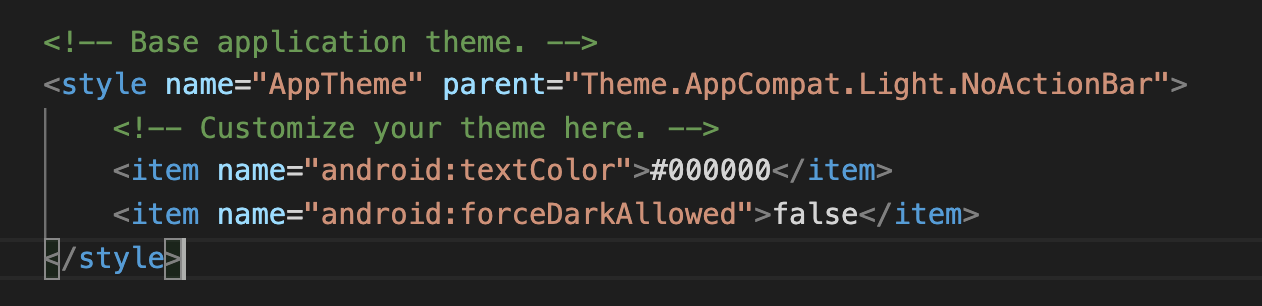
@Mohammad1704, For disable force dark mode you can follow this StackOverflow answer
amerllica
on 13 Oct 2020
Dear @dulmandakh, this kind of behavior or answering just caused discourage and disappoint developers. actually, answering others' questions and attention to them is attention to yourself. all of us know force dark mode theme is for Android but your developers faced this new unwanted feature and a little help can help the community.
amerllica
on 13 Oct 2020
@amerllica I tried your method, but it didn't work
 leoyb
on 26 Oct 2020
leoyb
on 26 Oct 2020
@leoyb, that is impossible, why it didn't work? can you write about your environment?
amerllica
on 26 Oct 2020
@amerllica you can open your project in Android Studio, then edit styles.xml to extend a theme you want to use. I closed the issue because it's not related to React Native neither resolvable in it. Sorry.
dulmandakh
on 27 Oct 2020
@amerllica
Environment
Environment:
  OS: macOS Catalina 10.15.6
  Node: 10.16.0
  Yarn: 1.16.0
  npm: 6.9.0

Packages:
  "react": "16.13.1",
  "react-native": "0.63.2"
Configuration information:

leoyb
on 27 Oct 2020
@leoyb, what is the compileSdkVersion in your android/app/build.gradle file:
android {
    compileSdkVersion ???
What is ??? for your project?
amerllica
on 27 Oct 2020
@amerllica

leoyb
on 27 Oct 2020
@leoyb, Use compileSdkVersion version 30, the android/app/build.gradle is ok, just change the android/build.gradle.
Please attention, at the end of my StackOverflow post, delete all last builds and catches:
Hint: For being sure that you have a new build, completely delete your last build by using the
rm -rf android/app/buildcommand and uninstall the app on your Emulator/Device and then runyarn androidagain.
amerllica
on 27 Oct 2020
@amerllica
According to your method, it still doesn't work
leoyb
on 28 Oct 2020
@leoyb, Let me know, What does it mean _It doesn't work!_. Could you explain what's your desire and what happened what you said _It doesn't work!_. and another question, Could you upload a re-production of your project somewhere?
amerllica
on 28 Oct 2020
Related issues
 lazywei
·
3Comments
lazywei
·
3Comments
 aniss
·
3Comments
aniss
·
3Comments
 despairblue
·
3Comments
despairblue
·
3Comments
 grabbou
·
3Comments
grabbou
·
3Comments
 jlongster
·
3Comments
jlongster
·
3Comments
Most helpful comment
@Mohammad1704, For disable force dark mode you can follow this StackOverflow answer