React-native: `Invariant Violation: Native module cannot be null` error info does not show the precise stack of which module is null
i got this error: Invariant Violation: Native module cannot be null, and i want to know which native module is null so i can come to handle it, but the error stack message dose not show any useful message for me to investigate it
Invariant Violation: Native module cannot be null.
reportException @ ExceptionsManager.js:44
handleException @ ExceptionsManager.js:113
handleError @ setUpErrorHandling.js:23
reportFatalError @ error-guard.js:49
guardedLoadModule @ require.js:204
metroRequire @ require.js:128
(anonymous) @ deprecatedTypes.ts:40
executeApplicationScript @ RNDebuggerWorker.js:2
(anonymous) @ RNDebuggerWorker.js:2
React Native version:
System:
    OS: macOS Mojave 10.14.6
    CPU: (12) x64 Intel(R) Core(TM) i7-9750H CPU @ 2.60GHz
    Memory: 1.99 GB / 16.00 GB
    Shell: 5.3 - /bin/zsh
  Binaries:
    Node: 12.3.1 - /usr/local/bin/node
    Yarn: 1.16.0 - /usr/local/bin/yarn
    npm: 6.13.0 - /usr/local/bin/npm
    Watchman: 4.9.0 - /usr/local/bin/watchman
  SDKs:
    iOS SDK:
      Platforms: iOS 13.2, DriverKit 19.0, macOS 10.15, tvOS 13.2, watchOS 6.1
    Android SDK:
      API Levels: 21, 23, 26, 27, 28
      Build Tools: 23.0.1, 26.0.1, 28.0.3, 29.0.2
  IDEs:
    Android Studio: 3.5 AI-191.8026.42.35.5900203
    Xcode: 11.2/11B52 - /usr/bin/xcodebuild
  npmPackages:
    react: 16.9.0 => 16.9.0
    react-native: 0.61.4 => 0.61.4
Steps To Reproduce
[skip reproduce step]
Describe what you expected to happen:
the error log of Invariant Violation: Native module cannot be null. show the exact stack message of the null module
 KingAmo
All 27 comments
Hey, were you able to solve your error?
 anacnfalcao
on 29 Nov 2019
anacnfalcao
on 29 Nov 2019
I got the same error, did you solve it?
 ly9310
on 18 Dec 2019
ly9310
on 18 Dec 2019
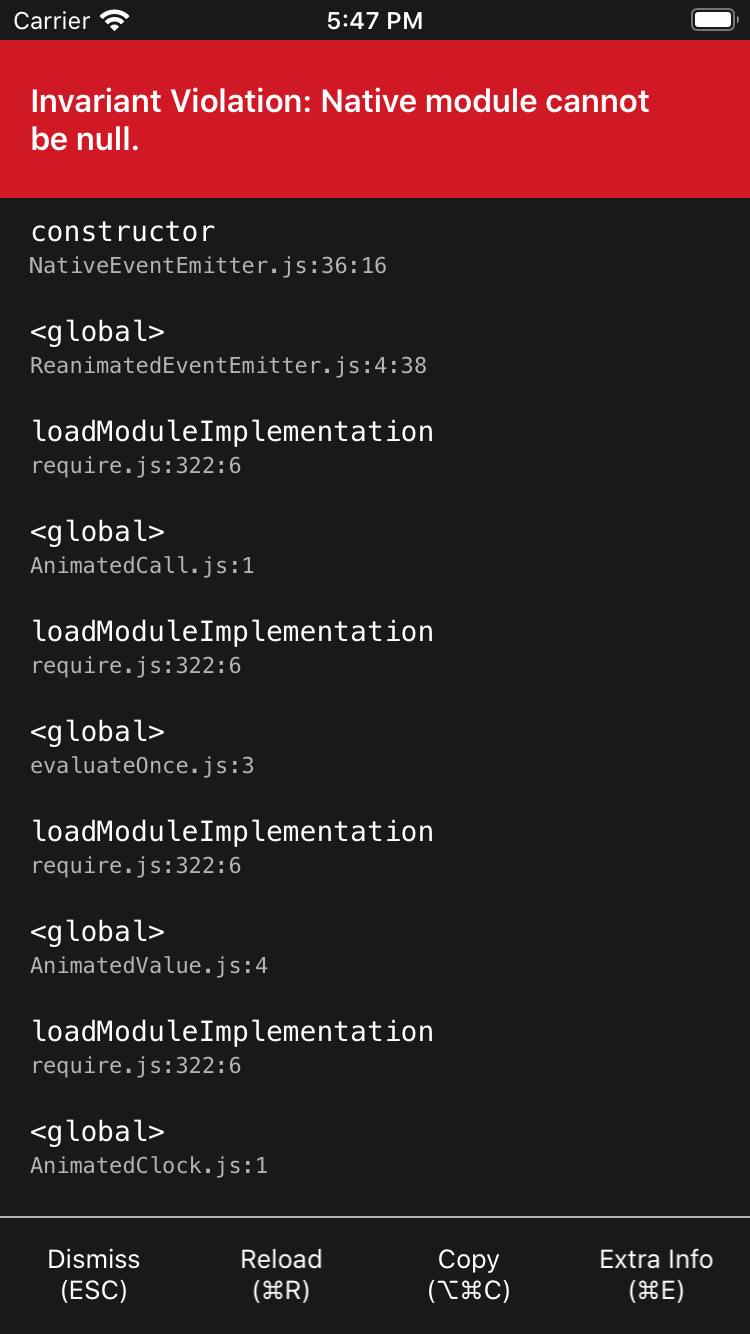
Hey, having the same issue.
I'll add some info. I had to install new libraries that where required because of a new version of react-navigation (currently using 4.0.9). In Android I solved this error by installing those required libraries (react-navigation-drawer, react-navigation-tabs and react-native-reanimated) but in iOS I'm still having this issue.
 gg-ballin
on 18 Dec 2019
gg-ballin
on 18 Dec 2019
Solved it,
Hey, having the same issue.
I'll add some info. I had to install new libraries that where required because of a new version of react-navigation (currently using 4.0.9). In Android I solved this error by installing those required libraries (react-navigation-drawer, react-navigation-tabs and react-native-reanimated) but in iOS I'm still having this issue.
Solved it.
Reinstalled those three libraries and upgraded in package.json, react-navigation to 4.0.9. All is up and running!
gg-ballin
on 19 Dec 2019
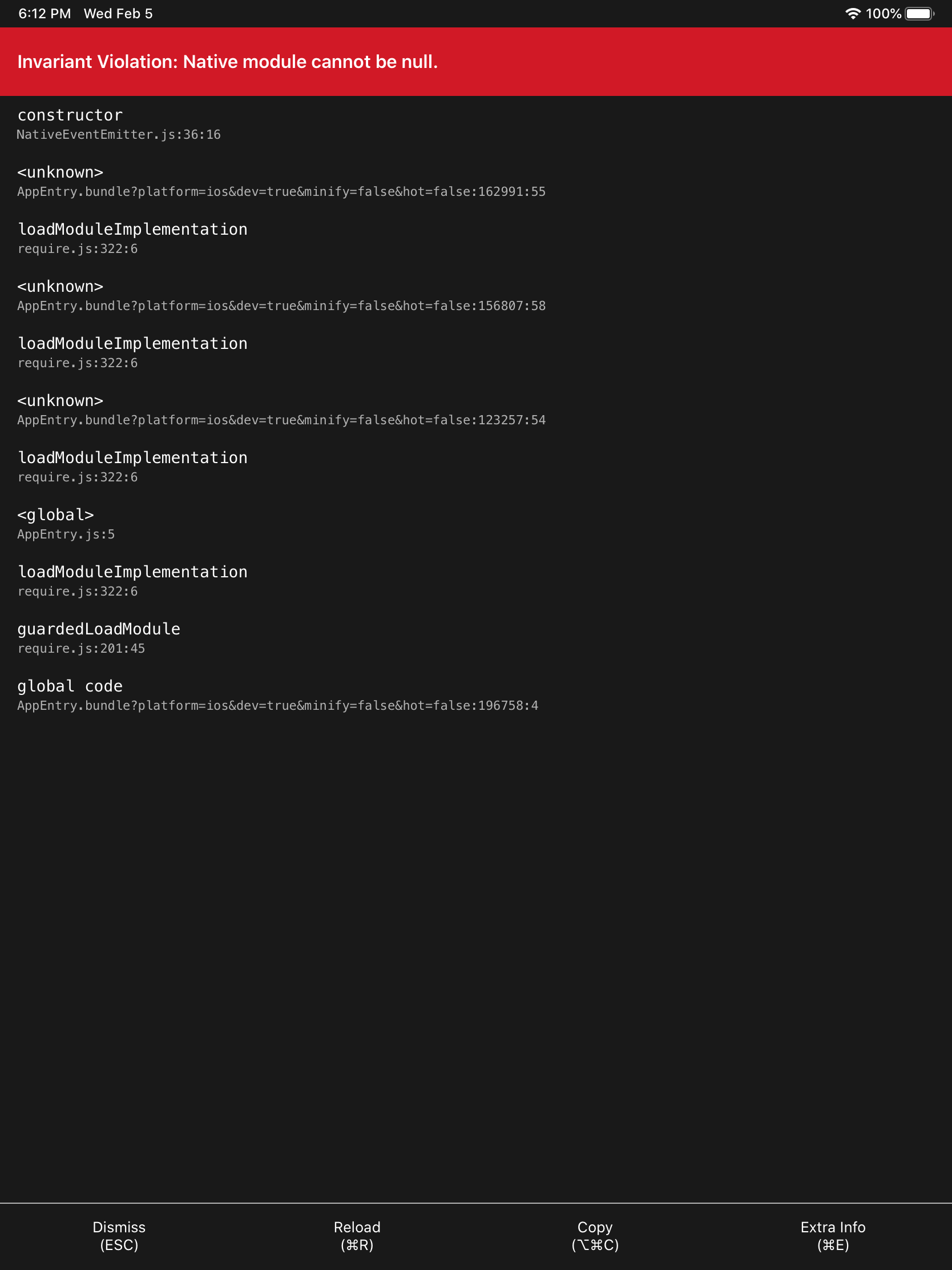
Hey. I have the same error now.
I had already upgraded any packages (react-navigation,react-native-reanimated, react-navigation-drawer, react-navigation-tabs), however I can not solve it . I want to launch on only ipad
help me..
(currently using version 4.1.1 ...)
jackage.json :↓
{
  "main": "node_modules/expo/AppEntry.js",
  "scripts": {
    "start": "expo start",
    "android": "expo start --android",
    "ios": "expo start --ios",
    "web": "expo start --web",
    "eject": "expo eject"
  },
  "dependencies": {
    "@react-native-community/masked-view": "^0.1.5",
    "expo": "~36.0.0",
    "expokit": "^36.0.1",
    "moment": "^2.24.0",
    "native-base": "^2.13.8",
    "react": "16.9.0",
    "react-dom": "~16.9.0",
    "react-native": "0.61.5",
    "react-native-elements": "^1.2.7",
    "react-native-fs": "^2.16.2",
    "react-native-gesture-handler": "^1.5.5",
    "react-native-pdf": "^6.0.1",
    "react-native-reanimated": "^1.7.0",
    "react-native-simple-radio-button": "^2.7.4",
    "react-native-unimodules": "^0.7.0",
    "react-native-web": "~0.11.7",
    "react-navigation": "^4.1.1",
    "rn-fetch-blob": "^0.12.0"
  },
  "devDependencies": {
    "babel-preset-expo": "~8.0.0",
    "@babel/core": "^7.0.0"
  },
  "private": true
}
app.json: ↓
{
  "expo": {
    "name": "aries_forXcode11",
    "slug": "aries_forXcode11",
    "privacy": "public",
    "sdkVersion": "36.0.0",
    "platforms": [
      "ios",
      "android",
      "web"
    ],
    "version": "1.0.0",
    "orientation": "portrait",
    "icon": "./assets/icon.png",
    "splash": {
      "image": "./assets/splash.png",
      "resizeMode": "contain",
      "backgroundColor": "#ffffff"
    },
    "updates": {
      "fallbackToCacheTimeout": 0
    },
    "assetBundlePatterns": [
      "**/*"
    ],
    "ios": {
      "supportsTablet": true,
      "bundleIdentifier": "interviewform",
      "publishBundlePath": "ios/aries_forxcode11/Supporting/shell-app.bundle",
      "publishManifestPath": "ios/aries_forxcode11/Supporting/shell-app-manifest.json"
    },
    "isDetached": true,
    "detach": {
      "iosExpoViewUrl": "https://s3.amazonaws.com/exp-exponent-view-code/ios-v2.14.3-sdk36.0.0-00f587c0-b8c9-4b6b-88f6-2ccd4f20dc9c.tar.gz",
      "androidExpoViewUrl": "https://s3.amazonaws.com/exp-exponent-view-code/android-v2.14.2-sdk36.0.0-51bb3c16-c2a5-4797-b721-4091ed00e53a.tar.gz"
    },
    "scheme": "exp6b4e5a53a7e1453b96c2c9bf23b1a04d",
    "android": {
      "package": "intervewform.com",
      "publishBundlePath": "android/app/src/main/assets/shell-app.bundle",
      "publishManifestPath": "android/app/src/main/assets/shell-app-manifest.json"
    }
  }
}
 MaSuCcHI
on 5 Feb 2020
MaSuCcHI
on 5 Feb 2020
Having the same issue. were you able to find a solution?
 AviIhej
on 6 Feb 2020
AviIhej
on 6 Feb 2020
I added react-native-reanimated,this error gone.------------------ 原始邮件 ------------------
发件人: "Avi Ihej"notifications@github.com
发送时间: 2020年2月6日(星期四) 中午12:29
收件人: "facebook/react-native"react-native@noreply.github.com;
抄送: "lzy"374725514@qq.com;"Comment"comment@noreply.github.com;
主题: Re: [facebook/react-native] Invariant Violation: Native modulecannot be null error info does not show the precise stack of which module isnull (#27191)
Having the same issue. were you able to find a solution?
—
You are receiving this because you commented.
Reply to this email directly, view it on GitHub, or unsubscribe.
ly9310
on 6 Feb 2020
Hey there, it looks like there has been no activity on this issue recently. Has the issue been fixed, or does it still require the community's attention? This issue may be closed if no further activity occurs. You may also label this issue as a "Discussion" or add it to the "Backlog" and I will leave it open. Thank you for your contributions.
![stale[bot] picture](https://avatars3.githubusercontent.com/in/1724?v=4&s=40) stale[bot]
on 6 May 2020
stale[bot]
on 6 May 2020
Hey. I have the same error now.
Package.json
{
  "name": "MyApp",
  "version": "0.0.1",
  "private": true,
  "scripts": {
    "android": "react-native run-android",
    "ios": "react-native run-ios",
    "start": "react-native start",
    "test": "jest",
    "lint": "eslint ."
  },
  "dependencies": {
    "@react-native-community/async-storage": "^1.9.0",
    "@react-native-community/datetimepicker": "^2.3.2",
    "@react-native-community/masked-view": "^0.1.9",
    "@react-native-community/netinfo": "^5.7.1",
    "@react-navigation/bottom-tabs": "^5.2.7",
    "@react-navigation/compat": "^5.1.10",
    "@react-navigation/drawer": "^5.5.0",
    "@react-navigation/native": "^5.1.6",
    "@react-navigation/stack": "^5.2.11",
    "axios": "^0.19.2",
    "core-js": "^3.6.5",
    "data.task": "^3.1.2",
    "moment": "^2.24.0",
    "react": "^16.11.0",
    "react-native": "0.62.2",
    "react-native-actionsheet": "^2.4.2",
    "react-native-audio": "^4.3.0",
    "react-native-background-upload": "^5.6.1",
    "react-native-cached-image": "^1.4.3",
    "react-native-elements": "^1.2.7",
    "react-native-fetch-blob": "^0.10.8",
    "react-native-firebase": "^5.6.0",
    "react-native-fs": "^2.16.6",
    "react-native-gesture-handler": "^1.6.1",
    "react-native-get-random-values": "^1.4.0",
    "react-native-google-cast": "^3.3.0",
    "react-native-google-places": "^3.1.2",
    "react-native-image-crop-picker": "^0.28.0",
    "react-native-image-picker": "^2.3.1",
    "react-native-image-view": "^2.1.9",
    "react-native-indicators": "^0.17.0",
    "react-native-keyboard-aware-scroll-view": "^0.9.1",
    "react-native-linear-gradient": "^2.5.6",
    "react-native-loading-spinner-overlay": "^1.1.0",
    "react-native-modal-datetime-picker": "^8.5.4",
    "react-native-permissions": "^2.1.2",
    "react-native-push-notification": "^3.1.9",
    "react-native-reanimated": "^1.8.0",
    "react-native-safe-area-context": "^0.7.3",
    "react-native-screens": "^2.5.0",
    "react-native-snap-carousel": "^3.9.0",
    "react-native-sound": "^0.11.0",
    "react-native-thumbnail": "^1.1.3",
    "react-native-vector-icons": "^6.6.0",
    "react-native-video": "^4.4.5",
    "react-native-video-helper": "^1.4.4",
    "react-native-webview": "^9.0.1",
    "react-navigation": "^4.3.7",
    "react-redux": "^7.2.0",
    "redux": "^4.0.5",
    "redux-thunk": "^2.3.0",
    "sendbird": "^3.0.121",
    "socket.io-client": "^2.3.0",
    "tipsi-stripe": "^7.5.3"
  },
  "devDependencies": {
    "@babel/core": "^7.6.2",
    "@babel/runtime": "^7.6.2",
    "@react-native-community/eslint-config": "^0.0.5",
    "babel-jest": "^24.9.0",
    "eslint": "^6.5.1",
    "jest": "^24.9.0",
    "metro-react-native-babel-preset": "^0.58.0",
    "react-test-renderer": "16.11.0"
  },
  "jest": {
    "preset": "react-native"
  },
  "rnpm": {
    "assets": [
      "./src/assets/fonts"
    ]
  }
}
 gaminilesh
on 7 May 2020
gaminilesh
on 7 May 2020
Hey. I have the same error now.
Package.json
{
  "name": "MyApp",
  "version": "0.0.1",
  "private": true,
  "scripts": {
    "android": "react-native run-android",
    "ios": "react-native run-ios",
    "start": "react-native start",
    "test": "jest",
    "lint": "eslint ."
  },
  "dependencies": {
    "@react-native-community/async-storage": "^1.9.0",
    "@react-native-community/datetimepicker": "^2.3.2",
    "@react-native-community/masked-view": "^0.1.9",
    "@react-native-community/netinfo": "^5.7.1",
    "@react-navigation/bottom-tabs": "^5.2.7",
    "@react-navigation/compat": "^5.1.10",
    "@react-navigation/drawer": "^5.5.0",
    "@react-navigation/native": "^5.1.6",
    "@react-navigation/stack": "^5.2.11",
    "axios": "^0.19.2",
    "core-js": "^3.6.5",
    "data.task": "^3.1.2",
    "moment": "^2.24.0",
    "react": "^16.11.0",
    "react-native": "0.62.2",
    "react-native-actionsheet": "^2.4.2",
    "react-native-audio": "^4.3.0",
    "react-native-background-upload": "^5.6.1",
    "react-native-cached-image": "^1.4.3",
    "react-native-elements": "^1.2.7",
    "react-native-fetch-blob": "^0.10.8",
    "react-native-firebase": "^5.6.0",
    "react-native-fs": "^2.16.6",
    "react-native-gesture-handler": "^1.6.1",
    "react-native-get-random-values": "^1.4.0",
    "react-native-google-cast": "^3.3.0",
    "react-native-google-places": "^3.1.2",
    "react-native-image-crop-picker": "^0.28.0",
    "react-native-image-picker": "^2.3.1",
    "react-native-image-view": "^2.1.9",
    "react-native-indicators": "^0.17.0",
    "react-native-keyboard-aware-scroll-view": "^0.9.1",
    "react-native-linear-gradient": "^2.5.6",
    "react-native-loading-spinner-overlay": "^1.1.0",
    "react-native-modal-datetime-picker": "^8.5.4",
    "react-native-permissions": "^2.1.2",
    "react-native-push-notification": "^3.1.9",
    "react-native-reanimated": "^1.8.0",
    "react-native-safe-area-context": "^0.7.3",
    "react-native-screens": "^2.5.0",
    "react-native-snap-carousel": "^3.9.0",
    "react-native-sound": "^0.11.0",
    "react-native-thumbnail": "^1.1.3",
    "react-native-vector-icons": "^6.6.0",
    "react-native-video": "^4.4.5",
    "react-native-video-helper": "^1.4.4",
    "react-native-webview": "^9.0.1",
    "react-navigation": "^4.3.7",
    "react-redux": "^7.2.0",
    "redux": "^4.0.5",
    "redux-thunk": "^2.3.0",
    "sendbird": "^3.0.121",
    "socket.io-client": "^2.3.0",
    "tipsi-stripe": "^7.5.3"
  },
  "devDependencies": {
    "@babel/core": "^7.6.2",
    "@babel/runtime": "^7.6.2",
    "@react-native-community/eslint-config": "^0.0.5",
    "babel-jest": "^24.9.0",
    "eslint": "^6.5.1",
    "jest": "^24.9.0",
    "metro-react-native-babel-preset": "^0.58.0",
    "react-test-renderer": "16.11.0"
  },
  "jest": {
    "preset": "react-native"
  },
  "rnpm": {
    "assets": [
      "./src/assets/fonts"
    ]
  }
}


gaminilesh
on 7 May 2020
Same exact issue:
{
"name": "AppName",
"version": "0.0.1",
"private": true,
"scripts": {
"android": "react-native run-android",
"ios": "react-native run-ios",
"start": "react-native start",
"test": "jest",
"lint": "eslint ."
},
"dependencies": {
"@react-native-community/datetimepicker": "^2.3.2",
"expo-barcode-scanner": "^8.1.0",
"expo-constants": "^9.0.0",
"expo-image-picker": "^8.1.0",
"expo-local-authentication": "^9.0.0",
"expo-location": "^8.1.0",
"expo-permissions": "^8.1.0",
"expo-secure-store": "^8.1.0",
"firebase": "^7.14.2",
"ngeohash": "^0.6.3",
"react": "16.11.0",
"react-native": "0.62.2",
"react-native-device-info": "^5.5.7",
"react-native-elements": "^2.0.0",
"react-native-flip-countdown-timer": "^0.0.3",
"react-native-gesture-handler": "^1.6.1",
"react-native-maps": "^0.27.1",
"react-native-modal-datetime-picker": "^8.6.0",
"react-native-onboarding-animate": "^1.1.0",
"react-native-payments": "^0.7.1",
"react-native-reanimated": "^1.8.0",
"react-native-snap-carousel": "^3.9.0",
"react-native-splash-screen": "^3.2.0",
"react-native-tab-view": "^2.14.0",
"react-native-unimodules": "^0.9.1",
"react-native-vector-icons": "^6.6.0",
"react-navigation": "^4.3.9",
"react-redux": "^7.2.0",
"redux": "^4.0.5",
"redux-thunk": "^2.3.0",
"styled-components": "^5.1.0",
"tipsi-stripe": "^7.5.3"
},
"devDependencies": {
"@babel/core": "^7.9.6",
"@babel/runtime": "^7.9.6",
"@react-native-community/eslint-config": "^1.1.0",
"babel-jest": "^26.0.1",
"eslint": "^6.8.0",
"jest": "^26.0.1",
"metro-react-native-babel-preset": "^0.59.0",
"react-test-renderer": "16.11.0"
},
"jest": {
"preset": "react-native"
}
}
 taylor-mahony
on 7 May 2020
taylor-mahony
on 7 May 2020
I am facing the same issue after adding react-native-dialogflow to my app, I have reinstalled it, but still facing the same error.
I really don;t understand how so many people are facing this issue and noone is able to resolve it for them.
 AgrawalAnsh22
on 13 May 2020
AgrawalAnsh22
on 13 May 2020
I am facing the same issue, I think its got something to do with react-native-dialogflow as well. I am using Expo though.
 draturi
on 22 May 2020
draturi
on 22 May 2020
I have the same exact issue as all of you.

i
 dougwperez
on 24 May 2020
dougwperez
on 24 May 2020

facing the problem too
 NSShentu
on 11 Jun 2020
NSShentu
on 11 Jun 2020
Facing the same problem too

:( Does anyone got solution for this?
 arunios3195
on 11 Jun 2020
arunios3195
on 11 Jun 2020
Same here. I do have dialogflow installed, could it be because of it?...
 classicalguss
on 19 Jun 2020
classicalguss
on 19 Jun 2020
I had to remove dialogflow, and systematically install different versions of DFlow until i got the latest version of Dflow that was compatible with the version of react-native (using Expo) i am using.
ill have to dig up the exact commands I used. If the above doesnt help i can spend some time to find out exactly what I did.
draturi
on 20 Jun 2020
I had to remove dialogflow, and systematically install different versions of DFlow until i got the latest version of Dflow that was compatible with the version of react-native (using Expo) i am using.
ill have to dig up the exact commands I used. If the above doesnt help i can spend some time to find out exactly what I did.
Same here. The problem was gone when I downgraded to react-native-dialogflow 3.1.0
classicalguss
on 20 Jun 2020
yes, it seems react-native-dialogflow didn't do very good integration
testing.
On Fri, Jun 19, 2020 at 4:55 PM Ghassan Barghouti notifications@github.com
wrote:
I had to remove dialogflow, and systematically install different versions
of DFlow until i got the latest version of Dflow that was compatible with
the version of react-native (using Expo) i am using.ill have to dig up the exact commands I used. If the above doesnt help i
can spend some time to find out exactly what I did.Same here. The problem was gone when I downgraded to
react-native-dialogflow 3.1.0—
You are receiving this because you commented.
Reply to this email directly, view it on GitHub
https://github.com/facebook/react-native/issues/27191#issuecomment-646901295,
or unsubscribe
https://github.com/notifications/unsubscribe-auth/AASHD5PVZ5ARP4WPJ3CWFMLRXP3FNANCNFSM4JLSCKDA
.
draturi
on 22 Jun 2020
Hey there, it looks like there has been no activity on this issue recently. Has the issue been fixed, or does it still require the community's attention? This issue may be closed if no further activity occurs. You may also label this issue as a "Discussion" or add it to the "Backlog" and I will leave it open. Thank you for your contributions.
stale[bot]
on 20 Sep 2020
Closing this issue after a prolonged period of inactivity. If this issue is still present in the latest release, please feel free to create a new issue with up-to-date information.
stale[bot]
on 4 Oct 2020
I'm still getting this error when trying to debug or build for iOS.
 peterchibunna
on 3 Nov 2020
peterchibunna
on 3 Nov 2020
I am also still getting same error any updates one this @peterchibunna did you get any luck with this
 Naveen562117
on 10 Nov 2020
Naveen562117
on 10 Nov 2020
There was a native module that did not link properly in my setup. It was react-native-geolocation. I added the pod entry in the Podfile and ran pod deintegrate then pod clean, then pod install. And the problem went away. I'm thinking it would be painstakingly resolved by reinstalling all packages in package.json one by one and then verify that all used libraries were linked properly.
peterchibunna
on 10 Nov 2020
@peterchibunna thank you so much for solution hopefully it work form me as well, will update id it work for me
Naveen562117
on 10 Nov 2020
hi in my case
'react-native-play-install-referrer' was the package caused the issue Invariant Violation: Native module cannot be null.
Naveen562117
on 16 Nov 2020
Related issues
 axelg12
·
3Comments
axelg12
·
3Comments
 jlongster
·
3Comments
jlongster
·
3Comments
 jobsamuel
·
3Comments
jobsamuel
·
3Comments
 upbit
·
3Comments
upbit
·
3Comments
 janmonschke
·
3Comments
janmonschke
·
3Comments
Most helpful comment
facing the problem too