React-native: Xcode 11 release build Yoga.cpp compiling error
Impossible to assemble release iOS build with latest Xcode 11.0 or 11.1.
During assembling release build we can see Yoga.cpp compiling error:
error: non-portable path to file ‘“/Users/distiller/mobile-web-app/ios/Pods/Target Support Files/yoga/yoga-prefix.pch”’; specified path differs in case from file name on disk [-Werror,-Wnonportable-include-path]
Full logs:
Building library libReact-jsiexecutor.a
[15:22:29]: ▸ Building library libReact-jsiexecutor.a
[15:22:30]: ▸ Compiling log.cpp
[15:22:30]: ▸ ❌  error: non-portable path to file ‘“/Users/distiller/mobile-web-app/ios/Pods/Target Support Files/yoga/yoga-prefix.pch”’; specified path differs in case from file name on disk [-Werror,-Wnonportable-include-path]
[15:22:30]: ▸ Compiling experiments.cpp
[15:22:30]: ▸ Compiling event.cpp
[15:22:30]: ▸ Compiling Yoga.cpp
[15:22:30]: ▸     The iOS deployment target ‘IPHONEOS_DEPLOYMENT_TARGET’ is set to 7.0, but the range of supported deployment target versions is 8.0 to 13.1.99. (in target ‘react-native-version-number’ from project ‘Pods’)
[15:22:30]: ▸     The iOS deployment target ‘IPHONEOS_DEPLOYMENT_TARGET’ is set to 6.0, but the range of supported deployment target versions is 8.0 to 13.1.99. (in target ‘RSKImageCropper’ from project ‘Pods’)
[15:22:30]: ▸ ** ARCHIVE FAILED **
[15:22:30]: ▸ The following build commands failed:
[15:22:30]: ▸     CompileC /Users/distiller/Library/Developer/Xcode/DerivedData/Brandgility-ccncokfacuuibwcjplhtkspodqby/Build/Intermediates.noindex/ArchiveIntermediates/Brandgility/IntermediateBuildFilesPath/Pods.build/Release-iphoneos/Yoga.build/Objects-normal/armv7/event.o /Users/distiller/mobile-web-app/node_modules/react-native/ReactCommon/yoga/yoga/event/event.cpp normal armv7 c++ com.apple.compilers.llvm.clang.1_0.compiler
[15:22:30]: ▸ (1 failure)
With Xcode 10.2.1 everything works fine.
React Native version:
System:
    OS: macOS 10.14.6
    CPU: (4) x64 Intel(R) Core(TM) i5-6360U CPU @ 2.00GHz
    Memory: 105.80 MB / 8.00 GB
    Shell: 3.2.57 - /bin/bash
  Binaries:
    Node: 12.4.0 - ~/.nvm/versions/node/v12.4.0/bin/node
    Yarn: 1.19.0 - /usr/local/bin/yarn
    npm: 6.9.0 - ~/.nvm/versions/node/v12.4.0/bin/npm
    Watchman: 4.9.0 - /usr/local/bin/watchman
  SDKs:
    iOS SDK:
      Platforms: iOS 13.0, DriverKit 19.0, macOS 10.15, tvOS 13.0, watchOS 6.0
    Android SDK:
      API Levels: 23, 24, 25, 26, 27, 28
      Build Tools: 23.0.1, 25.0.1, 26.0.1, 26.0.2, 26.0.3, 27.0.3, 28.0.0, 28.0.3
      System Images: android-23 | Intel x86 Atom_64, android-23 | Google APIs Intel x86 Atom, android-23 | Google APIs Intel x86 Atom_64, android-25 | Google APIs Intel x86 Atom, android-27 | Google Play Intel x86 Atom, android-28 | Google APIs Intel x86 Atom
  IDEs:
    Android Studio: 3.5 AI-191.8026.42.35.5791312
    Xcode: 11.0/11A420a - /usr/bin/xcodebuild
  npmPackages:
    @react-native-community/cli: 2.9.0 => 2.9.0
    react: 16.9.0 => 16.9.0
    react-native: 0.61.2 => 0.61.2
Steps To Reproduce
- Run assembling release build
- Use Xcode 11.0 or 11.1
- Check Build error during compiling
Yoga.cpp
Expected result:
Build assembled correctly without Yoga.cpp compiling error.
 oleksandr-dziuban
All 13 comments
@oleksandr-dziuban
I'm migrating from 0.59.1 to 0.61.2 and I solved this issue exporting the MapKit.framework.
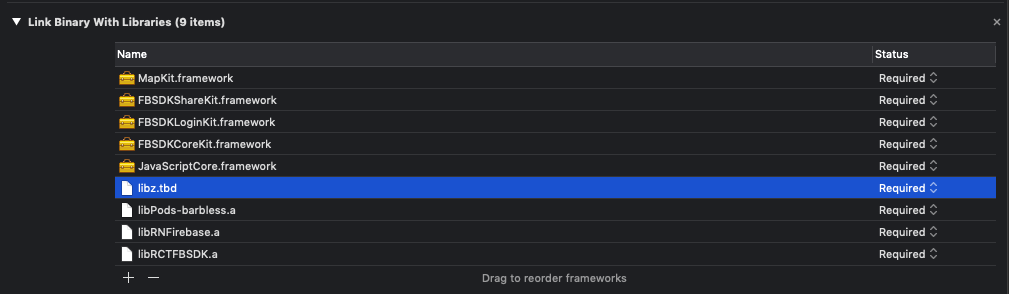
I hope that solves your issue.
 EdgarXolop
on 24 Oct 2019
EdgarXolop
on 24 Oct 2019
@EdgarXolop Thanks a lot! But could you please provide quick instructions where is this framework can be found to map it in Xcode? Thank you
oleksandr-dziuban
on 24 Oct 2019
@oleksandr-dziuban

Press the + button.

And search for the MapKit.framework here
EdgarXolop
on 24 Oct 2019
Thanks a lot, will try to add it and check my CI flow again
oleksandr-dziuban
on 24 Oct 2019
@oleksandr-dziuban Were you able to solve your issue?
I finished migrating to 0.61.2
EdgarXolop
on 25 Oct 2019
@EdgarXolop, not unfortunately I have same error, when Yoga.cpp compiles.
MapKit is not related to Yoga framework in my case.
Did you have same error with Yoga.cpp in your app?
oleksandr-dziuban
on 26 Oct 2019
I have finally found a workaround....
Just deleted all pods, deleted whole pods cache, deleted Pods folder from Git (it was under git to speed up CI builds) and everything is working now.
Closing this issue.
oleksandr-dziuban
on 29 Oct 2019
Just in case anyone happens on this thread looking for solutions to this issue...
This likely happened because the yoga directory and files had their names changed to Yoga. MacOS, by default, is a case insensitive file system, so if you had your Pod folder committed in Git, the rename was probably not detected.
There's probably a more elegant way to do this, but you can fix the issue with two commits. First, rename all instances of "yoga" under ios/Pods/Target Support Files/yoga (including the directory itself) to "yogurt" or something. Commit your changes. Now change the "yogurt" files and directory to Yoga (note the uppercase Y). Commit your changes. Any new clones of your git repo should now have the proper casing.
 dougkeen
on 17 Jan 2020
dougkeen
on 17 Jan 2020
Just in case anyone happens on this thread looking for solutions to this issue...
This likely happened because the
yogadirectory and files had their names changed toYoga. MacOS, by default, is a case insensitive file system, so if you had your Pod folder committed in Git, the rename was probably not detected.There's probably a more elegant way to do this, but you can fix the issue with two commits. First, rename all instances of "yoga" under
ios/Pods/Target Support Files/yoga(including the directory itself) to "yogurt" or something. Commit your changes. Now change the "yogurt" files and directory toYoga(note the uppercaseY). Commit your changes. Any new clones of your git repo should now have the proper casing.
Or you could git rm --cached Pods/ -r && git add .
 Bernabe-Felix
on 26 Jan 2020
Bernabe-Felix
on 26 Jan 2020
Another option:
git config core.ignorecase false
Remove pods folder
intermediate commit
git config core.ignorecase true
Pod install
final commit
 Ricowere
on 13 Mar 2020
Ricowere
on 13 Mar 2020
Translating @Ricowere 's comment to commands.
cd ios
git config core.ignorecase false
rm -rf Pods
git add .;git commit -m "Removing pods"
git config core.ignorecase true
pod install
git add .;git commit --amend -m "Reinstalled pods"
 SudoPlz
on 19 Mar 2020
SudoPlz
on 19 Mar 2020
Yoga Lexical or Preprocessor Issue
unfortunately I have same error, With latest Xcode Version 11.5 (11E608c).
/
System:
    OS: macOS 10.15.5 (19F101)
  Binaries:
    Node: v10.15.1
    npm: 6.4.1

  IDEs:
    Xcode: 11.5 (11E608c)

  npm Packages:
   react: ^16.11.0
    react-native:0.62.2

 MahiK14
on 13 Jul 2020
MahiK14
on 13 Jul 2020
@MahiK14 are you able to resolve this issue?
 rajeshsmallarc
on 3 Aug 2020
rajeshsmallarc
on 3 Aug 2020
Related issues
 janmonschke
·
3Comments
janmonschke
·
3Comments
 despairblue
·
3Comments
despairblue
·
3Comments
 arunabha
·
3Comments
arunabha
·
3Comments
 TrakBit
·
3Comments
TrakBit
·
3Comments
 phongyewtong
·
3Comments
phongyewtong
·
3Comments
Most helpful comment
Or you could
git rm --cached Pods/ -r && git add .