React-native: NativeModules empty object
I tried to recreate the Native Modules for Android guide on React Native's documentation, NativeModules was an empty object. I found a 3 years old Github repo explaining Native Modules on a rather old version of React (https://github.com/promptworks/ReactNativeBridgeExample) which works. I could not find anything wrong in my code. Either I am doing something very silly or there is a bug in the codebase.
React Native version:
react: 16.9.0
react-native: 0.61.2
react-native-cli: 2.0.1
Steps To Reproduce
- Create a new react native project using react-cli
- Follow the steps mention in https://facebook.github.io/react-native/docs/native-modules-android.html for the Toast module
or
- Add Kotlin support to your project and create files as described below (full Kotlin code provided)
Describe what you expected to happen:
NativeModules to have the exported functions instead of being an empty object.
Snack, code example, screenshot, or link to a repository:
Here I provide code for a Kotlin project trying to count the number of clicks. Everything compiles correctly.
Note
I tried without Kotlin as well, exactly copying code from the official React docs but with the same results
Code
gradle.properties:
android.useAndroidX=true
android.enableJetifier=false
app/build.gradle:
dependencies {
    implementation fileTree(dir: "libs", include: ["*.jar"])
    implementation "com.facebook.react:react-native:+"  // From node_modules

    implementation "org.jetbrains.kotlin:kotlin-stdlib-jdk7:1.2.71"

    if (enableHermes) {
        def hermesPath = "../../node_modules/hermes-engine/android/";
        debugImplementation files(hermesPath + "hermes-debug.aar")
        releaseImplementation files(hermesPath + "hermes-release.aar")
    } else {
        implementation jscFlavor
    }
}
StateModule.kt:
package com.statemanagertest.state

import com.facebook.react.bridge.*

import kotlin.collections.HashMap

class StateModule(context: ReactApplicationContext) : ReactContextBaseJavaModule(context) {
    private val constants : HashMap<String, Any> = hashMapOf("clicks" to 0)

    companion object {
        lateinit var reactContext: ReactApplicationContext
    }

    init {
        reactContext = context
    }

    override fun getName(): String {
        return "StateExample"
    }

    override fun getConstants(): HashMap<String, Any> {
        return constants
    }

    @ReactMethod
    fun whenClicked(callback: Callback) {
        val curValAny = constants["clicks"]
        val curVal = if (curValAny is Int) curValAny else 0
        constants["clicks"] = curVal + 1
        callback.invoke()
    }
}
StatePackage.kt:
package com.statemanagertest.state

import android.view.View
import com.facebook.react.ReactPackage
import com.facebook.react.bridge.JavaScriptModule
import com.facebook.react.bridge.NativeModule
import com.facebook.react.bridge.ReactApplicationContext
import com.facebook.react.uimanager.ReactShadowNode
import com.facebook.react.uimanager.ViewManager

class StatePackage : ReactPackage {
    override fun createNativeModules(reactContext: ReactApplicationContext): MutableList<NativeModule> {
        return mutableListOf(StateModule(reactContext))
    }

    override fun createViewManagers(reactContext: ReactApplicationContext): MutableList<ViewManager<View, ReactShadowNode<*>>> {
        return mutableListOf()
    }

    fun createJSModules(): List<Class<out JavaScriptModule>> {
        return listOf()
    }
}
MainApplication.kt:
package com.statemanagertest

import android.app.Application
import android.content.Context
import com.facebook.react.ReactApplication
import com.facebook.react.ReactNativeHost
import com.facebook.react.ReactPackage
import com.facebook.soloader.SoLoader
import java.lang.reflect.InvocationTargetException
import com.facebook.react.shell.MainReactPackage
import com.statemanagertest.state.StatePackage


class MainApplication : Application(), ReactApplication {

  private val mReactNativeHost = object : ReactNativeHost(this) {
    override fun getUseDeveloperSupport(): Boolean {
      return BuildConfig.DEBUG
    }

    override fun getPackages(): List<ReactPackage> {
      return listOf(
              MainReactPackage(),
              StatePackage()
      )
    }

    override fun getJSMainModuleName(): String {
      return "index"
    }
  }

  override fun getReactNativeHost(): ReactNativeHost {
    return mReactNativeHost
  }

  override fun onCreate() {
    super.onCreate()
    SoLoader.init(this, /* native exopackage */ false)
    initializeFlipper(this) // Remove this line if you don't want Flipper enabled
  }

  private fun initializeFlipper(context: Context) {
    if (BuildConfig.DEBUG) {
      try {
        val aClass = Class.forName("com.facebook.flipper.ReactNativeFlipper")
        aClass.getMethod("initializeFlipper", Context::class.java).invoke(null, context)
      } catch (e: ClassNotFoundException) {
        e.printStackTrace()
      } catch (e: NoSuchMethodException) {
        e.printStackTrace()
      } catch (e: IllegalAccessException) {
        e.printStackTrace()
      } catch (e: InvocationTargetException) {
        e.printStackTrace()
      }

    }
  }
}
App.js:
import React, { Component } from 'react';
import {
  SafeAreaView,
  StyleSheet,
  Text,
  Button,
  NativeModules
} from 'react-native';

class App extends Component {
  constructor() {
    super();
    console.log("vvk::NativeModules:", NativeModules)
  }
  render() {
    return (
      <>
        <SafeAreaView style={styles.container}>
          <Text style={styles.text}>Clicks: {0}</Text>
          <Button title="Click" onPress={() => {console.log(NativeModules)}}/>
        </SafeAreaView>
      </>
    )
  }
}

const styles = StyleSheet.create({
  container: {
    flex: 1,
    justifyContent: 'center',
    alignItems: "stretch",
    margin: 20,
  },
  text: {
    textAlign: 'center',
    padding: 20,
    fontSize: 20
  }
});

export default App;
 thezealousfool
All 23 comments
I also face the same problem, have you solved it, how to solve it?
 s349856186
on 14 Oct 2019
s349856186
on 14 Oct 2019
@s349856186 I moved to version 0.60.0 (https://github.com/thezealousfool/ReactNative-Java-Cpp/blob/master/package.json) and things worked.
thezealousfool
on 14 Oct 2019
@thezealousfool I solved it, it's need to packages.add("xxxmodules") at MainApplication.java, and on debug mode of Chrome to check NativeModules
s349856186
on 18 Oct 2019
@s349856186 Still doesn't work for me.
thezealousfool
on 18 Oct 2019
in build.gradle in dependencies add your Project --> implementation project(':myModule')
you can see the https://github.com/react-native-community/releases/issues/148
s349856186
on 18 Oct 2019
I'm really new to Kotlin and trying to get this working too. Does the MainApplication.java have to be changed to a Kotlin file as well or can Java import Kotlin packages? And is adding implementation "org.jetbrains.kotlin:kotlin-stdlib-jdk7:x.x.xxx" to build.gradle really enough to get Kotlin up & running?
 mrTuomoK
on 29 Oct 2019
mrTuomoK
on 29 Oct 2019
@mrTuomoK You can look at the ReactToCpp branch: https://github.com/thezealousfool/ReactNative-Java-Cpp/tree/ReactToCpp
Will serve as example code, though I am using react-native version 0.60.0 as the latest build wasn't working coorectly for me, but apparently there are ways to make latest version to work (I haven't tried it though).
thezealousfool
on 29 Oct 2019
@s349856186 I still could not get it to work. Do you have a sample repo that I can look at? Thanks
thezealousfool
on 31 Oct 2019
Turns out, turning on debug mode once fixes the problem. Strange..
thezealousfool
on 31 Oct 2019
Having exact same issue, turning on debug worked for me.
Any ideas what could be happening?
 cayasso
on 1 Nov 2019
cayasso
on 1 Nov 2019
I might be completely wrong here, but my guess is it has got something to do with the js-core that is being used.
When we turn on debug mode, it uses Chrome's V8 engine instead which works without a problem. If that's the case, fiddling around with the js-core version will make it work in non-debug mode too.
thezealousfool
on 1 Nov 2019
@thezealousfool thanks for reporting, since this seems like an issue with the documentation what do you think about me moving this to the react-native-website repo? cc @rachelnabors
 rickhanlonii
on 9 Dec 2019
rickhanlonii
on 9 Dec 2019
@OlegNovosad
possible solution to the problem. The commend is hidden, so you need to open it
sunnylqm says:
You should check upgrade-helper carefully to see if you missed any config. Especially something like https://github.com/facebook/react-native/blob/master/template/android/settings.gradle#L2 and https://github.com/facebook/react-native/blob/master/template/android/app/build.gradle#L209
And do not use react-native link command any more.
Here you can find the upgrade-helper and see how android file have changed between releases
 fabriziobertoglio1987
on 29 Dec 2019
fabriziobertoglio1987
on 29 Dec 2019
I had this problem and I fixed it by changing the MainApplication.java file with the segment
    @Override
    protected List<ReactPackage> getPackages() {
      @SuppressWarnings("UnnecessaryLocalVariable")
      List<ReactPackage> packages = new PackageList(this).getPackages();
      // Packages that cannot be autolinked yet can be added manually here, for example:
// packages.add(new INSERTPACKAGENAMEHERE());
      return packages;
    }
If there is any packages that you need to add that require manual linking, the right way to do it is like this:
packages.add(new INSERTPACKAGENAMEHERE());
This above is what React Native 0.60 adds in. Because everything is now linked automatically, you don't need to import modules like new MainReactPackage()
This is what my file looked like before
           return Arrays.<ReactPackage>asList(
              new MainReactPackage(),
       );
Hope this helps.
 emachta
on 13 Jan 2020
emachta
on 13 Jan 2020
Chamos, I found the solution. If you try all the proposed solutions above and nothing works, then the answer is to turn the debugger on. That's how I received the NativeModules object. It seems like a bug RN has.
 Gricardov
on 2 Apr 2020
Gricardov
on 2 Apr 2020
Also running into this after ejecting from expo. Seems like native modules are undefined / NativeModules is an empty object but it works in chrome debug mode
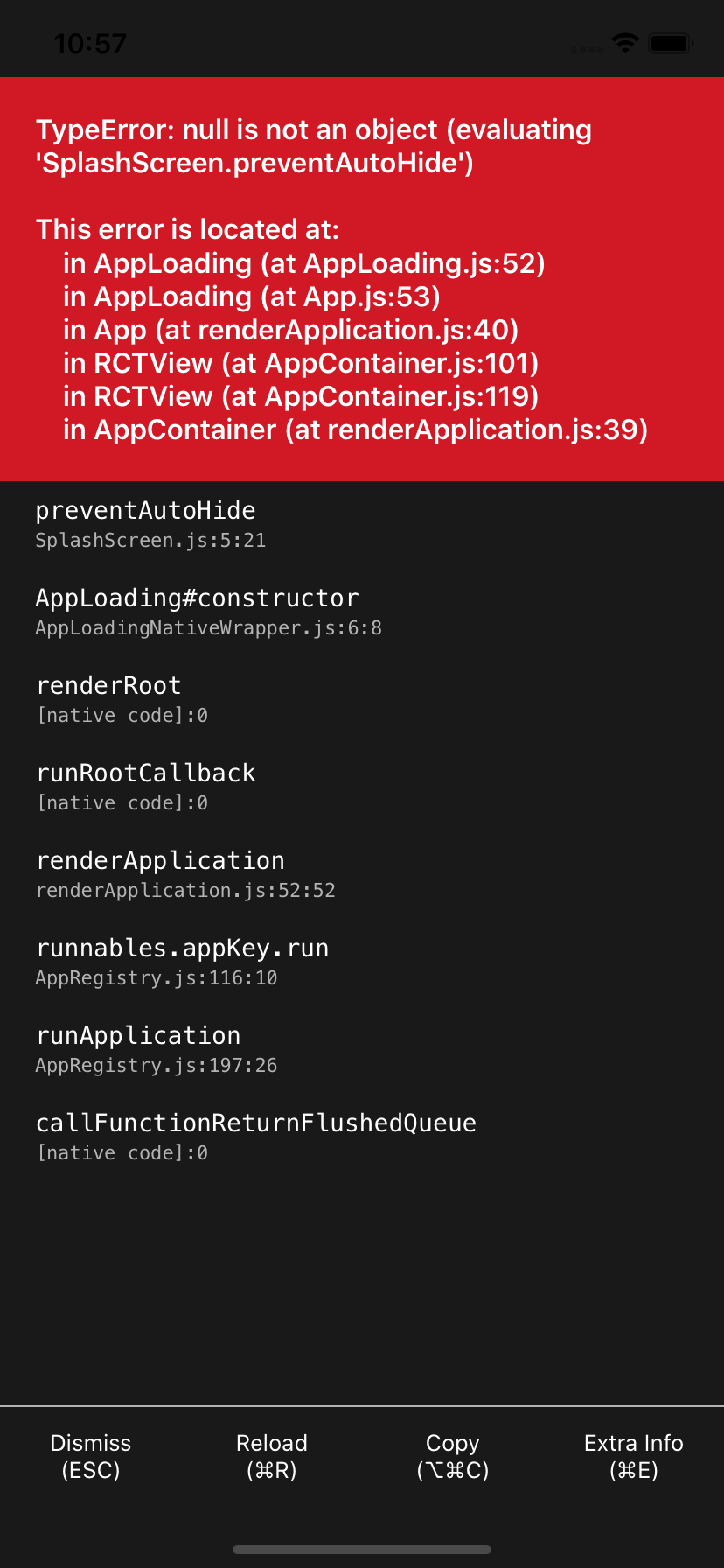
Edit: maybe this is just a symptom of a different issue.. commented out node_modules/expo/build/launch/SplashScreen.js (see screenshot) and things started working again
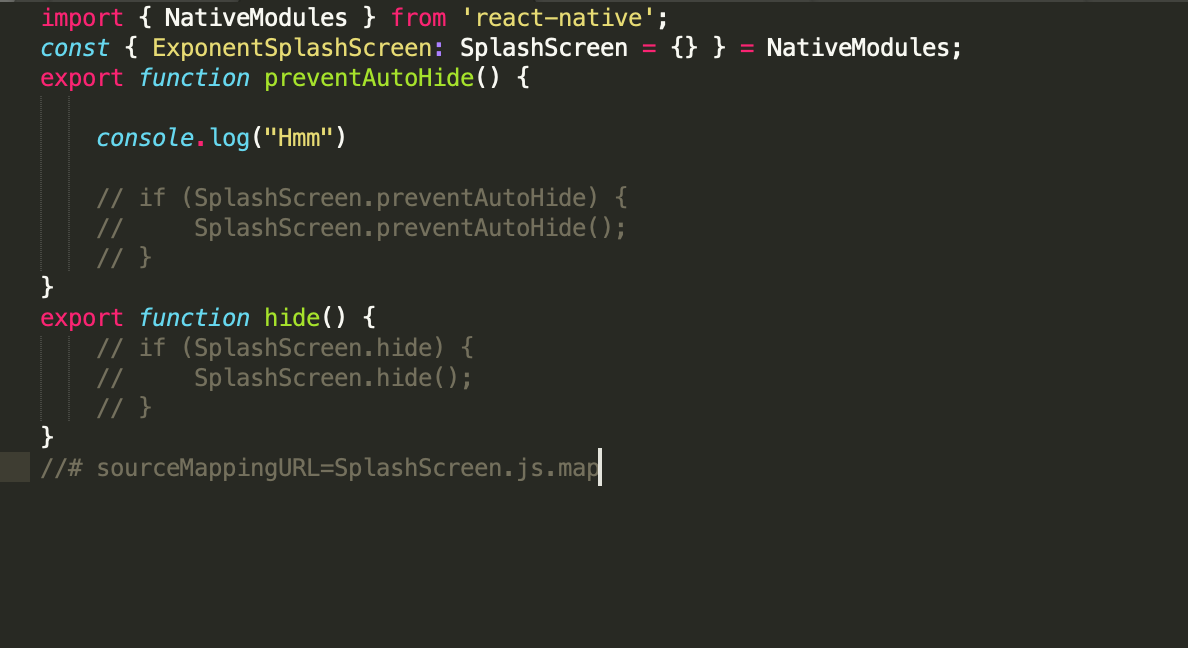
Edit: this error for me is because I was using AppLoading in Expo Bare Workflow, which I shouldn't have been. It was then calling SplashScreen which also doesn't exist. Getting rid of AppLoading fixed it for me.
 raphaelrk
on 7 Apr 2020
raphaelrk
on 7 Apr 2020
Sorry for a basic question like this but new to React Native and I am reading a lot of answers here saying "turn debug on" and I am not sure what this means? I am using expo ejected workflow, running on an attached device...I have dev tools open on localhost: 9002 I don't see anything explicit about "turning on debug" in either expo or Rn docs?
https://reactnative.dev/docs/debugging.html
https://docs.expo.io/workflow/debugging/
 simplesthing
on 26 May 2020
simplesthing
on 26 May 2020
Sorry for a basic question like this but new to React Native and I am reading a lot of answers here saying "turn debug on" and I am not sure what this means? I am using expo ejected workflow, running on an emulator...I have dev tools open on localhost: 9002 I don't see anything explicit about "turning on" in either expo or Rn docs?
https://reactnative.dev/docs/debugging.html
https://docs.expo.io/workflow/debugging/
The docs do not mention it. It is a bug which I am sure the React Native team is working on fixing. As I mentioned above, the bug seems to not be in the V8 engine and that's the reason turning on React's debugging fixes this issue.
I might be completely wrong here, but my guess is it has got something to do with the js-core that is being used.
When we turn on debug mode, it uses Chrome's V8 engine instead which works without a problem. If that's the case, fiddling around with the js-core version will make it work in non-debug mode too.
thezealousfool
on 26 May 2020
Thanks for reply I did find the debugger, its set in .expo/settings.json and shows up on the emulator, however on a device, either running locally or as distributed through Google Play I still get an empty object for RN modules.
I am using a library, react-native-iap, that requires their module to be found in order to function, I am not understanding how I can have a production application function w/o debugger?
Related issue on other project's repo: https://github.com/dooboolab/react-native-iap/issues/1017
simplesthing
on 26 May 2020
Thanks for reply I did find the debugger, its set in
.expo/settings.jsonand shows up on the emulator, however on a device, either running locally or as distributed through Google Play I still get an empty object for RN modules.I am using a library, react-native-iap, that requires their module to be found in order to function, I am not understanding how I can have a production application function w/o debugger?
Related issue on other project's repo: dooboolab/react-native-iap#1017
Chamo, in my case, pressing the square button of my device for some seconds shows me the option to turn the debugger on.
Gricardov
on 29 May 2020
Still reproduced in "react-native": "0.63.2"
 whalemare
on 2 Aug 2020
whalemare
on 2 Aug 2020
I have created new issue that's relevant to my case
https://github.com/facebook/react-native/issues/29548
whalemare
on 10 Aug 2020
yuh, I experienced it too in almost same code(in the project made with Ignite CLI)..
When I wrote this code and run it, It returns empty object :
{}
And I use react-native verson "0.60.0"(first time, I used 0.63.2 but I changed to 0.60.0 because of someone's comment)
KomoranParserModule.java (I used a NLP library that called "Komoran") :
package com.ilux;

import androidx.annotation.NonNull;
import com.facebook.react.bridge.Promise;
import com.facebook.react.bridge.ReactApplicationContext;
import com.facebook.react.bridge.ReactContextBaseJavaModule;
import com.facebook.react.bridge.ReactMethod;
import com.google.gson.Gson;
import com.google.gson.JsonArray;
import com.google.gson.JsonElement;
import com.google.gson.JsonObject;

import java.util.HashMap;
import java.util.List;
import java.util.Map;

import kr.co.shineware.nlp.komoran.constant.DEFAULT_MODEL;
import kr.co.shineware.nlp.komoran.core.Komoran;
import kr.co.shineware.nlp.komoran.model.Token;

public class KomoranParserModule extends ReactContextBaseJavaModule {
    public static ReactApplicationContext reactContext;
    public static Komoran Parser;

    public KomoranParserModule(ReactApplicationContext ctx){
        super(ctx);
        this.reactContext = ctx;
    }

    @Override
    public Map<String, Object> getConstants(){
        final Map<String, Object> constants = new HashMap<>();
        return constants;
    }

    @Override
    public String getName() {
        return "KomoranParser";
    }

    @ReactMethod
    public void InitKomoran(final Promise promise){ //Init Komoran parser
        try{
            Parser = new Komoran(DEFAULT_MODEL.FULL);
            promise.resolve(null);
        }catch (Exception ex){promise.reject(ex.getMessage()); return;}
    }

    @ReactMethod
    public void ParseToJson(String Text, final Promise promise){
        if(Parser == null){promise.reject("Komoran Parser is not init");return;}
        List<Token> TokenList = Parser.analyze(Text).getTokenList();

        JsonObject ResultJson = new JsonObject();
        JsonArray ResultArray = new JsonArray();
        for(Token TokenItem : TokenList){
            JsonObject Item = new JsonObject();
            Item.addProperty("BeginIndex", TokenItem.getBeginIndex());
            Item.addProperty("EndIndex", TokenItem.getEndIndex());
            Item.addProperty("Morph", TokenItem.getMorph());
            Item.addProperty("Pos", TokenItem.getPos());
            ResultArray.add(Item);
        }
        ResultJson.add("Result", ResultArray);

        promise.resolve(new Gson().toJson(ResultJson));
    }

}
KomoranParserPackage.java :
package com.ilux;

import androidx.annotation.NonNull;

import com.facebook.react.ReactPackage;
import com.facebook.react.bridge.NativeModule;
import com.facebook.react.bridge.ReactApplicationContext;
import com.facebook.react.uimanager.ViewManager;

import java.util.ArrayList;
import java.util.Collections;
import java.util.List;

public class KomoranParserPackage implements ReactPackage {

    @Override
    public List<ViewManager> createViewManagers(ReactApplicationContext reactContext) {
        return Collections.emptyList();
    }

    @Override
    public List<NativeModule> createNativeModules(ReactApplicationContext reactContext) {
        List<NativeModule> Modules = new ArrayList<>();

        //Add Modules
        Modules.add(new KomoranParserModule(reactContext));

        return Modules;
    }


}
MainApplication.java :
package com.ilux;

import android.app.Application;
import android.content.Context;
import com.facebook.react.PackageList;
import com.facebook.react.ReactApplication;
import com.facebook.react.ReactInstanceManager;
import com.facebook.react.ReactNativeHost;
import com.facebook.react.ReactPackage;
import com.facebook.soloader.SoLoader;
import java.lang.reflect.InvocationTargetException;
import java.util.List;
import com.ilux.KomoranParserPackage;

public class MainApplication extends Application implements ReactApplication {

  private final ReactNativeHost mReactNativeHost =
      new ReactNativeHost(this) {
        @Override
        public boolean getUseDeveloperSupport() {
          return BuildConfig.DEBUG;
        }

        @Override
        protected List<ReactPackage> getPackages() {
          @SuppressWarnings("UnnecessaryLocalVariable")
          List<ReactPackage> packages = new PackageList(this).getPackages();
          packages.add(new KomoranParserPackage());
          return packages;
        }

        @Override
        protected String getJSMainModuleName() {
          return "index";
        }
      };

  @Override
  public ReactNativeHost getReactNativeHost() {
    return mReactNativeHost;
  }

  @Override
  public void onCreate() {
    super.onCreate();
    SoLoader.init(this, /* native exopackage */ false);
    initializeFlipper(this, getReactNativeHost().getReactInstanceManager());
  }

  /**
   * Loads Flipper in React Native templates. Call this in the onCreate method with something like
   * initializeFlipper(this, getReactNativeHost().getReactInstanceManager());
   *
   * @param context
   * @param reactInstanceManager
   */
  private static void initializeFlipper(
      Context context, ReactInstanceManager reactInstanceManager) {
    if (BuildConfig.DEBUG) {
      try {
        /*
         We use reflection here to pick up the class that initializes Flipper,
        since Flipper library is not available in release mode
        */
        Class<?> aClass = Class.forName("com.ilux.ReactNativeFlipper");
        aClass
            .getMethod("initializeFlipper", Context.class, ReactInstanceManager.class)
            .invoke(null, context, reactInstanceManager);
      } catch (ClassNotFoundException e) {
        e.printStackTrace();
      } catch (NoSuchMethodException e) {
        e.printStackTrace();
      } catch (IllegalAccessException e) {
        e.printStackTrace();
      } catch (InvocationTargetException e) {
        e.printStackTrace();
      }
    }
  }
}
My Typescript Code(simplified code) :
import React, { useEffect } from "react"
import { NativeModules } from "react-native"
//and other imports..

    function App() {
        console.log(NativeModules)

        //and other codes(including return) are here..
    }
This code should return the object like this :
{KomoranParser}
I think that React Native can't transfer the native module to app.
I'm sure that the reason of this error will be my big silly mistake or runtime's critical bug.
How can we fix it?
 VINTO1819
on 3 Sep 2020
VINTO1819
on 3 Sep 2020
Related issues
 josev55
·
3Comments
josev55
·
3Comments
 grabbou
·
3Comments
grabbou
·
3Comments
 despairblue
·
3Comments
despairblue
·
3Comments
 DreySkee
·
3Comments
DreySkee
·
3Comments
 phongyewtong
·
3Comments
phongyewtong
·
3Comments
Most helpful comment
Still reproduced in
"react-native": "0.63.2"