React-native: console.log commands are not shown their code line locations
After 0.61.x releases on the debug mode console.log commands are not showing their code line locations. They always shown at ... Project Directioy ...\projectName\node_modules\react-native\Libraries\Core\setUpDeveloperTools.js:73 directory.
For example;
Before update:

After update:

Is this a bug? If it's not previous version was way more useful for variable, data or etc.. tracking.
Versions:
    "react": "16.9.0",
    "react-native": "0.61.1"
Environment:
[skip envinfo]
 ezranbayantemur
All 36 comments
Can you run react-native info and edit your issue to include these results under the React Native version: section?
[skip envinfo] alongside an explanation in your Environment: section.
 react-native-bot
on 9 Oct 2019
react-native-bot
on 9 Oct 2019
@motiz88, does this look familiar to any recent changes? Maybe something like framesToPop on console.log?
 TheSavior
on 10 Oct 2019
TheSavior
on 10 Oct 2019
This is probably due to the way we wrap console methods to add React component stacks. I'm not sure whether Chrome exposes a way to manipulate the call site attribution for logs. cc @bvaughn
 motiz88
on 10 Oct 2019
motiz88
on 10 Oct 2019
I'm not sure why and how it's happening but it would be more better to work like other version.
ezranbayantemur
on 10 Oct 2019
I'm getting the same result in my console with the newer versions of RN.
 cheetahcoding
on 10 Oct 2019
cheetahcoding
on 10 Oct 2019
This is probably due to the way we wrap console methods to add React component stacks. I'm not sure whether Chrome exposes a way to manipulate the call site attribution for logs. cc @bvaughn
@motiz88 It does not, although I did open a discussion issue about this type of thing:
https://github.com/whatwg/console/issues/163
It got a little attention initially but seems to have fizzled 😞
I'm not sure why and how it's happening but it would be more better to work like other version.
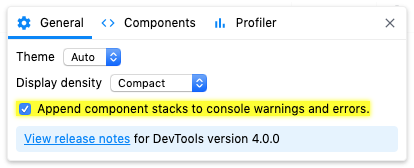
@ezranbayantemur @motiz88 This is a React DevTools v4 feature, so it would be expected to impact RN v61+.
You should be able to disable it in the general settings.
React component authors have often requested a way to log warnings that include the React "component stack". DevTools now provides an option to automatically append this information to warnings (
console.warn) and errors (console.error).
It can be disabled in the general settings panel:

 bvaughn
on 10 Oct 2019
bvaughn
on 10 Oct 2019
I'm also experiencing this after upgrading to React Native 0.61.2. Worked fine in 0.60.x
 acoutts
on 11 Oct 2019
acoutts
on 11 Oct 2019
To be clear, this is 100% expected to happen for v61+ and not for v60 (or earlier) because v61 embeds the new backend from react-devtools-core v4.
I also made a judgement call for the override to be on by default (so it's opt-out rather than opt-in) because (1) people might not be running the DevTools frontend at all and (2) even if they were, there's an initialization race during which any logged errors would not get the appended callstack.
This decision is somewhat controversial. If folks feel that I made the wrong decision by defaulting on, we can talk about it.
bvaughn
on 11 Oct 2019
Thanks @bvaughn - for those of us on v61+ now, what's the recommended toolset to continue debugging to see line numbers? I'm willing to switch tools if it means I can see the line numbers again.
acoutts
on 11 Oct 2019
See my comment right above where I copied instructions for disabling it?
bvaughn
on 11 Oct 2019
When I tried to start react-devtools v4, it said: DevTools v4 is incompatible with this version of React so then I tried v3 and it doesn't look like your screenshot there. There's no settings to toggle.
Is this documented anywhere for me to read more and understand the issue rather than me continue to ask questions?
acoutts
on 11 Oct 2019
Does not sound like you are running v61 of React Native if you saw that message. The v4 frontend can only connect and work with the v4 backend, and vice versa.
bvaughn
on 11 Oct 2019
Hm, I followed the upgrade guide and checked every change in every file, it's definitely on that version as I have fast refresh as well.
$ react-native upgrade
info No version passed. Fetching latest...
warn Specified version "0.61.2" is already installed in node_modules and it satisfies "0.61.2" semver range. No need to upgrade
You should be able to disable it in the general settings.
React component authors have often requested a way to log warnings that include the React "component stack". DevTools now provides an option to automatically append this information to warnings (
console.warn) and errors (console.error).
It can be disabled in the general settings panel:
I was tracking logs on Google Chrome Debugger, not React Devtools, so there is no way to disable such as you mention it. But anyway, like @acoutts said when I try to devtools I got incompatible errors.
ezranbayantemur
on 12 Oct 2019
I also use Chrome Debugger tools, It feels simpler... if this decision can be discussed, count my vote for allowing to see logs like before without having to install React DevTools.
 IceDev-xyz
on 13 Oct 2019
IceDev-xyz
on 13 Oct 2019
Can we default it to see logs as they were before if React Devtools is not installed?
 ledzep9012
on 15 Oct 2019
ledzep9012
on 15 Oct 2019
My takeaway from this is that the current default is probably not working out very well for folks, so I'll change it (off instead of on). Sorry for the inconvenience.
bvaughn
on 15 Oct 2019
Thanks @bvaughn. I think most of the confusion comes from most people not using react devtools but just using Chrome (the thing that opens by default when you enable debugging).
acoutts
on 15 Oct 2019
Follow up clarification question for @ezranbayantemur @ledzep9012 etc: Why was the "before" behavior of showing YellowBox.js (already a React Native console override) preferable to the new location of showing the DevTools backend? Neither is the original place the error/warning was logged.
bvaughn
on 15 Oct 2019
Follow up clarification question for @ezranbayantemur @ledzep9012 etc: Why was the "before" behavior of showing
YellowBox.js(already a React Nativeconsoleoverride) preferable to the new location of showing the DevTools backend? Neither is the original place the error/warning was logged.
@bvaughn I was referring to console.log statements
ledzep9012
on 15 Oct 2019
Gotcha. I misunderstood the screenshots.
DevTools overrides console.log too so that it can suppress logging when shallow re-rendering a component to inspect hooks values (learn more here). This uses the same mechanism as the "component stacks" feature but the purpose is different.
However, this override is deferred until the first time a component is actually inspected (which would never happen if you weren't using the DevTools UI). It's also unpatched as soon as we're done inspecting. (See the source code here.)
So I'm now unsure of how the originally reported issue was being triggered. Are we actually seeing console.log being overridden eagerly? Are we potentially talking about console.trace instead?
bvaughn
on 15 Oct 2019
I think there’s a misunderstanding.
Could it be that console.logs are being eaten by the thing that sends them to Metro? So then it wouldn’t be React DevTools-related at all.
In that case ideally the fix would be to somehow detect if we’re in a “rich console” environment like Chrome or not. When we are, don’t hijack console to send logs to Metro.
A possible way to detect that could be to check whether console methods are native or RN polyfill. Maybe by toString-ing them. Or by checking for some Chrome specific property on console. Need to make sure the fix doesn’t give a false positive for Hermes.
 gaearon
on 15 Oct 2019
gaearon
on 15 Oct 2019
Yes. I assumed this was DevTools because it does a similar override, and I was pinged on this issue. You're right though. It looks like this is a React Native override:
https://github.com/facebook/react-native/blob/b7c14f29cf391ae9b35a2011dca4e631c881dfd7/Libraries/Core/setUpDeveloperTools.js#L62-L81
Which makes sense, given that the console screenshot above shows setupDeveloperTools.js rather than (DevTools) backend.js
Looks like this change maps back to a recent commit "Improve console logging to Metro":
https://github.com/facebook/react-native/commit/76e10c4e8bc3e31eecf80b15bde29d133caaca1e
bvaughn
on 15 Oct 2019
Checking whether console is native or not and skipping the Metro logging setup makes sense to me. Do you wanna send a PR for that?
 cpojer
on 16 Oct 2019
cpojer
on 16 Oct 2019
This is fixed by https://github.com/facebook/react-native/pull/26883
That diff will revert this back to showing "YellowBox.js":

This will stay the case until Chrome exposes a way for us to ignore our wrapping frame (see here).
Until then, if you want to see the true frame, you can blackbox YellowBox.js (or any script) and Chrome will know to skip that frame:

_Note: The regexes to use are /YellowBox\.js$ and /setUpDeveloperTools\.js$_

_Note: Notice that App.js is referenced here instead of YellowBox.js_
You can read more about Chrome Blackboxing here
 rickhanlonii
on 16 Oct 2019
rickhanlonii
on 16 Oct 2019
This is fixed by #26883
I just applied this patch and chrome console logs work again for me and it's showing the correct files/ line numbers as before.

acoutts
on 16 Oct 2019
Sorry for my ignorance, but how do you apply the patch? Well for now I just manually changed the file.
 razirbel
on 16 Oct 2019
razirbel
on 16 Oct 2019
Sorry for my ignorance, but how do you apply the patch? Well for now I just manually changed the file.
Manually modify the react native core file in node_modules as per the commit here: https://github.com/facebook/react-native/pull/26883/commits/77acfd74b6324c651e814c4a1e032471952dfce2
acoutts
on 16 Oct 2019
When will the patch fix be merged into the repo?
 Dellybro
on 18 Oct 2019
Dellybro
on 18 Oct 2019
It will be merged when it's ready. Likely next week.
gaearon
on 18 Oct 2019
This is fixed by #26883
Thanks for the support, like @acoutts said this fixed the issue. We waiting for merge.
Closing the issue for fixed, have a great day you all, bugless coding ! 🍺
ezranbayantemur
on 18 Oct 2019
The fix was merged, we went with a strategy that was a bit better than the original patch tested above so please check it out and let me know if you have any questions https://github.com/facebook/react-native/commit/42ac240bceb104474494c6007df0089baec00f7a
rickhanlonii
on 22 Oct 2019
0.61.3 - Still shows setUpDeveloperTools.js:73 .. I was with the idea that the fix was already merged for this release, did I miss something?
IceDev-xyz
on 29 Oct 2019
0.61.5:
Logcat:
ReactNativeJS: 'Unhandled promise rejection', [TypeError: Cannot read property 'reset' of undefined]
App showing:
console.error: "Unhandled promise rejection', [TypeError: Cannot read property 'reset' of undefined, js engine: hermes
apply

_construct
construct.js:30:26

Wrapper
wrapNativeSuper.js:26:23

call

apply

SyntheticError
index.bundle?platform=andoird&dev=true&minify=false;35761:111

reactConsoleErrorHandler
ExceptionsManager.js:135:52

call

apply

perform$argument_0
....
 tapz
on 4 Dec 2019
tapz
on 4 Dec 2019
index.bundle?platform=andoird&dev=true&minify=false;35761:111 is basically a totally useless line number.
tapz
on 4 Dec 2019
@tapz that looks like a different issue, it seems like symbolication is only partially applied.
If you can repro, can you create a new issue?
rickhanlonii
on 26 Dec 2019
Related issues
 jobsamuel
·
3Comments
jobsamuel
·
3Comments
 DreySkee
·
3Comments
DreySkee
·
3Comments
 janmonschke
·
3Comments
janmonschke
·
3Comments
 madwed
·
3Comments
madwed
·
3Comments
 jlongster
·
3Comments
jlongster
·
3Comments
Most helpful comment
Thanks for the support, like @acoutts said this fixed the issue. We waiting for merge.
Closing the issue for fixed, have a great day you all, bugless coding ! 🍺