React-native: Build iOS library not found for -lyoga (0.60.3)
ld: warning: directory not found for option '-L/Users/enrico/Library/Developer/Xcode/DerivedData/Disef-flgtzbclbyxvuhezqmmzgllyqpwe/Build/Intermediates.noindex/ArchiveIntermediates/Disef/BuildProductsPath/Release-iphoneos/yoga'
ld: library not found for -lyoga
clang: error: linker command failed with exit code 1 (use -v to see invocation)
React Native version:
info Fetching system and libraries information...
System:
OS: macOS 10.14.3
CPU: (4) x64 Intel(R) Core(TM) i7-3820 CPU @ 3.60GHz
Memory: 1.88 GB / 8.00 GB
Shell: 3.2.57 - /bin/bash
Binaries:
Node: 12.7.0 - /usr/local/bin/node
npm: 6.10.0 - /usr/local/bin/npm
Watchman: 4.9.0 - /usr/local/bin/watchman
SDKs:
iOS SDK:
Platforms: iOS 12.4, macOS 10.14, tvOS 12.4, watchOS 5.3
IDEs:
Android Studio: 3.4 AI-183.6156.11.34.5692245
Xcode: 10.3/10G8 - /usr/bin/xcodebuild
npmPackages:
react: 16.8.6 => 16.8.6
react-native: 0.60.3 => 0.60.3
npmGlobalPackages:
react-native-cli: 2.0.1
running the archive command on xcode I find the following problem
 enri90
All 9 comments
Upgraded React Native to v0.60.4
identical problem:
Showing Recent Messages
Ld /Users/enrico/Library/Developer/Xcode/DerivedData/Disef-flgtzbclbyxvuhezqmmzgllyqpwe/Build/Intermediates.noindex/Disef.build/Release-iphoneos/Disef.build/Objects-normal/arm64/Disef normal arm64 (in target: Disef)
cd /Users/enrico/Desktop/Disef/ios
export IPHONEOS_DEPLOYMENT_TARGET=9.0
/Applications/Xcode.app/Contents/Developer/Toolchains/XcodeDefault.xctoolchain/usr/bin/clang -arch arm64 -isysroot /Applications/Xcode.app/Contents/Developer/Platforms/iPhoneOS.platform/Developer/SDKs/iPhoneOS12.4.sdk -L/Users/enrico/Library/Developer/Xcode/DerivedData/Disef-flgtzbclbyxvuhezqmmzgllyqpwe/Build/Products/Release-iphoneos -L/Users/enrico/Library/Developer/Xcode/DerivedData/Disef-flgtzbclbyxvuhezqmmzgllyqpwe/Build/Products/Release-iphoneos/DoubleConversion -L/Users/enrico/Library/Developer/Xcode/DerivedData/Disef-flgtzbclbyxvuhezqmmzgllyqpwe/Build/Products/Release-iphoneos/Folly -L/Users/enrico/Library/Developer/Xcode/DerivedData/Disef-flgtzbclbyxvuhezqmmzgllyqpwe/Build/Products/Release-iphoneos/RNCAsyncStorage -L/Users/enrico/Library/Developer/Xcode/DerivedData/Disef-flgtzbclbyxvuhezqmmzgllyqpwe/Build/Products/Release-iphoneos/RNFS -L/Users/enrico/Library/Developer/Xcode/DerivedData/Disef-flgtzbclbyxvuhezqmmzgllyqpwe/Build/Products/Release-iphoneos/RNGestureHandler -L/Users/enrico/Library/Developer/Xcode/DerivedData/Disef-flgtzbclbyxvuhezqmmzgllyqpwe/Build/Products/Release-iphoneos/RNVectorIcons -L/Users/enrico/Library/Developer/Xcode/DerivedData/Disef-flgtzbclbyxvuhezqmmzgllyqpwe/Build/Products/Release-iphoneos/React-Core -L/Users/enrico/Library/Developer/Xcode/DerivedData/Disef-flgtzbclbyxvuhezqmmzgllyqpwe/Build/Products/Release-iphoneos/React-DevSupport -L/Users/enrico/Library/Developer/Xcode/DerivedData/Disef-flgtzbclbyxvuhezqmmzgllyqpwe/Build/Products/Release-iphoneos/React-RCTActionSheet -L/Users/enrico/Library/Developer/Xcode/DerivedData/Disef-flgtzbclbyxvuhezqmmzgllyqpwe/Build/Products/Release-iphoneos/React-RCTAnimation -L/Users/enrico/Library/Developer/Xcode/DerivedData/Disef-flgtzbclbyxvuhezqmmzgllyqpwe/Build/Products/Release-iphoneos/React-RCTBlob -L/Users/enrico/Library/Developer/Xcode/DerivedData/Disef-flgtzbclbyxvuhezqmmzgllyqpwe/Build/Products/Release-iphoneos/React-RCTImage -L/Users/enrico/Library/Developer/Xcode/DerivedData/Disef-flgtzbclbyxvuhezqmmzgllyqpwe/Build/Products/Release-iphoneos/React-RCTLinking -L/Users/enrico/Library/Developer/Xcode/DerivedData/Disef-flgtzbclbyxvuhezqmmzgllyqpwe/Build/Products/Release-iphoneos/React-RCTNetwork -L/Users/enrico/Library/Developer/Xcode/DerivedData/Disef-flgtzbclbyxvuhezqmmzgllyqpwe/Build/Products/Release-iphoneos/React-RCTSettings -L/Users/enrico/Library/Developer/Xcode/DerivedData/Disef-flgtzbclbyxvuhezqmmzgllyqpwe/Build/Products/Release-iphoneos/React-RCTText -L/Users/enrico/Library/Developer/Xcode/DerivedData/Disef-flgtzbclbyxvuhezqmmzgllyqpwe/Build/Products/Release-iphoneos/React-RCTVibration -L/Users/enrico/Library/Developer/Xcode/DerivedData/Disef-flgtzbclbyxvuhezqmmzgllyqpwe/Build/Products/Release-iphoneos/React-RCTWebSocket -L/Users/enrico/Library/Developer/Xcode/DerivedData/Disef-flgtzbclbyxvuhezqmmzgllyqpwe/Build/Products/Release-iphoneos/React-cxxreact -L/Users/enrico/Library/Developer/Xcode/DerivedData/Disef-flgtzbclbyxvuhezqmmzgllyqpwe/Build/Products/Release-iphoneos/React-fishhook -L/Users/enrico/Library/Developer/Xcode/DerivedData/Disef-flgtzbclbyxvuhezqmmzgllyqpwe/Build/Products/Release-iphoneos/React-jsi -L/Users/enrico/Library/Developer/Xcode/DerivedData/Disef-flgtzbclbyxvuhezqmmzgllyqpwe/Build/Products/Release-iphoneos/React-jsiexecutor -L/Users/enrico/Library/Developer/Xcode/DerivedData/Disef-flgtzbclbyxvuhezqmmzgllyqpwe/Build/Products/Release-iphoneos/React-jsinspector -L/Users/enrico/Library/Developer/Xcode/DerivedData/Disef-flgtzbclbyxvuhezqmmzgllyqpwe/Build/Products/Release-iphoneos/glog -L/Users/enrico/Library/Developer/Xcode/DerivedData/Disef-flgtzbclbyxvuhezqmmzgllyqpwe/Build/Products/Release-iphoneos/react-native-config -L/Users/enrico/Library/Developer/Xcode/DerivedData/Disef-flgtzbclbyxvuhezqmmzgllyqpwe/Build/Products/Release-iphoneos/react-native-netinfo -L/Users/enrico/Library/Developer/Xcode/DerivedData/Disef-flgtzbclbyxvuhezqmmzgllyqpwe/Build/Products/Release-iphoneos/yoga -F/Users/enrico/Library/Developer/Xcode/DerivedData/Disef-flgtzbclbyxvuhezqmmzgllyqpwe/Build/Products/Release-iphoneos -filelist /Users/enrico/Library/Developer/Xcode/DerivedData/Disef-flgtzbclbyxvuhezqmmzgllyqpwe/Build/Intermediates.noindex/Disef.build/Release-iphoneos/Disef.build/Objects-normal/arm64/Disef.LinkFileList -Xlinker -rpath -Xlinker @executable_path/Frameworks -miphoneos-version-min=9.0 -dead_strip -Xlinker -object_path_lto -Xlinker /Users/enrico/Library/Developer/Xcode/DerivedData/Disef-flgtzbclbyxvuhezqmmzgllyqpwe/Build/Intermediates.noindex/Disef.build/Release-iphoneos/Disef.build/Objects-normal/arm64/Disef_lto.o -fembed-bitcode-marker -fobjc-arc -fobjc-link-runtime -ObjC -lDoubleConversion -lFolly -lRNCAsyncStorage -lRNFS -lRNGestureHandler -lRNVectorIcons -lReact-Core -lReact-DevSupport -lReact-RCTActionSheet -lReact-RCTAnimation -lReact-RCTBlob -lReact-RCTImage -lReact-RCTLinking -lReact-RCTNetwork -lReact-RCTSettings -lReact-RCTText -lReact-RCTVibration -lReact-RCTWebSocket -lReact-cxxreact -lReact-fishhook -lReact-jsi -lReact-jsiexecutor -lReact-jsinspector -lglog -lreact-native-config -lreact-native-netinfo -lstdc++ -lyoga -framework JavaScriptCore -ObjC -lc++ -lPods-Disef -Xlinker -dependency_info -Xlinker /Users/enrico/Library/Developer/Xcode/DerivedData/Disef-flgtzbclbyxvuhezqmmzgllyqpwe/Build/Intermediates.noindex/Disef.build/Release-iphoneos/Disef.build/Objects-normal/arm64/Disef_dependency_info.dat -o /Users/enrico/Library/Developer/Xcode/DerivedData/Disef-flgtzbclbyxvuhezqmmzgllyqpwe/Build/Intermediates.noindex/Disef.build/Release-iphoneos/Disef.build/Objects-normal/arm64/Disefld: warning: directory not found for option '-L/Users/enrico/Library/Developer/Xcode/DerivedData/Disef-flgtzbclbyxvuhezqmmzgllyqpwe/Build/Products/Release-iphoneos/yoga'
ld: library not found for -lyoga
clang: error: linker command failed with exit code 1 (use -v to see invocation)
Pod Update
Downloading dependencies
Using DoubleConversion (1.1.6)
Using Folly (2018.10.22.00)
Using RNCAsyncStorage (1.5.1)
Using RNFS (2.14.1)
Using RNGestureHandler (1.3.0)
Using RNVectorIcons (6.6.0)
Installing React 0.60.4 (was 0.60.3)
Installing React-Core 0.60.4 (was 0.60.3)
Installing React-DevSupport 0.60.4 (was 0.60.3)
Installing React-RCTActionSheet 0.60.4 (was 0.60.3)
Installing React-RCTAnimation 0.60.4 (was 0.60.3)
Installing React-RCTBlob 0.60.4 (was 0.60.3)
Installing React-RCTImage 0.60.4 (was 0.60.3)
Installing React-RCTLinking 0.60.4 (was 0.60.3)
Installing React-RCTNetwork 0.60.4 (was 0.60.3)
Installing React-RCTSettings 0.60.4 (was 0.60.3)
Installing React-RCTText 0.60.4 (was 0.60.3)
Installing React-RCTVibration 0.60.4 (was 0.60.3)
Installing React-RCTWebSocket 0.60.4 (was 0.60.3)
Installing React-cxxreact 0.60.4 (was 0.60.3)
Installing React-fishhook 0.60.4 (was 0.60.3)
Installing React-jsi 0.60.4 (was 0.60.3)
Installing React-jsiexecutor 0.60.4 (was 0.60.3)
Installing React-jsinspector 0.60.4 (was 0.60.3)
Using boost-for-react-native (1.63.0)
Using glog (0.3.5)
Using react-native-config (0.11.7)
Using react-native-netinfo (4.1.1)
Installing yoga 0.60.4.React (was 0.60.3.React)
Generating Pods project
Integrating client project
Sending stats
Pod installation complete! There are 28 dependencies from the Podfile and 29 total pods installed.
enri90
on 11 Aug 2019
Is it a clean project or upgraded?
 radko93
on 12 Aug 2019
radko93
on 12 Aug 2019
Getting a similar error but on another lib.
running a react-native run-ios works
But the build from xcode breaks.
@radko93 Mine is an upgraded one.
 LuigiMaestrelli
on 14 Aug 2019
LuigiMaestrelli
on 14 Aug 2019
I found out...
I was opening then project file(xxx.xcodeproj) and not the WORKSPACE file (xxx.xcworkspace)
Man, what a stupid mistake... I lost hours on this.
I figure out because the pods was showing like a folder on the project navigator and not like a project.
Hope that solves for you.
LuigiMaestrelli
on 14 Aug 2019
@enri90 if the solution won't help I will reopen this
radko93
on 15 Aug 2019
Had this issue. Had my workspace file open, not project, so @LuigiMaestrelli's suggestion did not fix it. However, I found my issue.
Things to check for:
- Make sure Yoga is included in your
ios/Podfile. It should look something like this:
pod 'React', :path => '../node_modules/react-native/'
pod 'React-Core', :path => '../node_modules/react-native/React'
# ... several other React-related things here
pod 'yoga', :path => '../node_modules/react-native/ReactCommon/yoga'
If the pod 'yoga' line is not added already, make sure to do it. Or go back and follow the upgrade guide for RN 0.60, so you get the full list of required libraries.
Run
pod installin yourios/folderIf you already had the line added and
pod installdid nothing, open the Xcode workspace and click thePodsproject:
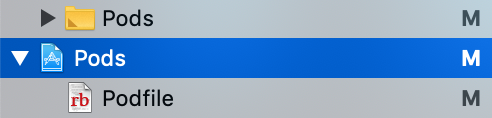
You should see a long list of (react native) libraries linked. It looks like this:
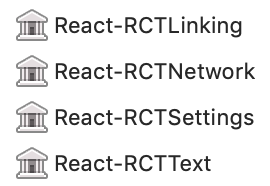
If you do not see "yoga" listed, then you may have some script that is removing it.
- If you added this script from
react-native-config, it contains the problem! It unlinks yoga, which caused the problem for me.
Comment the lines:
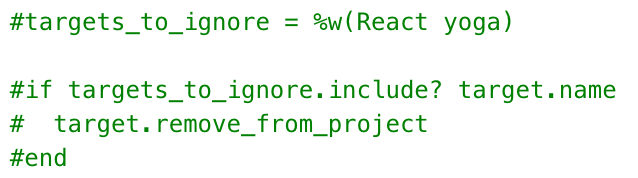
or any other lines that may be running a "remove_from_project" command.
Project now builds in Xcode for me.
 scarlac
on 15 Aug 2019
scarlac
on 15 Aug 2019
@scarlac I think you meant _comment_ the lines. For me, I just removed the yoga part.
 MattPark
on 22 Aug 2019
MattPark
on 22 Aug 2019
Maybe these steps can be helpful: 'GeneratedDotEnv.m' file not found.
 helderburato
on 9 Sep 2019
helderburato
on 9 Sep 2019
I have the same problem RN0.59.10 upgrade to RN0.60.0
@scarlac solved my problem, thanks !
~Next step RN0.60.0 to RN0.61.0
 coldbess
on 7 Nov 2019
coldbess
on 7 Nov 2019
Related issues
 TrakBit
·
3Comments
TrakBit
·
3Comments
 jlongster
·
3Comments
jlongster
·
3Comments
 lazywei
·
3Comments
lazywei
·
3Comments
 anchetaWern
·
3Comments
anchetaWern
·
3Comments
 madwed
·
3Comments
madwed
·
3Comments
Most helpful comment
Had this issue. Had my workspace file open, not project, so @LuigiMaestrelli's suggestion did not fix it. However, I found my issue.
Things to check for:
ios/Podfile. It should look something like this:If the
pod 'yoga'line is not added already, make sure to do it. Or go back and follow the upgrade guide for RN 0.60, so you get the full list of required libraries.Run
pod installin yourios/folderIf you already had the line added and


pod installdid nothing, open the Xcode workspace and click thePodsproject:You should see a long list of (react native) libraries linked. It looks like this:
If you do not see "yoga" listed, then you may have some script that is removing it.
react-native-config, it contains the problem! It unlinks yoga, which caused the problem for me.Comment the lines:

or any other lines that may be running a "remove_from_project" command.
Project now builds in Xcode for me.