React-native: Issues with Xcode 10.3 build
I updated to Xcode 10.3 this morning. I started experiencing issues with builds taking several more minutes to complete. I ran on device and the app took a long time to load.
I created a new app following the React Native CLI getting started (even called it AwesomeProject). Experiencing the same issues. No changes to the process at all.
React Native version:
info Fetching system and libraries information...
System:
OS: macOS 10.14.5
CPU: (12) x64 Intel(R) Core(TM) i9-8950HK CPU @ 2.90GHz
Memory: 13.35 GB / 32.00 GB
Shell: 5.0.7 - /usr/local/bin/bash
Binaries:
Node: 12.6.0 - ~/.nvm/versions/node/v12.6.0/bin/node
Yarn: 1.16.0 - /usr/local/bin/yarn
npm: 6.9.0 - ~/.nvm/versions/node/v12.6.0/bin/npm
Watchman: 4.9.0 - /usr/local/bin/watchman
SDKs:
iOS SDK:
Platforms: iOS 12.4, macOS 10.14, tvOS 12.4, watchOS 5.3
IDEs:
Xcode: 10.3/10G8 - /usr/bin/xcodebuild
npmPackages:
react: 16.8.6 => 16.8.6
react-native: 0.60.4 => 0.60.4
npmGlobalPackages:
react-native-cli: 2.0.1
Steps To Reproduce
- Start a new project following the React Native CLI instructions
- Open workspace file in Xcode 10.3. Set signing.
- Select device
- Build to device
Describe what you expected to happen:
I expected the app to open on my device.
Snack, code example, screenshot, or link to a repository:
It's the OOTB React Native init project without any changes.
Xcode Output:
2019-07-23 12:19:43.635754-0400 AwesomeProject[2839:995482] Task <6124E3B6-D7B6-44A6-A16A-E9C067CFE6AF>.<1> finished with error - code: -1001
2019-07-23 12:19:43.662327-0400 AwesomeProject[2839:995477] Task <6124E3B6-D7B6-44A6-A16A-E9C067CFE6AF>.<1> HTTP load failed (error code: -999 [1:89])
2019-07-23 12:19:43.663 [info][tid:main][RCTCxxBridge.mm:236] Initializing <RCTCxxBridge: 0x103611fa0> (parent: <RCTBridge: 0x2833fea70>, executor: (null))
2019-07-23 12:19:43.668079-0400 AwesomeProject[2839:995411] Initializing <RCTCxxBridge: 0x103611fa0> (parent: <RCTBridge: 0x2833fea70>, executor: (null))
2019-07-23 12:19:43.763 [info][tid:main][RCTRootView.m:293] Running application AwesomeProject ({
    initialProps =     {
    };
    rootTag = 1;
})
2019-07-23 12:19:43.763145-0400 AwesomeProject[2839:995411] Running application AwesomeProject ({
    initialProps =     {
    };
    rootTag = 1;
})
2019-07-23 12:19:43.805 [info][tid:main][RCTCxxBridge.mm:1061] Invalidating <RCTCxxBridge: 0x103611fa0> (parent: <RCTBridge: 0x2833fea70>, executor: RCTWebSocketExecutor)
2019-07-23 12:19:43.805317-0400 AwesomeProject[2839:995411] Invalidating <RCTCxxBridge: 0x103611fa0> (parent: <RCTBridge: 0x2833fea70>, executor: RCTWebSocketExecutor)
2019-07-23 12:19:43.902 [info][tid:com.facebook.react.JavaScript][RCTNativeModule.mm:86] Attempted to invoke `5` (method ID) on `WebSocketModule` (NativeModule name) without a method queue.
2019-07-23 12:19:43.901745-0400 AwesomeProject[2839:995793] Attempted to invoke `5` (method ID) on `WebSocketModule` (NativeModule name) without a method queue.
2019-07-23 12:19:43.952 [error][tid:com.facebook.react.JavaScript] undefined is not an object (evaluating 'result.viewConfig')
2019-07-23 12:19:43.952642-0400 AwesomeProject[2839:995793] undefined is not an object (evaluating 'result.viewConfig')
2019-07-23 12:19:43.963 [info][tid:com.facebook.react.JavaScript][RCTNativeModule.mm:86] Attempted to invoke `5` (method ID) on `WebSocketModule` (NativeModule name) without a method queue.
2019-07-23 12:19:43.963569-0400 AwesomeProject[2839:995793] Attempted to invoke `5` (method ID) on `WebSocketModule` (NativeModule name) without a method queue.
2019-07-23 12:19:43.964 [info][tid:com.facebook.react.JavaScript][RCTNativeModule.mm:86] Attempted to invoke `5` (method ID) on `WebSocketModule` (NativeModule name) without a method queue.
2019-07-23 12:19:43.963646-0400 AwesomeProject[2839:995793] Attempted to invoke `5` (method ID) on `WebSocketModule` (NativeModule name) without a method queue.
2019-07-23 12:19:43.964 [info][tid:com.facebook.react.JavaScript][RCTNativeModule.mm:86] Attempted to invoke `5` (method ID) on `WebSocketModule` (NativeModule name) without a method queue.
2019-07-23 12:19:43.963705-0400 AwesomeProject[2839:995793] Attempted to invoke `5` (method ID) on `WebSocketModule` (NativeModule name) without a method queue.
2019-07-23 12:19:43.964 [info][tid:com.facebook.react.JavaScript][RCTNativeModule.mm:86] Attempted to invoke `1` (method ID) on `WebSocketModule` (NativeModule name) without a method queue.
2019-07-23 12:19:43.963757-0400 AwesomeProject[2839:995793] Attempted to invoke `1` (method ID) on `WebSocketModule` (NativeModule name) without a method queue.
2019-07-23 12:19:43.964 [info][tid:com.facebook.react.JavaScript][RCTNativeModule.mm:86] Attempted to invoke `0` (method ID) on `BlobModule` (NativeModule name) without a method queue.
2019-07-23 12:19:43.963824-0400 AwesomeProject[2839:995793] Attempted to invoke `0` (method ID) on `BlobModule` (NativeModule name) without a method queue.
2019-07-23 12:19:43.964 [info][tid:com.facebook.react.JavaScript][RCTNativeModule.mm:86] Attempted to invoke `1` (method ID) on `ExceptionsManager` (NativeModule name) without a method queue.
2019-07-23 12:19:43.964225-0400 AwesomeProject[2839:995793] Attempted to invoke `1` (method ID) on `ExceptionsManager` (NativeModule name) without a method queue.
2019-07-23 12:19:43.970 [info][tid:com.facebook.react.JavaScript][RCTNativeModule.mm:86] Attempted to invoke `4` (method ID) on `BlobModule` (NativeModule name) without a method queue.
2019-07-23 12:19:43.969952-0400 AwesomeProject[2839:995793] Attempted to invoke `4` (method ID) on `BlobModule` (NativeModule name) without a method queue.
2019-07-23 12:19:43.979 [warn][tid:com.facebook.react.JavaScript] Unable to symbolicate stack trace: Bundle was not loaded from the packager
2019-07-23 12:19:43.978789-0400 AwesomeProject[2839:995793] Unable to symbolicate stack trace: Bundle was not loaded from the packager
2019-07-23 12:19:43.979 [info][tid:com.facebook.react.JavaScript][RCTNativeModule.mm:86] Attempted to invoke `0` (method ID) on `Timing` (NativeModule name) without a method queue.
2019-07-23 12:19:43.979179-0400 AwesomeProject[2839:995793] Attempted to invoke `0` (method ID) on `Timing` (NativeModule name) without a method queue.
2019-07-23 12:19:43.979 [info][tid:com.facebook.react.JavaScript][RCTNativeModule.mm:86] Attempted to invoke `1` (method ID) on `Timing` (NativeModule name) without a method queue.
2019-07-23 12:19:43.979260-0400 AwesomeProject[2839:995793] Attempted to invoke `1` (method ID) on `Timing` (NativeModule name) without a method queue.
2019-07-23 12:19:53.980 [error][tid:com.facebook.react.JavaScript][RCTCxxBridge.mm:1108] Timed out waiting for modules to be invalidated
2019-07-23 12:19:53.980855-0400 AwesomeProject[2839:995793] Timed out waiting for modules to be invalidated
2019-07-23 12:20:43.968713-0400 AwesomeProject[2839:995477] Task <9736E470-3D12-4BB8-A02C-2563335D9F7D>.<2> finished with error - code: -1001
2019-07-23 12:20:43.971 [info][tid:main][RCTCxxBridge.mm:236] Initializing <RCTCxxBridge: 0x10361ae20> (parent: <RCTBridge: 0x2833fea70>, executor: RCTWebSocketExecutor)
2019-07-23 12:20:43.971251-0400 AwesomeProject[2839:995411] Initializing <RCTCxxBridge: 0x10361ae20> (parent: <RCTBridge: 0x2833fea70>, executor: RCTWebSocketExecutor)
2019-07-23 12:20:43.976579-0400 AwesomeProject[2839:995477] Task <9736E470-3D12-4BB8-A02C-2563335D9F7D>.<2> HTTP load failed (error code: -999 [1:89])
2019-07-23 12:20:43.985706-0400 AwesomeProject[2839:995411] *** Assertion failure in -[RCTCxxBridge ensureOnJavaScriptThread:](), /Users/steve/Projects/AwesomeProject/node_modules/react-native/React/CxxBridge/RCTCxxBridge.mm:293
2019-07-23 12:20:43.986623-0400 AwesomeProject[2839:995411] *** Terminating app due to uncaught exception 'NSInternalInconsistencyException', reason: 'This method must not be called before the JS thread is created'
*** First throw call stack:
(0x1bf11127c 0x1be2eb9f8 0x1bf02a988 0x1bfb3aee8 0x1024ab940 0x1024b4154 0x1031076f0 0x103108c74 0x1031166fc 0x1bf0a2c1c 0x1bf09db54 0x1bf09d0b0 0x1c129d79c 0x1eba4b978 0x10240abe8 0x1beb628e0)
libc++abi.dylib: terminating with uncaught exception of type NSException
Message from debugger: The LLDB RPC server has crashed. The crash log is located in ~/Library/Logs/DiagnosticReports and has a prefix 'lldb-rpc-server'. Please file a bug and attach the most recent crash log.
 spdaly
All 17 comments
I have the same issue.
System:
- OS: macOS 10.13.6
- XCode: 10.1
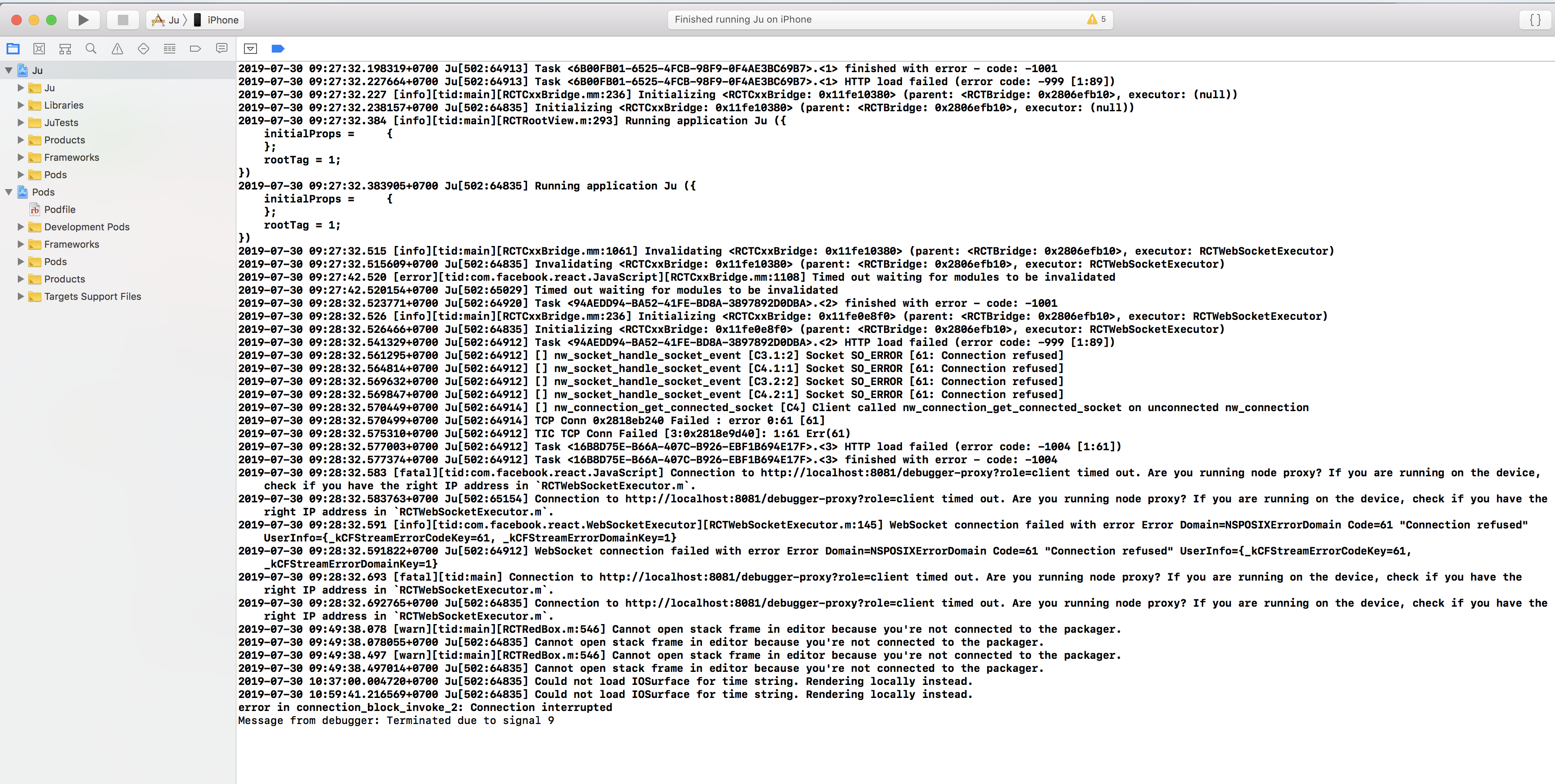
 bevvater
on 30 Jul 2019
bevvater
on 30 Jul 2019
Can you try this please? https://github.com/facebook/react-native/issues/25820#issuecomment-515742426
 slavikdenis
on 31 Jul 2019
slavikdenis
on 31 Jul 2019
Can you try this please? #25820 (comment)
In my case, the app has built successful but it failed to load JS bundle.
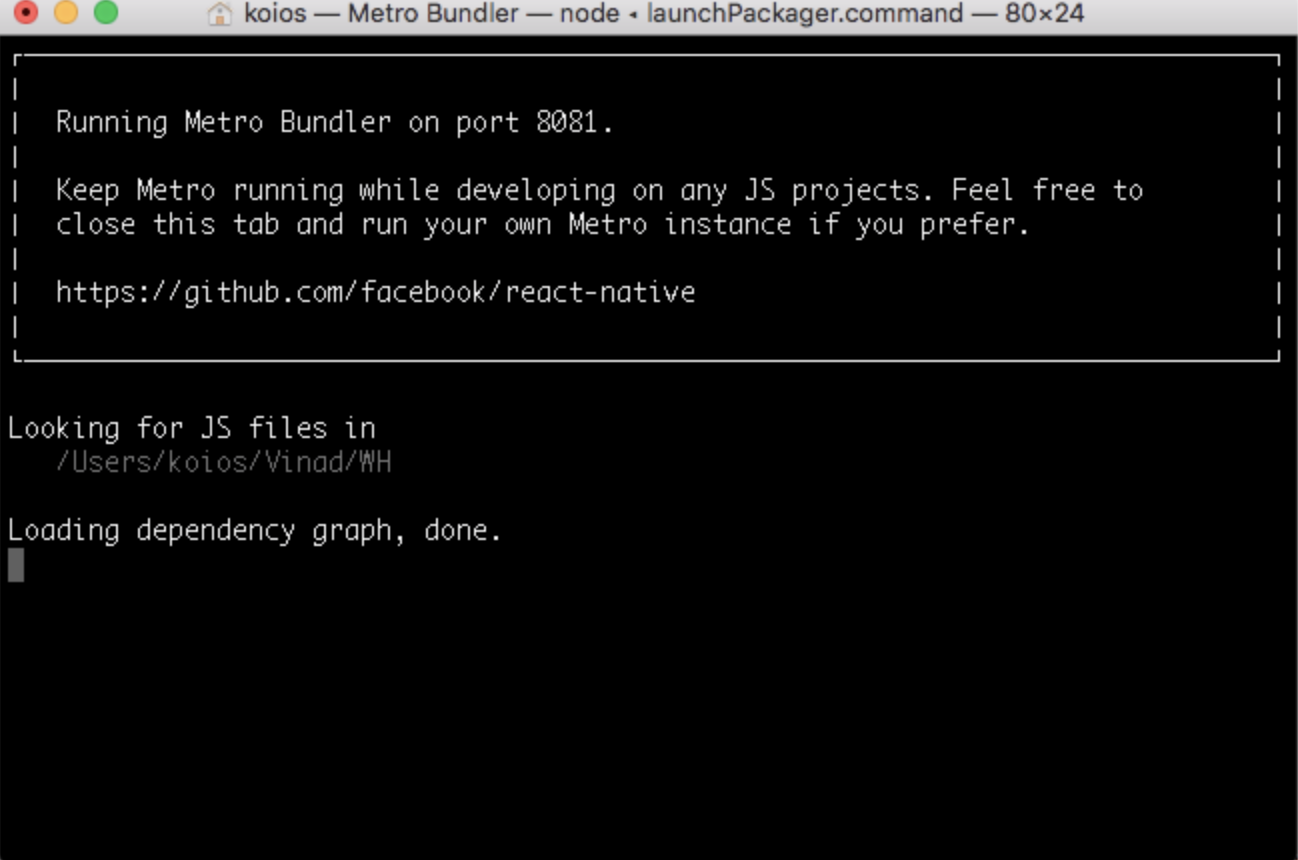
bevvater
on 31 Jul 2019
Same here. RN: 0.59.10
 trickeyd
on 2 Aug 2019
trickeyd
on 2 Aug 2019
False alarm - my wifi connection had just gone.
trickeyd
on 2 Aug 2019
Can you try this please? #25820 (comment)
In my case, the app has built successful but it failed to load JS bundle.
Hey , I have the same issue. Hae you found the solution ? I cannot build App on my device, it works fine on simulator
 Karniej
on 9 Aug 2019
trickeyd
on 9 Aug 2019
Karniej
on 9 Aug 2019
trickeyd
on 9 Aug 2019
I have tried it ad it didn't work - besides adb is for android and my android build works good, as well ass app on simultator. What did you do to solve the problem ?
Karniej
on 11 Aug 2019
I have tried it ad it didn't work - besides adb is for android and my android build works good, as well ass app on simultator. What did you do to solve the problem ?
I reset my wifi router then it worked.
bevvater
on 11 Aug 2019
Same here,Xcode 10.2.1 and React-Native 0.60.4
I can build successfully, but has this console log.
ps: my project without react-native cli
 objHua
on 12 Aug 2019
objHua
on 12 Aug 2019
xcode 10.3 all rn projects cannot connect to packager server when run-ios ....
hope some dev team guys can notice this issue, blocking all 0.60 + rn projects on ios now ...
 ivanzhang2
on 31 Aug 2019
ivanzhang2
on 31 Aug 2019
finally, i found the problem! i use proxy for global, turn off the proxy tool, everything is worked ....
thanks guys say that reset wifi router will work given me tips ...
ivanzhang2
on 1 Sep 2019
Your device should be connected to the same wifi as your computer
 Nargle30
on 21 Nov 2019
Nargle30
on 21 Nov 2019
And if internet connection is fine on both device and computer, but you still have the issue, delete the app from your device and try to run it again
Nargle30
on 21 Nov 2019
this is still a serious issue, xcode 10.2.1, RN 60/61. no change to existing project, both devices DEFINATELY ONLINE
 georgewwindsor
on 19 Jan 2020
georgewwindsor
on 19 Jan 2020
Hey there, it looks like there has been no activity on this issue recently. Has the issue been fixed, or does it still require the community's attention? This issue may be closed if no further activity occurs. You may also label this issue as a "Discussion" or add it to the "Backlog" and I will leave it open. Thank you for your contributions.
![stale[bot] picture](https://avatars3.githubusercontent.com/in/1724?v=4&s=40) stale[bot]
on 18 Apr 2020
stale[bot]
on 18 Apr 2020
Closing this issue after a prolonged period of inactivity. If this issue is still present in the latest release, please feel free to create a new issue with up-to-date information.
stale[bot]
on 25 Apr 2020
Related issues
 arunabha
·
3Comments
arunabha
·
3Comments
 axelg12
·
3Comments
axelg12
·
3Comments
 TrakBit
·
3Comments
TrakBit
·
3Comments
 grabbou
·
3Comments
grabbou
·
3Comments
 anchetaWern
·
3Comments
anchetaWern
·
3Comments
Most helpful comment
Hey , I have the same issue. Hae you found the solution ? I cannot build App on my device, it works fine on simulator