React-native: Hook set state stop animation
Issue
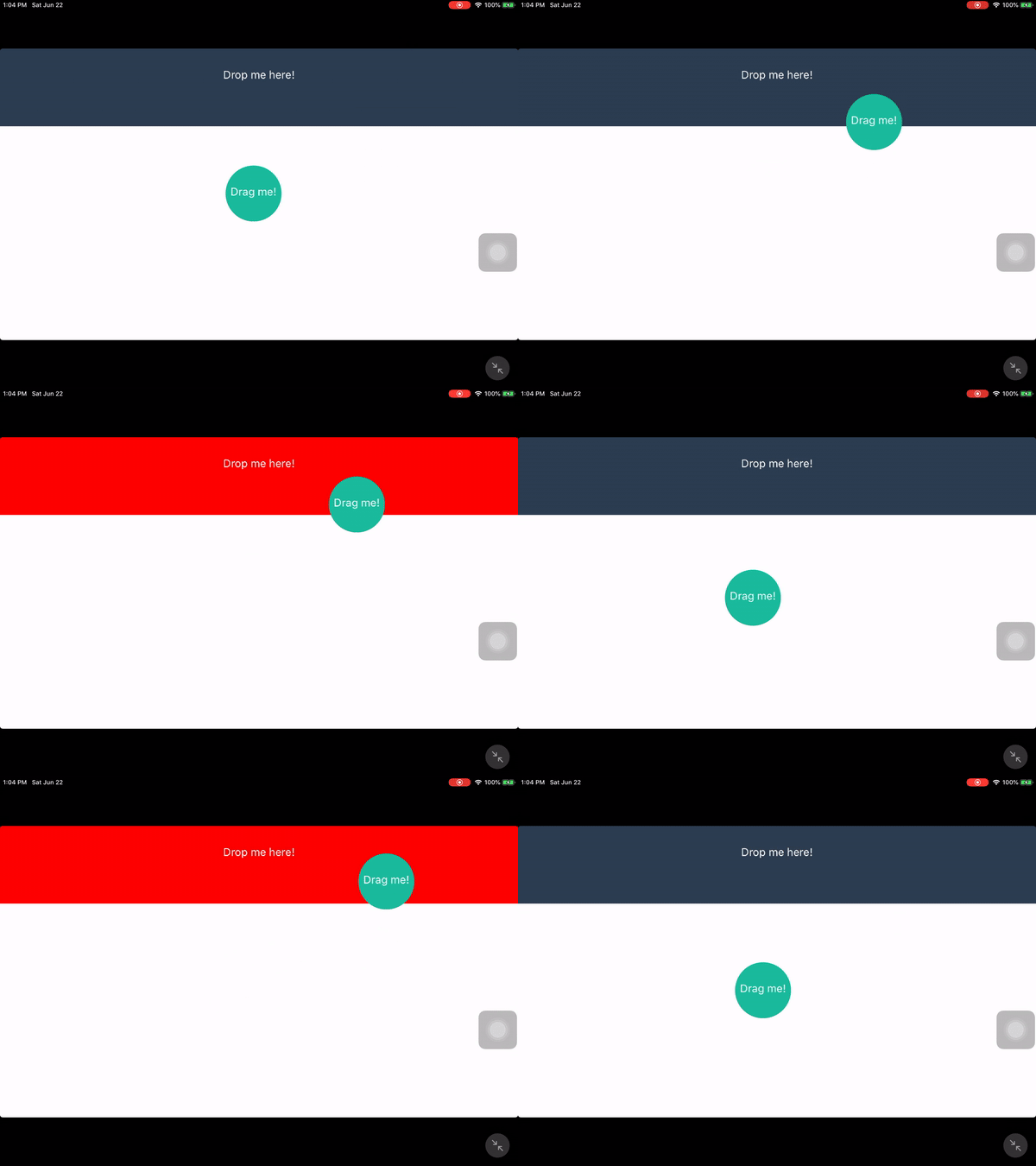
When I move the "Drag me" using React Hooks the animation is stopped when I updated the background color.
Expo Snack: https://snack.expo.io/@albertcito/animation-react-hook-stop-set-state
Code
I created two codes to do exactly the same. One of them is with Hooksand the another one without hooks
Without Hooks

Hooks
React Native version
React Native Environment Info:
System:
OS: macOS 10.14.5
CPU: (4) x64 Intel(R) Core(TM) i5-5257U CPU @ 2.70GHz
Memory: 54.12 MB / 8.00 GB
Shell: 5.3 - /bin/zsh
Binaries:
Node: 12.3.1 - /usr/local/bin/node
Yarn: 1.15.2 - ~/.yarn/bin/yarn
npm: 6.9.0 - /usr/local/bin/npm
Watchman: 4.9.0 - /usr/local/bin/watchman
SDKs:
iOS SDK:
Platforms: iOS 12.2, macOS 10.14, tvOS 12.2, watchOS 5.2
Android SDK:
API Levels: 27
Build Tools: 27.0.3
IDEs:
Android Studio: 3.1 AI-173.4697961
Xcode: 10.2.1/10E1001 - /usr/bin/xcodebuild
npmPackages:
react: 16.8.3 => 16.8.3
react-native: 0.59.9 => 0.59.9
npmGlobalPackages:
create-react-native-app: 2.0.2
react-native-cli: 2.0.1
react-native-create-library: 3.1.2
react-native-git-upgrade: 0.2.7
 albertcito
All 3 comments
Hello @albertcito, I fixed your example by rewriting your code. You need to take care to not recreate your pan-responder on every render (which happens on you call setBgColor). which you make your view to switch pan handlers on every render. IMO this is not a react bug. This would also happen using class components if you create your pan responder inside the render function.
Please take a look at this code:
import React from 'react';
import { StyleSheet, View, Text, Dimensions, Animated, PanResponder } from 'react-native';

export default function Drag() {
  const dropZoneValues = React.useRef(null);
  const pan = React.useRef(new Animated.ValueXY());
  const [bgColor, setBgColor] = React.useState('#2c3e50');

  const isDropZone = React.useCallback((gesture) => {
    const dz = dropZoneValues.current;
    return gesture.moveY > dz.y && gesture.moveY < dz.y + dz.height;
  }, []);

  const onMove = React.useCallback((_, gesture) => {
    if (isDropZone(gesture)) setBgColor('red');
    else setBgColor('#2c3e50');
  }, [isDropZone]);

  const setDropZoneValues = React.useCallback((event) => {
    dropZoneValues.current = event.nativeEvent.layout;
  });

  const panResponder = React.useMemo(() => PanResponder.create({
    onStartShouldSetPanResponder: () => true,

    onPanResponderMove: Animated.event([null, {
      dx  : pan.current.x,
      dy  : pan.current.y
    }], {
      listener: onMove
    }),
    onPanResponderRelease: (e, gesture) => {
      if (!isDropZone(gesture)) {
        Animated.spring(
          pan.current,
          {toValue:{x:0,y:0}}
        ).start();
      }
    }
  }), []);

  return (
    <View style={styles.mainContainer}>
      <View
        onLayout={setDropZoneValues}
        style={[styles.dropZone, {backgroundColor: bgColor}]}
      >
        <Text style={styles.text}>Drop me here!</Text>
      </View>
      <View style={styles.draggableContainer}>
        <Animated.View
          {...panResponder.panHandlers}
          style={[pan.current.getLayout(), styles.circle]}
        >
          <Text style={styles.text}>Drag me!</Text>
        </Animated.View>
      </View>
    </View>
  );
}

let CIRCLE_RADIUS = 36;
let Window = Dimensions.get('window');
let styles = StyleSheet.create({
  mainContainer: {
    flex: 1
  },
  dropZone: {
    height  : 100,
    backgroundColor:'#2c3e50'
  },
  text        : {
    marginTop   : 25,
    marginLeft  : 5,
    marginRight : 5,
    textAlign   : 'center',
    color       : '#fff'
  },
  draggableContainer: {
    position    : 'absolute',
    top         : Window.height/2 - CIRCLE_RADIUS,
    left        : Window.width/2 - CIRCLE_RADIUS,
  },
  circle: {
    backgroundColor     : '#1abc9c',
    width               : CIRCLE_RADIUS*2,
    height              : CIRCLE_RADIUS*2,
    borderRadius        : CIRCLE_RADIUS
  }
});
 cabelitos
on 25 Jun 2019
cabelitos
on 25 Jun 2019
O.o thank you very much for your help. You are absolutely right. it's not a bug.
albertcito
on 25 Jun 2019
I am currently having a similar issue but not sure what is the best way to solve.. I want to call setState in panResponder's method using Hook.. Can give some suggestions?
const Page = () => {
 const [correctCount, setCorrectCount] = useState(0);

 const getPanResponder = (index) => PanResponder.create({ // <- index is needed because I have a few items
   ...
    onPanResponderMove: Animated.event([null, {
      dx : pan[index].x,
      dy : pan[index].y
    }]),
    onPanResponderRelease: (e, gesture) => {
      let [isCorrectZone, destinationIndex] = isDropZone(gesture, index);
       // .. other codes
       setCorrectCount(prev => prev + 1); // <-- this call will just stop the whole animation
      } else {
        Animated.spring(
          pan[index],
          {toValue: {x: 0, y: 0}}
        ).start();
      }
    }
  });

 return (
  .. all views and component render
)
}
 Aung-Myint-Thein
on 7 May 2020
Aung-Myint-Thein
on 7 May 2020
Related issues
 ghost
·
3Comments
ghost
·
3Comments
 anchetaWern
·
3Comments
anchetaWern
·
3Comments
 upbit
·
3Comments
upbit
·
3Comments
 jlongster
·
3Comments
jlongster
·
3Comments
 vikeri
·
3Comments
vikeri
·
3Comments
Most helpful comment
Hello @albertcito, I fixed your example by rewriting your code. You need to take care to not recreate your pan-responder on every render (which happens on you call setBgColor). which you make your view to switch pan handlers on every render. IMO this is not a react bug. This would also happen using class components if you create your pan responder inside the render function.
Please take a look at this code: