React-native: Image.resolveAssetSource cannot resolve asset correctly in Android Release mode
I have a native UI module in Android that takes props from JS. My images are not under /android folder so I use resolveAssetSource to get root level folder assets from Android.
Native module's prop is the output of Image.resolveAssetSource(require('imagename')).
const img = require('./images/png/marker.png')
const imgProps = Image.resolveAssetSource(img);
..
<CustomImage style={{ width: imgProps.width, height: imgProps.height }} src={imgProps} />
This works pretty good in debug mode. Because asset uri is in full form as below:
{
"__packager_asset": "true",
"width": 80,
"height": 80,
"uri": "http://10.0.2.2:8081/assets/images/png/marker.png?platform=android&hash=412827xxxxxxxxx",
"scale": 1
}
But when I bundle the app and create the signed apk, uri changes and it's not in a form that I can use. Therefore, the image is not showing up. Uri shows up like below:
{
"__packager_asset": "true",
"width": 80,
"height": 80,
"uri": "images_png_marker",
"scale": 1
}
It seems that bundler flattens folder structure using underscore for each subfolder, removes the file extension and the full path.
This very same issue was mentioned in issue:https://github.com/facebook/react-native/issues/18216, but it was closed without a resolution. No one created a repo. But I've created one and attached screenshots.
|DEBUG|RELEASE|
|-----|-------|
|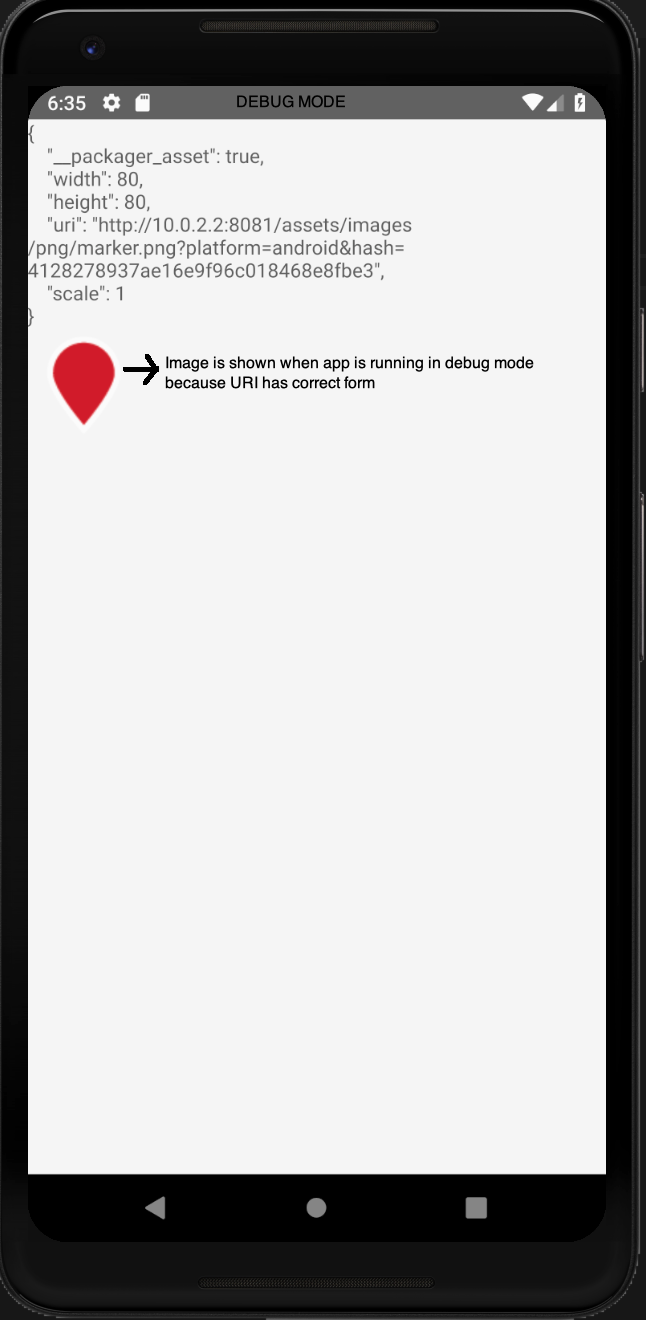 |
| |
|
React Native version:
React Native Environment Info:
System:
OS: macOS 10.14.4
CPU: (8) x64 Intel(R) Core(TM) i7-4850HQ CPU @ 2.30GHz
Memory: 81.64 MB / 16.00 GB
Shell: 3.2.57 - /bin/bash
Binaries:
Node: 8.10.0 - ~/.nvm/versions/node/v8.10.0/bin/node
Yarn: 1.5.1 - /usr/local/bin/yarn
npm: 5.6.0 - ~/.nvm/versions/node/v8.10.0/bin/npm
Watchman: 4.9.0 - /usr/local/bin/watchman
SDKs:
iOS SDK:
Platforms: iOS 12.2, macOS 10.14, tvOS 12.2, watchOS 5.2
Android SDK:
API Levels: 23, 25, 26, 27, 28
Build Tools: 23.0.1, 27.0.3, 28.0.3
System Images: android-27 | Google APIs Intel x86 Atom, android-28 | Google APIs Intel x86 Atom
IDEs:
Android Studio: 3.4 AI-183.5429.30.34.5452501
Xcode: 10.2/10E125 - /usr/bin/xcodebuild
npmPackages:
react: 16.8.3 => 16.8.3
react-native: 0.59.8 => 0.59.8
npmGlobalPackages:
react-native-cli: 2.0.1
react-native-macos-cli: 2.0.1
react-native-rename: 2.4.1
Steps to reproduce:
- Create an app with react-native init
- Create a UI Native component(ImageView) for Android and implement as in
CustomImage.java - From JS, send props to this component using
Image.resolveAssetSource(require('imagename')) - Run the app in debug mode and see the marker.png is shown correct
- Run android bundler for release mode and create a signed apk and upload it to either emulator or physical device. See marker.png is not show because URI is not formed correctly.
Note: To see what props are sent to native component, I also print out props in a Text component. URI is formed without file extension or full path. Therefore ImageView cannot find the resource.
The whole thing is reproducible in this bare minimum repo created with latest versions:
https://github.com/aliustaoglu/react-native-bug-resolve-asset-source
Files to check:
App.js
CustomImage.java
 aliustaoglu
All 10 comments
Please use this instead.
<CustomImage style={{ width: imgProps.width, height: imgProps.height }} src={img} />
Image.resolveAssetSource() doesn't intend to be used directly and for network images width and height won't be available.
 guhungry
on 22 May 2019
guhungry
on 22 May 2019
Image.resolveAssetSource()doesn't intend to be used directly
What is it supposed to mean? Documentation does not mention anything about calling it directly. Also it is an exposed function which means it could be called. I am not doing any hack. Just using a function that is exposed. It is callable and it does work, just not in the release mode. width and height is not a concern for this one as it is a static asset.
ImageSource is an object like { uri: '
' }
According to here it is intended to be called and can be http location or file path. http location works both in debug and relese but file path is not working for release.
CustomImage is a native module and src is a @ReactProp and that way does not work. require('modulename') as a ReactProp, does not resolve to anything meaningful from native side.
This issue was discussed in https://github.com/facebook/react-native/issues/18216 but was not resolved due to inactivity and closed. I made a repo in which this is reproducible.
aliustaoglu
on 22 May 2019
Then @aliustaoglu should refer to native's ImageSource not from javascript side.
I said that because it not meant to be used the way you used it. That is implementation detail.
guhungry
on 22 May 2019
Thanks for the helper function suggestion. I think I'll handle it from the native side. However, I still think that this is an issue. An implementation detail should not be exported then. I see that in stackoverflow people suggest using this method. That's why private and public functions exist.
aliustaoglu
on 26 May 2019
below code should work as expected. Also resources on Android doesn't include file extensions and url like path. To make development easy, RN runs metro bundler which acts as web server for assets and makes reload possible.
const img = require('./images/png/marker.png')
<CustomImage style={{ width: imgProps.width, height: imgProps.height }} src={imgProps} />
 dulmandakh
on 31 May 2019
dulmandakh
on 31 May 2019
@aliustaoglu may i know how u fixed the issue?
 rajashekar545
on 17 Sep 2019
rajashekar545
on 17 Sep 2019
@rajashekar545
I did something like this:
If ui starts with "http" (or it's in debug mode) get the bitmap from uri
URL url = new URL("http://10.0.0.2:8081/assets/images/png/marker.png");
Bitmap image = BitmapFactory.decodeStream(url.openConnection().getInputStream());
if not (release mode) then it resolves to R.drawable.images_png_marker. Please note that nested folders are flattened into a single file name. So, to make it come from JavaScript and come as prop I did below:
String assetName = "images_png_marker"
int resourceId = context.getResources().getIdentifier(assetName, "drawable", context.getPackageName());
// int resourceId = R.drawable.images_png_marker // This will work as well
Bitmap image = BitmapFactory.decodeResource(getResources(), resourceId);
If interested for IOS I add the folder that has the png files into
Build Phases > Copy Bundle Resources
then from Swift I can get it like this:
let uiImage = UIImage(named: "images/png/marker.png")
This structure works good for me.
aliustaoglu
on 17 Sep 2019
Can confirm the above works -- not the most elegant, but it works. For anyone else struggling I was looking for an mp4 file, which was in the "raw" deftype instead of "drawable".
Here's my code:
int resourceId = mReactContext.getResources().getIdentifier(videoUrl, "raw", mReactContext.getPackageName());
resolvedUri = RawResourceDataSource.buildRawResourceUri(resourceId);
 franzwarning
on 23 Sep 2019
franzwarning
on 23 Sep 2019
@rajashekar545
I did something like this:If ui starts with "http" (or it's in debug mode) get the bitmap from uri
URL url = new URL("http://10.0.0.2:8081/assets/images/png/marker.png");
Bitmap image = BitmapFactory.decodeStream(url.openConnection().getInputStream());
if not (release mode) then it resolves to R.drawable.images_png_marker. Please note that nested folders are flattened into a single file name. So, to make it come from JavaScript and come as prop I did below:
String assetName = "images_png_marker"
int resourceId = context.getResources().getIdentifier(assetName, "drawable", context.getPackageName());
// int resourceId = R.drawable.images_png_marker // This will work as well
Bitmap image = BitmapFactory.decodeResource(getResources(), resourceId);
If interested for IOS I add the folder that has the png files into
Build Phases > Copy Bundle Resources
then from Swift I can get it like this:
let uiImage = UIImage(named: "images/png/marker.png")This structure works good for me.
@aliustaoglu Where did you write this code, in your CustomImage.java or any other file. Please give me more details about this implementation. I am also facing same problem while creating html to pdf. It works fine on debug app but not in release mode. It just shows image name as assets_images_logo. Please give more details about this implementation.
Thanks in advance.
 rshaikhcornerstone
on 5 Nov 2019
rshaikhcornerstone
on 5 Nov 2019
@rajashekar545
I did something like this:If ui starts with "http" (or it's in debug mode) get the bitmap from uri
URL url = new URL("http://10.0.0.2:8081/assets/images/png/marker.png");
Bitmap image = BitmapFactory.decodeStream(url.openConnection().getInputStream());
if not (release mode) then it resolves to R.drawable.images_png_marker. Please note that nested folders are flattened into a single file name. So, to make it come from JavaScript and come as prop I did below:
String assetName = "images_png_marker"
int resourceId = context.getResources().getIdentifier(assetName, "drawable", context.getPackageName());
// int resourceId = R.drawable.images_png_marker // This will work as well
Bitmap image = BitmapFactory.decodeResource(getResources(), resourceId);
If interested for IOS I add the folder that has the png files into
Build Phases > Copy Bundle Resources
then from Swift I can get it like this:
let uiImage = UIImage(named: "images/png/marker.png")This structure works good for me.
Save my day bro!
 yangxiaobinhaoshuai
on 25 Dec 2019
yangxiaobinhaoshuai
on 25 Dec 2019
Related issues
 lazywei
·
3Comments
lazywei
·
3Comments
 arunabha
·
3Comments
arunabha
·
3Comments
 jobsamuel
·
3Comments
jobsamuel
·
3Comments
 DreySkee
·
3Comments
DreySkee
·
3Comments
 madwed
·
3Comments
madwed
·
3Comments
Most helpful comment
@rajashekar545
I did something like this:
If ui starts with "http" (or it's in debug mode) get the bitmap from uri
if not (release mode) then it resolves to R.drawable.images_png_marker. Please note that nested folders are flattened into a single file name. So, to make it come from JavaScript and come as prop I did below:
If interested for IOS I add the folder that has the png files into
Build Phases > Copy Bundle Resources
then from Swift I can get it like this:
This structure works good for me.