React-native: [Android] Attempt to invoke virtual method 'void com.facebook.marketing.ViewIndexer.unschedule()' on a null object reference
🐛 Bug Report
This error suddenly happened on my latest android build.
This happened on RN 0.55.4, then I tried to upgrade to 0.57.8 and it still persist.
This is the crash log
Caused by java.lang.NullPointerException: Attempt to invoke virtual method 'void com.facebook.marketing.ViewIndexer.unschedule()' on a null object reference
       at com.facebook.marketing.CodelessActivityLifecycleTracker$1.onActivityPaused(CodelessActivityLifecycleTracker.java:129)
       at android.app.Application.dispatchActivityPaused(Application.java:225)
       at android.app.Activity.onPause(Activity.java:1589)
       at com.facebook.react.ReactActivity.onPause(ReactActivity.java:57)
       at android.app.Activity.performPause(Activity.java:6806)
       at android.app.Instrumentation.callActivityOnPause(Instrumentation.java:1322)
       at android.app.ActivityThread.performPauseActivityIfNeeded(ActivityThread.java:3906)
       at android.app.ActivityThread.performPauseActivity(ActivityThread.java:3883)
       at android.app.ActivityThread.performPauseActivity(ActivityThread.java:3857)
       at android.app.ActivityThread.handlePauseActivity(ActivityThread.java:3831)
       at android.app.ActivityThread.-wrap16(ActivityThread.java)
       at android.app.ActivityThread$H.handleMessage(ActivityThread.java:1593)
       at android.os.Handler.dispatchMessage(Handler.java:110)
       at android.os.Looper.loop(Looper.java:203)
       at android.app.ActivityThread.main(ActivityThread.java:6368)
       at java.lang.reflect.Method.invoke(Method.java)
       at com.android.internal.os.ZygoteInit$MethodAndArgsCaller.run(ZygoteInit.java:1063)
       at com.android.internal.os.ZygoteInit.main(ZygoteInit.java:924)
To Reproduce
- Open the app with android version 8.1.0 or SDK 27
- Put the app to background
- Suddenly there an error dialog

This error also happened when user click facebook and google button because the app also put to background.
Expected Behavior
- App not crashed
Code Example
- There is no code example
Environment
React Native Environment Info:
System:
OS: macOS 10.14.1
CPU: (4) x64 Intel(R) Core(TM) i5-6360U CPU @ 2.00GHz
Memory: 34.96 MB / 8.00 GB
Shell: 5.3 - /bin/zsh
Binaries:
Node: 10.6.0 - /usr/local/bin/node
Yarn: 1.9.2 - ~/.yarn/bin/yarn
npm: 6.9.0 - /usr/local/bin/npm
Watchman: 4.9.0 - /usr/local/bin/watchman
SDKs:
iOS SDK:
Platforms: iOS 12.1, macOS 10.14, tvOS 12.1, watchOS 5.1
Android SDK:
API Levels: 16, 19, 20, 21, 22, 23, 24, 25, 26, 27, 28
Build Tools: 21.1.2, 22.0.1, 23.0.1, 23.0.2, 23.0.3, 24.0.3, 25.0.0, 25.0.1, 25.0.2, 25.0.3, 26.0.0, 26.0.1, 26.0.2, 26.0.3, 27.0.0, 27.0.1, 27.0.2, 27.0.3, 28.0.0, 28.0.0, 28.0.2, 28.0.3
System Images: android-19 | Google APIs Intel x86 Atom, android-27 | Google Play Intel x86 Atom
IDEs:
Android Studio: 3.2 AI-181.5540.7.32.5056338
Xcode: 10.1/10B61 - /usr/bin/xcodebuild
npmPackages:
react: 16.6.3 => 16.6.3
react-native: 0.57.8 => 0.57.8
npmGlobalPackages:
create-react-native-app: 1.0.0
react-native-cli: 2.0.1
react-native-git-upgrade: 0.2.7
solidarity-react-native: 1.0.0
 addingama
All 21 comments
It looks like you are using an older version of React Native. Please update to the latest release, v0.59 and verify if the issue still exists.
react-native info on a project using the latest release.
 react-native-bot
on 18 Apr 2019
react-native-bot
on 18 Apr 2019
This already solved by upgrading to the latest RN
addingama
on 19 Apr 2019
This already solved by upgrading to the latest RN
i can use maximum v0.58.6 in my project (updated few days ago) - will that fix the issue ?
 pebehb
on 23 Apr 2019
pebehb
on 23 Apr 2019
This already solved by upgrading to the latest RN
i can use maximum v0.58.6 in my project (updated few days ago) - will that fix the issue ?
i updated to v0.59
pebehb
on 21 May 2019
Still Showing error in v0.59
 pktappsindia
on 6 Jun 2019
pktappsindia
on 6 Jun 2019
This error still exists. Please reopen the issue.
 sauravexodus
on 23 Jun 2019
sauravexodus
on 23 Jun 2019
i am also facing same issue can you please fix....
device 8.0.0 , HUAWEI Y6 2018 ,Jun 23, 2019, 4:15:00 AM
 bhupendra191292
on 24 Jun 2019
bhupendra191292
on 24 Jun 2019
This already solved by upgrading to the latest RN
i'm using RN 0.59.6 - the problem still exists
pebehb
on 1 Jul 2019
Saw this with RN 0.60.4
Huawei P20 Pro (HWCLT), Android 9
Report 1 of 1
java.lang.RuntimeException:
  at android.app.ActivityThread.performPauseActivityIfNeeded (ActivityThread.java:4742)
  at android.app.ActivityThread.performPauseActivity (ActivityThread.java:4691)
  at android.app.ActivityThread.handlePauseActivity (ActivityThread.java:4626)
  at android.app.servertransaction.PauseActivityItem.execute (PauseActivityItem.java:45)
  at android.app.servertransaction.TransactionExecutor.executeLifecycleState (TransactionExecutor.java:145)
  at android.app.servertransaction.TransactionExecutor.execute (TransactionExecutor.java:70)
  at android.app.ActivityThread$H.handleMessage (ActivityThread.java:2199)
  at android.os.Handler.dispatchMessage (Handler.java:112)
  at android.os.Looper.loop (Looper.java:216)
  at android.app.ActivityThread.main (ActivityThread.java:7625)
  at java.lang.reflect.Method.invoke (Native Method)
  at com.android.internal.os.RuntimeInit$MethodAndArgsCaller.run (RuntimeInit.java:524)
  at com.android.internal.os.ZygoteInit.main (ZygoteInit.java:987)

Caused by: java.lang.NullPointerException:
  at com.facebook.marketing.CodelessActivityLifecycleTracker$1.onActivityPaused (CodelessActivityLifecycleTracker.java:129)
  at android.app.Application.dispatchActivityPaused (Application.java:260)
  at android.app.Activity.onPause (Activity.java:1839)
  at androidx.fragment.app.FragmentActivity.onPause (FragmentActivity.java:470)
  at com.facebook.react.ReactActivity.onPause (ReactActivity.java:57)
  at android.app.Activity.performPause (Activity.java:7663)
  at android.app.Instrumentation.callActivityOnPause (Instrumentation.java:1536)
  at android.app.ActivityThread.performPauseActivityIfNeeded (ActivityThread.java:4726)
 cihati
on 23 Aug 2019
cihati
on 23 Aug 2019
Saw this with RN 0.60.4
Huawei P20 Pro (HWCLT), Android 9
Report 1 of 1
java.lang.RuntimeException:
  at android.app.ActivityThread.performPauseActivityIfNeeded (ActivityThread.java:4742)
  at android.app.ActivityThread.performPauseActivity (ActivityThread.java:4691)
  at android.app.ActivityThread.handlePauseActivity (ActivityThread.java:4626)
  at android.app.servertransaction.PauseActivityItem.execute (PauseActivityItem.java:45)
  at android.app.servertransaction.TransactionExecutor.executeLifecycleState (TransactionExecutor.java:145)
  at android.app.servertransaction.TransactionExecutor.execute (TransactionExecutor.java:70)
  at android.app.ActivityThread$H.handleMessage (ActivityThread.java:2199)
  at android.os.Handler.dispatchMessage (Handler.java:112)
  at android.os.Looper.loop (Looper.java:216)
  at android.app.ActivityThread.main (ActivityThread.java:7625)
  at java.lang.reflect.Method.invoke (Native Method)
  at com.android.internal.os.RuntimeInit$MethodAndArgsCaller.run (RuntimeInit.java:524)
  at com.android.internal.os.ZygoteInit.main (ZygoteInit.java:987)

Caused by: java.lang.NullPointerException:
  at com.facebook.marketing.CodelessActivityLifecycleTracker$1.onActivityPaused (CodelessActivityLifecycleTracker.java:129)
  at android.app.Application.dispatchActivityPaused (Application.java:260)
  at android.app.Activity.onPause (Activity.java:1839)
  at androidx.fragment.app.FragmentActivity.onPause (FragmentActivity.java:470)
  at com.facebook.react.ReactActivity.onPause (ReactActivity.java:57)
  at android.app.Activity.performPause (Activity.java:7663)
  at android.app.Instrumentation.callActivityOnPause (Instrumentation.java:1536)
  at android.app.ActivityThread.performPauseActivityIfNeeded (ActivityThread.java:4726)
check your android/app/build.gradle to have this:
implementation 'com.facebook.android:facebook-login:[5,11)'
for ios check SDK version should be v5.8.x
i have this in my pods
pod 'FBSDKCoreKit', '~> 5.8.0'
looks like problem gone after implementing this. will comment here again if problem will appear again
pebehb
on 23 Aug 2019
Still reproduced on android version 8.1.0 (SDK 27).
react-native-fbsd: 1.1.1
react-native-cli: 2.0.1
react-native: 0.60.4
 redko-o
on 23 Dec 2019
redko-o
on 23 Dec 2019
This error still exists on [email protected]
 SamiChab
on 19 Jan 2020
SamiChab
on 19 Jan 2020
problem gone after updating packages and gradle settings
here is my package.json
"react-native": "0.60.5",
"react": "16.8.6",
"react-native-fbsdk": "^1.0.3",
and android/app/build.gradle
    implementation 'com.facebook.android:facebook-login:[5,11)'
    implementation "com.facebook.react:react-native:+"  // From node_modules
pebehb
on 20 Jan 2020
@pebehb
I did implemeting the code above , but still crashed ...😵
    "react": "16.9.0",
    "react-native": "0.61.5",
    "react-native-fbsdk": "^1.0.3",
 hiroyaiizuka
on 20 Feb 2020
hiroyaiizuka
on 20 Feb 2020
"react": "16.9.0",
"react-native": "0.61.2",
"react-native-fbsdk": "^1.1.1".
Can't reproduce at device, but according to logs it's happening to real users on production.
@hiroyaiizuka what do you do to reproduce this?
 valeriashpiner
on 3 Mar 2020
valeriashpiner
on 3 Mar 2020
"react": "16.9.0",
"react-native": "0.61.2",
"react-native-fbsdk": "^1.1.1".Can't reproduce at device, but according to logs it's happening to real users on production.
@hiroyaiizuka what do you do to reproduce this?
It only happens on a few devices.
sauravexodus
on 14 Mar 2020
exactly.
not all devices...
hiroyaiizuka
on 14 Mar 2020
@pebehb
I did implemeting the code above , but still crashed ...😵"react": "16.9.0", "react-native": "0.61.5", "react-native-fbsdk": "^1.0.3",
@hiroyaiizuka why do you think error not solved ? I mean how do you check that error exists in your latest App ver ? I'm pretty sure you have a lot of users with old version of your App with broken settings.
pebehb
on 17 Mar 2020
@hiroyaiizuka why do you think error not solved ? I mean how do you check that error exists in your latest App ver ? I'm pretty sure you have a lot of users with old version of your App with broken settings.
@pebehb
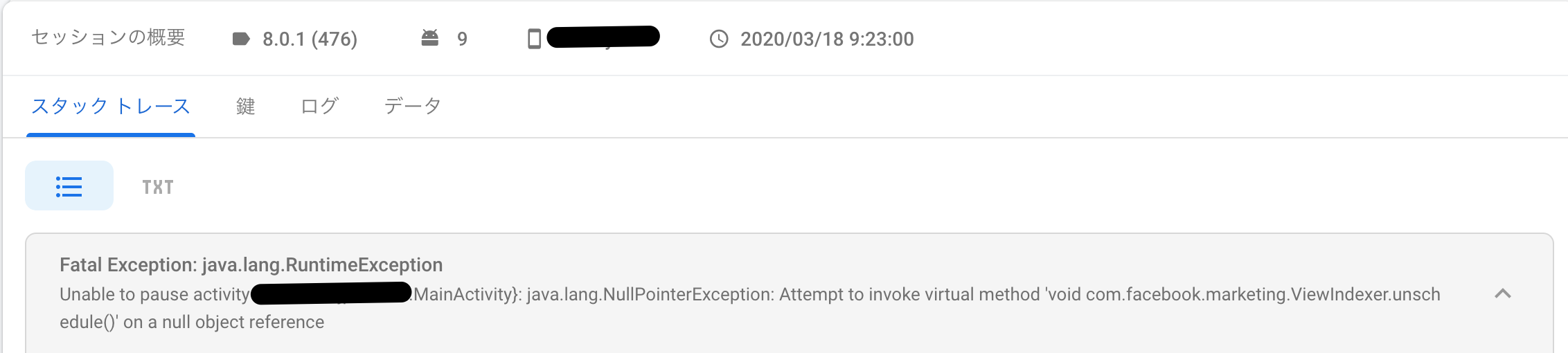
We check error logs by Firebase Crashlytics.
8.0.1 is latest version and implementing code fix written above but error is still occuring 30 events everyday.
hiroyaiizuka
on 18 Mar 2020
@hiroyaiizuka same for us.
valeriashpiner
on 18 Mar 2020
Hi everyone, I managed to overcome this terrible bug...😂
This is the link, i refered.
app/build.gradle
before:
dependencies {
    // Facebook SDK
    implementation 'com.facebook.android:facebook-android-sdk:4.34.0'
    implementation fileTree(dir: "libs", include: ["*.jar"])
    implementation 'com.facebook.android:facebook-login:[5,11)'
    implementation "com.facebook.react:react-native:+"  // From node_modules
}
after:
    // Facebook SDK
    implementation fileTree(dir: "libs", include: ["*.jar"])
    implementation 'com.facebook.android:facebook-login:[5,11)'
    implementation "com.facebook.react:react-native:+"  // From node_modules
and changed app/src/main/{your project}/MainAplication.java
before:
import com.facebook.CallbackManager;
import com.facebook.FacebookSdk;
import com.facebook.appevents.AppEventsLogger;
import cl.json.ShareApplication;
after:
import com.facebook.reactnative.androidsdk.FBSDKPackage;      ← add
import com.facebook.CallbackManager;
import com.facebook.FacebookSdk;
import com.facebook.appevents.AppEventsLogger;
import cl.json.ShareApplication;
I'm not sure why this made error fixed, but hope this will help someone :pray:
hiroyaiizuka
on 26 Mar 2020
Related issues
 aniss
·
3Comments
aniss
·
3Comments
 despairblue
·
3Comments
despairblue
·
3Comments
 oney
·
3Comments
oney
·
3Comments
 jobsamuel
·
3Comments
jobsamuel
·
3Comments
 madwed
·
3Comments
madwed
·
3Comments
Most helpful comment
i'm using RN 0.59.6 - the problem still exists