React-native: Xcode 10.2 'React/RCTBridgeModule.h' file not found
To Reproduce
Just steps in React iOS instructions.
Expected Behavior
Should build first project as expected
Code Example
npm install -g react-native-cli  &&
react-native init AwesomeProject  &&
cd AwesomeProject  &&
react-native run-ios
Then build in Xcode 10.2, and shows error: "'React/RCTBridgeModule.h' file not found"
Also tried another another solutions as removing node_models and "yarn"; also changing project build system to "Legacy Build System", but any of this worked.
Link to my repo: https://github.com/andremvb/TestReact
Help please :(.
Environment
React Native Environment Info:
System:
OS: macOS 10.14.4
CPU: (8) x64 Intel(R) Core(TM) i7-4850HQ CPU @ 2.30GHz
Memory: 265.90 MB / 16.00 GB
Shell: 3.2.57 - /bin/bash
Binaries:
Node: 11.13.0 - /usr/local/bin/node
Yarn: 1.15.2 - /usr/local/bin/yarn
npm: 6.9.0 - /usr/local/bin/npm
Watchman: 4.9.0 - /usr/local/bin/watchman
SDKs:
iOS SDK:
Platforms: iOS 12.2, macOS 10.14, tvOS 12.2, watchOS 5.2
IDEs:
Xcode: 10.2/10E125 - /usr/bin/xcodebuild
npmPackages:
react: 16.8.3 => 16.8.3
react-native: 0.59.4 => 0.59.4
npmGlobalPackages:
react-native-cli: 2.0.1
 andremvb
All 42 comments
+1
 ZionChang
on 11 Apr 2019
ZionChang
on 11 Apr 2019
+1
 tavikukko
on 16 Apr 2019
tavikukko
on 16 Apr 2019
+1
os - 10.14.3
react: "16.8.3"
xcode: 10.2.1
react-native: "0.59.4"
node: v10.15.3
I've been dealing with the same problem with any new projects I've tried testing, and an app that was previously working and my coworker can get to run. I noticed that my build differs from my coworkers with the same settings and code, not sure why. This is the specific error I'm seeing.
`CompileC /Users/PATH/project/node_modules/react-native/Libraries/Blob/build/RCTBlob.build/Debug-iphonesimulator/RCTBlob.build/Objects-normal/x86_64/RCTBlobManager.o /Users/PATH/project/node_modules/react-native/Libraries/Blob/RCTBlobManager.mm normal x86_64 objective-c++ com.apple.compilers.llvm.clang.1_0.compiler (in target: RCTBlob)
...
In file included from /Users/PATH/node_modules/react-native/Libraries/Blob/RCTFileReaderModule.m:9:
/Users/PATH/node_modules/react-native/Libraries/Blob/RCTFileReaderModule.h:8:9: fatal error: 'React/RCTBridgeModule.h' file not found
import
^~~~~~~~~~~~~~~~~~~~~~~~~`
Looking at the log, RCTBridgeModule.h is copied successfully in the React build. The RCTBlobManager.o file is not in the /Blob/build/.. folder. Following other suggestions, parallelize build is unchecked, headers includes $(inherited). I've tried adding React as an explicit dependency and used legacy build, which didn't work, have deleted and reinstalled node_mods with clean cache.
Would also appreciate some help. Thanks!
 NYCSwan
on 25 Apr 2019
NYCSwan
on 25 Apr 2019
+1
 mouthzipper
on 1 May 2019
mouthzipper
on 1 May 2019
I think some problem when config in xcode. I did try reset and it working. In your terminal, run:
defaults delete com.apple.dt.Xcode
 anhdevit
on 2 May 2019
anhdevit
on 2 May 2019
@anhdevit Your solution works. Thanks a lot!
mouthzipper
on 3 May 2019
Thanks @anhdevit for the workaround, I'll close as solved as it seems out of the realm of RN and more macosx/Xcode
 kelset
on 3 May 2019
kelset
on 3 May 2019
This is still a problem for React-Native 0.55.1 for tvOS build targets.
 OluAgunloye
on 14 Jun 2019
OluAgunloye
on 14 Jun 2019
I think some problem when config in xcode. I did try reset and it working. In your terminal, run:
defaults delete com.apple.dt.Xcode
@anhdevit Still getting the same error. Any solutions please.
 AmitPandya007
on 4 Jul 2019
AmitPandya007
on 4 Jul 2019
Still a bug, despite attempting workaround.
 gbanfalvikl
on 22 Jul 2019
gbanfalvikl
on 22 Jul 2019
Anyone found any solution?
 andersonqi
on 26 Jul 2019
andersonqi
on 26 Jul 2019
Still broken :(
 ralfisalhon
on 1 Aug 2019
ralfisalhon
on 1 Aug 2019
@ralfisalhon try clearing derived data cache rm -rf ~/Library/Developer/Xcode/DerivedData and restart xcode. maybe it can help you.
andersonqi
on 1 Aug 2019
Hey @andersonqi thanks for the response, unfortunately still experiencing the same issue. Do you know of a way to use React inside a module without using Pods? I do not want to migrate my project to be a Pods project but it depends on React/RCTBridgeModule.h
ralfisalhon
on 6 Aug 2019
The same problem. What's your workaround?
 san003
on 12 Aug 2019
san003
on 12 Aug 2019
Has anyone found the Solution?
Experiencing this issue only in xcode 10.2
 codervss
on 13 Aug 2019
codervss
on 13 Aug 2019
I think some problem when config in xcode. I did try reset and it working. In your terminal, run:
defaults delete com.apple.dt.Xcode
Can you tell me what does this command does?
codervss
on 13 Aug 2019
Still a problem - anyone found the solution!?
 tawanorg
on 3 Sep 2019
tawanorg
on 3 Sep 2019
+1
 baicuhaha
on 5 Sep 2019
baicuhaha
on 5 Sep 2019
+1
 srhtylmz19
on 8 Sep 2019
srhtylmz19
on 8 Sep 2019
+1
 sultan-arshi
on 12 Sep 2019
sultan-arshi
on 12 Sep 2019
Same problem here.I tried changing on Edit Scheme and disabling Parallelize Build but not successfully.
 troyam
on 18 Sep 2019
troyam
on 18 Sep 2019
if by any chance someone is experiencing this issue and is using iCloud, make sure your project is not syncing to iCloud. That is the root cause of all the problems I encountered.
mouthzipper
on 18 Sep 2019
+1 same issue
 m1m6
on 18 Sep 2019
m1m6
on 18 Sep 2019
I solved it deleting my Pods files removing the DerivedData opening the terminal and running pod install again and after pod update.
This error is caused because the Library it's not sync with your project.
You need to see your package on Pods folder not on Library Folder.
Note: Every time you install a new package you need to be sure if your package are linked correctly with your Podfile.
troyam
on 18 Sep 2019
+1 same issue
 mlegendre-axt
on 19 Sep 2019
mlegendre-axt
on 19 Sep 2019
+1 same issue. Our project is at a standstill to no avail
 andrenorman
on 22 Sep 2019
andrenorman
on 22 Sep 2019
+1
 rodriguezmanu
on 27 Sep 2019
rodriguezmanu
on 27 Sep 2019
I solved it deleting my Pods files removing the DerivedData opening the terminal and running pod install again and after pod update.
This error is caused because the Library it's not sync with your project.
You need to see your package on Pods folder not on Library Folder.Note: Every time you install a new package you need to be sure if your package are linked correctly with your Podfile.
@troyam
I have followed your solution but did not worked out.
Library which I am using is not using Pod files and giving this error while I am linking the library in build phases. will you please help me out to resolve this error?
AmitPandya007
on 27 Sep 2019
From researching this issue, there are quite a few issues which cause this error to happen. So trying many different ones will eventually lead to success.
Upgrade from 0.60 to 0.61 I had this issue. The solution was to delete all react-native linked 3rd party .xcodeproj files in Project Navigator that pointed to ../node_modules/. And then just add them again by right-clicking Navigator and using "Add files to"Project Name ""
I am at RN 0.59.9 only and getting this error.
AmitPandya007
on 27 Sep 2019
Getting this same issue using React-Native 0.60.5 and XCode 10.3. I tried the solutions posted above without any luck, anybody have any luck with other methods?
 RyanMitchellWilson
on 28 Sep 2019
RyanMitchellWilson
on 28 Sep 2019
From researching this issue, there are quite a few issues which cause this error to happen. So trying many different ones will eventually lead to success.
Upgrade from 0.60 to 0.61 I had this issue. The solution was to delete all react-native linked 3rd party .xcodeproj files in Project Navigator that pointed to ../node_modules/. And then just add them again by right-clicking Navigator and using "Add files to"Project Name ""
This was exactly my case. Thanks @alnorris !
 co-de
on 8 Oct 2019
co-de
on 8 Oct 2019
Manually adding React.xcodeproj to your Libraries folder in XCode solved the problem
 olegwn
on 11 Oct 2019
olegwn
on 11 Oct 2019
react-native-sensitive-info was complaining about this problem for me. I had updated to RN <0.6, and had it linked. Unlinking it resolved this for me, but then I ran into some other issues.
 mkilponen
on 11 Oct 2019
mkilponen
on 11 Oct 2019
Any news about this? I'm stuck with the same problem... RN 0.61.5
 SamiChab
on 20 Jan 2020
SamiChab
on 20 Jan 2020
Any news about this? I'm stuck with the same problem... RN 0.61.5
me too I'm stuck with the same problem!
 deliaelvina
on 23 Jan 2020
deliaelvina
on 23 Jan 2020
same problem after trying to install the facebook sdk :(
 pvanny1124
on 2 Mar 2020
pvanny1124
on 2 Mar 2020
Any news about this? I'm stuck with the same problem... RN 0.61.5
Can you try to use Pod?
Link Podfile for v0.61.5
https://github.com/facebook/react-native/blob/v0.61.5/template/ios/Podfile
anhdevit
on 3 Mar 2020
any solution for react-native 0.59.1?
pvanny1124
on 3 Mar 2020
any solution for react-native 0.59.1?
Try this way:
- Open Scheme Manager and choose your library
- Uncheck Parallelize Build
- Delete React and Add it again
- Drag to top of list
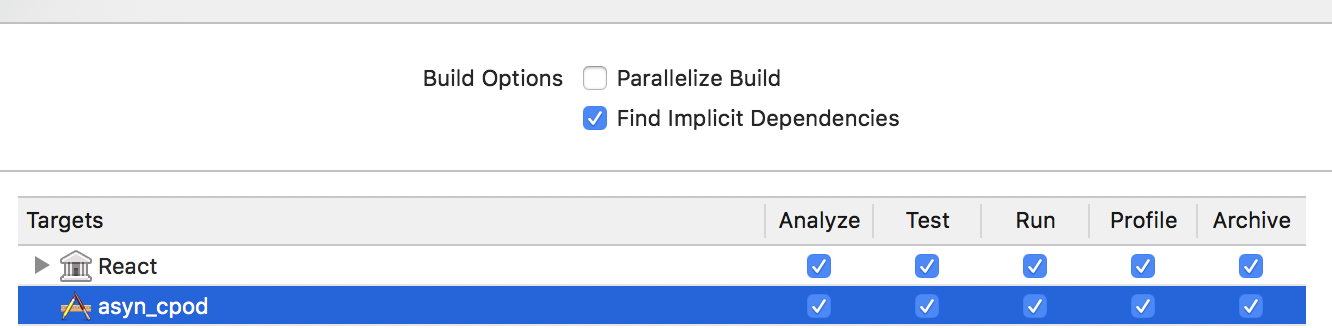
anhdevit
on 3 Mar 2020
still a problem
rn 0.62.2
xcode 11.4.1
 leachimsumiri
on 18 Apr 2020
leachimsumiri
on 18 Apr 2020
Same problem for me with Xcode 11.3 and rn 0.59.9
 rahamin1
on 27 Apr 2020
rahamin1
on 27 Apr 2020
Related issues
 madwed
·
3Comments
madwed
·
3Comments
 aniss
·
3Comments
aniss
·
3Comments
 jobsamuel
·
3Comments
jobsamuel
·
3Comments
 despairblue
·
3Comments
despairblue
·
3Comments
 lazywei
·
3Comments
lazywei
·
3Comments
Most helpful comment
I think some problem when config in xcode. I did try reset and it working. In your terminal, run:
defaults delete com.apple.dt.Xcode