React-native: React native v0.59.1 error "backgroundColor" only in Android device
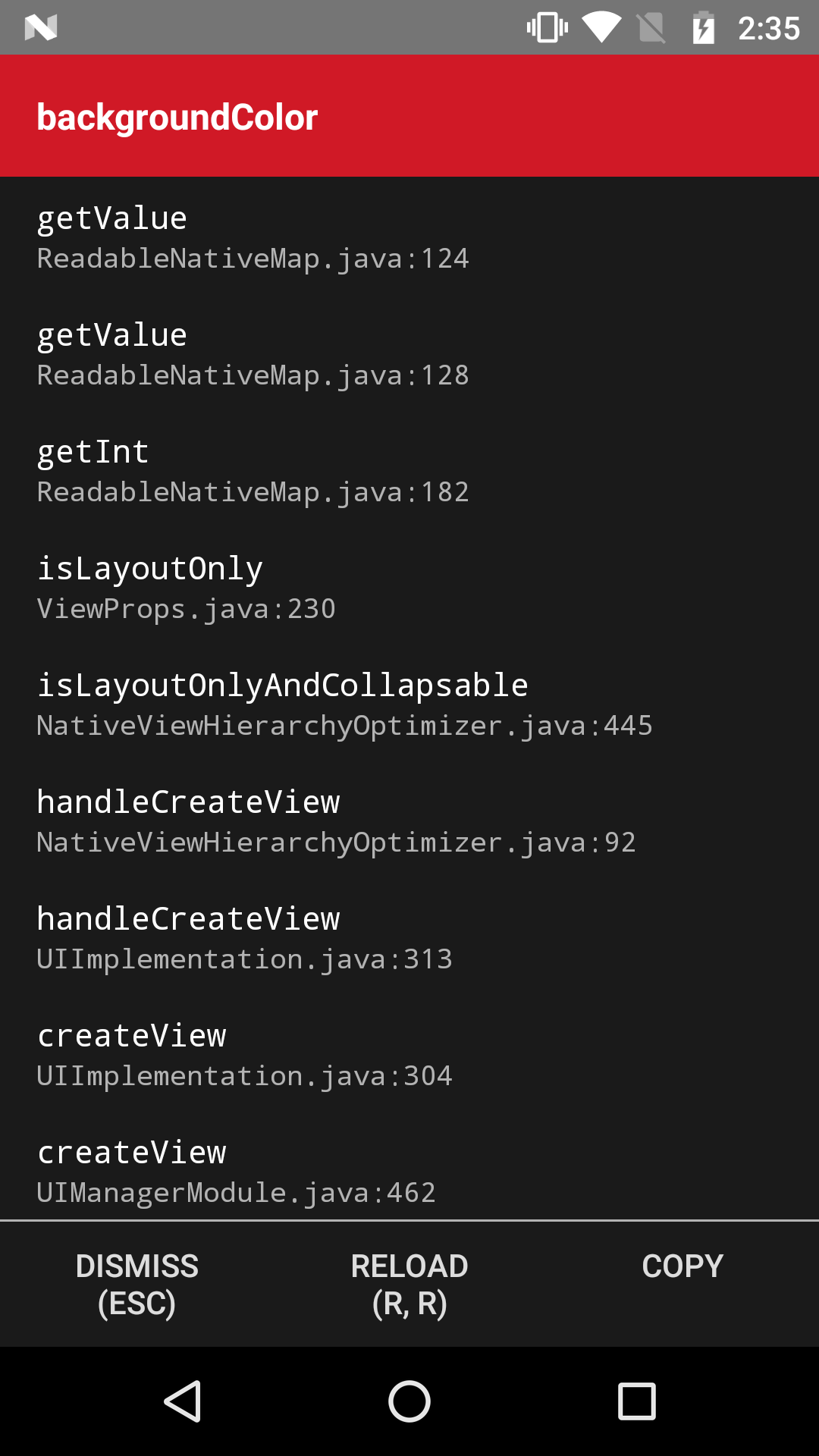
After upgrading react native version from 0.55.2 to 0.59.1, I got an error like backgroundColor in some screen only in android device.
In genymotion(Android simulator) and in ios(both device and simulator), it works perfect.
Screenshot:

Please help me
Thanks in advance
 piks2252
All 27 comments
Thanks for submitting your issue. Can you take another look at your description and make sure the issue template has been filled in its entirety?
👉 Click here if you want to take another look at the Bug Report issue template.
 react-native-bot
on 18 Mar 2019
react-native-bot
on 18 Mar 2019
I'm also getting this error, @piks2252 why did you close this? Did you figure it out?
 alphashuro
on 25 Mar 2019
alphashuro
on 25 Mar 2019
@alphashuro this error occurs after upgrading React Native. Make sure "backgroundColor" value is not null or undefined. example: ( backgroundColor: item.color ->this could be undefined, you can give a default color when item.color is null or undefined, backgroundColor: item.color || blue )
 ymerademi1
on 3 Apr 2019
ymerademi1
on 3 Apr 2019
Anyone fix this issue?
 danieljgp2
on 22 Apr 2019
danieljgp2
on 22 Apr 2019
for me the Button component from Native-base was causing the problem, I simply add a color myself and removed the color(success,danger,...) from it. :)
 Ashkan-Oliaie
on 22 Apr 2019
Ashkan-Oliaie
on 22 Apr 2019
I also fixed it, i was returning a null on a backgroundColor and that cause the issue, it seems that in rn 0.59 if you return an undefined or a null the apps crashed on android device
danieljgp2
on 22 Apr 2019
I have the same problem, and I don't know where the error is. Some help?
 marcelofb
on 5 May 2019
marcelofb
on 5 May 2019
@marcelofb since react native 0.59.0 the property backgroundColor cant be null or undefined, check your code, you are probably setting this property to null or undefined, in my case i had something like:
backgroundColor: condition ? property : undefined
and then i changed to
backgroundColor: condition ? property : ""
and the that's it. problem solved.
danieljgp2
on 5 May 2019
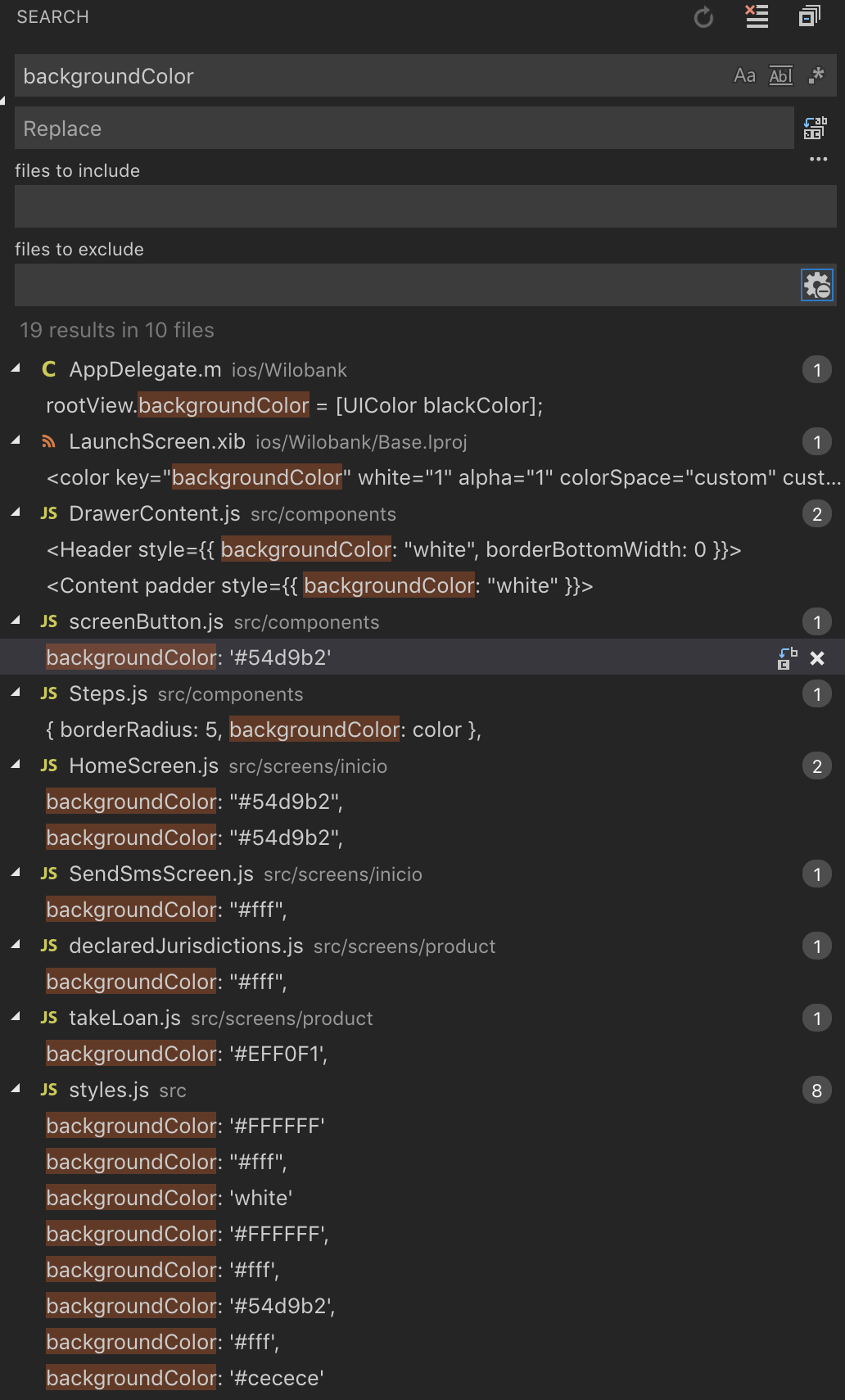
Hello @danieljgp2 , I don't see an error
marcelofb
on 5 May 2019
@marcelofb Make sure that in Steps.js the const color is not null or undefined, if is it, then try something like color || ""
danieljgp2
on 5 May 2019
Yes, it is set. I've even hard-coded it
marcelofb
on 5 May 2019
Those are all the files with a backgroundColor ? take a deep look, in my case it took me like 25 minutes find it
danieljgp2
on 5 May 2019
That is the result of the search in the project. In emulator and other device I don't have this problem.
marcelofb
on 5 May 2019
Yes, it only happens on android devices. can you she me your Steps.js file ?
danieljgp2
on 5 May 2019

marcelofb
on 5 May 2019
Try changing backgroundColor: 'white' to '#ffffff'
danieljgp2
on 5 May 2019
The same
marcelofb
on 5 May 2019
thank you
On Mon, Mar 18, 2019 at 6:07 AM Bot notifications@github.com wrote:
Thanks for submitting your issue. Can you take another look at your
description and make sure the issue template has been filled in its
entirety?👉 Click here if you want to take another look at the Bug Report issue
template.
https://github.com/facebook/react-native/issues/new?template=bug_report.md—
You are receiving this because you are subscribed to this thread.
Reply to this email directly, view it on GitHub
https://github.com/facebook/react-native/issues/24000#issuecomment-473901474,
or mute the thread
https://github.com/notifications/unsubscribe-auth/ArgqHyWZlGSqDmYxPb9Jk4iwbyZ7Jmuvks5vX4-IgaJpZM4b5ujt
.
 dick12345678
on 5 May 2019
dick12345678
on 5 May 2019
I already solved the problem. It was the same situation that @Ashkan-Oliaie mentioned. NativeBase error.
marcelofb
on 6 May 2019
As mentioned before, the error is because of NativeBase. I fixed it by changing all the backgroundColor: null to backgroundColor: '' from the folder node_modules/native-base/src/theme/components/Button.js.
 pgqueme
on 15 May 2019
pgqueme
on 15 May 2019
Para mí, el componente Button de Native-base estaba causando el problema, simplemente agregué un color y eliminé el color (éxito, peligro, ...) de él. :)
Tambien me paso eso, estaba tratando de crear un componente de boton para que en ambas plataformas se vieran iguales y en algún punto los props llegaban como null
 stiagocab
on 30 May 2019
stiagocab
on 30 May 2019
As mentioned before, the error is because of NativeBase. I fixed it by changing all the
backgroundColor: nulltobackgroundColor: ''from the foldernode_modules/native-base/src/theme/components/Button.js.
This work for me!! thanks!
 silkyland
on 12 Jun 2019
silkyland
on 12 Jun 2019
i solved this issue by downgrading my expo android apk
 faatimahbadriyah
on 13 Jun 2019
faatimahbadriyah
on 13 Jun 2019
my problem was the transparent style in a button from native base
 josevsp
on 13 Jun 2019
josevsp
on 13 Jun 2019
@marcelofb in my case i had something like:
backgroundColor: condition ? property : undefined
and then i changed to
backgroundColor: condition ? property : ""
and the that's it. problem solved.
Same here, I had to change an helper function where I returned a color equal to null, had to changed it with '' and works like a charm now ! Quite boring tho, to find the needed file, took me several long minutes, step by step.
 MayoudP
on 20 Jun 2019
MayoudP
on 20 Jun 2019
my problem was the transparent style in a button from native base
How did you solve your problem? I have the same problem, but can't solve it with the above answers.
 Minhoko
on 25 Jun 2019
Minhoko
on 25 Jun 2019
But I have created a project with this information:
```
React Native Environment Info:
System:
OS: macOS High Sierra 10.13.6
CPU: (4) x64 Intel(R) Core(TM) i5-3330S CPU @ 2.70GHz
Memory: 776.41 MB / 8.00 GB
Shell: 3.2.57 - /bin/bash
Binaries:
Node: 12.2.0 - /usr/local/bin/node
npm: 6.10.0 - /usr/local/bin/npm
Watchman: 4.9.0 - /usr/local/bin/watchman
SDKs:
iOS SDK:
Platforms: iOS 12.1, macOS 10.14, tvOS 12.1, watchOS 5.1
Android SDK:
API Levels: 23, 24, 25, 26, 27, 28
Build Tools: 23.0.1, 24.0.0, 25.0.0, 25.0.2, 25.0.3, 26.0.0, 26.0.1, 26.0.2, 26.0.3, 27.0.3, 28.0.0, 28.0.3
System Images: android-23 | Intel x86 Atom_64, android-23 | Google APIs Intel x86 Atom, android-24 | Google APIs Intel x86 Atom, android-25 | Google APIs Intel x86 Atom_64, android-26 | Google APIs Intel x86 Atom, android-26 | Google APIs Intel x86 Atom_64, android-26 | Google Play Intel x86 Atom, android-27 | Google APIs Intel x86 Atom, android-27 | Google Play Intel x86 Atom, android-28 | Google APIs Intel x86 Atom, android-28 | Google Play Intel x86 Atom
IDEs:
Android Studio: 3.4 AI-183.6156.11.34.5692245
Xcode: 10.1/10B61 - /usr/bin/xcodebuild
npmPackages:
react: 16.8.3 => 16.8.3
react-native: 0.59.10 => 0.59.10
npmGlobalPackages:
create-react-native-app: 1.0.0
react-native-cli: 2.0.1
react-native-create-library: 3.1.2
react-native-git-upgrade: 0.2.7
react-native-rename: 2.4.0
And I am creating the bug with using null or undefined but everything working.
export default class App extends Component
state = {
bg: undefined
}
render() {
return (
);
}
}
```
Note: using Motorola x4 android device for test.
 prashen
on 17 Jul 2019
prashen
on 17 Jul 2019
Related issues
 lazywei
·
3Comments
lazywei
·
3Comments
 phongyewtong
·
3Comments
phongyewtong
·
3Comments
 anchetaWern
·
3Comments
anchetaWern
·
3Comments
 madwed
·
3Comments
madwed
·
3Comments
 aniss
·
3Comments
aniss
·
3Comments
Most helpful comment
As mentioned before, the error is because of NativeBase. I fixed it by changing all the
backgroundColor: nulltobackgroundColor: ''from the foldernode_modules/native-base/src/theme/components/Button.js.