React-native: Width of TextInput is wrong with custom font on Android
🐛 Bug Report
The width of TextInput on Android is calculated wrong.
Looks like it takes the width of the default font.
See screenshots below:
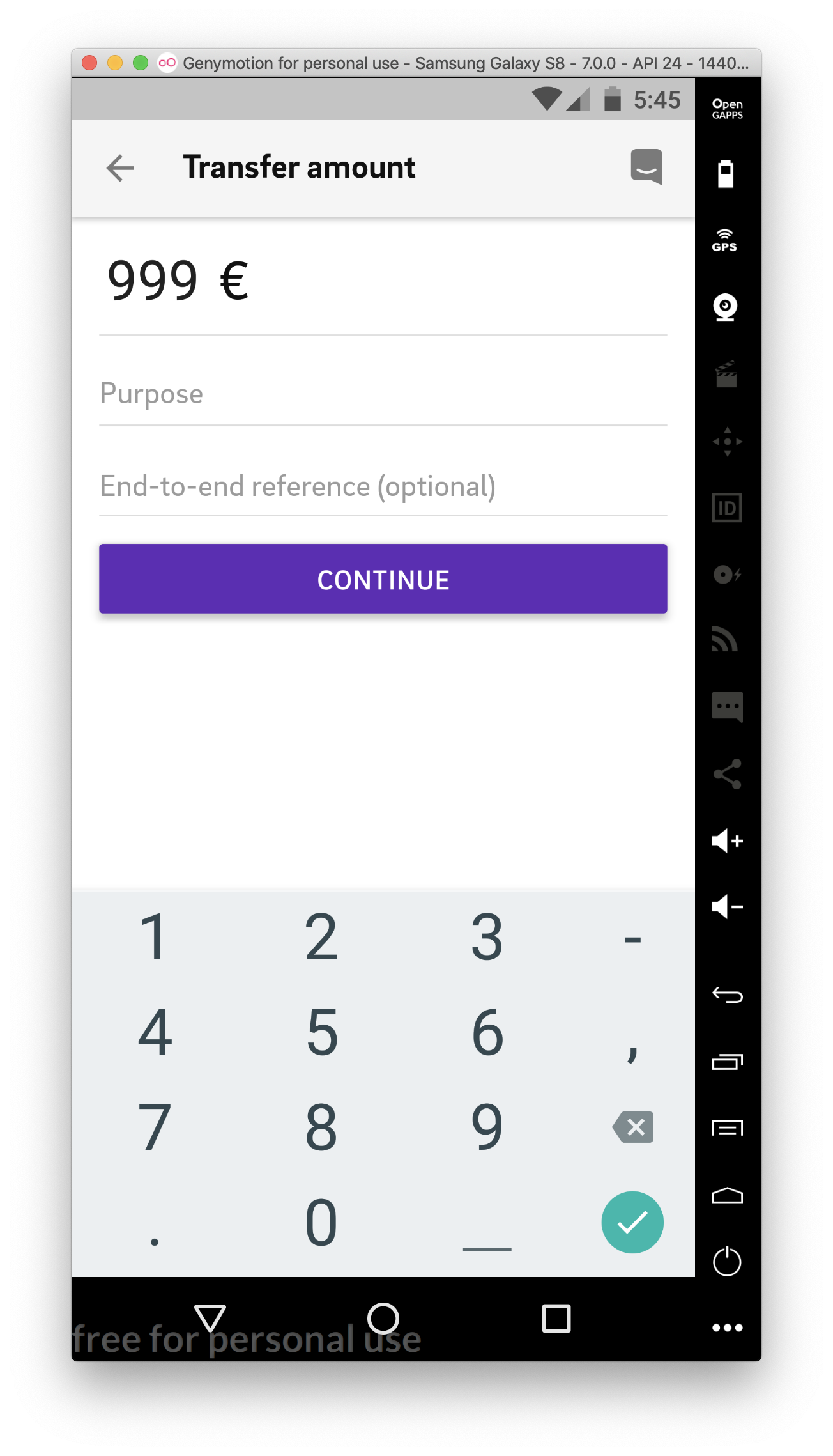


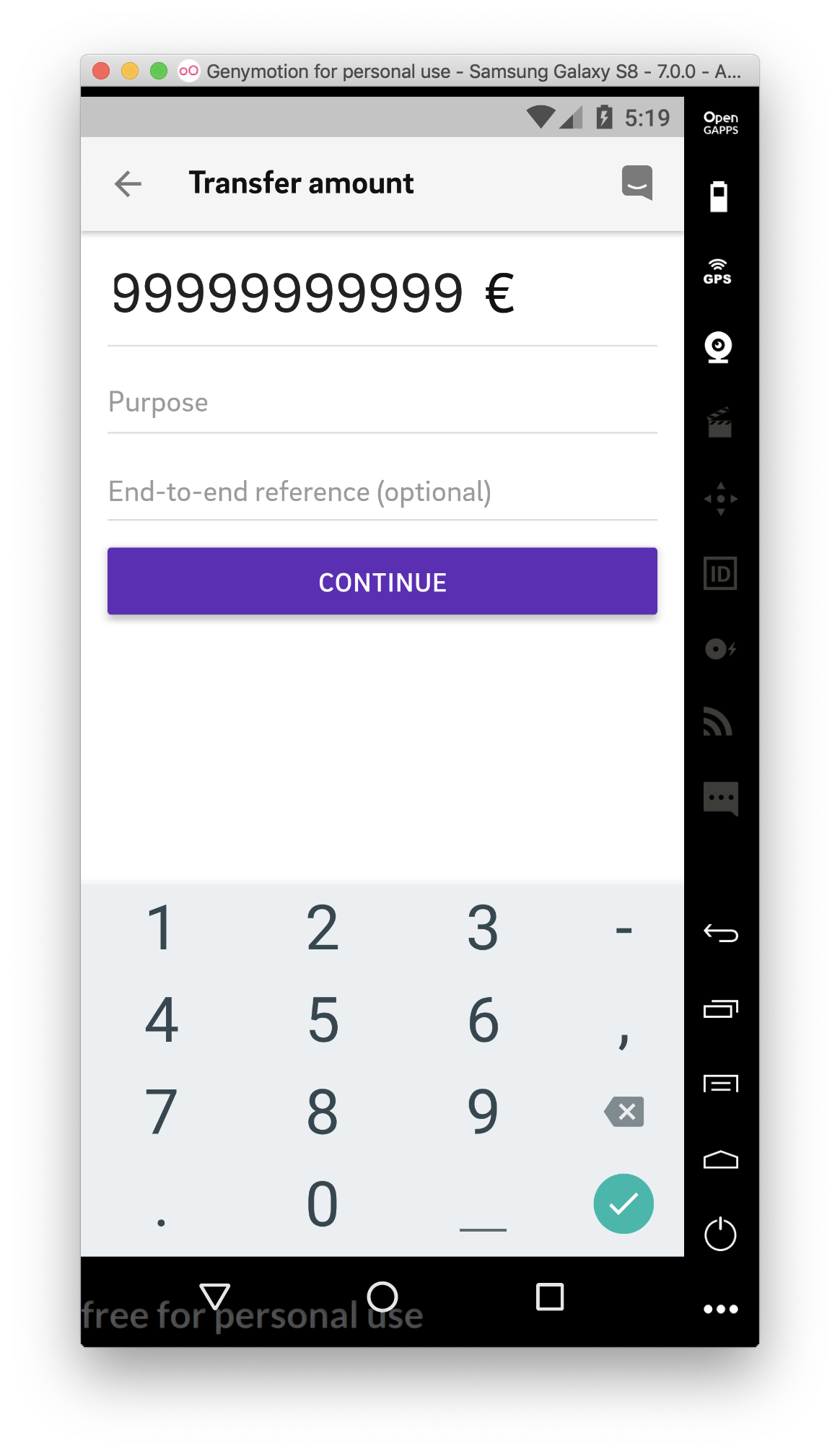

With default font (looks like it should be):


To Reproduce
Add a Text component after TextInput (in our case Text with € sign).
Expected Behavior
TextInput should take the width of its content. The distance between TextInput content and the € sign should always be the same. Content shouldn't be cut.
Code Example
import React from 'react';
import { StyleSheet, Text, View, TextInput } from 'react-native';

export default class Test extends React.Component {
  render() {
    return (
      <View style={styles.container}>
        <TextInput
          style={styles.textInput}
          underlineColorAndroid='transparent'
          placeholder='0'
        />
        <Text style={styles.textInput}> €</Text>
      </View>
    );
  }
}

const styles = StyleSheet.create({
  container: {
    flex: 1,
    flexDirection: 'row',
  },
  textInput: {
     fontFamily: 'customFont'
  }
});
Environment
React Native Environment Info:
    System:
      OS: macOS 10.14.3
      CPU: (4) x64 Intel(R) Core(TM) i5-7360U CPU @ 2.30GHz
      Memory: 137.99 MB / 16.00 GB
      Shell: 5.3 - /bin/zsh
    Binaries:
      Node: 10.6.0 - ~/.nvm/versions/node/v10.6.0/bin/node
      Yarn: 1.9.4 - /usr/local/bin/yarn
      npm: 6.1.0 - ~/.nvm/versions/node/v10.6.0/bin/npm
      Watchman: 4.9.0 - /usr/local/bin/watchman
    SDKs:
      iOS SDK:
        Platforms: iOS 12.1, macOS 10.14, tvOS 12.1, watchOS 5.1
      Android SDK:
        API Levels: 23, 24, 25, 26, 27, 28
        Build Tools: 23.0.1, 23.0.3, 25.0.2, 27.0.3, 28.0.2, 28.0.3
        System Images: android-26 | Google Play Intel x86 Atom, android-28 | Intel x86 Atom, android-28 | Intel x86 Atom_64, android-28 | Google APIs Intel x86 Atom_64, android-28 | Google Play Intel x86 Atom
    IDEs:
      Android Studio: 3.2 AI-181.5540.7.32.5014246
      Xcode: 10.1/10B61 - /usr/bin/xcodebuild
    npmPackages:
      react: 16.6.3 => 16.6.3
      react-native: 0.58.4 => 0.58.4
 temhota
All 10 comments
Also I sight what TextInput on android have min height related with placeholder length. Maybe this is that case. You can try set empty placeholder while TextInput not empty as a temporary solution.
 Bardimaswift
on 26 Feb 2019
Bardimaswift
on 26 Feb 2019
Also I sight what TextInput on android have min height related with placeholder length. Maybe this is that case. You can tray set empty placeholder while TextInput not empty as a temporary solution.
@Bardimaswift There is another issue with the placeholder, yes. But this one is not related to placeholder. I just updated the screenshots to make it more visible. If I type 1111111 the distance to€ increases. If I type 00000 digits become cut. But with a default font everything looks fine.
temhota
on 26 Feb 2019
@temhota Any solution ?
 xhirazi
on 23 Apr 2019
xhirazi
on 23 Apr 2019
Not sure if this will help. I was having the same issue with a custom font and textinput.
I had to add the '.ttf' to the end of the custom font family (in your case, textInput: {
fontFamily: 'customFont.ttf'
}) and this resolved my issue. I am still looking at the root cause or why this would have worked, but in case you need a temporary solution, there you go.
 mjfiandaca
on 9 May 2019
mjfiandaca
on 9 May 2019
Was there an alternative resolution to this aside from adding '.ttf' to the font family? @temhota
 krisxcrash
on 17 Jun 2019
krisxcrash
on 17 Jun 2019
Actually, the .ttf just caused all of my custom fonts to disappear and go to the default font of Roboto. Thank you for asking as I forgot to update this accordingly.
To fix this, I actually embedded a
So where I formerly had:
<TextInput
                  key={item.itemDisplay}
                  value={item.itemDisplay}
                  style={index === selectedItem ? itemSelectedStyle : itemStyle}
                  caretHidden={true}
                  spellCheck={false}
                  autoCorrect={false}
                  onChangeText={input => this.OnChangeItem(input, item.itemDisplay)}
                  onFocus={() => onFocus(index)}
                  onBlur={onBlur}
                  ref={ref => (this.lastInputRef = ref)}
                />
It became:
<TextInput
                      caretHidden={true}
                      spellCheck={false}
                      autoCorrect={false}
                      onChangeText={input => this.OnChangeItem(input, item.itemDisplay)}
                      onFocus={() => onFocus(index)}
                      onBlur={onBlur}
                      style={index === selectedItem ? itemTextSelectedStyle : itemTextStyle}
                      ref={ref => (this.lastInputRef = ref)}
                    >
                      <Text>{item.itemDisplay}</Text>
                    </TextInput>
mjfiandaca
on 17 Jun 2019
This is really a big problem of TextInput. We are developing the mobile application of a known bank using react native and have custom fonts. We are trying to implement an input Amount component which is always horizontally centralized and font-decreasing after a number character length. Also integer part and the decimal part should be independently changable. When we put the two TextInputs, the seperator Text between them and the currency type indicator Text at the end in flex direction "row". TextInputs can't calculate their character widths correctly on Android and distances between components seem too much if we write thin characters like 1 and too less when we write thick characters like 0 or 8 (even they go to the top of the adjacent Text). Are u guys planning to resolve this issue soon?
 edipkavvas
on 14 Jul 2019
edipkavvas
on 14 Jul 2019
Hey again,
The problem solved @0.59.10 version a hundred percent but maybe after >=0.59 working according to that pull request merged (just a guess btw) https://github.com/facebook/react-native/commit/d2153fc
Please try @0.59 first if you can and then @0.59.10 @temhota
 hassan1903
on 25 Jul 2019
hassan1903
on 25 Jul 2019
Hey there, it looks like there has been no activity on this issue recently. Has the issue been fixed, or does it still require the community's attention? This issue may be closed if no further activity occurs. You may also label this issue as a "Discussion" or add it to the "Backlog" and I will leave it open. Thank you for your contributions.
![stale[bot] picture](https://avatars3.githubusercontent.com/in/1724?v=4&s=40) stale[bot]
on 23 Oct 2019
stale[bot]
on 23 Oct 2019
Closing this issue after a prolonged period of inactivity. If this issue is still present in the latest release, please feel free to create a new issue with up-to-date information.
stale[bot]
on 31 Oct 2019
Related issues
 arunabha
·
3Comments
arunabha
·
3Comments
 vikeri
·
3Comments
vikeri
·
3Comments
 oney
·
3Comments
oney
·
3Comments
 WG-Com
·
3Comments
WG-Com
·
3Comments
 TrakBit
·
3Comments
TrakBit
·
3Comments
Most helpful comment
This is really a big problem of TextInput. We are developing the mobile application of a known bank using react native and have custom fonts. We are trying to implement an input Amount component which is always horizontally centralized and font-decreasing after a number character length. Also integer part and the decimal part should be independently changable. When we put the two TextInputs, the seperator Text between them and the currency type indicator Text at the end in flex direction "row". TextInputs can't calculate their character widths correctly on Android and distances between components seem too much if we write thin characters like 1 and too less when we write thick characters like 0 or 8 (even they go to the top of the adjacent Text). Are u guys planning to resolve this issue soon?