React-native: Newly create local module does not exist in Haste module map
🐛 Bug Report
I'm trying to import a module I created in my App.js file
import RNModule from 'react-native-module';
The module is not found by metro when trying to load the project.

Yes I have tried:
1. Clear watchman watches: `watchman watch-del-all`.
2. Delete the `node_modules` folder: `rm -rf node_modules && npm install`.
3. Reset Metro Bundler cache: `rm -rf /tmp/metro-bundler-cache-*` or `npm start -- --reset-cache`.
4. Remove haste cache: `rm -rf /tmp/haste-map-react-native-packager-*`.
It however works if you import the module using NativeModules...
import { NativeModules } from 'react-native';
const { RNModule } = NativeModules;
To Reproduce
- Create project using
react-native init - Create a library using
react-native-create-library - npm install your library from your project
- react-native link
- import the library in the App.js (or anywhere else) of the project
- Try run
react-native run-androidorreact-native run-ios
Expected Behavior
The project should load without issues.
Code Example
https://github.com/814k31/TestReactNativeNativeModule
Environment
React Native Environment Info:
System:
OS: macOS 10.14.2
CPU: (8) x64 Intel(R) Core(TM) i7-6700K CPU @ 4.00GHz
Memory: 486.52 MB / 16.00 GB
Shell: 3.2.57 - /bin/bash
Binaries:
Node: 10.13.0 - /usr/local/bin/node
npm: 6.4.1 - /usr/local/bin/npm
Watchman: 4.9.0 - /usr/local/bin/watchman
SDKs:
iOS SDK:
Platforms: iOS 12.1, macOS 10.14, tvOS 12.1, watchOS 5.1
Android SDK:
API Levels: 22, 23, 26, 27, 28
Build Tools: 23.0.1, 25.0.0, 26.0.2, 27.0.3, 28.0.0, 28.0.2, 28.0.3
System Images: android-28 | Google APIs Intel x86 Atom
IDEs:
Android Studio: 3.2 AI-181.5540.7.32.5014246
Xcode: 10.1/10B61 - /usr/bin/xcodebuild
npmPackages:
react: 16.6.3 => 16.6.3
react-native: ^0.58.3 => 0.58.3
npmGlobalPackages:
create-react-native-app: 2.0.2
react-native-ci-tools: 1.1.0
react-native-cli: 2.0.1
react-native-create-library: 3.1.2
react-native-git-upgrade: 0.2.7
 814k31
All 8 comments
@814k31 Thank you for the solid repro repository! I've checked out the project and I don't have any issues importing the library. Are you sure you are not symlinking the library into node_modules? Because that doesn't work with the metro bundler https://github.com/facebook/metro/issues/1.
These are the commands that lead to the below screenshot:
  598  git clone https://github.com/814k31/TestReactNativeNativeModule
  599  cd TestReactNativeNativeModule/
  600  ls
  601  cd RNApp/
  602  ls
  603  yarn
  604  cat package-lock.json
  605  ls -lah node_modules/react-native-module
  606  ls -lah node_modules | grep react-native-module
  607  react-native run-ios

 bartolkaruza
on 8 Feb 2019
bartolkaruza
on 8 Feb 2019
@bartolkaruza ahhh thank you symlinking is a very high possibility though I didn't do it explicitly, the only linking was done using npm install which would most likely be the culprit there.
I'll check it out tomorrow and report back!
814k31
on 9 Feb 2019
@bartolkaruza it was the symlink issue... thanks!
I will close this issue now but out of curiosity whats a good way to develop this way?
I've just learnt about npm pack which worked, though it seems like it will be a bit annoying to keep repacking and installing for every change...
814k31
on 10 Feb 2019
@814k31
Several options, but the ones I like to use is to checkout the library inside the node_modules or when I'm working on a library and an app project in parallel I use https://github.com/wix/wml
Neither solution is perfect but it gets the job done. Hope this helps you along.
bartolkaruza
on 12 Feb 2019
@bartolkaruza legend, thanks for your help!
814k31
on 12 Feb 2019
@bartolkaruza why did you not have to run react-native link after running yarn in the main project?
 grisaitis
on 17 May 2019
grisaitis
on 17 May 2019
I can reproduce @bartolkaruza's screenshot with @814k31's repo, but not if I start with a fresh project (react-native init):
$ cd TestReactNativeNativeModule
$ react-native init RNApp2
$ cd RNApp2
$ yarn add file:../react-native-module
$ react-native run-ios
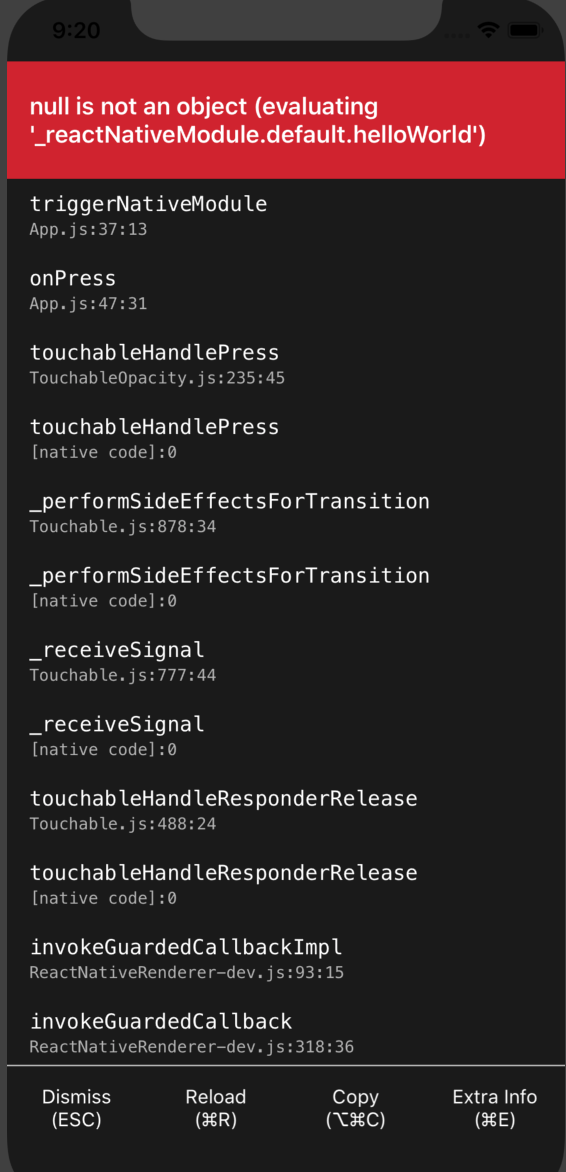
Build succeeds, but when I click the button, the screenshot below happens
When I diff RNApp with RNApp2 (diff -qr -x node_modules -x build -x android ./RNApp ./RNApp2) I see that some XCode project files are different and that @814k31 added a cocoapod or something for the native code. Am I missing something, or has something broken with the newest react and importing native modules?
I created a fork here with the new project: https://github.com/grisaitis/TestReactNativeNativeModule
grisaitis
on 18 May 2019
@814k31
Several options, but the ones I like to use is to checkout the library _inside_ the node_modules or when I'm working on a library and an app project in parallel I use https://github.com/wix/wmlNeither solution is perfect but it gets the job done. Hope this helps you along.
Thanks @bartolkaruza, wix/wml doesn't work on Window 10. So I used npm link and it seemed to work fine until I got the 'module doesn't exist in Haste module map' error.
What are the other options please?
 SackeyDavid
on 20 Jun 2019
SackeyDavid
on 20 Jun 2019
Related issues
 oney
·
3Comments
oney
·
3Comments
 janmonschke
·
3Comments
janmonschke
·
3Comments
 vikeri
·
3Comments
vikeri
·
3Comments
 WG-Com
·
3Comments
WG-Com
·
3Comments
 phongyewtong
·
3Comments
phongyewtong
·
3Comments
Most helpful comment
@814k31
Several options, but the ones I like to use is to checkout the library inside the node_modules or when I'm working on a library and an app project in parallel I use https://github.com/wix/wml
Neither solution is perfect but it gets the job done. Hope this helps you along.