React-native: Increasing node memory not possible when building straight from Xcode
- [x] Review the documentation: https://facebook.github.io/react-native
- [x] Search for existing issues: https://github.com/facebook/react-native/issues
- [x] Use the latest React Native release: https://github.com/facebook/react-native/releases
Environment
React Native Environment Info:
    System:
      OS: macOS 10.14
      CPU: x64 Intel(R) Core(TM) i7-4770HQ CPU @ 2.20GHz
      Memory: 2.80 GB / 16.00 GB
      Shell: 5.6.1 - /usr/local/bin/zsh
    Binaries:
      Node: 9.11.2 - /usr/local/bin/node
      Yarn: 1.10.1 - /usr/local/bin/yarn
      npm: 5.6.0 - /usr/local/bin/npm
      Watchman: 4.9.0 - /usr/local/bin/watchman
    SDKs:
      iOS SDK:
        Platforms: iOS 12.0, macOS 10.14, tvOS 12.0, watchOS 5.0
      Android SDK:
        Build Tools: 25.0.1, 26.0.1, 26.0.3, 27.0.3, 28.0.0, 28.0.3
        API Levels: 23, 25, 26, 27, 28
    IDEs:
      Android Studio: 3.2 AI-181.5540.7.32.5056338
      Xcode: 10.0/10A255 - /usr/bin/xcodebuild
    npmPackages:
      react: 16.6.0-alpha.8af6728 => 16.6.0-alpha.8af6728
      react-native: 0.57.3 => 0.57.3
    npmGlobalPackages:
      react-native-cli: 2.0.1
      react-native-git-upgrade: 0.2.7
Description
I need to use the profiling tool in Xcode, which requires building the app from Xcode. My app requires extra memory. I can successfully build my app from the command line with node --expose-gc --max_old_space_size=4096 ./node_modules/react-native/local-cli/cli.js bundle [...], but I have to rewrite react-native-xcode.sh in order to get this working in Xcode. If I skip bundling entirely, Xcode complains that the bundle doesn't exist. If I don't increase the space manually in the script, Xcode hangs on Building 1 of 2 shell scripts (the shell script being react-native-xcode.sh, and then it runs out of memory (throws Allocation: JS heap out of memory).
I can either add in main.jsbundle manually, or edit the script. There doesn't seem to be any _real_ way to accomplish increasing node memory for Xcode without using a hack, or nothing I could find in old issues or documentation. There's no obvious way of how to use the flags that exist in react-native-xcode.sh.
Somewhat related issues: #5196, #12686
Reproducible Demo
Run react-native init, open that project in Xcode, try to increase node memory. Obviously this works better if you have an app that requires more memory.
 gretzky
All 7 comments
In Xcode, Target > Build Phases > Bundle React Native code and images change the line export NODE_BINARY=node to NODE_BINARY="node --expose-gc --max_old_space_size=4096"
 bartolkaruza
on 31 Oct 2018
bartolkaruza
on 31 Oct 2018
Unfortunately it doesn't look like this is the same in Xcode 10
gretzky
on 31 Oct 2018
Unfortunately it doesn't look like this is the same in Xcode 10
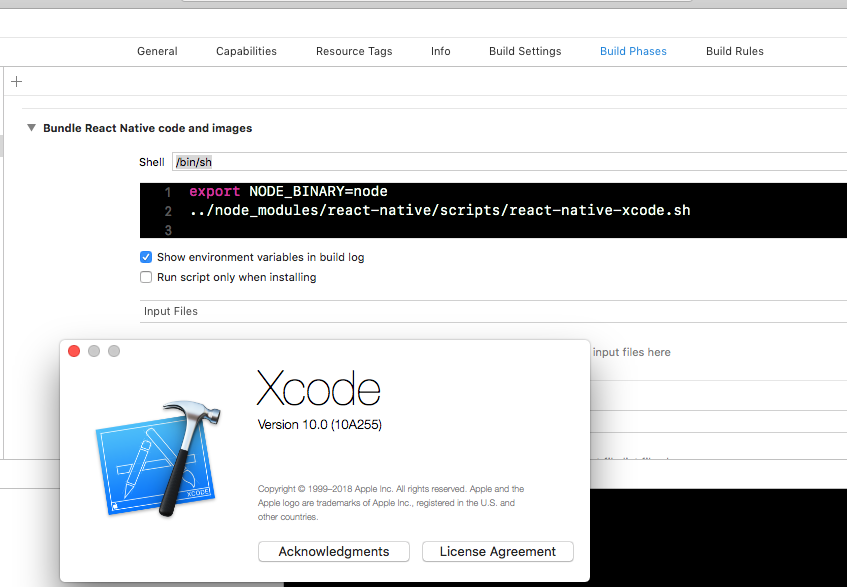
Are you sure?
bartolkaruza
on 1 Nov 2018
I guess no, I'm not sure, because I can't navigate to the same screen-- but that's a me problem 😅 . Regardless, I think your solution should do it, thanks!
gretzky
on 2 Nov 2018
I am trying to use aws-sdk but it uses a lot of memory. I am able to run my simulator only if I run the node server with the "--max_old_space_size=8192" command beforehand, but when I try to upload my app to the app store via Xcode --> Archive, I keep getting the out of memory error.
I tried the following from @bartolkaruza: In Xcode, Target > Build Phases > Bundle React Native code and images change the line export NODE_BINARY=node to NODE_BINARY="node --expose-gc --max_old_space_size=4096"
But that does not fix it. Here is my stack-trace:

Did anyone of you figure it out? I cannot use aws-sdk without fixing this issue!
 Blutude
on 27 Feb 2019
Blutude
on 27 Feb 2019
I was running into the same issue and found a work around. The extra arguments for node were not picked up when I added them in Xcode, Target > Build Phases > Bundle React Native code so I changed the following line in react-native-xcode.sh
[ -z "$NODE_ARGS" ] && export NODE_ARGS=""
to:
[ -z "$NODE_ARGS" ] && export NODE_ARGS="--max_old_space_size=4096"
I am not too familiar with shell script but I guess that the second NODE_ARGS in that line is the fallback?
--
npm install will overwrite these c hanges but at least I can make a release build now again. In my app the aws-sk package is also responsible for the out of memory error. @Blutude let me know if this helps you or if you have fixed the issue in another way.
 timkuilman
on 1 May 2019
timkuilman
on 1 May 2019
@timkuilman Instead of modifying react-native-xcode.sh (which as you point out is temporary), you can specify NODE_ARGS in the Xcode, Target > Build Phases > Bundle React Native code and images script like so:
export NODE_BINARY=node
export NODE_ARGS="--max_old_space_size=8192"
../node_modules/react-native/scripts/react-native-xcode.sh
This was the only way I could get my productions builds working again, as passing in the memory allocation argument as suggested here and in other similar issues ( export NODE_BINARY='node --max_old_space_size=8192') did not solve the problem for me.
 marstankev
on 5 Jun 2019
marstankev
on 5 Jun 2019
Related issues
 WG-Com
·
3Comments
WG-Com
·
3Comments
 janmonschke
·
3Comments
janmonschke
·
3Comments
 axelg12
·
3Comments
axelg12
·
3Comments
 lazywei
·
3Comments
lazywei
·
3Comments
 madwed
·
3Comments
madwed
·
3Comments
Most helpful comment
@timkuilman Instead of modifying
react-native-xcode.sh(which as you point out is temporary), you can specifyNODE_ARGSin theXcode, Target > Build Phases > Bundle React Native code and imagesscript like so:This was the only way I could get my productions builds working again, as passing in the memory allocation argument as suggested here and in other similar issues (
export NODE_BINARY='node --max_old_space_size=8192') did not solve the problem for me.