React-native: RCTRootView: updating appProperties does not work on iOS if bridge is still loading
- [x] Review the documentation: https://facebook.github.io/react-native
- [x] Search for existing issues: https://github.com/facebook/react-native/issues
- [x] Use the latest React Native release: https://github.com/facebook/react-native/releases
Environment
Scanning folders for symlinks in /Users/veen011/Projects/Apps/AppPropertiesNoReRenderWhileBridgeIsLoading/node_modules (13ms)

  React Native Environment Info:
    System:
      ### Please let me know if you need this ###
    Binaries:
      Node: 10.5.0 - /usr/local/bin/node
      Yarn: 1.7.0 - /usr/local/bin/yarn
      npm: 6.1.0 - /usr/local/bin/npm
      Watchman: 4.9.0 - /usr/local/bin/watchman
    SDKs:
      iOS SDK:
        Platforms: iOS 11.4, macOS 10.13, tvOS 11.4, watchOS 4.3
    IDEs:
      Android Studio: 3.1 AI-173.4819257
      Xcode: 9.4.1/9F2000 - /usr/bin/xcodebuild
    npmPackages:
      react: 16.4.1 => 16.4.1
      react-native: 0.56.0 => 0.56.0
Short description
Follow up on https://github.com/facebook/react-native/issues/15938
RCTRootView also provides a read-write property appProperties. After appProperties is set, the React Native app is re-rendered with new properties. The update is only performed when the new updated properties differ from the previous ones.
{...}
It is fine to update properties anytime. However, updates have to be performed on the main thread. You use the getter on any thread.
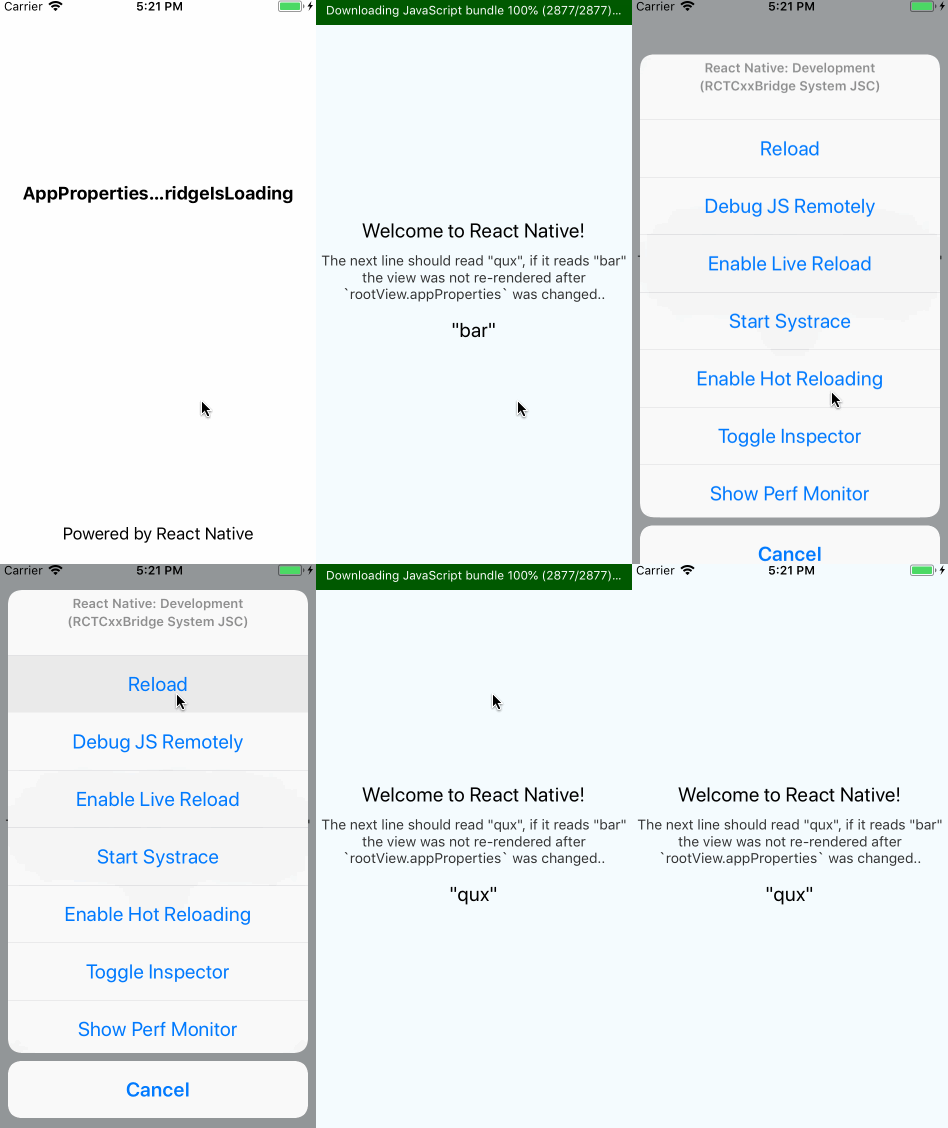
This is not the case, the app is not re-rendered if the bridge was still loading when the properties are updated.
Reproducible Demo
git clone [email protected]:teameh/AppPropertiesNoReRenderWhileBridgeIsLoading.git
cd AppPropertiesNoReRenderWhileBridgeIsLoading
react-native run-ios
or
- create new RN app (
react-native init MyProject) - apply this commit https://github.com/teameh/AppPropertiesNoReRenderWhileBridgeIsLoading/commit/981e953d45ff440bf4dde6bc24100a41822e53ec
react-native run-ios
The only change I made to the sample project is adding and updating some some props of the view:
    RCTRootView *rootView = [[RCTRootView alloc] initWithBundleURL:jsCodeLocation
                                                       moduleName:@"AppPropertiesNoReRenderWhileBridgeIsLoading"
-                                               initialProperties:nil
+                                               initialProperties:@{@"foo" : @"bar"}
                                                    launchOptions:launchOptions];
+
+  rootView.appProperties = @{@"foo" : @"qux"};
Which are used in the RN view:
<Text style={styles.welcome}>"{this.props.foo}"</Text>
Before reloading the project the 3rd text node on the view should display "qux" if it displays "bar" it means the props have not been updated.
 teameh
All 9 comments
I did some more digging and I think this is caused by the following:
In
RCTRootView'sinitWithBridgemethodbundleFinishedLoadingis always called even though the javascript might still be loading..bundleFinishedLoadingcallsrunApplication:bridgewith the initial properties.An instant later, when
setAppPropertiesis called (and normally the app runs again) the bridge is still loading so the app won't run again:
- (void)setAppProperties:(NSDictionary *)appProperties
{
  RCTAssertMainQueue();

  if ([_appProperties isEqualToDictionary:appProperties]) {
    return;
  }

  _appProperties = [appProperties copy];

  if (_contentView && _bridge.valid && !_bridge.loading) {
    [self runApplication:_bridge];
  }
}
- Somewhere after this the loading of the javascript completes and
javaScriptDidLoadis called. But the bridge is the same and thusbundleFinishedLoadingwon't get called again, preventing the update:
- (void)javaScriptDidLoad:(NSNotification *)notification
{
  RCTAssertMainQueue();

  // Use the (batched) bridge that's sent in the notification payload, so the
  // RCTRootContentView is scoped to the right bridge
  RCTBridge *bridge = notification.userInfo[@"bridge"];
  if (bridge != _contentView.bridge) {
    [self bundleFinishedLoading:bridge];
  }
}
Tried to write some code that fixes this, see the PR.
teameh
on 9 Jul 2018
Is there anything I can do to help fix this issue? No worries, I understand that it's hard to maintain a repo with 600+ open issues :)
teameh
on 26 Jul 2018
I'm having the same issue, any updates?
 jessedijkstra
on 24 Aug 2018
jessedijkstra
on 24 Aug 2018
Until this is fixed, a workaround is to listen to the RCTJavaScriptDidLoad and set the appProperties in there.
```swift
NotificationCenter.default.addObserver(forName: NSNotification.Name.RCTJavaScriptDidLoad, object: nil, queue: nil) {
[weak self] _ in
self?.setAppProperties()
}
 harking
on 8 Nov 2018
harking
on 8 Nov 2018
@cpojer The issue has been closed, does that mean that this bug has been fixed?
jessedijkstra
on 25 Feb 2019
I think I am still experiencing this issue. The Objective C code is slightly different:
[[NSNotificationCenter defaultCenter] addObserverForName:RCTJavaScriptDidLoadNotification object:nil queue:nil usingBlock:^(NSNotification * _Nonnull note) {

}];
 jeremyis
on 12 May 2019
jeremyis
on 12 May 2019
@jessedijkstra This is a react native repo, which means they close bugs whenever they want because otherwise they'd have too many to ever actually fix ;) Need to use the workaround.
 zbagley
on 16 Aug 2019
zbagley
on 16 Aug 2019
This is even something they know because its references here: https://facebook.github.io/react-native/docs/communication-ios on the docs.
 imcodingideas
on 25 Jan 2020
imcodingideas
on 25 Jan 2020
Related issues
 jlongster
·
3Comments
jlongster
·
3Comments
 anchetaWern
·
3Comments
anchetaWern
·
3Comments
 madwed
·
3Comments
madwed
·
3Comments
 upbit
·
3Comments
upbit
·
3Comments
 oney
·
3Comments
oney
·
3Comments
Most helpful comment
I'm having the same issue, any updates?