React-native: View bounds and touchable area incorrect after a rotate or a scale transform
- [x] Review the documentation: https://facebook.github.io/react-native
- [x] Search for existing issues: https://github.com/facebook/react-native/issues
- [x] Use the latest React Native version: https://github.com/facebook/react-native/releases
- [x] Run
react-native infoin your terminal and paste its contents under "Environment" - [x] Let us know how to reproduce the issue. Include a code sample, share a project, or
share an app that reproduces the issue using https://snack.expo.io/
Environment
React Native Environment Info:
System:
OS: macOS High Sierra 10.13.5
CPU: x64 Intel(R) Core(TM) i7-6660U CPU @ 2.40GHz
Memory: 4.38 GB / 16.00 GB
Shell: 5.3 - /bin/zsh
Binaries:
Node: 10.5.0 - /usr/local/bin/node
Yarn: 1.7.0 - ~/.yarn/bin/yarn
npm: 6.1.0 - /usr/local/bin/npm
Watchman: 4.9.0 - /usr/local/bin/watchman
SDKs:
iOS SDK:
Platforms: iOS 11.4, macOS 10.13, tvOS 11.4, watchOS 4.3
Android SDK:
Build Tools: 23.0.1, 25.0.0, 25.0.1, 25.0.2, 26.0.0, 26.0.1, 26.0.2, 26.0.3
API Levels: 19, 21, 22, 23, 24, 25, 26
IDEs:
Android Studio: 3.0 AI-171.4443003
Xcode: 9.4.1/9F2000 - /usr/bin/xcodebuild
npmPackages:
react: 16.4.1 => 16.4.1
react-native: 0.56.0 => 0.56.0
npmGlobalPackages:
create-react-native-app: 1.0.0
react-native-cli: 2.0.1
react-native-rename: 2.2.2
Description
The bounds of transformed views, as reported by the inspector or as detected by the Touchable components, do not match what you seen on the screen. The touch area is not correctly transformed with the view.
Screenshot of a { scale: 2 } transform
The real view (scaled) is in pink, the incorrect touchable area is in blue.

Screenshot of a { rotateZ: "-45deg" } transform
The real view (rotated) is in pink, the incorrect touchable area is in blue.
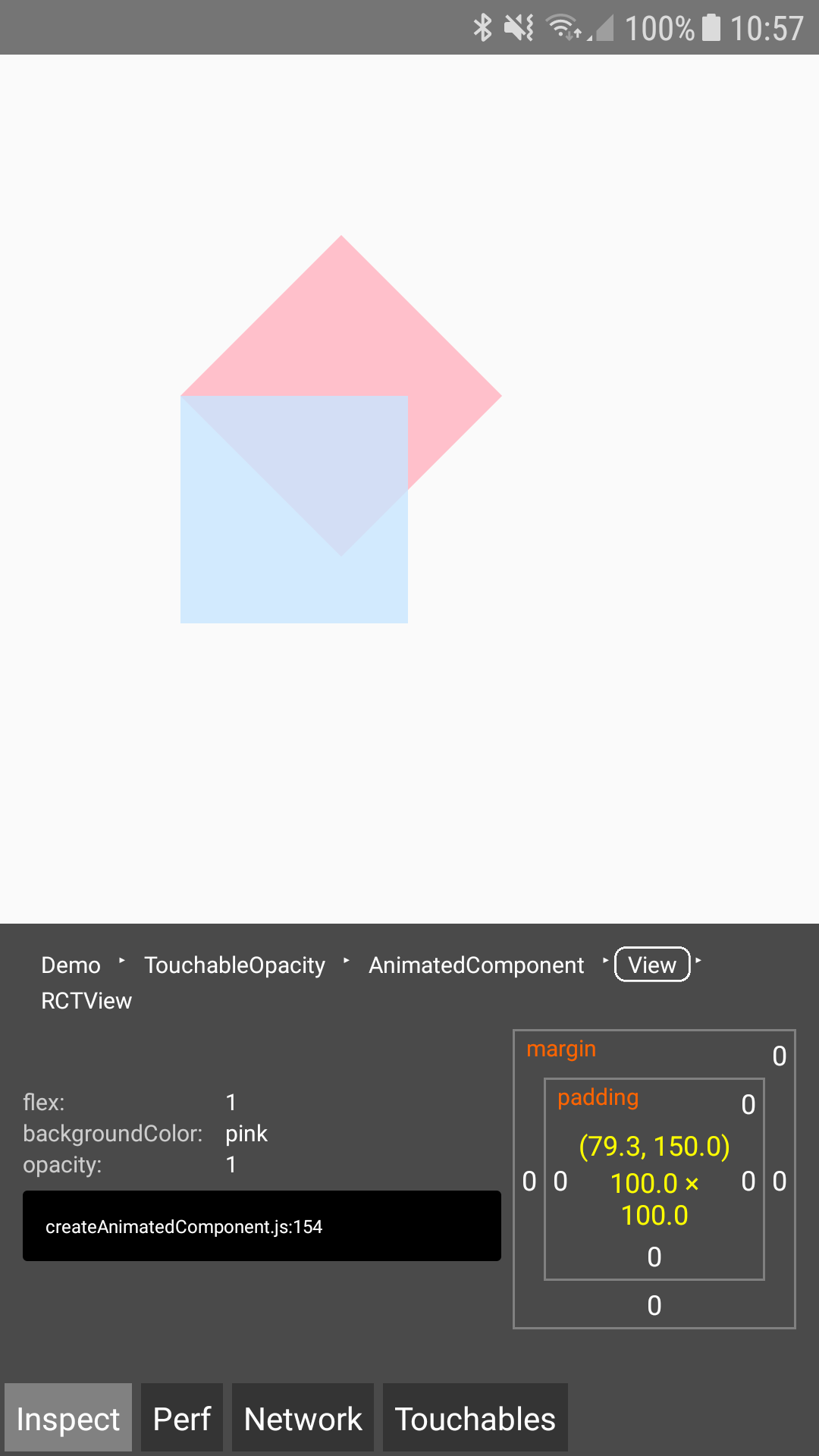
This issue has already been reported in 2016 but has been closed because it was missing reproduction steps. This bug has been here for a long time.
Steps to Reproduce
- Use a real device (I haven't been able to reproduce the bug on emulator, I have on a real Galaxy A5 2017)
UPDATE: See this comment for an emulator reproduction. - Use the inspector to display the view bounds
- See that the reported bounds (blue square) do not match the real view (pink square)
- Without the inspector, press somewhere on the real view where the blue square didn't overlap: the press is not correctly detected. onPressOut is triggered immediately after onPressIn, without onPress being triggered. onPressOut is immediately triggered even if you don't release the touch. Sometimes on the very first press, onPress is logged but it doesn't wait for touch release.
Demo code with on-screen logging
I've included some on-screen logging code to easily see the press events.
This example shows the bug with the scale transform but it can be reproduced with a rotate transform as well.
import React from "react";
import { AppRegistry, View, TouchableOpacity, Text } from "react-native";

let i = 1;

class Demo extends React.Component {

  state = {
    logs: []
  };

  log(str) {
    this.setState(state => ({
      logs: [...state.logs.slice(-5), `${i++}  - ${str}`]
    }));
  }

  render() {
    return (
      <View style={{ flex: 1 }}>

        <View style={{
          position: "absolute",
          top: 100,
          left: 100,
          height: 100,
          width: 100,
          transform: [{
            scale: 2 // you can also try rotateZ: "-45deg"
          }]
        }}>
          <TouchableOpacity
            onPress={() => this.log("pressed")}
            onPressIn={() => this.log("pressed in")}
            onPressOut={() => this.log("pressed out")}
            style={{
              flex: 1,
              backgroundColor: "pink"
            }}
          />
        </View>

        <View style={{ position: "absolute", bottom: 0, height: 200 }}>
          <Text style={{ fontWeight: "bold", fontSize: 20 }}>Logs</Text>
          <Text>{this.state.logs.join("\n")}</Text>
        </View>

      </View>
    );
  }
}

AppRegistry.registerComponent("Demo", () => Demo);
Minimal example without on-screen logging
import React from "react";
import { AppRegistry, View, TouchableOpacity } from "react-native";

class Demo extends React.Component {

  render() {
    return (
      <View style={{ flex: 1 }}>

        <View style={{
          position: "absolute",
          top: 100,
          left: 100,
          height: 100,
          width: 100,
          transform: [{
            scale: 2 // you can also try rotateZ: "-45deg"
          }]
        }}>
          <TouchableOpacity
            onPress={() => alert("pressed")}
            style={{
              flex: 1,
              backgroundColor: "pink"
            }}
          />
        </View>

      </View>
    );
  }
}

AppRegistry.registerComponent("Demo", () => Demo);
Expected Behavior
The bounds should match the view even when transformed.
The touch area should match what you see.
Actual Behavior
The bounds are not correctly transformed.
The touch area is not correctly transformed and press behaviour is broken where the real view and the incorrect bounds do not overlap.
 floriancargoet
All 31 comments
I managed to partially reproduce the bug in the emulator:
- the bounds are not transformed in the inspector
- the onPress detection only works if I do not move (which is probably why I can't do that on a real phone)
- BUT you can also press in the view and release in the reported bounds and onPress will be triggered!
In the following GIF we can see this. Here's what I did
- Inspect the pink view to show the reported bounds (blue).
- Press the pink view without moving between press in and press out: it's detected (alert).
- Press in the pink view, move a bit, and release in the pink view: it's incorrectly not detected.
- Press in the pink view, move a outside the pink view, and release: it's correctly not detected.
- Press in the pink view, move a outside the pink view but inside the reported bounds, and release: it's incorrectly detected (alert).

floriancargoet
on 10 Jun 2018
I spent several hours in the Java debugger and I believe I've found the source of the issue.
Both TouchableMixin.touchableHandleResponderMove() & the inspector request a call to UIManager.measure() and the measurements are incorrect. That's why both the touch behavior and the inspector have problems.
The measure() code has 2 problems:
- it doesn't correctly compute the size
- it doesn't correctly compute the top left coordinate
The size
This is the simplest one: measure returns the size without the transforms applied.
It calls view.getWidth() and view.getHeight() here which are not aware of the transform.
The position
The core of the method here is to take the (0, 0) coordinates and to ask the transform matrix to transform it. It gives you the coordinates of the transformed origin of the view.
The problem is that with a { scaleX: - 1 } transform, since it flips the view, the transformed origin point is in the top-right corner.
The transformed origin is not the top-left bound.
I believe measure() is supposed to return a bounding box (that's what the iOS inspector seems to display). We should compute the transformed coordinates of the 4 corners and easily extract the bounding box from that.
floriancargoet
on 10 Jun 2018
Related: #18266
 brunolemos
on 12 Jun 2018
brunolemos
on 12 Jun 2018
The issue is still here in RN 0.56, I've updated the environment section.
floriancargoet
on 6 Jul 2018
Would a PR implementing the fix suggested in https://github.com/facebook/react-native/issues/19637#issuecomment-396065914 be considered?
floriancargoet
on 6 Jul 2018
i am facing the same issues on android, any news about it?
 MarianBe
on 3 Sep 2018
MarianBe
on 3 Sep 2018
Hey there, it looks like there has been no activity on this issue recently. Has the issue been fixed, or does it still require the community's attention? This issue may be closed if no further activity occurs. You may also label this issue as "For Discussion" or "Good first issue" and I will leave it open. Thank you for your contributions.
![stale[bot] picture](https://avatars3.githubusercontent.com/in/1724?v=4&s=40) stale[bot]
on 2 Dec 2018
stale[bot]
on 2 Dec 2018
Issue still exists in .57.4. iOS works fine, but Android does not.
 johnhaup
on 4 Dec 2018
johnhaup
on 4 Dec 2018
Still a bug on 0.58.3. After a translate, the zone where the Touchable was is still touchable, but the zone where the item is now isn't.
 tominou
on 9 Feb 2019
tominou
on 9 Feb 2019
Still exist in Android on 0.59.1
 karvulf
on 21 Mar 2019
karvulf
on 21 Mar 2019
Confirmed, using any transform on a touchable reproduces the bug on 0.58.
 hyphenized
on 23 Mar 2019
hyphenized
on 23 Mar 2019
I have encountered the same problem. Is there some Temporary solution?
 hushicai
on 1 Apr 2019
hushicai
on 1 Apr 2019
As a workaround for scaling, you can use the prop hitslop in your TouchableOpacity. There you can define the size of your touchable area dependant on your scaling.
But it would be better if this bug would get a fix in the next update of react-native @hushicai
karvulf
on 1 Apr 2019
Same problem here :/ I animate a list of items with transform on iOS, but doing it through marginLeft instead on Android because of this very bug (and so I can't use useNativeDriver and have some inconsistencies)
Is there anything I/We can do to help to fix this issue? :/
 Ilphrin
on 14 Jun 2019
Ilphrin
on 14 Jun 2019
When I opened this issue 1 year ago, I was used to see PRs opened for a very long time with little "official" response. I was afraid of working for nothing, that's why I asked if a PR would be considered (without response).
Last months' open source efforts (OSS Roadmap, March update, June update ) show that the core team now gives a lot more consideration to contributions. That's very motivating and I might restart working on that PR soon.
floriancargoet
on 14 Jun 2019
Hi @floriancargoet, thank you for such a detailed bug report and for spending time to debug the issue and find its root cause. I just wanted to ask if you are working or going to work on a PR with the fix anytime soon? I would be more than happy to help or review the PR.
 makovkastar
on 4 Jul 2019
makovkastar
on 4 Jul 2019
Hi @makovkastar, I've actually written the code a few days ago but haven't found the time to write up a proper PR to go with it. I'll try to take that time tomorrow, no promises.
floriancargoet
on 4 Jul 2019
Hi @floriancargoet, any updates on this? I might need to start working on this bug soon since we are experiencing the same issue in one of the FB projects. Pleas let me know if you don't have time to submit a PR in the next couple of days.
makovkastar
on 15 Jul 2019
Here's my PR: #25836
Sorry for the delay @makovkastar
floriancargoet
on 26 Jul 2019
As a workaround for scaling, you can use the prop hitslop in your TouchableOpacity. There you can define the size of your touchable area dependant on your scaling.
But it would be better if this bug would get a fix in the next update of react-native @hushicai
This worked for me. I recommend trying it out for anyone who won't be able to update immediately when the fix PR is merge in. Thanks @floriancargoet for your work!
 Brianwebb22
on 8 Aug 2019
Brianwebb22
on 8 Aug 2019
as temporarily solution just add hitSlop={{ top: 0, bottom: 0, left: 0, right: 0 }} to your TouchableOpacity
 nicollasmatheus
on 15 Aug 2019
nicollasmatheus
on 15 Aug 2019
I'm not sure if this is the right place to say this, but it would be great if once it is picked up this could also be backported to the React-Native version of the original question (0.56.0).
 JunoVW
on 20 Aug 2019
JunoVW
on 20 Aug 2019
@JunoVW I'm not sure if this can be done, but you can ask for this to be added for the next 60.6 here I guess https://github.com/react-native-community/releases/issues/130
Ilphrin
on 23 Aug 2019
I have this same issue on RN 59.10 and as I can't still move to next version I came up with following workaround (use view instead button) hope it can help someone:
<View style={[styles.styleWithTransform]}
           onStartShouldSetResponder={() => {}}>
        <Image />
</View>
 vvusts
on 30 Oct 2019
vvusts
on 30 Oct 2019
has anyone had a fix for this? I've encountered this one right now. I rotated my button to 90 degrees and can't seem to trigger the function when I'm not pressing the top left of the button.
 darsodango
on 11 Dec 2019
darsodango
on 11 Dec 2019
HI guys
I am not sur but I think this problem does not only concern the TouchableOpacity component. When we wrap a TextInput component in a Animated View which use a transform animation, we can't focus the input...
                <Animated.View
                    style={[
                        styles.inputContainer,
                        {
                            transform: [
                                {
                                    translateY: animatedTranslateYInputContainer,
                                },
                            ],
                        },
                    ]}>
                    <TextInput
                        style={styles.input}
                        onChangeText={onChangeText}
                        value={value}
                    />
                </Animated.View>
 kiki-le-singe
on 14 Feb 2020
kiki-le-singe
on 14 Feb 2020
I'm experiencing the same kind of touchable area issues in an Animated.View as well @kiki-le-singe. If I uncomment these lines:
And open the expand the FAB at the root of my app, it no longer allows me to select the sub-buttons. This is a blocker for implementing a specific animation I was hoping to get in the app that otherwise entirely works
 crutchcorn
on 4 Apr 2020
crutchcorn
on 4 Apr 2020
Still experiencing this issue in RN 0.62
 spooksmus
on 11 Jul 2020
spooksmus
on 11 Jul 2020
I'm also experiencing this issue. Not only does it affect TouchableOpacity and TexBox, but Picker (and Picker.Item) as well.
 rchristian
on 30 Jul 2020
rchristian
on 30 Jul 2020
TouchableOpacity problem solved using it from "react-native-gesture-handler" instead of "react-naitve"
import { TouchableOpacity } from "react-native-gesture-handler"
but still stuck with TextInput
 sumit1317
on 19 Sep 2020
sumit1317
on 19 Sep 2020
Experiencing something similar on RN 0.63.3 with an Animated.View that has been transformed to have scale 0. If instead I transform it to something very small like 0.01, the view bounds and touchable area work as expected.
 r0gi
on 13 Oct 2020
r0gi
on 13 Oct 2020
Related issues
 arunabha
·
3Comments
arunabha
·
3Comments
 vikeri
·
3Comments
vikeri
·
3Comments
 axelg12
·
3Comments
axelg12
·
3Comments
 upbit
·
3Comments
upbit
·
3Comments
 anchetaWern
·
3Comments
anchetaWern
·
3Comments
Most helpful comment
When I opened this issue 1 year ago, I was used to see PRs opened for a very long time with little "official" response. I was afraid of working for nothing, that's why I asked if a PR would be considered (without response).
Last months' open source efforts (OSS Roadmap, March update, June update ) show that the core team now gives a lot more consideration to contributions. That's very motivating and I might restart working on that PR soon.