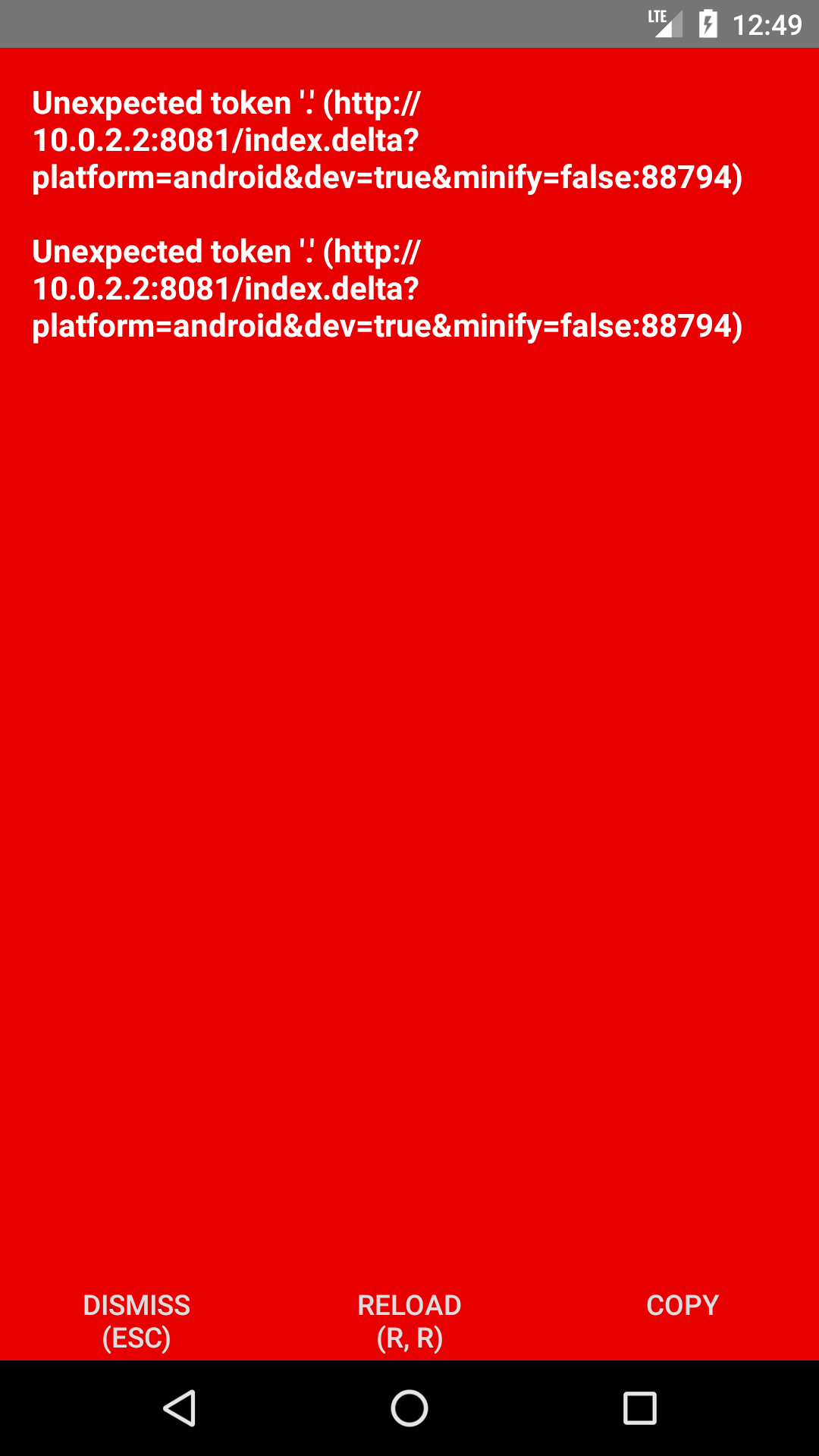
React-native: Android: Unexpected token '.' (http://10.0.2.2:8081/index.delta?platform=android&dev=true&minify=false:88794) at com.facebook.react.bridge.queue.NativeRunnable.run(Native Method)
package.json
{
"name": "Simple",
"version": "0.0.1",
"private": true,
"scripts": {
"start": "node node_modules/react-native/local-cli/cli.js start",
"test": "jest"
},
"dependencies": {
"react": "16.3.1",
"react-native": "0.55.4",
"react-native-actionsheet": "^2.4.2",
"react-native-communications": "^2.2.1",
"react-native-device-info": "^0.21.5",
"react-native-fbsdk": "^0.7.0",
"react-native-fcm": "^15.0.0",
"react-native-google-maps-services": "^0.5.1",
"react-native-huawei-protected-apps": "^0.1.7",
"react-native-image-crop-picker": "^0.20.1",
"react-native-root-toast": "^1.3.0",
"react-native-vector-icons": "^4.6.0",
"react-navigation": "^2.0.1"
},
"devDependencies": {
"babel-jest": "22.4.3",
"babel-preset-react-native": "4.0.0",
"jest": "22.4.3",
"react-test-renderer": "16.3.1"
},
"jest": {
"preset": "react-native"
}
}
Error log
05-19 01:26:21.529 15124-15142/com.harrybui.simple E/FA: Discarding data. Failed to send app launch
05-19 01:26:21.530 15124-15142/com.harrybui.simple E/FA: Failed to get app instance id
05-19 01:26:21.530 15124-15142/com.harrybui.simple E/FA: Discarding data. Failed to send event to service
05-19 01:26:21.530 15124-15142/com.harrybui.simple E/FA: Failed to send current screen to service
05-19 01:26:24.748 15124-15209/com.harrybui.simple E/ReactNativeJNI: Got JS Exception: Unexpected token '.' (http://10.0.2.2:8081/index.delta?platform=android&dev=true&minify=false:88796)
05-19 01:26:24.749 15124-15209/com.harrybui.simple E/unknown:ReactNative: Exception in native call from JS
com.facebook.react.devsupport.JSException: Unexpected token '.' (http://10.0.2.2:8081/index.delta?platform=android&dev=true&minify=false:88796)
at com.facebook.react.bridge.queue.NativeRunnable.run(Native Method)
at android.os.Handler.handleCallback(Handler.java:751)
at android.os.Handler.dispatchMessage(Handler.java:95)
at com.facebook.react.bridge.queue.MessageQueueThreadHandler.dispatchMessage(MessageQueueThreadHandler.java:29)
at android.os.Looper.loop(Looper.java:154)
at com.facebook.react.bridge.queue.MessageQueueThreadImpl$3.run(MessageQueueThreadImpl.java:192)
at java.lang.Thread.run(Thread.java:761)
Caused by: com.facebook.jni.CppException: Unexpected token '.' (http://10.0.2.2:8081/index.delta?platform=android&dev=true&minify=false:88796)
at com.facebook.react.bridge.queue.NativeRunnable.run(Native Method)
at android.os.Handler.handleCallback(Handler.java:751)
at android.os.Handler.dispatchMessage(Handler.java:95)
at com.facebook.react.bridge.queue.MessageQueueThreadHandler.dispatchMessage(MessageQueueThreadHandler.java:29)
at android.os.Looper.loop(Looper.java:154)
at com.facebook.react.bridge.queue.MessageQueueThreadImpl$3.run(MessageQueueThreadImpl.java:192)
at java.lang.Thread.run(Thread.java:761)
05-19 01:26:24.751 15124-15209/com.harrybui.simple E/unknown:ReactNative: Exception in native call
java.lang.RuntimeException: Error calling AppRegistry.runApplication
at com.facebook.react.bridge.queue.NativeRunnable.run(Native Method)
at android.os.Handler.handleCallback(Handler.java:751)
at android.os.Handler.dispatchMessage(Handler.java:95)
at com.facebook.react.bridge.queue.MessageQueueThreadHandler.dispatchMessage(MessageQueueThreadHandler.java:29)
at android.os.Looper.loop(Looper.java:154)
at com.facebook.react.bridge.queue.MessageQueueThreadImpl$3.run(MessageQueueThreadImpl.java:192)
at java.lang.Thread.run(Thread.java:761)
Caused by: com.facebook.jni.CppException: Could not get BatchedBridge, make sure your bundle is packaged correctly
at com.facebook.react.bridge.queue.NativeRunnable.run(Native Method)
at android.os.Handler.handleCallback(Handler.java:751)
at android.os.Handler.dispatchMessage(Handler.java:95)
at com.facebook.react.bridge.queue.MessageQueueThreadHandler.dispatchMessage(MessageQueueThreadHandler.java:29)
at android.os.Looper.loop(Looper.java:154)
at com.facebook.react.bridge.queue.MessageQueueThreadImpl$3.run(MessageQueueThreadImpl.java:192)
at java.lang.Thread.run(Thread.java:761)
05-19 01:26:31.548 15124-15142/com.harrybui.simple E/FA: Discarding data. Failed to send event to service
I run command
adb reverse tcp:8081 tcp:8081 & react-native run-android
then it worked on debug but when build release apk, app crashed
 harrybui2804
All 13 comments
It looks like your issue may be incomplete. Are all the fields required by the Issue Template filled out?
If you believe your issue contains all the relevant information, let us know in order to have a maintainer remove the No Template label.
 react-native-bot
on 19 May 2018
react-native-bot
on 19 May 2018
Im getting the same error but on index.android.bundle
 xelop
on 19 May 2018
xelop
on 19 May 2018
If you are still encountering the issue described here, please open a new issue and make sure to fill out the Issue Template when doing so.
react-native-bot
on 22 May 2018
same error! How to fix this?
 vance-liu
on 28 May 2018
vance-liu
on 28 May 2018
Same error—showstopper. Would love some assistance, please.
 nikkwong
on 4 Jun 2018
nikkwong
on 4 Jun 2018
yes,i need some assistance
 shi-zeyu
on 4 Jun 2018
shi-zeyu
on 4 Jun 2018
I'm fixed this issues
this error of react-native-google-maps-services
- change index.js in
node_modules/react-native-google-maps-services/lib/index.js
exports.createClient = function(options)
to
export function createClient(options) - using it
import {createClient} from 'react-native-google-maps-services'
var googleMapsClient = createClient({
key: 'your API key'
});
if you using google-maps-services-js, you can fix as same
harrybui2804
on 18 Jun 2018
@react-native-bot please reopen
 egemon
on 5 Jul 2018
egemon
on 5 Jul 2018
Any fix, update, workaround, something that could help prevent this issue?
Thanks!
 martincarrera
on 29 Aug 2018
martincarrera
on 29 Aug 2018
I encounter the error too. Then I start "Remote JS Debugging" and the error disappear.
 Ankarrr
on 6 Sep 2018
Ankarrr
on 6 Sep 2018
Same error here. Anyone solved this?
 Rafolo78
on 10 Sep 2018
Rafolo78
on 10 Sep 2018
As I understand it, the root of these sort of problems is explained here.
More specifically when it says (bold is mine):
When using React Native, you're going to be running your JavaScript code in two environments:
- In most cases, React Native will use JavaScriptCore, the JavaScript engine that powers Safari. [...]
- When using Chrome debugging, all JavaScript code runs within Chrome itself, [...]. Chrome uses V8 as its JavaScript engine.
While both environments are very similar, you may end up hitting some inconsistencies.
So, the confusing part about getting an error if the debugger is closed and not getting it when the debugger is running may be explained by that.
Also consider the syntax error is found by the JavaScript engine itself in the bundle and not by the compiler/bundler in your source code, so that is the reason why the line number mentioned in the error message might not correspond to any of your source files. I think in general these errors are caused by some dependency package not being strictly transpiled ES5 code, so it will run in some environments and not in others.
What I've found useful in such scenarios is generating the bundle manually running something like
react-native bundle \
    --platform android \
    --dev true \
    --entry-file index.js \
    --bundle-output android-debug.bundle \
    --sourcemap-output android-debug.bundle.map
And then in the generated android-debug.bundle file looking at the line number mentioned in the error message (88794 in the OP screenshot). There you should find the offending code.
 pablen
on 10 Sep 2018
pablen
on 10 Sep 2018
I upgraded "react-native-elements" from "0.19.0" to "1.10" then i had this problem. I had revert back to "0.19.0" then my app works fine. I did as @pablen said, but i still not found the problem.
 duycoder
on 5 Mar 2019
duycoder
on 5 Mar 2019
Related issues
 jlongster
·
3Comments
jlongster
·
3Comments
 TrakBit
·
3Comments
TrakBit
·
3Comments
 janmonschke
·
3Comments
janmonschke
·
3Comments
 DreySkee
·
3Comments
DreySkee
·
3Comments
 axelg12
·
3Comments
axelg12
·
3Comments
Most helpful comment
As I understand it, the root of these sort of problems is explained here.
More specifically when it says (bold is mine):
So, the confusing part about getting an error if the debugger is closed and not getting it when the debugger is running may be explained by that.
Also consider the syntax error is found by the JavaScript engine itself in the bundle and not by the compiler/bundler in your source code, so that is the reason why the line number mentioned in the error message might not correspond to any of your source files. I think in general these errors are caused by some dependency package not being strictly transpiled ES5 code, so it will run in some environments and not in others.
What I've found useful in such scenarios is generating the bundle manually running something like
And then in the generated
android-debug.bundlefile looking at the line number mentioned in the error message (88794 in the OP screenshot). There you should find the offending code.